How to Relist an Item on eBay: Steps, Fees & When to Sell Similar Instead (2026)
Short answer: To relist an item on eBay, open Seller Hub, go to Listings > Unsold, tick the item and click Relist — then review the price and details before you confirm. Relisting is free inside your monthly free listings; beyond that it costs one insertion fee ($0.35 in the US, £0.35 for UK private sellers).
How to Relist an Item on eBay
Relisting is how you put an ended eBay listing back on sale without starting from a blank form. The listing ended — it did not sell, you ended it early, or it sold out — and instead of retyping the title, photos, description and postage, you reuse the listing you already built. It takes about two minutes, and it is the single most useful piece of listing housekeeping a seller can learn, because unsold items are the norm on eBay, not the exception: most sellers have far more ended listings than sold ones, and every one of those ended listings is either money waiting to be relisted or a listing that needs a fix before it goes back up.
This guide works through the full process using eBay’s own help pages as read on 6 November 2026: the exact Seller Hub and app steps, what relisting costs in the US and the UK, how long you have before the listing disappears from the Unsold section, when eBay relists for you automatically, and when Sell Similar is the better choice instead of Relist. Zyrro’s free eBay Fee & Profit Calculator works out what a relisted item is actually worth once it sells, so you can check the profit before you spend another insertion fee on it. One honest note first: most of the pages currently ranking for this question are a 562-day-old guide, a second guide from the same low-quality site, a multi-platform post that tells you to delete the listing and start again, or a thin support document that copies eBay’s own page. None of them is a full written walkthrough that covers the fee maths, the 90-day window, auto-relist and Sell Similar in one place. That is the gap this guide fills.
Relist an item on eBay in Seller Hub
These are eBay’s own steps from its Relisting items help page, and they work the same in the US and the UK:
- Go to Seller Hub and open the Listings tab.
- Select Unsold in the left-side menu. This is where every ended listing that did not sell lives.
- Tick the box beside the listing you want to bring back.
- Click Relist.
- Review the listing form that opens — price, title, photos, description, postage and return settings — change anything that needs changing, then confirm to list it.
If you prefer the older My eBay view, the route is the same idea: open My eBay, find the item in the Unsold section, and under Actions select Relist. Either way, eBay warns that a relisted item can take a few hours to appear on the site, so do not panic if it is not in search results the minute you click confirm — check back later, and check your Active listings first, because that is where it shows up before search catches up.
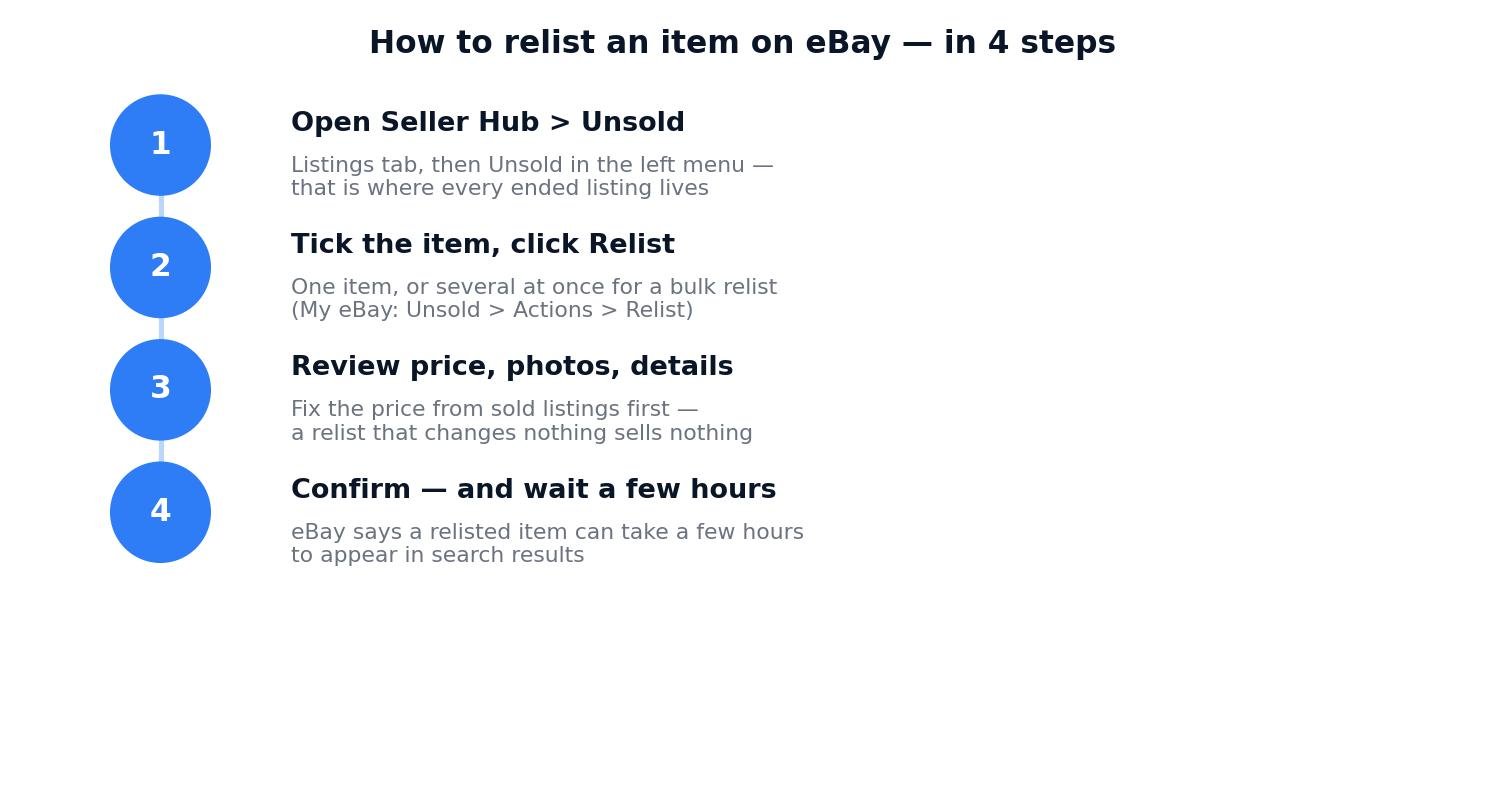
Relisting takes four steps: Seller Hub > Unsold, tick the item, Relist, then review before you confirm. The review step is where a relist succeeds or fails.
What to check before you click List It
Relisting with one click is easy; relisting well is the part that matters. A listing that did not sell the first time will not sell the second time for the same reason it failed the first time, and eBay gives you the review screen precisely so you can fix it. Work through this checklist on the review screen before you confirm:
- Price: check sold listings for the same item first. If identical items sold for less than your price, your relist needs a lower price, not just a second chance. Our guide to how to price items on eBay works through the sold-listings check step by step.
- Title: the first 55 characters are what buyers see in search. Put the brand, model and key detail up front; drop filler words.
- Photos: the first photo is the thumbnail. If it is dark, blurry or cropped, replace it — a relist with the same bad first photo gets the same result.
- Postage: check the postage cost is still right and the service still matches what you offer. If you charge postage, remember eBay’s final value fee is charged on the postage too, so a high postage figure costs you twice.
- Format and duration: you can change these on the relist. An auction that got no bids can go back as a fixed-price listing, and a fixed-price listing can go back as an auction — the relist form lets you switch.
- Quantity: if you have more than one of the item, set the quantity. A single-quantity listing that sold out needs a relist; a multi-quantity listing that still has stock does not.
One more check that costs nothing: look at the listing’s views and watchers before you relist. A listing with views and watchers but no sale usually has a price problem. A listing with almost no views has a visibility problem — wrong category, weak title, or no Best Offer. Fix the problem the numbers point to; relisting the same listing unchanged is just paying another insertion fee for the same outcome.
How Do I Relist a Previously Sold Item on eBay?
A sold item is a different case from an unsold one, and the right move depends on whether you have another one to sell. If the listing was multi-quantity and it sold out completely, eBay moves it to the Unsold section just like an unsold listing, and you relist it the same way — Seller Hub > Listings > Unsold, tick it, Relist — then set the quantity to the number you have in stock. If the listing was single-quantity and it sold, there is nothing left to relist in the usual sense: the item is gone. What you can do instead is use Sell Similar from the sold order, which copies the listing into a fresh one for the next identical item you have — useful if you sell the same product repeatedly and want the same title, photos and description without retyping them.
eBay’s own bulk listing tool confirms the routes: from the Orders tab in Seller Hub you can choose Relist or Sell Similar for sold items, and from Unsold listings you can choose Relist, Relist as fixed price, or Sell Similar. The practical rule is simple: relist when the same listing should go back up (same item, more stock, same listing identity), and Sell Similar when you want a fresh listing built from the old one’s details. The comparison table later in this guide sets out exactly what each choice keeps and loses.
There is one sold-item case that sorts itself out. If a buyer returns an item or an order is cancelled and you refund them, eBay automatically relists the item for you — that is eBay’s own rule, stated on its relisting help page. If you do not want it relisted — because the item is damaged, or you no longer have it — untick the Relist item or Relist item after cancellation box when you issue the refund. Our guide to how to refund a buyer on eBay works through the refund steps, and our guide to how to cancel an order on eBay as a seller covers the cancellation side, including the fee credit you may be owed when an order is cancelled.
How Much Does It Cost to Relist an Item on eBay?
A manual relist costs one insertion fee — or uses one of your free monthly listings. That is eBay’s own rule, stated plainly on its relisting page: “We charge an insertion fee (or count it as a zero insertion fee listing) for both the original listing and the manual relisting.” So the first listing cost you one insertion fee (or one free listing), and the relist costs you another one. The two pieces of good news: most sellers relist for free most of the time, because the free allowances are generous, and if the relisted item sells, eBay says you may qualify for an insertion fee credit — the relist’s insertion fee can come back to you.
| Free listings per month | Insertion fee beyond the allowance | |
|---|---|---|
| US sellers | 250 | $0.35 per listing |
| UK private sellers | 300 | £0.35 per listing |
| UK business sellers | Depends on Shop subscription — check Seller Hub | £0.30 per listing |
| Automatic relists (auctions) | — | Free, except vehicles categories |
| Good ‘Til Cancelled renewal | Uses a free listing each month | One insertion fee per renewal beyond the allowance |
Free-listing figures: US 250/month from eBay’s own pages; UK private 300/month from eBay’s own UK selling page. Older guides still quote 1,000 free UK listings — that figure is outdated. UK business insertion fee £0.30 from eBay’s export hub fee table.
Two more costs hide inside a relist. First, any listing upgrades you chose — subtitle, bold title, extra photos beyond the free allowance, scheduling — are charged again when you relist manually. eBay’s help page says so directly: “Keep in mind that fees for any listing upgrades you’ve chosen will apply when an item is relisted manually.” If you do not need the subtitle the second time, remove it on the review screen. Second, a relist is a new listing for fee purposes, so if the item sells, the final value fee and per-order fee apply to the sale exactly as they did the first time — relisting does not change the sale fees, it only adds the insertion fee. Run the numbers through the eBay Fee & Profit Calculator before you relist a low-value item, because on a cheap item the insertion fee can eat the whole margin.
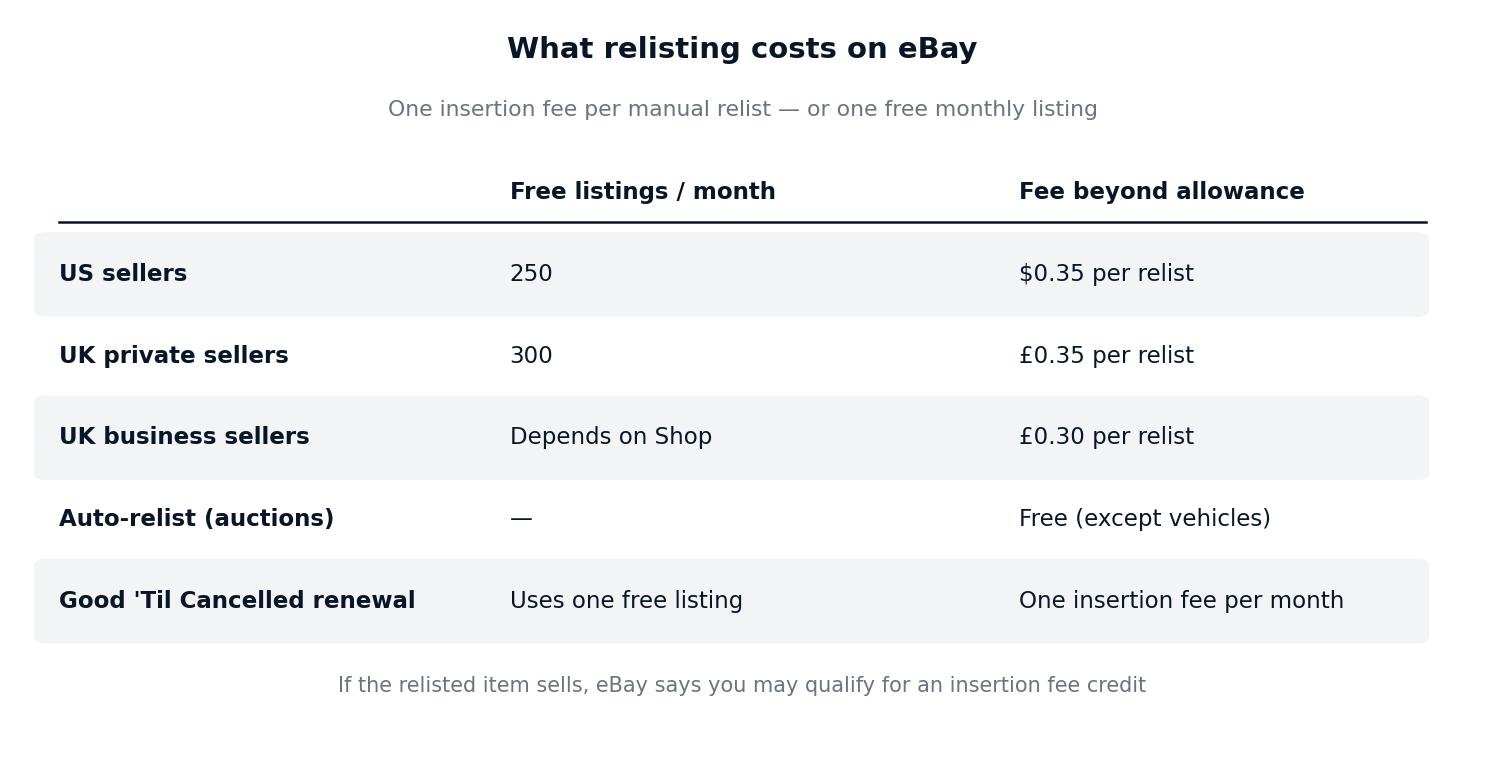
What a relist costs: free inside your monthly allowance, one insertion fee beyond it. Automatic auction relists are free — manual relists are not.
Worked example: what relisting actually costs
Take a $50 item in the US, in a 13.6% final value fee category. The sale fees are $6.80 final value fee plus a $0.40 per-order fee — $7.20 in total — so if it sells, $42.80 reaches your bank. Now suppose it does not sell, and you relist it manually three times while you are already past your 250 free listings for the month. Each manual relist costs $0.35, so three relists cost $1.05 with no sale yet. If it sells on the third relist, you pay the $7.20 sale fees on top, and eBay says you may qualify for an insertion fee credit — the $0.35 for that relist can come back. The relist cost is small next to the $42.80 payout, but it is not zero, and on a $10 item the same three relists would cost $1.05 against a payout of about $8.24 — more than 12% of what you keep. That is why the review step matters more than the Relist button: a cheaper listing that sells first time beats a relist that costs you three insertion fees.
The UK maths works the same way. A £50 item sold by a UK business seller at the 12.9% Everything Else rate carries £8.43 of fees including VAT on fees, so the payout is £41.57. Five manual relists beyond the free allowance at £0.30 each cost £1.50 — small against a £41.57 payout, but real money if the item never sells. A UK private seller on the same £50 item pays no transaction fees at all, so the payout is the full £50.00, and five relists beyond the 300 free listings cost £1.75 at £0.35 each. And a Good ‘Til Cancelled fixed-price listing that renews every month uses one free listing — or one insertion fee — per renewal, so a listing that sits unsold for a year beyond your allowance costs 12 insertion fees: $4.20 in the US. None of these numbers is large on its own. Added across a shop full of relisted items, they are the difference between a profitable month and a month where the fees ate the margin.
How Long Do You Have to Relist an Item on eBay?
You have 90 days — according to eBay seller guides. Unsold listings stay in the Unsold section of Seller Hub for 90 days after the listing ends, and then eBay removes them. That 90-day figure does not appear on eBay’s own relisting help page, so treat it as the figure the seller guides report rather than an eBay-published rule — but every current guide agrees on it, and the practical advice is the same either way: relist within weeks, not months, because the longer an ended listing sits, the more likely its price, photos and postage are out of date anyway.
After the 90 days, the listing is gone from Unsold and you cannot relist it — you have to create a new listing from scratch, retyping everything. Two habits protect you from that. First, if you know you will want the listing again later, save it to your inventory or keep a draft copy before the 90 days run out; saved items keep indefinitely and carry no listing fee until you publish them again. Second, do not let ended listings pile up: go through Unsold once a month, relist the ones still worth selling, and delete the ones that are not. A monthly Unsold clear-out takes twenty minutes and stops the 90-day clock from ever biting.
There is one related timer worth knowing. If your fixed-price listing is Good ‘Til Cancelled and it runs out of stock, eBay’s out-of-stock option keeps the listing alive at zero quantity so it comes back the moment you restock — seller guides report that a listing kept alive this way stays up for 180 days, a limit they say was raised from 90 days. That only applies while the listing is still live at zero quantity; once it has actually ended and moved to Unsold, the 90-day window above is the one that counts.
Does eBay Automatically Relist Unsold Items?
Sometimes — and only for some sellers and some listing types. eBay’s automatic relisting works like this, from its own help page:
- Auction-style listings, 5 days or longer: if you select the auto-relist option when you create the listing, eBay automatically relists the auction up to 8 times if it does not sell.
- Auction-style listings, 1 or 3 days: also up to 8 automatic relists, but each relist runs as a 7-day listing.
- Cost: auto-relists are free, except for listings in vehicles categories.
- Vehicles categories: you can choose to automatically relist up to 2 times, and the original listing fees apply for each relist.
- Who gets it: the automatic relist option is only available on listings created by new and occasional sellers. If you are an established seller, the option will not show for you — which surprises a lot of sellers who remember it from when they started.
- Excluded categories: some categories cannot be relisted automatically at all, including Business > Businesses for Sale, Home & Garden > Real Estate, and Tickets, Travel > Flights, Tickets, Travel and Vouchers/Gift Certificates.
- After 8 relists: if the item still has not sold, it moves to your Unsold items, and from there only a manual relist (or Sell Similar) will bring it back.
A 7-day auction relisted 8 times gets up to 63 days of exposure from a single listing — the original 7 days plus 8 more 7-day runs — which is why auto-relist is worth switching on for auction sellers who have it. But remember it is not free exposure in the sense that matters: each relist puts the same listing back up, and if the price or photos were the problem, eight free relists will not fix them. Check the listing after the second or third auto-relist, and if it still has no bids, end it yourself and fix the price before you relist it manually.
Fixed-price listings work differently: they are set to Good ‘Til Cancelled by default, which means they renew automatically every month until they sell or you end them. That monthly renewal is automatic, but it is not free in the same way — each renewal uses one of your free monthly listings or costs one insertion fee, as the cost table above shows. To stop an automatic relist, go to My eBay > Selling > Active, find the item, and select Remove Automatic Relisting from the More actions drop-down, then save. And remember the refund case from the sold-item section: when you refund a buyer, eBay auto-relists the item unless you untick the box — a seller who refunds three returned items in a week and forgets the box ends up with three listings back on sale that they did not mean to list.
Relist vs Sell Similar on eBay: Which Should You Use?
Relist and Sell Similar look like the same button, but they do different things to your listing — and choosing wrong is the most common relisting mistake. Here is the difference, as the seller guides describe it:
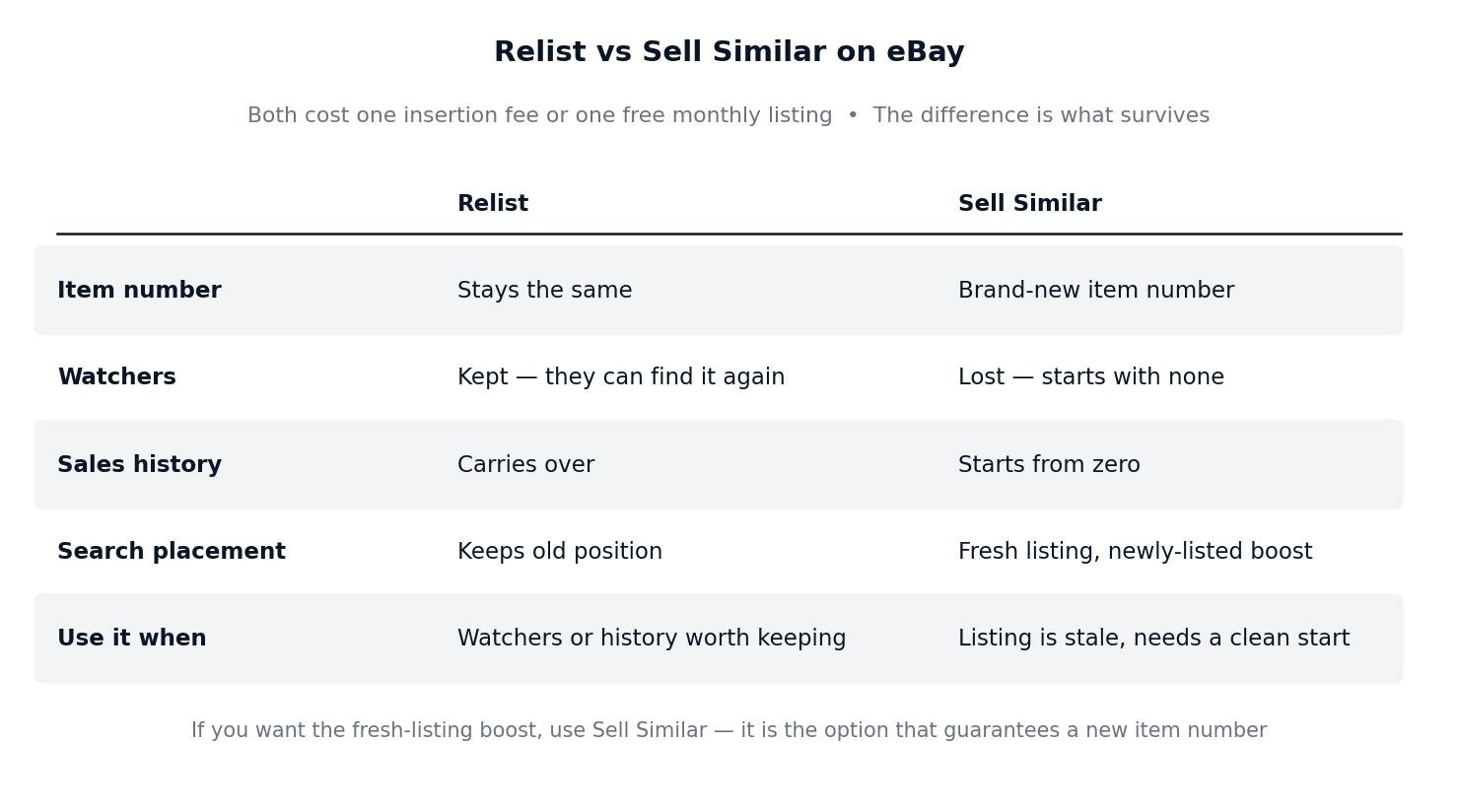
Relist continues the old listing; Sell Similar starts a new one from the old one’s details. Both cost one insertion fee or one free listing.
| Relist | Sell Similar | |
|---|---|---|
| What it creates | The same listing, put back on sale | A brand-new listing copied from the old one |
| Item number | Stays the same | New item number |
| Watchers | Kept — watchers can find the relisted item through eBay’s “See relisted item” link | Lost — the new listing starts with no watchers |
| Sales history | Carries over and keeps feeding search for a while | Starts from zero |
| Search placement | Keeps the old listing’s position; no fresh “newly listed” boost | Treated as a new listing, so it can appear in “newly listed” results |
| Cost | One insertion fee or one free listing | One insertion fee or one free listing |
| Best when | The listing was selling or nearly selling, and you want its watchers and history | The listing is stale, has no watchers, or you want a clean start with a new price and photos |
So which should you use? Use Relist when the listing has something worth keeping: watchers, a sales record, or views that show buyers are finding it. The watchers are the valuable part — they are buyers who already showed interest, and eBay lets them find the relisted item. Use Sell Similar when the listing is stale: no views, no watchers, no sales for months, and you are changing the price or photos anyway. A fresh listing gets a fresh start in search, which is exactly what a stale listing needs.
One honest caveat, because sellers argue about this constantly: some sellers report that Relist now behaves like Sell Similar in practice — one eBay Community thread found a relisted item got a new item number and a “New Listing” badge, but kept its original start date in the “Newly Listed” sort, so it did not actually reach the top. The behaviour seems to vary, and eBay does not publish a rule for it. The safe way to read that is: if you specifically want the fresh-listing boost, use Sell Similar, because that is the option that guarantees a new item number and a clean start. Relist is for keeping what you have, not for refreshing what you have not.
Also note what Sell Similar does to your Promoted Listings rate, if you use one: sellers report that the suggested ad rate shown on a Sell Similar listing can be the old listing’s rate carried over, not the rate a brand-new listing would get. Check the ad rate on the new listing before you confirm, rather than trusting the pre-filled figure.
Why Can’t I Relist My Items on eBay?
If the Relist button is missing or greyed out, one of these is usually the reason. Work down the list before you contact eBay support:
| Problem | Likely cause | Fix |
|---|---|---|
| No Relist button on an ended listing | More than 90 days since the listing ended — it has been removed from Unsold | Create a new listing from scratch, or from a saved draft or inventory copy if you kept one |
| Relist fails on a removed listing | eBay removed the listing for a policy violation — relisting the same item breaks the same rule | Fix the violation first (prohibited item, misleading title, wrong category), then list it correctly; do not just relist it unchanged |
| Auto-relist option never appears | Auto-relist is only offered on listings created by new and occasional sellers | Established sellers relist manually — the option is not available to you, and that is by design |
| Auto-relist not offered for the item | The category is excluded (real estate, businesses for sale, travel and tickets) | Relist manually from Unsold; the category exclusion only blocks automatic relisting |
| Item shows as sold out, not unsold | A Good ‘Til Cancelled listing at zero quantity with the out-of-stock option on is still live — there is nothing to relist | Restock the quantity instead: the listing comes back on its own the moment stock is added |
| Relist button missing on the app | The app shows ended listings under Selling > Ended, and the button sits on the listing itself | Open the listing from Ended listings and look for Relist there; if it is still missing, use Seller Hub on desktop |
| Relisted item does not appear in search | Normal — eBay says a relisted item can take a few hours to appear | Wait a few hours, then check Active listings first; if it is there, search will catch up |
| Relist blocked by selling limits | Relisted items count as listings, and your monthly selling limits count active and sold listings | Check your limits in Seller Hub > Overview > Monthly limits; our guide to eBay selling limits explains how to check and raise them |
The most common of these by far is the first one: a seller finds a listing they ended months ago, goes to Unsold, and it is simply not there. That is the 90-day rule doing its job. The fix is a habit, not a trick — clear out Unsold every month, and save anything you might want again as a draft or inventory item before the window closes.
How to Relist an Item on eBay App
Relisting from the eBay app uses the same Unsold list, just in the app’s layout. The steps sellers report for the current app are:
- Open the eBay app and go to the Selling tab.
- Open Ended listings.
- Find the item you want to bring back and tap Relist.
- Review the price, photos and details on the listing form, change what needs changing, and confirm.
Two app-specific notes. First, the app’s review screen is smaller, so it is easy to confirm a relist without noticing a stale price or an old photo — if the listing matters, do the price check on desktop first and use the app only to press the button. Second, if the Relist button does not appear on a listing in the app, switch to Seller Hub on desktop: the app sometimes hides the button on listings the desktop view still allows you to relist, and the desktop route is the one eBay’s own help page describes. Bulk relisting — several items at once — is also a desktop job: in Seller Hub, tick several listings in Unsold and click Relist, or use eBay’s bulk listing tool from the same screen.
How to Make a Relisted Item Actually Sell
Relisting is not a sales strategy on its own. It puts the listing back in front of buyers; it does not fix the reason it did not sell. Before you relist, spend ten minutes on the three fixes that actually move an unsold listing:
- Reprice from sold listings, not from hope. Search the item, filter by Sold listings, and look at what identical items actually sold for in the last 90 days. If your price is above the sold range, lower it — a relist at the same over-high price is just another insertion fee spent. Our pricing guide shows the exact check.
- Send offers to watchers. If the listing has watchers, eBay lets you send them an offer below the listed price. A relist plus a watcher offer is worth more than a relist alone, because the watchers are the buyers who already raised their hands.
- Fix the first photo and the first line. Buyers decide from the thumbnail and the title. A brighter first photo and a title that leads with brand and model will do more for a relist than any number of automatic renewals.
And know when to stop relisting. A listing that has been relisted three or four times with no views is telling you something: either the item has no buyers at the price you want, or the listing is invisible for a fixable reason — wrong category, missing item specifics, or a title nobody searches for. After three failed relists, change something real — price, photos, title, category — or accept the item may need a different marketplace. Relisting the same listing unchanged a fifth time is the definition of paying eBay to ignore you.
How to Relist an Item on eBay: The Short Version
Relisting is simple, and the rules around it are simple too. Open Seller Hub, go to Listings > Unsold, tick the item and click Relist, then fix the price and photos on the review screen before you confirm — a relist that changes nothing will sell nothing. It costs one insertion fee beyond your free monthly listings ($0.35 in the US, £0.35 for UK private sellers), and if the relisted item sells, eBay says you may get that insertion fee credited back. You have 90 days from the end of the listing to relist it from Unsold; after that, list it again from scratch. Auctions can auto-relist up to 8 times for free if you are a new or occasional seller, and fixed-price listings renew monthly as Good ‘Til Cancelled. Use Relist when the listing has watchers and history worth keeping, and Sell Similar when it is stale and needs a clean start. Zyrro’s eBay Fee & Profit Calculator shows you what the relisted item is worth once it sells, and the eBay tools hub has the full fee picture for US and UK sellers. Relist with a fix, not just a click, and the second listing will do what the first one could not.
Frequently Asked Questions About How to Relist an Item on eBay
Why can’t I relist my items on eBay?
The most common reason is time: unsold listings stay in the Unsold section for 90 days, then eBay removes them, so an old listing has no Relist button left. Other reasons are a policy removal, which must be fixed first, or the listing still being live at zero quantity with the out-of-stock option on. Check Unsold first.
How much does it cost to relist an item on eBay?
One insertion fee, or one free monthly listing: $0.35 in the US beyond 250 free listings a month, and £0.35 in the UK beyond 300 free listings a month for private sellers. Automatic auction relists are free except in vehicles categories. If the relisted item sells, eBay says you may qualify for an insertion fee credit.
How do I relist a previously sold item on eBay?
If it was a multi-quantity listing that sold out, relist it from Seller Hub under Listings and then Unsold, and set the quantity to the stock you have. If a single item sold, use Sell Similar from the sold order instead — it copies the listing into a fresh one for the next identical item.
What happens if you relist an item on eBay?
The listing goes back on sale with the same details, price and photos unless you change them on the review screen. Relist keeps the item number, watchers and sales history, and it can take a few hours to appear in search. You are charged one insertion fee or one free listing, and any listing upgrades are charged again.
How to relist an item on eBay after 90 days?
You cannot relist it from the Unsold section after 90 days, because eBay removes the listing from Unsold after that window. You have to create a new listing from scratch, re-entering the title, photos and description. To avoid this, save listings you may want again as drafts or inventory items before the 90 days run out.
How do I relist an item on eBay that was returned?
Usually you do not have to: when you refund a buyer for a return, eBay automatically relists the item for you. If it was not relisted — because you unticked the Relist item box when refunding — relist it manually from Seller Hub under Listings and then Unsold, and check the item’s condition before you confirm.