How to Add a Variation on TikTok Shop (Manual, Bulk Upload and App)

Short answer
To add a variation on TikTok Shop, open Seller Center, go to Products, then Add Product, fill in the basic details, scroll to Sales Information and switch on the Enable Variations toggle. Add up to three variation types, such as Colour and Size, give every resulting SKU its own price and stock, then submit the product for review.
If you sell a T-shirt in three colours and two sizes, you do not need six listings. You need one listing with variations, and TikTok Shop turns those choices into six SKUs that buyers pick from a drop-down. That one decision affects almost everything else in the listing: the price each size carries, the stock each colour holds, the photos buyers see, the fee on every sale, and even what happens when one size gets returned. This guide from Zyrro walks through all three ways to add variations — manually in Seller Center, in bulk with a spreadsheet, and in the Seller Center app — plus the limits that catch sellers out, the fee maths per SKU, and the fixes for the errors that stop variations saving.
What is a variation on TikTok Shop?
A variation is one buyable option of a product: a colour, a size, a material, a pack quantity. The product is the T-shirt; the variations are Red in Small, Red in Medium, Blue in Small, and so on. Each combination is a SKU (stock keeping unit) with its own price, stock quantity and Seller SKU, while the product name, description, images and shipping details stay shared across all of them.
Three words get mixed up here, so keep them straight:
- Variation type (sales attribute): the kind of choice, such as Colour or Size. TikTok Shop allows up to three per product.
- Variation option (value): one choice inside a type, such as Red, Blue or Yellow inside Colour.
- SKU: one finished combination, such as Red + Small. Every SKU needs its own price and stock.
The SKU count multiplies fast, and that is the first thing to plan before you start clicking. Three colours times two sizes is 3 x 2 = 6 SKUs. Three colours times three sizes times two materials is 3 x 3 x 2 = 18 SKUs. Each one needs a price and a stock number, so a listing that looks small on paper can mean 18 rows of data entry. The table below shows how quickly the combinations grow.
| Colour options | Size options | Material options | SKUs created |
|---|---|---|---|
| 2 | 2 | — | 4 |
| 3 | 2 | — | 6 |
| 3 | 3 | — | 9 |
| 3 | 3 | 2 | 18 |
| 4 | 4 | 2 | 32 |
Two rules from TikTok Shop’s own bulk-listing guide decide whether those combinations group into one product at all: every variation must share the same product name and the same package dimensions, and every SKU must have different variation values. If the product information differs between rows, TikTok Shop cannot treat them as variations of one product, and the upload fails or splits. Shipping information and package weight sit at the parent product level, not per variation, so a heavier size does not get its own shipping weight — plan the package weight for the heaviest option.
How to add a variation on TikTok Shop: the three ways
TikTok Shop offers three routes to the same result, and the right one depends on how many products you are listing. Manual entry suits one product with a few options. Bulk listing suits a catalogue or a product with dozens of SKUs. URL listing and Quick Listing suit copying a listing that already exists somewhere else. All three end the same way: a price and a stock quantity for every SKU, then submit for review.
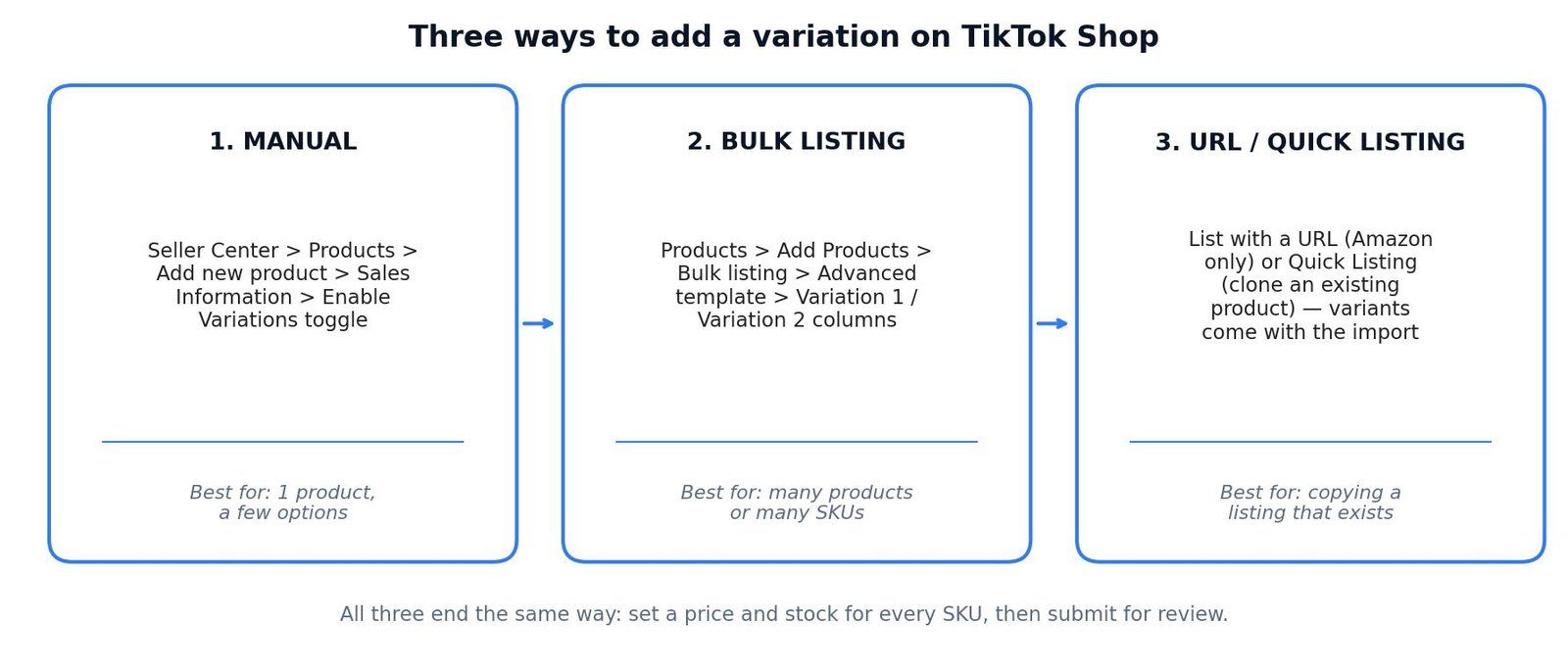
Way 1: Add a variation manually in Seller Center (best for one product)
Manual entry is the route most sellers use first, and it is the only route that works the same on desktop and in the app. Use it when you are listing one product with a handful of options.
- Open TikTok Shop Seller Center and go to Products, then Add Product.
- Fill in the basic information: product images, product name, category, brand and description. TikTok Shop recommends at least five images, with the first image showing a single product on a white background, and a product name of 25 to 80 characters.
- Scroll to the Sales Information section. By default there is a single SKU.
- Switch on the Enable Variations toggle. TikTok Shop’s own guide puts it plainly: “You can set up 3 sales attributes by activating the Enable Variations toggle.”
- Add your first variation type, for example Colour, and enter its options: Red, Blue, Yellow.
- Add a second variation type if you need one, for example Size, with Small, Medium and Large. A third type, such as Material, is allowed but rarely needed.
- TikTok Shop generates the SKU list from your choices. For every SKU, enter the Price and the Quantity available. You may also enter a Seller SKU for your own stock tracking — it is optional but worth doing, because it is the only label that stays yours across every channel.
- Upload a different image for each option of your first variation so buyers can see the colour they are picking. TikTok Shop advises different images for different sales attributes, and the first variation is the one that carries images.
- Complete the shipping section and any compliance fields, then click Submit for review. The listing goes to Reviewing first, then Live.
One detail saves a lot of rework: use Batch Edit before you submit. If every size carries the same price, or every colour starts with 20 units of stock, Batch Edit sets them all in one move instead of 18 separate fields. Fix the exceptions afterwards — the XXL at $2 more, the Red that only has 5 units left — rather than typing every row by hand.
Our separate guide to adding products to TikTok Shop covers the rest of the listing form — images, category, brand authorisation and shipping — so this guide stays focused on the variations section itself.
Way 2: Add variations with the bulk listing template (best for many SKUs)
Bulk listing is a spreadsheet upload, and it is the only sane way to list a product with 30 or 60 SKUs. It runs on desktop only — the Seller Center app cannot do it. The template is TikTok Shop’s own Excel file, downloaded from Seller Center, and the rules around it are strict.
- In Seller Center, go to Products, then Add Products, and choose Bulk listing. You can also reach it from Products, then Manage Products, then the Bulk Action button.
- Download the template for your product’s category. Since June 2025 the template only includes the final, leaf-level category you picked — one category per template — so download a fresh template for each category you list in.
- Open the template and fill in the product information first. Every required field is outlined in red, and you must not add or delete rows or columns, or the upload fails.
- Fill in the Variation 1 column. This column is mandatory for any product with more than one variation: put each variant on its own row, for example White, Black and Grey if Colour is your first variation.
- Fill in the Variation 2 column only if you need a second tier, such as Size. TikTok Shop treats Variation 1 as the first tier and Variation 2 as the second by default.
- Give every SKU its own row. Three colours means three SKUs and three rows; three colours and two sizes means six SKUs and six rows. The variation values in each row must be different from every other row.
- Keep the product information identical across all rows of the same product — same name, same description, same package dimensions — changing only the variant information, the retail price, the quantity and the Seller SKU. TikTok Shop states this directly: if the product information differs, it cannot consider the items variations of one product.
- Upload the finished spreadsheet from the same Bulk listing page and click Import. The tool pre-checks the file; any SKU with an error opens in an online editor with the faulty field in a red box. Correct every error, then click Publish Now. Failed entries only include the failed products — anything that uploaded cleanly does not need to be uploaded again.
Three bulk-listing traps catch sellers repeatedly. First, a downloaded template can only be uploaded once — to use it again, change the file name and re-upload. Second, watch the listing limit shown on the Bulk listing page: it counts how many products you have uploaded against your total limit under the Shop Probation Policy, and you cannot upload new products once you have reached it. Third, TikTok Shop caps one product at 100 SKUs through bulk listing, so a catalogue that needs more combinations than that has to be split or listed manually.
Way 3: Copy variations with URL Listing or Quick Listing
These two tools copy a listing that already exists, variations included, instead of building one from scratch.
- URL Listing: go to Products, then Add new product, then List with a URL, and paste an Amazon product URL. TikTok Shop imports the product, including its variants, as a draft for you to review. Only Amazon URLs are supported, one product at a time, and bundles cannot be imported. You must hold the brand authorisation to copy the listing — sellers are responsible for that themselves.
- Quick Listing: go to Seller Center, then Add New Product, then Quick Listing Tool, and search for a product by name, GTIN or UPC. Pick the match, click Apply Info, and the product information copies into your new listing form. Fill in the remaining fields — images, price and stock, compliance — and submit for review. Quick Listing works on desktop and in the app.
Both routes save the most time when the product already exists in TikTok Shop’s catalogue or on Amazon with the exact options you sell. If it does not, manual entry or bulk listing is faster than fighting an import that keeps pulling in the wrong options.
How to add a variation on TikTok Shop on the app
Yes, you can add variations from your phone, but only the manual route. Bulk listing is desktop-only, and that is the main reason sellers still keep a laptop nearby for catalogue work.
- Open the TikTok Shop Seller Center app and tap the Products icon.
- Tap Add Product, then Manual Listing.
- Complete the four key sections — basic information, product attributes, sales information and shipping — plus product compliance where the form asks for it. The form is dynamic: new sections appear based on what you enter.
- In Sales Information, switch on variations, add your types and options, and set a price and stock quantity for every SKU, exactly as on desktop.
- Tap Submit for review.
The app route suits adding one variation to one product while you are away from your desk. It does not suit building a 40-SKU listing on a phone screen — the SKU matrix is a table, and tables belong on a desktop. Packaged weight on the app form must sit between 1 and 220 pounds, the same as desktop, and a valid product identifier (GTIN, UPC, ISBN or EAN) is required where the category asks for one.
How do I add a variation to an existing TikTok Shop listing?
You do not need to delete a live listing to add an option. TikTok Shop lets you add variations to a product that is already selling, and the new option goes live with the rest of the listing once you save.
- Open Seller Center and go to Products, then Manage Products.
- Find the product and click Edit (or the three dots, then Edit).
- Scroll to the Sales Information or Variations section and switch variations on if they are not already.
- Add the new variation type or the new option values — a fourth colour, a new size — and set the price, stock quantity and variant images for the new options.
- Click Update to save. The changes push live to your shop.
Two warnings apply here. First, adding a variation changes the SKU list, so double-check the prices and stock on the existing SKUs before you save — an edit that accidentally resets a price is a silent loss until a buyer notices. Second, if you need to change a price on a live listing at the same time, our guide to changing the price on TikTok Shop covers the exact steps and the review delay to expect.
How many variations can I add on TikTok Shop?
The answer depends on where you sell and how you add them, and the two numbers sellers quote most often — 300 and 100 — are both right, for different routes. TikTok Shop’s UK guide says a product can have up to 300 distinct variations when added manually, with a maximum of three sales attributes. TikTok Shop’s US bulk-listing guide says a single product can have up to 100 SKUs when uploaded through the bulk template. The table below puts the limits side by side.

| Limit | US | UK |
|---|---|---|
| Maximum variations per product | Up to 100 SKUs (bulk listing) | Up to 300 variations (manual add) |
| Sales attributes per product | 3 | 3 |
| Images per variant | Up to 9 | Up to 9 |
| Bulk listing | Desktop only | Desktop only |
| Products shown online | Up to 1,000 | Up to 1,000 |
The three-attribute limit is the one that surprises sellers most. It means Colour plus Size plus Material is the whole allowance — there is no fourth attribute for Fit, Length or Pack Size. If your product genuinely needs four choices, the honest fix is to split it into two listings (for example, one listing per fit, with colour and size inside each) rather than cramming a fourth choice into a description buyers will not read. Autocomplete agrees this is a live question: “how to add more than 3 variations on tiktok shop” is a suggested search in its own right.
What are TikTok Shop standard variations?
Since October 2025, TikTok Shop pre-fills variation options for new listings in eligible categories. These are called standard variations: recognised values such as standard colours and sizes that TikTok Shop already knows, instead of free text you type yourself.
When you create a new product, the Variations section of Sales Information shows more pre-populated variation types (Colour, Resolution and others, depending on the category) and more pre-populated options (Red, Yellow, Blue and others). For some products the options cascade: you first pick a general Size Type, and the size values that follow depend on that choice. TikTok Shop says standard values give buyers a consistent shopping experience, which improves search and filter visibility and reduces returns through more consistent product data.
Three facts matter for sellers. First, standard variations apply only to new listings you create going forward — your existing listings are not affected. Second, if the option you need is not in the pre-populated list, you can still add a custom value in most cases, with very rare exceptions for certain categories. Third, pick the most accurate standard value rather than the closest free-text one: a buyer filtering for “Blue” will not find your listing if you typed “Teal-ish” instead of choosing Blue. That filter visibility is the whole point of the feature, and it is free — use it.
How much does TikTok Shop take from a variation sale?
Every SKU pays the same fee as a single-SKU product: the referral fee (US) or commission fee (UK) is charged per order, on the price of the SKU the buyer actually picked. Variations do not get a discount, and they do not get a surcharge — but the fee does multiply with the SKU count, because six SKUs selling once each is six orders, not one.
The rates below are TikTok Shop’s own published rates, verified against its Seller Center pages. US referral fee: 6% for most categories, 5% for five jewellery sub-categories and all pre-owned categories, and 3% on the portion of a sale over $10,000 for collectibles and pre-owned. UK commission fee: 9% inclusive of VAT, with a reduced 5% rate for specified electronics and selected beauty and personal care categories. Work out your exact numbers on the TikTok Shop Fee and Profit Calculator, and check the price each variation should carry on the TikTok Shop Pricing Calculator.

| Worked example | Revenue | TikTok fee | Seller keeps* |
|---|---|---|---|
| US $30 T-shirt, one SKU (6%) | $30.00 | $1.80 | $28.20 |
| UK £30 T-shirt, one SKU (9%) | £30.00 | £2.70 | £27.30 |
| US 6 SKUs x $30 (3 colours x 2 sizes) | $180.00 | $10.80 | $169.20 |
| US $30 shirt, $12 cost*, $4.50 label* | $30.00 | $1.80 | $11.70 profit |
| UK £30 shirt, £12 cost*, £3.50 label* | £30.00 | £2.70 | £11.80 profit |
* “Seller keeps” is before product and shipping costs except where labelled profit. Cost and label prices marked with an asterisk are example assumptions. All figures recalculated for this guide with exact decimal arithmetic.
The worked example that matters most is the third row. One listing with six SKUs is not one $30 sale — if each SKU sells once, it is $180.00 of revenue and $10.80 of referral fees. Price the SKUs as if each one is its own product, because for fee purposes, each one is. A size that costs you $3 more to make and ship should carry a $3 higher price, not the same price as the cheaper sizes with the difference quietly eaten.
What happens to the fee when a variation is refunded?
When a buyer returns one variation, TikTok Shop refunds the referral fee for that SKU, minus a refund administration fee of 20% of the referral fee, capped at $5.00 per SKU (US, since 15 May 2025). The cap is per SKU, not per order — and TikTok Shop’s own worked examples prove it, using variations as the example.
| Refund scenario (TikTok Shop’s own examples) | Refund admin fee kept |
|---|---|
| One SKU costing $10 | $0.12 ($10 x 6% x 20%) |
| One SKU costing $500 | $5.00 ($500 x 6% x 20% = $6.00, reduced to the $5.00 cap) |
| One product, 2 SKUs at $10 each, both returned | $0.24 ($0.12 per SKU x 2) |
| One product, SKU A $500 and SKU B $10, both returned | $5.12 ($5.00 capped + $0.12) |
| Our check: one $50 SKU returned | $0.60 ($50 x 6% x 20%) |
Two exemptions are worth knowing. No refund administration fee is charged on “buy now, refund later” creator sample refunds, or on refunds where the buyer cancels before the order ships and the auto-cancelling criteria are met. And the fee only bites on post-delivery refunds — a variation that never ships costs you nothing in fees. Keep returns low on your worst-fitting size and the maths above stays small; let one size generate most of your returns and the $5.00 caps start stacking per SKU. Our guide to managing returns on TikTok Shop covers the return flow itself, and when TikTok Shop pays sellers explains when the money from the surviving SKUs actually reaches your bank account.
How do I add images and a size chart to variations?
Photos sell the variation, not the product. A buyer choosing between Red and Blue wants to see Red and Blue, not the same white-studio shot twice.
- Upload a different image for each option of your first variation. If Colour is Variation 1, Red gets a red photo, Blue gets a blue photo. TikTok Shop’s guide advises a unique image for the first variation, and different images for different sales attributes. Sellers can display up to nine images for each variant.
- Keep the first image clean. It should show a single product on a white background, without text, icons, borders or watermarks. The same rule applies to every variation image — the buyer is comparing options, not reading a poster.
- Add a size chart for size variations. For clothing or any size-sensitive product, TikTok Shop’s own tip is to add a size chart with accurate measurements — either create one in Seller Center or upload an existing size-chart image. A size chart is the cheapest return prevention there is: most size returns start with a buyer guessing.
- Keep the product name within 25 to 80 characters and put the brand, details and main features in it, not the variation list. The variations live in the Sales Information section, not in the title — “T-Shirt Red Blue Green Small Medium Large” in a title is a search and readability loss, not a gain.
One more image rule from the listing form: TikTok Shop recommends at least five images for the product as a whole. Five images of the same colour do not help a buyer who is choosing between colours; five images that show the real options do.
Do I need a barcode for each variation on TikTok Shop?
Where the category requires a product identifier, yes — one per variation. TikTok Shop asks for a valid identifier assigned to the exact product variation, such as a UPC, EAN, GTIN, ISBN or JAN, and its own guidance says identifiers should be registered with GS1. Requirements differ by category, so a handmade product may not need one at all, while a branded electronic item will. The practical rule: if two variations are genuinely different products in the barcode system (different colour, different GTIN), give each its own code; if you reuse one code across all colours, TikTok Shop may reject the listing or merge options you meant to keep apart. Check the requirement for your category before you build a 40-SKU template around codes you do not have.
Why will TikTok Shop not save my variations?
Most variation errors come from six causes, and all six are fixable in minutes once you know which one you have.
| What you see | Usual cause | Fix |
|---|---|---|
| Upload fails in bulk listing | Product information differs between rows of the same product | Make name, description and package dimensions identical on every row; change only variant info, price, quantity and Seller SKU |
| Upload fails in bulk listing | Variation 1 column empty, or a row added or deleted in the template | Fill Variation 1 on every row; never add or delete rows or columns in TikTok Shop’s template |
| Variations will not combine as expected | Two rows carry the same variation values | Every SKU’s variation values must be different — check for a duplicated Colour plus Size pair |
| Cannot add a fourth variation type | Three-attribute limit | Split the product into two listings (for example one per fit) instead of forcing a fourth attribute |
| Images will not attach to a size option | Images attach to the first variation tier | Put the image-carrying attribute (usually Colour) first; Size rides on those images |
| New product will not upload at all | Listing limit reached under the Shop Probation Policy | Check the limit shown on the Bulk listing page; you cannot upload new products once it is reached |
If the online editor flags a field in red after a bulk upload, fix it there and click Import again — you only need to correct the SKUs with errors, not re-upload the whole file. And if a template upload fails twice with the same error, download a fresh template: a template can only be uploaded once, and re-uploading the same file name is a common silent cause of the second failure.
Frequently asked questions
How many variations can I add on TikTok Shop?
You can add up to 300 variations to one product when adding manually in the UK, and up to 100 SKUs per product through bulk listing in the US. In both markets the maximum is three sales attributes, such as Colour, Size and Material. Three colours times two sizes makes six SKUs, each needing its own price and stock.
How do I add a variation to an existing TikTok Shop listing?
Go to Seller Center, then Products, then Manage Products, find the product and click Edit. Scroll to Sales Information or Variations, switch variations on if needed, add the new attribute or option values, and set the price, stock quantity and variant images for the new options. Click Update to save, and the new variation goes live with the listing.
Can I add more than 3 variations on TikTok Shop?
You can add more than three variation options, but not more than three variation types. Colour, Size and Material is the full allowance, while the options inside them can run to 300 variations manually or 100 SKUs by bulk upload. If your product needs a fourth type, such as Fit, split it into two listings.
How do I add a size chart on TikTok Shop?
Add it in the product details of the listing. For clothing and other size-sensitive products, TikTok Shop recommends a size chart with accurate measurements: create one in Seller Center or upload an existing size-chart image. A clear chart cuts size returns, and each returned SKU costs a refund administration fee of 20% of its referral fee, capped at $5.00.
How do I add images to TikTok Shop variations?
Upload a different image for each option of your first variation, usually Colour, so buyers see the exact option they are picking. TikTok Shop advises a unique image for the first variation and allows up to nine images per variant. Images attach to the first tier, so put the image-carrying attribute first.
How much does TikTok Shop take from a variation sale?
TikTok Shop charges its standard fee on every SKU sold: 6% referral fee in the US, or 9% commission inclusive of VAT in the UK. A $30 US shirt costs $1.80 in fees and a £30 UK shirt costs £2.70. Refunded SKUs also lose 20% of the referral fee, capped at $5.00 per SKU.
Conclusion
Variations are how one good product becomes a full range without a dozen duplicate listings. Add them manually for a single product, in bulk when the SKU count climbs, or by copying a listing that already exists — and in every case, set the price and stock per SKU, put the images on the first variation, and respect the three-attribute limit before you start typing. The fee maths rewards the same discipline: price each SKU like its own product, keep size returns down with a real size chart, and the $1.80 on a $30 sale stays exactly that. For the numbers behind any price you set, run them through Zyrro’s TikTok Shop Fee and Profit Calculator and the TikTok Shop Pricing Calculator, and browse the rest of the seller guides on the TikTok Shop hub.
Sources: TikTok Shop Seller Center, “How to Add a New Product” (seller-uk, variation limits, Enable Variations toggle, Batch Edit, size chart); TikTok Shop Seller Center, “Add products to your shop via bulk listing” (seller-us, Variation 1 and 2 columns, 100 SKUs, desktop-only, template rules); TikTok Shop Seller Center, “Standard Variations (and Variation options)” (seller-us, 16 Oct 2025); TikTok Shop Seller Center, “TikTok Shop Referral Fee Updates — 2024” (seller-us, updated 05 Aug 2025, 6% referral fee, refund administration fee 20% capped at $5.00 per SKU, worked examples); TikTok Shop Seller Center, “Introduction to Seller Fees” and “Commission Rate by Product Categories” (seller-uk, 9% commission inclusive of VAT, 5% reduced rate). Fee rates verified in Zyrro research 31 Oct 2026 with FBT re-check 16 Nov 2026. All fee figures in this article were recalculated for this guide; cost and label prices marked with an asterisk are example assumptions.