How to Cancel a Bid on eBay as a Seller: 4 Valid Reasons, the 12-Hour Rule & What It Costs

Short answer
As a seller, you cancel a bid on eBay through the Cancel bids form: enter the item number and the bidder’s username, pick one of eBay’s four valid reasons, and submit. The bid is removed at once and eBay notifies the bidder. Cancelling is free, but if the top bid goes, your item usually sells for less.
A bad bid is one of the most stressful moments in selling on eBay. The top bid on your auction is from an account with zero feedback and three unpaid-item strikes. Or a buyer messages you ten minutes after bidding, saying they typed $100 when they meant $10. Or you spot a mistake in your own listing after bids have already landed. In each case the fix is the same tool — cancelling a bid — but the rules around it are strict, and getting them wrong costs real money. Several popular guides get those rules wrong: two of them tell sellers they can cancel any bid at any time for any reason, which is not what eBay says at all. This Zyrro guide gives you the actual process, the four reasons eBay accepts, what happens after you cancel, and the exact profit you lose when the top bid disappears.
How do I cancel a bid on eBay as a seller?
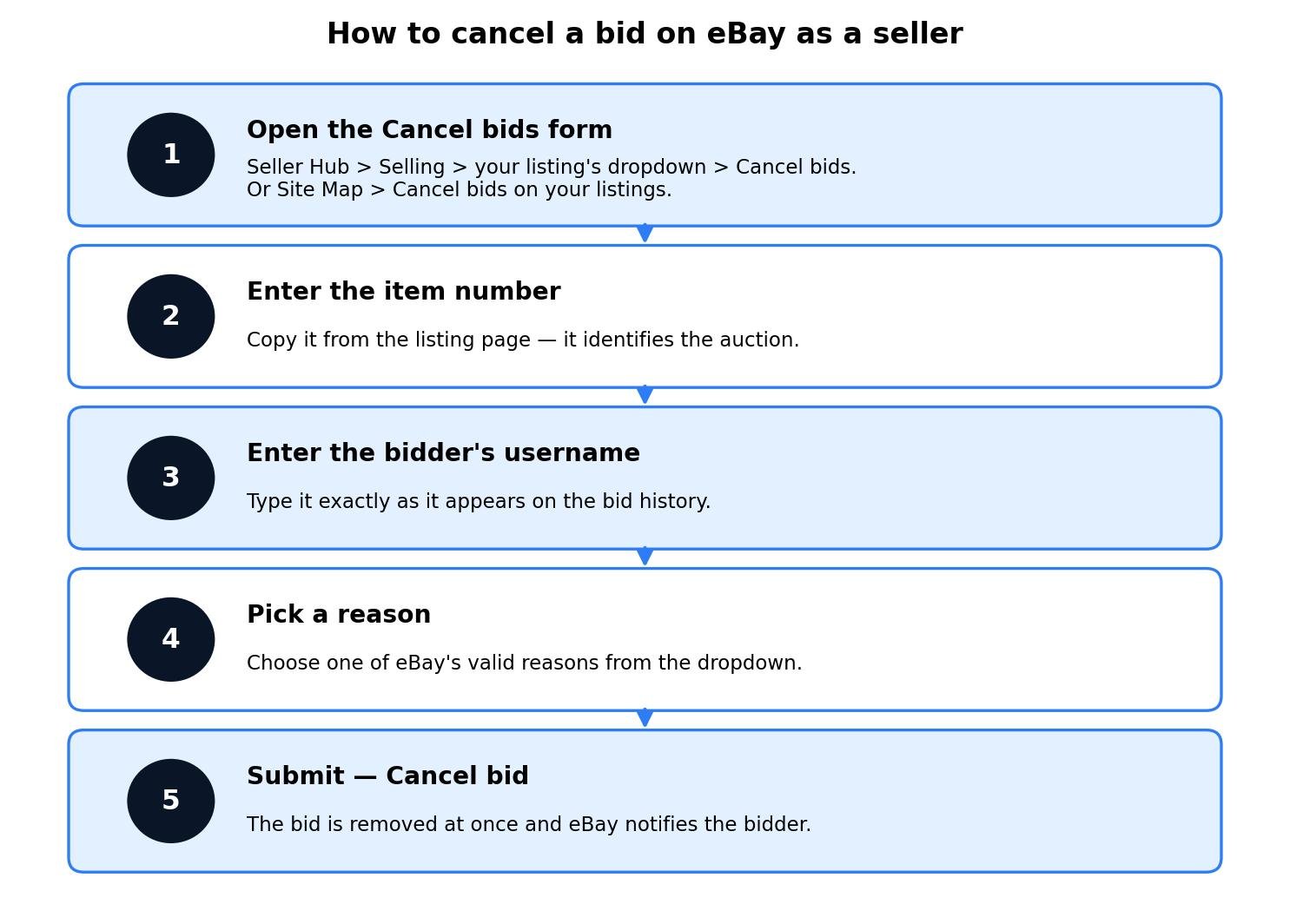
Cancelling a bid is a five-step job that takes about two minutes, and it all happens on one eBay form. You do not cancel a bid from inside the listing itself, and there is no cancel button next to a bid in your bid history. You go to the Cancel bids form, fill in three fields, and submit.
- Open the Cancel bids form. In Seller Hub, go to Selling, find the listing, open its dropdown menu and choose Cancel bids. If you cannot find that menu item, use the long way round: open the Site Map at the bottom of any eBay page and click Cancel bids on your listings. Both routes land on the same form.
- Enter the item number. This is the listing number shown on your auction page. Copy it rather than typing it from memory — one wrong digit cancels a bid on the wrong listing.
- Enter the bidder’s username. Type it exactly as it appears in the bid history, including any numbers, underscores or capital letters. eBay matches on the exact username, so a near-miss will not work.
- Pick a reason. Choose one of eBay’s valid reasons from the dropdown. The next section explains the four options and which one fits your situation.
- Submit — Cancel bid. The bid is removed immediately. eBay notifies the bidder that their bid has been cancelled, and the auction carries on with the remaining bids.
Before you start, have two things ready: the item number and the bidder’s exact username, both copied from the bid history. The form asks for nothing else — no message to the buyer, no evidence upload, no phone call to eBay. One practical tip from sellers who do this regularly: message the bidder first and tell them why you are cancelling. eBay notifies them, but a short note from you (“cancelling your bid because the item is no longer available — sorry for the trouble”) prevents the confused messages and the retaliatory feedback that sometimes follow a silent cancellation.
Note the language, because eBay is precise about it. Sellers cancel a bid. Buyers retract their own bid. The two words describe two different actions with different rules, and mixing them up is how sellers end up following buyer instructions that do not apply to them. The buyer side — retracting — gets its own section near the end of this guide.
What are the valid reasons to cancel a bid on eBay?
eBay does not let sellers cancel bids freely. Its help pages list four valid reasons to remove a buyer’s bid, and the Cancel bids form asks you to pick one of them. Choose honestly: the reason you pick is recorded against the cancellation, and a pattern of cancellations with flimsy reasons is exactly what gets a seller’s account flagged.
| Valid reason | What it means | Example |
|---|---|---|
| The buyer asked you to cancel it | The bidder contacted you and asked for their bid to be removed. | A buyer typed $100 instead of $10 and messages you straight away. |
| The item is no longer available | You cannot sell the item, so you will end the listing early. | The item was damaged or lost after bids were placed. |
| The listing contains an error | Something in the listing is wrong and the bids were placed on wrong information. | The wrong starting price, the wrong size, or a missing defect in the description. |
| You suspect a fraudulent bid | You have reason to believe the bid is not genuine. | A zero-feedback account bidding far above value, or a suspected shill bid. |
Two of these cover most real cases. “The buyer asked” is the commonest: a genuine typo or a change of mind, handled in minutes. “Suspected fraud” is the one that protects you: a bidder with a history of unpaid-item strikes, an account created yesterday that is bidding aggressively on your high-value item, or bidding patterns that look like shill bidding. If you cancel for suspected fraud, report the bidder to eBay as well — cancelling removes the bid, reporting is what stops the account doing it to the next seller.
Just as important is what is not a valid reason. Disliking the current bid amount is not one — if the top bid is lower than you hoped, that is the auction working as intended, and cancelling the bid to push the price up is bid manipulation. Neither is personal preference: you cannot cancel a bid because you do not like the bidder, or because you would rather sell to someone else. And you cannot cancel a bid to change the terms of the sale after bids are in — if the listing terms need changing, revise the listing or end it under the end-early rules instead.
This is where some of the guides ranking for this keyword actively mislead sellers. One popular guide claims sellers “can cancel any bid at any time for any reason without bidder consent”, and another says “you can cancel a bid at any time before the auction ends”. Both are wrong. eBay requires a valid reason, and as the troubleshooting section below explains, cancelling gets harder inside the final 12 hours of an auction. Follow the four reasons above and you stay inside eBay’s rules; follow the “any reason, any time” advice and you risk the listing restrictions and account penalties those same guides warn about in their next paragraph.
What happens after you cancel a bid on eBay?
Cancelling a bid is instant and permanent, so it is worth knowing exactly what changes the moment you click submit.
- The bid disappears immediately. The bidder’s amount is removed from the bid history and the current price drops to the next-highest bid. The auction itself keeps running — cancelling one bid does not pause or end the listing.
- eBay notifies the bidder. The bidder gets a message that their bid has been cancelled. They are not told your reason in detail, which is another argument for messaging them yourself with a short explanation.
- The cancellation cannot be undone. A cancelled bid cannot be reinstated, by you or by eBay. If you cancelled the wrong bidder by mistake, the only fix is to ask that bidder to bid again — and they are under no obligation to do so.
- The cancelled bid stays visible in the bid history. It remains on the record as a cancelled bid, so the history still shows what happened. Keep any message you send about it short, factual and unemotional: it is part of the permanent record of that auction.
- The bidder can bid again unless you block them. Cancelling a bid does not stop the same person bidding again on the same listing. If the bidder is a genuine problem — a repeat non-payer, a suspected shill — block them right after cancelling, using the Block bidders or buyers page. Our guide to how to block a buyer on eBay covers the 5,000-username limit and the exact steps.
- Your other bids are untouched. Cancelling one bidder’s bid affects only that bid. Every other bid on the listing stands exactly as it was.
One more consequence is easy to miss: cancelling the top bid usually means your item sells for less, because the price falls to the next-highest bid. That is not a fee eBay charges you — it is the market price of removing a bidder. The next section puts exact numbers on it.
How much does cancelling a bid cost?
Cancelling a bid carries no fee from eBay. There is no charge for using the Cancel bids form, and no penalty fee is added to your account for a single cancellation made for a valid reason. The real cost is what the cancellation does to your final sale price — and that cost is easy to calculate, because it is just the gap between the bid you removed and the bid that replaces it.
Take a $100 auction item. Say your item cost is $40, the buyer pays $10 postage, and the label costs you $10. If it sells at the $100 top bid, the maths is: $110 revenue, minus a 13.6% final value fee of $14.96 and the $0.40 per-order fee, minus $40 item cost and the $10 label — a profit of $44.64. Now cancel that $100 top bid because the bidder looks like a non-payer, and the item sells to the next-highest bidder at $80. Revenue falls to $90, the final value fee falls to $12.24, and profit falls to $27.36. Cancelling that one bid cost you $17.28.
| Scenario | Sale price | Revenue (incl. postage) | eBay fees | Profit | Cost of cancelling |
|---|---|---|---|---|---|
| US seller, sells at top bid | $100 | $110 | $15.36 | $44.64 | — |
| US seller, top bid cancelled, sells at $80 | $80 | $90 | $12.64 | $27.36 | $17.28 |
| UK business seller, sells at top bid | £100 | £105 | £17.18 | £42.82 | — |
| UK business seller, top bid cancelled, sells at £80 | £80 | £85 | £14.00 | £26.00 | £16.82 |
| UK private seller, sells at top bid | £100 | £105 | £0.00 | £60.00 | — |
| UK private seller, top bid cancelled, sells at £80 | £80 | £85 | £0.00 | £40.00 | £20.00 |
The pattern is the same in every market: the fee saving on the lower price is small, and the lost $20 or £20 of sale price swamps it. A UK private seller loses the full £20.00, because there are no fees to save in the first place. The chart below shows the same three cases at a glance.

Two details in the maths are worth knowing. First, eBay’s final value fee is charged on the total amount of the sale — item price plus buyer-paid postage — so the fee falls slightly when the price falls, which is why the US fee drops from $15.36 to $12.64 rather than staying flat. Second, the per-order fee ($0.40 in the US, £0.40 for UK business sellers) does not change: you pay it once per order whatever the price. Run your own numbers before you cancel, using the eBay Fee and Profit Calculator — if the gap between the top two bids is $2, cancelling is a shrug; if it is $20, it is a real decision, and sometimes the right call is to leave the bid alone and manage the risk another way, such as messaging the bidder or setting buyer requirements for your next listing.
One more cost question sellers ask: is there a penalty for cancelling a bid? There is no per-cancellation penalty fee. But eBay does watch for abuse, and sellers who cancel bids repeatedly, or without a valid reason, can face listing restrictions or account action. A single cancellation for a genuine reason is routine. A habit of cancelling the bids you do not like is not.
Should I end the listing early instead of cancelling a bid?
Sometimes cancelling one bid is not enough, and the right move is to end the whole listing. The two actions solve different problems: cancelling a bid removes one bidder and the auction continues; ending the listing stops the auction entirely. eBay’s rules for ending a listing depend on how much time is left, whether there are bids, and whether a reserve price has been met — and ending early can cost you money even when nothing sells.
| Time left | Bids | Reserve | Can you end it? |
|---|---|---|---|
| 12+ hours | None | — | Yes |
| 12+ hours | Yes | Not met | Yes — eBay may charge a final value fee on the highest bid |
| 12+ hours | Yes | Met, or no reserve | Yes, by cancelling all bids — eBay may charge a final value fee on the highest bid, or you can sell to the highest bidder |
| Under 12 hours | None | — | Yes |
| Under 12 hours | Yes | Not met | Yes — eBay may charge a final value fee on the highest bid |
| Under 12 hours | Yes | Met, or no reserve | No — only sell to the highest bidder |
The expensive line in that table is the final value fee eBay may charge when you end an auction early with bids on it. The fee is charged on the highest bid even though the item does not sell. On a $100 high bid in the US, that is a $13.60 final value fee plus the $0.40 per-order fee — $14.00 out of your pocket for an item still sitting on your shelf. On a £100 high bid for a UK business seller, it is £12.90 plus a £0.35 regulatory fee plus £0.40 plus 20% VAT on those fees — £16.38 in total. And if the listing has a reserve price, the reserve fee is charged whether or not the item sells: $5 or 7.5% of the reserve (maximum $250) in the US, and 4% of the reserve (maximum £150, minimum reserve £50) in the UK. A $150 high bid on a $200 reserve ended early costs $20.40 of final value fee plus the $0.40 per-order fee and a $15.00 reserve fee — $35.80 gone, against $15.00 if you had simply let the same auction expire unsold. The UK equivalent — a £150 high bid on a £200 reserve — costs £24.33 of fees plus an £8.00 reserve fee: £32.33 sunk, against £8.00 if you had let it expire unsold.
Compare that with selling to the highest bidder instead. Ending the same $100 auction early and selling to the highest bidder gives you the $44.64 profit from the worked example above, against losing $14.00 by ending it with no sale — a swing of $58.64. The UK business equivalent is a £42.82 profit against a £16.38 loss, a swing of £59.20. So the decision rule is simple: if the item is genuinely unavailable or the listing is wrong, end it and accept the possible fee. If the problem is one bidder, cancel that bid and let the auction run — it is almost always cheaper. Our full guide to how to end an eBay listing early covers every combination of time, bids and reserve in detail.
Cancel a bid vs retract a bid vs end a listing vs block a buyer
Four different eBay actions get confused with each other, and picking the wrong one is how sellers lose money or leave a problem bidder in place. Here is the difference in one view.

The most common mistake is reaching for “end listing” when “cancel bid” would do. Ending the listing kills the auction, cancels every bid, and can trigger a final value fee on the highest bid. Cancelling one bid removes the problem and lets the other bidders carry on. The second most common mistake is cancelling a bid and forgetting to block the bidder: the cancellation removes today’s bid, but nothing stops the same account bidding again tomorrow. Cancel first, then block — in that order — and the problem is actually solved.
How do I cancel a bid on eBay app as a seller?
There is no cancel-bid button inside a listing in the eBay app, so use the web form instead. On your phone, open your mobile browser, sign in to eBay, and go to the Cancel bids page — either through Seller Hub (Selling, then the listing’s dropdown, then Cancel bids) or through the Site Map at the bottom of any eBay page (Cancel bids on your listings). The form works the same in a mobile browser as it does on a desktop: item number, bidder’s username, reason, submit.
That is also the answer if you are trying to cancel a bid from an iPhone: the “cancel a bid on eBay on iPhone” searches all point at the same form, because the app does not offer the action itself. Do the cancellation in the browser, then go back to the app for everything else. One warning for phone users: type the bidder’s username from the bid history rather than from memory, and double-check the item number before submitting — a small screen is exactly where a mistyped username or a wrong listing number happens, and a cancelled bid cannot be reinstated.
How do I cancel a bid on eBay in the UK?
The process is the same on eBay UK as it is on eBay US: the same Cancel bids form, the same four valid reasons, the same rule that a cancelled bid cannot be reinstated. eBay UK calls the pages by the same names (“Canceling bids and managing bidders” for sellers, “Retracting a bid” for buyers), and the buyer retraction rules — the 12-hour window, the 1-hour exception, the Trading Cards exception — apply in the UK too.
What changes in the UK is the money. A UK business seller pays a 12.9% final value fee plus a 0.35% regulatory fee plus £0.40 per order, with 20% VAT charged on those fees — so cancelling a £100 top bid that sells at £80 costs £16.82 of profit, as the worked example above shows. A UK private seller pays no final value fee at all, so the same cancellation costs the full £20.00. And if you end a listing early instead, the UK reserve fee is 4% of the reserve price (maximum £150, minimum reserve £50), charged whether or not the item sells — private sellers pay it too. The fee figures in this guide are the current eBay UK rates; if your category carries a different final value fee rate, run your own numbers through the eBay Fee and Profit Calculator before you decide.
Why won’t eBay let me cancel a bid?
When the form refuses you, it is almost always one of these reasons. Work through them in order.
- You are inside the final 12 hours. Seller guides report that cancelling a bid gets harder inside the last 12 hours of an auction: the cases sellers report as accepted that late are buyer-requested cancellations and suspected fraud. If neither applies and you are inside the window, ask the bidder to retract instead — buyers have their own 1-hour exception in the final 12 hours — or end the listing under the end-early rules in the table above.
- The auction has already ended. You cannot cancel a bid on a finished auction. If you won and want out, contact the seller and ask them to cancel the order — sellers can cancel an order within 30 days in Seller Hub. Our guide to how to cancel an order on eBay covers that flow, including the fees.
- You picked a reason eBay does not accept. “I don’t like the price” is not a valid reason, and neither is personal preference. Go back to the four valid reasons: buyer asked, item unavailable, listing error, suspected fraud. If none of them honestly fits, do not cancel the bid — revise the listing or wait the auction out.
- The username or item number is wrong. The form matches on exact values. Copy the username from the bid history and the item number from the listing page, and check both before submitting.
- You are looking in the wrong place. The cancel action lives on the Cancel bids form, not on the listing page or in the bid history. Use Seller Hub (Selling, then the listing’s dropdown, then Cancel bids) or the Site Map (Cancel bids on your listings).
- The bidder keeps bidding after you cancel. Cancelling removes one bid; it does not stop the bidder. Block them on the Block bidders or buyers page — you can list up to 5,000 usernames — and the same account cannot bid on your listings again.
How does a buyer retract a bid on eBay?
This guide is written for sellers, but half the searches for this keyword come from buyers, and the two actions are constantly confused — so here is the buyer side, briefly, so you can recognise it when a buyer asks you about it.
A buyer retracts their own bid through eBay’s “Retracting a bid” page: select the item, choose a reason, and select Retract bid. The timing rules are strict. A buyer can retract while more than 12 hours remain in the auction, or within one hour of placing the bid during the final 12 hours. Outside those windows, retraction is allowed only in three situations: the buyer entered the wrong amount (and must immediately re-enter the correct bid), the seller significantly changed the item description after the bid was placed, or the seller cannot be contacted. Bids on Trading Cards cannot be retracted at all.
Two limits matter for sellers dealing with retraction requests. First, a retracted bid cannot be reinstated — once it is gone, it is gone, which is why a buyer who asks you to cancel their bid is asking for something permanent. Second, once an auction is won, a bid cannot be retracted at all: the buyer must contact the seller and ask for the order to be cancelled. If a buyer messages you saying they cannot retract, check the clock first — if there are under 12 hours left and more than an hour has passed since they bid, eBay will block the retraction unless one of the three exceptions applies. In that case, cancelling their bid yourself (with “the buyer asked” as your reason) is the cleanest fix.
Frequently asked questions about cancelling bids on eBay
Can I cancel someone’s bid on my item on eBay?
Yes. As a seller you can cancel any bid on your own auction through eBay’s Cancel bids form: enter the item number and the bidder’s username, pick one of the four valid reasons, and submit. The bid is removed immediately and eBay notifies the bidder. You cannot cancel a bid just because you dislike the price.
How do I cancel someone’s bid as a seller?
Open the Cancel bids form from Seller Hub — Selling, then your listing’s dropdown, then Cancel bids — or from the Site Map. Enter the item number, the bidder’s exact username, choose a valid reason, and click Cancel bid. The bid disappears at once and cannot be reinstated.
Is there a penalty for canceling a bid on eBay?
Cancelling one bid carries no fee, but it is not free of consequences. If the cancelled bid was the top bid, your item sells to the next-highest bidder for less — $17.28 less profit on a $100 US sale in our example. Repeated cancellations without valid reasons can also draw eBay’s attention and restrictions.
Can I remove an item from eBay that has a bid?
Yes, you can end a listing that has bids, but the rules depend on time left and reserve. With 12+ hours left you can usually end it, though eBay may charge a final value fee on the highest bid. Under 12 hours with bids and the reserve met, you cannot end it — only sell to the highest bidder.
Why won’t eBay let me retract a bid?
A buyer can only retract a bid while more than 12 hours remain, or within one hour of placing it during the final 12 hours — unless the seller changed the description or cannot be contacted. Trading Cards bids cannot be retracted at all, and a bid cannot be retracted after the auction is won.
How do I cancel a bid on eBay after winning?
You cannot cancel or retract a bid once the auction has ended and you have won. Contact the seller and ask them to cancel the order — they can do that within 30 days in Seller Hub. If they agree, the sale is cancelled; if not, you are expected to complete the purchase.
Conclusion
Cancelling a bid on eBay is a small job with a strict rulebook: use the Cancel bids form, pick one of the four valid reasons, and accept that the price will fall to the next-highest bid. The cancellation itself is free, but the lost profit is real — $17.28 on a $100 US sale, £16.82 for a UK business seller, £20.00 for a UK private seller — so run the numbers before you click submit, and cancel the bid and block the bidder together when the bidder is the problem. Do that, and a bad bid becomes a two-minute fix instead of a lost sale. For the numbers behind any price you set, run them through Zyrro’s eBay Fee and Profit Calculator, and browse the rest of the seller guides on the eBay hub.
Sources: eBay Help Center, “Canceling bids and managing bidders” and “Retracting a bid” (US and UK), as summarised in Google’s People Also Ask answers and AI Overview citing eBay Help Center on 17 Nov 2026, and as quoted in seller guides citing those pages; eBay Help Center via the official export help page for ending listings early (verified 11 Nov 2026: end-early matrix, “may be charged” final value fee wording, US reserve fee $5 or 7.5% max $250, UK reserve fee 4% max £150); eBay Help Center, “Blocking a buyer” (verified 16 Nov 2026: 5,000-username limit, Restore list). Direct reads of eBay’s help pages were blocked on 17 Nov 2026 (eBay returned a 403 / site-wide error page in the browser and to text fetches), so the cancel-bid rules above rest on the Help Center summaries and the quoted official wording; the fee figures are from Zyrro’s verified eBay fee research (US final value fee 13.6% + $0.40 per order; UK business 12.9% + 0.35% regulatory fee + £0.40 + 20% VAT on fees; UK private sellers pay no final value fee). All fee figures in this article were recalculated for this guide; item cost and label prices marked with an asterisk are example assumptions.