How to Refund a Buyer on eBay: A Seller’s Step-by-Step Guide (2026)

Short answer: To refund a buyer on eBay, find the order in Seller Hub or My eBay Orders, select Send refund, choose a reason, enter the amount and confirm. You can refund up to 100% of the transaction within 90 days, and eBay pays it from your Available funds first. Your final value fee is credited back; the per-order fee is not.
How to Refund a Buyer on eBay
Every eBay seller refunds a buyer sooner or later — a damaged parcel, a wrong size, a buyer who changed their mind, an order that never arrived. The refund itself takes about a minute once you know where the button is. What takes longer is everything around it: knowing which refund route to use, what it will cost you, which fees come back, and what happens if you get the timing wrong. Get those wrong and a simple refund turns into a defect on your account, or fees you never get back.
This guide covers the whole process for UK and US sellers, using eBay’s own help pages as the source — read on 3 November 2026 — and worked examples with real numbers, so you can see exactly what a refund costs on a £50 or $50 sale. Zyrro’s free eBay Fee & Profit Calculator uses the same fee rates, so you can run your own sale through it before you refund. One warning first: most of the guides currently ranking for this question are two to three years old, or short videos rather than written steps, and some still tell sellers to refund through PayPal — which no longer applies, because eBay now handles all payments itself. The steps below are the current ones.
How to Refund a Buyer on eBay in Seller Hub (Step by Step)
The standard route is called Send refund, and it works the same way in the UK and the US. eBay’s own help page lists these steps, and they are the ones to follow:
Step 1: Find the order
Go to Seller Hub and open Orders, or go to My eBay and open Orders. Find the order you want to refund. You can refund a single item in a multi-item order, or the whole order — if you issue a partial refund on a multi-item order, eBay splits the amount proportionally across each item.
Step 2: Select Send refund
From the dropdown menu on the order, select Send refund. If you do not see the option, stop: something else is already open on the order. Send refund disappears while a cancellation request, a return request, an eBay Money Back Guarantee case, an item-not-received report or an outside-eBay dispute is open. In that case the refund has to go through the open request or case instead — see the section below on when not to use Send refund.
Step 3: Choose a reason
Pick the reason that matches what actually happened — damaged, not as described, buyer changed their mind, and so on. The reason matters: it feeds into whether eBay credits your fees back, and it is part of the record if the buyer later opens a case. Choose honestly; do not pick a reason that makes the refund look like something it is not.
Step 4: Enter the amount
Specify the refund amount for the item or for the whole order. You can refund up to 100% of the transaction, and you can issue a partial refund — for example, £10 back on a £50 sale because the item arrived with a small mark. Partial refunds are also how you settle a problem without the buyer sending the item back at all, which often costs both sides less than return postage.
Step 5: Send the refund and check it landed
Select Send refund to confirm. eBay sends you an email confirming the refund has been initiated, and another email once it is complete, and the refunded amount appears in the order details. The money comes from your Available or Processing funds first; if those do not cover it, eBay takes the rest from your linked bank account or an on-file payment method. If the refund fails — usually a payment-method problem — eBay prompts you to use the Retry refund button, and you can change how the refund is funded from the same order screen.
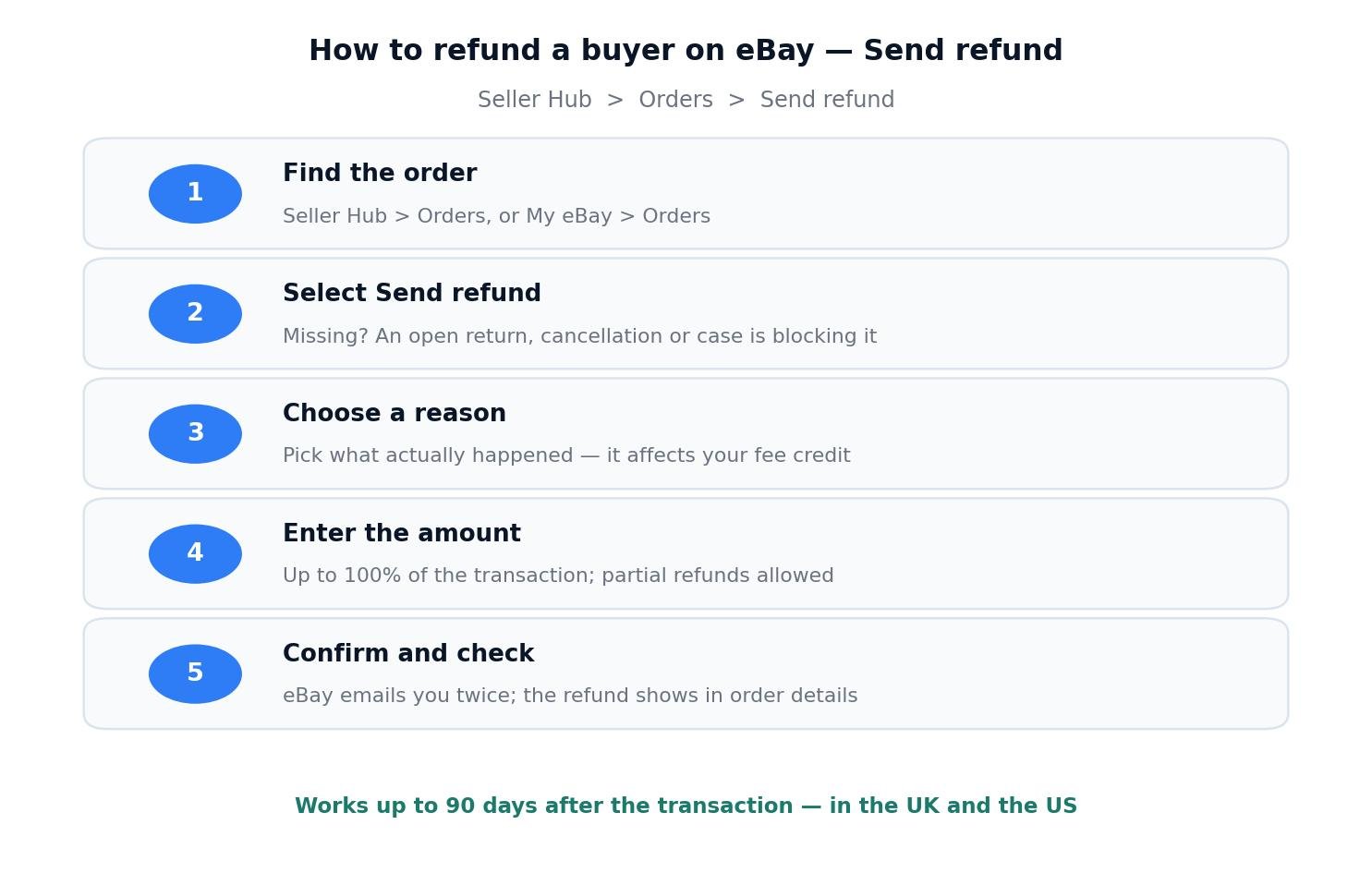
The five Send refund steps in Seller Hub. If the Send refund option is missing, an open return, cancellation or case is blocking it — refund through that request instead.
How to Refund a Buyer on eBay on the App
The same flow works in the eBay app, which is how many sellers handle refunds from their phone. Open My eBay, go to Orders, open the order and tap Send refund, then choose the reason and amount exactly as on desktop. The 90-day window and the fee rules are identical — the app is just a smaller screen on the same system. If the button is missing in the app, check on a desktop browser before assuming it is gone: an open case blocks it in both places, but a stale app screen can also hide it.
How to Refund a Buyer on eBay Before Shipping
If the buyer asks to cancel before you have shipped the item, do not use Send refund at all — cancel the order instead. Cancelling is the right tool when nothing has left your hands yet, and it is cheaper for you: when an order is cancelled because the buyer requested it, eBay refunds the buyer and credits your fees, including the per-order fee that a normal refund does not return. To cancel, open the order, choose the cancel option, and select the reason that fits — buyer requested it, or a problem with the buyer’s address.
The distinction matters because the two routes are priced differently. A cancellation before dispatch is a clean unwind: the buyer gets their money back, you get your fees back, nobody pays postage. A refund after dispatch always costs you postage at least, and usually the per-order fee too. So if a buyer messages you five minutes after ordering to say they ordered the wrong size, cancel — do not ship it and refund it later. And if you have already shipped, you cannot cancel any more: the buyer has to wait for delivery and then open a return request, which is a different process with its own clocks.
How Much Does It Cost to Refund a Buyer on eBay?
A refund costs you more than the amount you send back, because some of what you already paid stays paid. The table below is the honest version, taken from eBay’s own returns page and its fee-credits policy:
| Fee | Full refund | Partial refund |
|---|---|---|
| Final value fee | Credited in full | Credited in proportion to the refund |
| Promoted Listings — general and international fees | Credited | Credited in proportion |
| Per-order fee (£0.40 / $0.40 on orders over £10 / $10) | Not refunded | Not refunded |
| Promoted Listings — priority (ad rate) fees | Not refunded | Not refunded |
| Regulatory operating fee + VAT on fees (UK) | Reversed as a credit note — confirm on your Transaction report | Reversed in proportion — confirm on your report |
Which eBay fees come back on a refund, from eBay’s own “How returns work” page and its fee-credits policy. The per-order fee is the one sellers most often expect back and do not get.
Two conditions decide whether you get the credits at all. First, you must refund the buyer yourself, through eBay, without eBay stepping in — if a case escalates and eBay refunds the buyer for you, there is no fee credit. Second, the credit can take up to 10 days to appear, so do not panic if it is not on your statement the same day. Check your Transaction report for the credit row against the original order number; if it is missing after 10 days, that is the time to contact eBay. One more nuance worth knowing: eBay’s fee-credits policy makes the per-order fee credit depend on the reason in some cancellation and refund cases — for example, a buyer-requested cancellation credits it, while a refund for a damaged or not-as-described item may not. eBay’s own returns page states the simpler rule that the per-order fee is not refunded, so this guide budgets on that basis and tells you to check your statement for the exact outcome.
Worked example: a £50 sale in the UK
Take a UK business seller who sells an item for £50 in the 12.9% “Everything Else” category. The fees on that sale, verified against eBay’s UK fee table, are £8.43 in total: £6.45 final value fee, £0.18 regulatory operating fee, a £0.40 per-order fee, and £1.41 VAT on the fees. Say the item cost £20 to source and £3.50 to post — the postage figure is an assumption for this example, so substitute your real cost. If the buyer keeps the item, the seller makes £18.07 profit.
| £50 UK sale — full refund | Amount |
|---|---|
| Refund to the buyer | − £50.00 |
| Final value fee credited back | + £6.45 |
| Per-order fee kept by eBay | − £0.40 |
| Outbound postage already spent (assumed £3.50) | − £3.50 |
| Return postage, if you pay it (assumed £3.50) | − £3.50 |
| Real cost of the refund, item resellable | £7.40 |
| Plus product cost, if the item cannot be resold | + £20.00 → £27.40 |
A full refund on a £50 UK sale costs £7.40 when the item comes back in sellable condition — the per-order fee plus postage both ways. If the item cannot be resold, the real cost is £27.40.
The number that surprises most sellers is how small the fee loss is and how large the postage loss is. The £6.45 final value fee comes back, so the fee damage is just the 40p per-order fee. The real cost is postage: £3.50 out and £3.50 back, £7.00 of the £7.40 total. That is why a partial refund is often the better deal — offer the buyer £10 to keep a slightly marked item and you pay £10, get £1.29 of final value fee credited back (a tenth of £6.45, since £10 is a tenth of £50), and nobody pays return postage. The item stays sold, the buyer stays happy, and you are £2.60 better off than a full refund with return postage, before you even count the time saved.
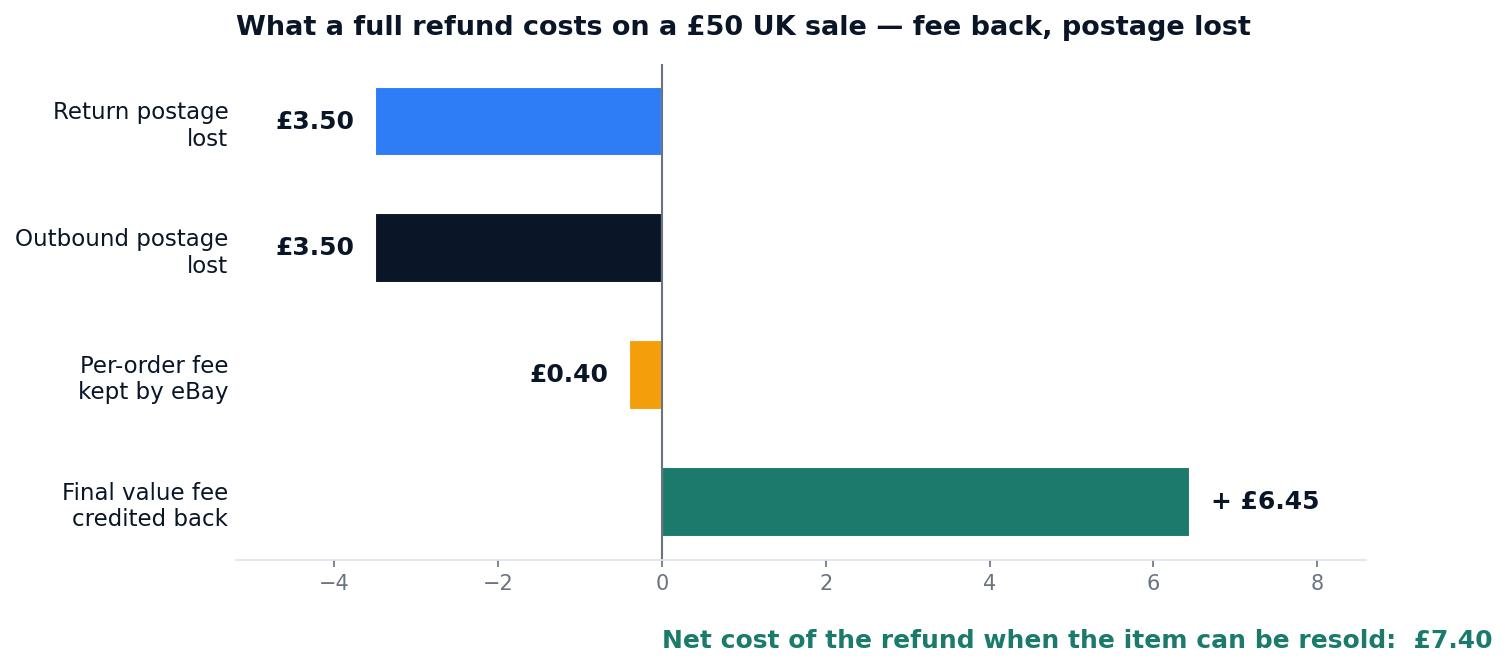
Where the money goes on a £50 UK refund. The final value fee comes back; postage both ways is the real cost.
Worked example: a $50 sale in the US
The same maths in the US is simpler, because there is no regulatory fee and no VAT on fees. A $50 sale in most categories carries a 13.6% final value fee of $6.80 plus a $0.40 per-order fee — $7.20 in total. Say the item cost $15 and shipping was $4.50 (assumed). Kept, the sale makes $23.30 profit. Refunded in full, the $6.80 final value fee is credited back, the $0.40 per-order fee is kept by eBay, and the $4.50 outbound shipping plus $4.50 return shipping are gone — a real cost of $9.40 when the item can be resold, or $24.40 when it cannot. A $10 partial refund on the same sale earns a $1.36 final value fee credit (a fifth of $6.80), and the per-order fee is not credited on a partial refund either. Run your own numbers through Zyrro’s eBay Fee & Profit Calculator, which uses the verified 13.6% US rate and the UK category rates and lets you change any rate to match your listing.
How to Refund a Buyer on eBay After 90 Days
Send refund works for 90 days after the original transaction. After that, the option is gone — eBay’s own help page states the limit plainly, and there is no way to extend it from Seller Hub. In practice the window is even tighter than 90 days for most cases: the eBay Money Back Guarantee, which is what lets a buyer force a refund through a case, runs for 30 days from the actual or estimated delivery date. So a buyer who contacts you on day 60 can still be refunded through Send refund, but cannot open a Money Back Guarantee case; a buyer who contacts you on day 100 is outside every eBay route.
If a buyer does contact you after 90 days and you still want to make it right — a loyal customer, a genuine mistake on your side — the only route left is outside eBay, and you should know what that costs you. eBay explicitly warns sellers not to issue refunds outside eBay, because those refunds do not qualify for seller protection: there is no record on the order, no fee credit, and no defence if the buyer then claims they were never refunded. The honest answer for most sellers after 90 days is that the sale is closed, and the right move is to say so politely in eBay Messages, explain the 90-day limit, and offer help that does not involve money moving outside eBay — a replacement at cost, or a discount on a future order. Keep the whole conversation in eBay Messages either way, so there is a record.
When You Should Not Use Send Refund
Send refund is the right tool for a straightforward refund you are choosing to make. It is the wrong tool in four situations, and using it there either fails outright or costs you the fee credit.
Something is already open on the order. If there is a cancellation request, a return request, a Money Back Guarantee case, an item-not-received report or an outside-eBay dispute open, Send refund will not even appear. Refund through the open request instead — that is the route eBay expects, and it is the one that keeps your fee credit and your seller record clean.
The buyer says the item never arrived. Check the tracking first. If tracking shows the parcel delivered, do not refund straight away — ask eBay to step in, because a delivered parcel with a not-received claim is exactly what eBay’s process is for. If tracking shows it genuinely lost, refund: the buyer is entitled to their money back, and a fast refund is far cheaper than a case that escalates.
The buyer broke the item. A buyer who damaged the item after delivery and then wants a refund is a different situation from a faulty item. You are not obliged to refund damage the buyer caused. Ask for photos, keep the conversation in eBay Messages, and decide on the evidence: a partial refund as goodwill, a replacement, or a polite decline. If the buyer opens a return anyway, you can offer a partial refund — Top Rated Sellers and sellers who offer free returns can deduct up to 50% when an item comes back in a different condition than it left in.
You are tempted to refund outside eBay. Do not. A refund sent by bank transfer or another app leaves no record on the order, earns no fee credit, and gives you no protection if the buyer then opens a case claiming they were never refunded. eBay says this plainly on its own help page. Every refund goes through eBay, or it does not happen.
How to Refund a Buyer on eBay UK
The flow is the same on ebay.co.uk — Seller Hub, Orders, Send refund, reason, amount, confirm — and the 90-day window applies in the UK too. What changes is the money. UK private sellers pay no final value fee, no regulatory operating fee and no per-order fee when an item sells, so a refund costs a private seller nothing in fees at all — only the postage already spent, and return postage if they choose to pay it. UK business sellers pay the fee stack from the worked example above: 5% to 14.9% final value fee by category, a 0.35% regulatory operating fee, a 30p or 40p per-order fee, and 20% VAT on those fees. On a refund, the final value fee is credited back, and the VAT charged on the fees reverses with it — since 31 October 2025 eBay issues a separate credit note for fee and tax reversals, so the reversal shows on your invoice as its own document. If your fee credit does not appear within 10 days, check the Transaction report for the order before contacting eBay. For the full UK fee picture, see our guide to how much eBay takes from a sale in the UK, and for the VAT layer specifically, our eBay VAT on fees explainer.
Refunding a Buyer Without Hurting Your Seller Account
A refund handled well costs you a few pounds and nothing else. A refund handled badly costs you a defect, which is what actually damages an eBay account. The clocks are the part sellers miss. When a buyer opens a return request, you have 3 business days to respond before either side can ask eBay to step in. Once the item is back in your hands — or once you have agreed to refund — you have 2 business days to issue the refund. Miss that second deadline and eBay refunds the buyer for you, which means no fee credit and a case closed without your resolution, which counts as a defect.
So the practical rules are simple. Refund fast when the buyer is right — a damaged item, a wrong item, a late delivery — because a fast refund is cheaper than a case in every way. Fight only when the evidence is on your side: tracking that shows delivery, photos that show the item left you in good condition, messages that show the buyer caused the damage. Offer a partial refund before a full one when the problem is small; a buyer who keeps the item with £10 back is a resolved case, and a resolved case is not a defect. And keep everything in eBay Messages, because eBay decides cases on the record in front of it, not on what you remember saying on the phone. If you are weighing whether an eBay Store subscription is worth the monthly cost, our eBay Store guide works through the break-even maths — and note that Top Rated status, which a store helps you hold, is what unlocks the 50% partial-refund deduction above.
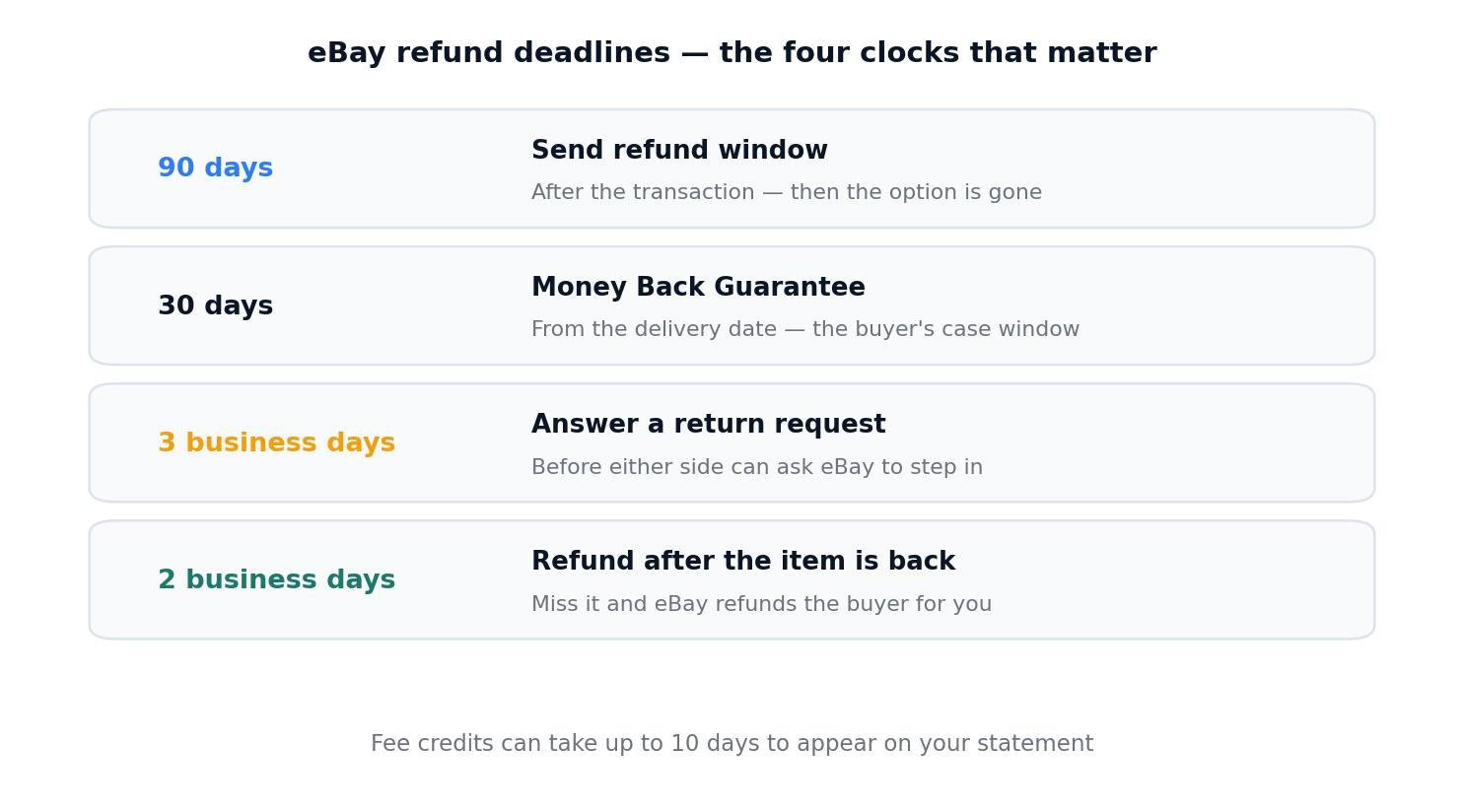
The four clocks that matter: 90 days to Send refund, 30 days for the Money Back Guarantee, 3 business days to answer a return, 2 business days to pay once the item is back.
Frequently Asked Questions About Refunding a Buyer on eBay
Can an eBay seller refund a buyer?
Yes. Any seller can refund a buyer through eBay using Send refund in Seller Hub or My eBay Orders, for up to 100% of the transaction and within 90 days of the sale. eBay pays it from your Available funds first. Refunds sent outside eBay do not count and carry no seller protection.
Does it cost the seller to refund on eBay?
Yes, but less than most sellers expect. The final value fee is credited back, so the fee you lose is only the per-order fee — £0.40 in the UK, $0.40 in the US. The real cost is postage: on a £50 UK sale, a refund costs £7.40 when the item can be resold, almost all of it postage both ways.
How to refund a buyer on eBay before shipping?
Do not use Send refund — cancel the order instead. Open the order, choose cancel, and select buyer requested it or a problem with the address. eBay refunds the buyer and credits your fees, including the per-order fee. Cancelling before dispatch is a clean unwind with no postage lost, so act as soon as the buyer asks.
How to refund a buyer on eBay after 90 days?
You cannot refund through eBay after 90 days — the Send refund option disappears, and the Money Back Guarantee window (30 days from delivery) has already closed. The only route left is outside eBay, which eBay warns against because it carries no seller protection and earns no fee credit. Explain the limit politely in eBay Messages instead.
How to refund a buyer on eBay UK?
Use the same Send refund flow on ebay.co.uk: Seller Hub, Orders, Send refund, reason, amount, confirm, within 90 days. UK private sellers pay no selling fees, so a refund costs them only postage. UK business sellers get the final value fee credited back and see the VAT on fees reversed as a credit note.
How to refund a buyer on eBay app?
Open the eBay app, go to My eBay, then Orders, open the order and tap Send refund — the same reason, amount and 90-day window as on desktop. If the button is missing, an open return, cancellation or case is blocking it, so handle the refund through that request instead, or check the same order on a desktop browser.
Refund steps, deadlines and fee-credit rules in this article were verified against eBay’s own help pages on 3 November 2026: “Refunding buyers” (eBay help) and “How returns work” (eBay export seller pages). UK and US fee rates are the verified figures from Zyrro’s earlier eBay fee guides: UK business sellers pay 5% to 14.9% final value fee by category plus a 0.35% regulatory fee, a 30p or 40p per-order fee and 20% VAT on fees; US sellers pay 13.6% plus $0.30 or $0.40 per order. Postage figures in the worked examples (£3.50 and $4.50) are stated assumptions, not eBay rates — substitute your real postage costs. Fee credits can take up to 10 days to appear; always check your Transaction report. eBay can change its fees and policies, so confirm the current rules on eBay’s help pages before acting. This article is general information, not financial advice. Zyrro’s free eBay Fee & Profit Calculator uses the same verified rates.