How to Price Items on eBay: A Seller’s Guide to Prices That Actually Sell

Short answer: To price an item on eBay, first check what identical items actually sold for in the last 90 days, then add up your product cost, postage, packaging and eBay fees, and set a price that covers all of it with the profit margin you want. Zyrro walks through the whole method below, with worked examples.
Most eBay sellers price the same way: they look at what other sellers are asking, pick a number near the middle, and hope. That is why so many listings sit unsold for weeks, and why so many sales turn out to be barely profitable once the fees land. The asking price on a live listing is not evidence of anything — it is just a number another seller chose. The only price evidence that matters is what buyers actually paid, and eBay shows it to you for free.
This guide covers the full pricing method: how to find your item’s real market value from sold listings, how to calculate a price that covers every cost, when an auction beats Buy It Now (and when it does not), how Best Offer fits in, and when to lower a price that is not selling. Every fee figure comes from eBay’s own published UK and US fee tables, and every worked example is calculated from those rates.
What Is the Best Way to Price Items on eBay?
The best way to price items on eBay is a four-step method: research sold prices, calculate your total costs, pick the right listing format, then monitor and adjust. Skip any one step and the price is a guess. Research tells you what buyers will pay. Costs tell you the lowest price you can accept. Format decides how the sale happens. Monitoring tells you when the price is wrong.
Step 1 — Research: find at least 10 identical items that actually sold in the last 90 days and work out the typical selling price. Step 2 — Calculate: add product cost, postage, packaging and eBay fees, then set your target profit on top. Step 3 — Format: choose fixed price, auction or Best Offer based on the item type. Step 4 — Adjust: if the listing gets no views in 72 hours, or watchers but no sales in two weeks, the price is usually the problem.
How Do I Find What My Item Is Worth on eBay?
Start with eBay’s own sold listings — it is the most accurate pricing data in existence for your item, because it records real completed sales rather than asking prices. Here is the exact process:
1. Search for your exact item. Use the same words a buyer would: brand, model, size, colour and condition. “Nike Air Jordan 1 Retro High OG Chicago size 10” gives useful comps; “Nike trainers” does not.
2. Filter to sold items only. On desktop, use Advanced Search and tick “Sold listings”. In the eBay app, tap Filter, scroll to “Show only”, and switch on “Sold items”. Ignore active listings completely at this stage — they show what sellers hope for, not what buyers pay.
3. Match the details. Compare only listings with the same model, condition, included accessories and, where it matters, size. A phone with a charger and box sells for more than the same phone on its own. A “like new” item sells for more than one with visible wear. Mixing unlike items is the most common research mistake.
4. Collect at least 10 sales and average them. Write down the sold prices, drop the outliers — anything roughly 20% above or below the average is usually a fluke, a bundle, or a mislisted item — and average the rest. That average is your item’s market value. If you find fewer than 10 sales, widen the date range to the full 90 days eBay keeps, or check a close model in the same range.
5. Check the trend, not just the average. If the last five sales are all higher than the five before them, the price is rising and you can aim at the top of the range. If recent sales are falling, price at or just under the recent average rather than the 90-day one. Seasonal items — coats in October, garden furniture in May — move fast, and a 90-day average can lag the market by weeks.
eBay’s Seller Hub also has a free Product Research tool under the Research tab, which shows average sold prices, sell-through rates and the best listing format for a search term. It is the same sold data, organised better. Use it when you are pricing a batch of similar items rather than a one-off.
How Do I Calculate a Profitable eBay Price?
Once you know the market value, the price has to cover four things: what the item cost you, what it costs to send it, what eBay charges, and the profit you want to keep. The formula is:
Your price = (product cost + fixed costs) ÷ (1 − fee percentage − target profit margin)
The fee percentage is the part sellers get wrong most often, because eBay’s fees are not one number. For a UK business seller they are a stack: the final value fee depends on your category, then a 0.35% regulatory operating fee, a 30p or 40p per-order fee, and 20% VAT charged on the fees themselves. A UK private seller pays none of these — selling is free for private sellers in the UK. In the US the stack is simpler: a 13.6% final value fee for most categories plus a $0.30 or $0.40 per-order fee, with no regulatory fee and no VAT.
| Fee (UK business seller) | Rate | On a £30 sale |
|---|---|---|
| Final value fee — clothes, home, media, toys | 9.9% | £2.97 |
| Regulatory operating fee | 0.35% | £0.11 |
| Per-order fee (orders over £10) | £0.40 flat | £0.40 |
| VAT on eBay fees | 20% of the fees above | £0.70 |
| Total eBay fees | 13.9% of the sale | £4.17 |
UK business seller fees on a £30 sale in a 9.9% category. Figures are rounded to the nearest penny; the £4.17 total is calculated from the unrounded amounts, as in our fee calculator. The same sale in a 12.9% “Everything Else” category costs £5.25 in fees — category alone moves the profit by more than a pound, which is why our guide to how much eBay takes from a sale in the UK starts with the category table.
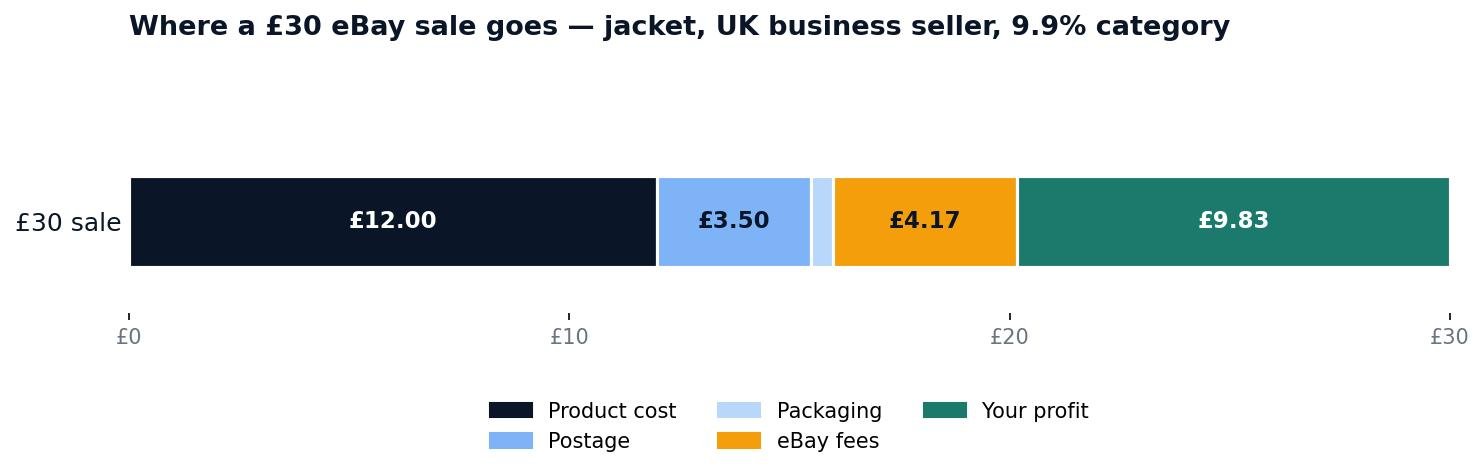
Where a £30 eBay sale goes: product cost £12.00, postage £3.50, packaging £0.50, eBay fees £4.17 — leaving £9.83 profit, a 32.8% margin.
Worked example: a £30 jacket (UK business seller)
Say you bought a jacket for £12, you will post it for £3.50 with £0.50 of packaging, and you list it at £30 with free postage in the clothes category (9.9% final value fee). Here is the full maths:
- Final value fee: 9.9% of £30 = £2.97
- Regulatory fee: 0.35% of £30 = £0.11
- Per-order fee: £0.40
- Fees before VAT: £2.97 + £0.11 + £0.40 = £3.48
- VAT on fees: 20% of £3.48 = £0.70
- Total eBay fees: £4.17 (Calculated from the unrounded figures)
- Total costs: £12.00 + £3.50 + £0.50 + £4.17 = £20.17
- Profit: £30.00 − £20.17 = £9.83 (32.8% margin)
The break-even price — the lowest price that loses nothing — is £18.79. Fixed costs are £16.48 (product, postage, packaging and the per-order fee with its VAT), and the percentage fees take 12.3% of the price (9.9% + 0.35%, plus 20% VAT on both). So £16.48 ÷ (1 − 0.123) = £18.79. Anything above that is profit; anything below it is a loss, however good the sale feels.
If you want a 30% margin on the same jacket instead of taking whatever the market gives, the formula sets the price for you: £16.48 ÷ (1 − 0.123 − 0.30) = £28.56. Listing at £30 beats that target, which is a good sign — the market price and your profit target agree.
Check the same maths in seconds with Zyrro’s free eBay Fee & Profit Calculator — it has the 13.6% US rate and the UK business rates built in, every rate is editable for your category, and it shows profit, margin and break-even price for any price you type in.
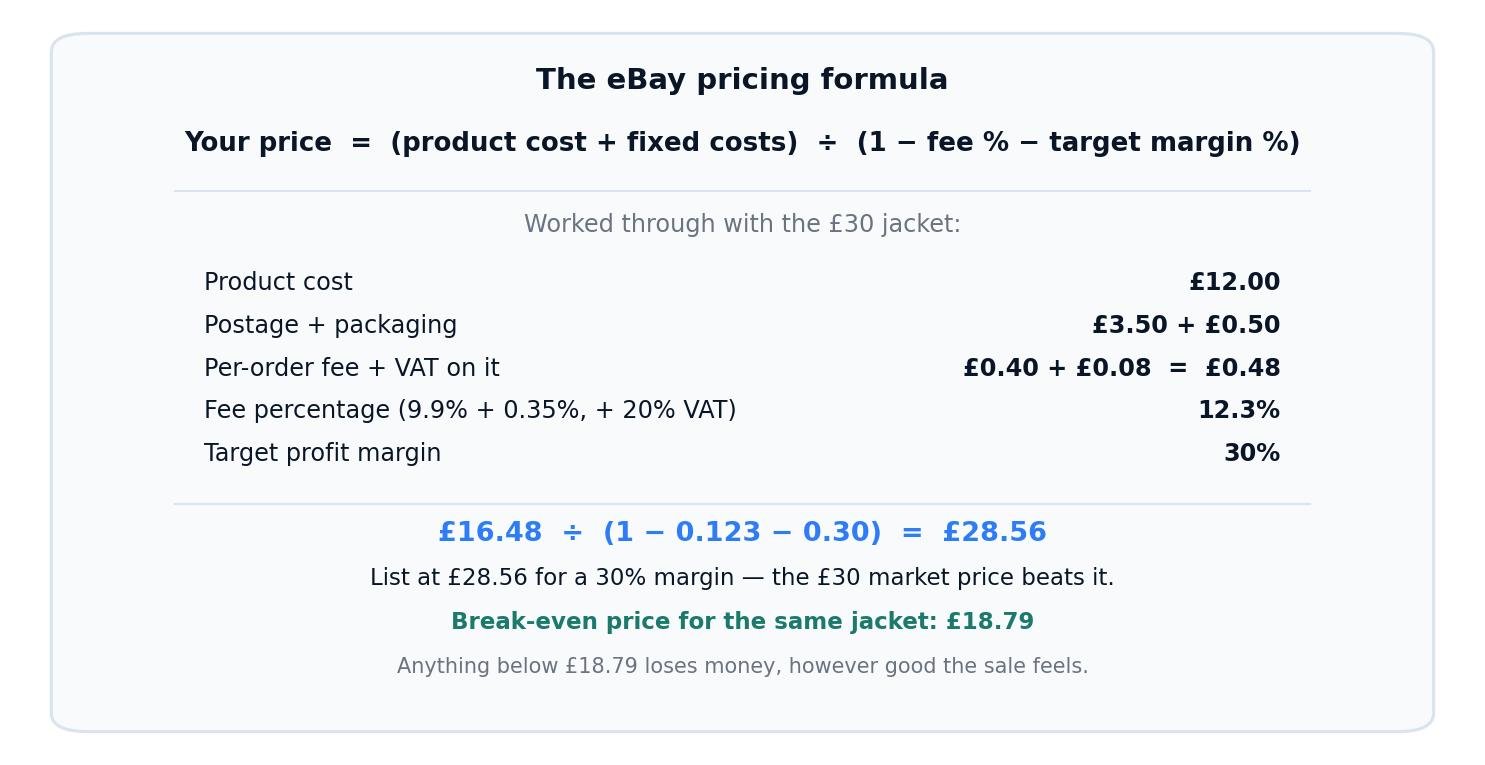
The pricing formula with the jacket example: (£12.00 + £3.50 + £0.50 + £0.48) ÷ (1 − 0.123 − 0.30) = £28.56 for a 30% margin.
Worked example: a $50 sale (US seller)
The US maths is shorter. A $50 item with free shipping, product cost $20, shipping cost $5 and packaging $1: the final value fee is 13.6% of $50 = $6.80, plus the $0.40 per-order fee, so total eBay fees are $7.20. Total costs are $20 + $5 + $1 + $7.20 = $33.20, leaving $16.80 profit — a 33.6% margin. Break-even is $30.56. There is no regulatory fee and no VAT for US sellers, and payment processing is already inside the 13.6% — do not add a card fee on top.
Two costs sellers forget belong in the formula. First, postage: if you offer free postage, the £3.50 or $5 comes out of your price, so it must be in the calculation before you list, not discovered afterwards. Second, returns: eBay returns the final value fee on a refunded order, but you still pay your own return postage, and a high return rate on a category quietly eats the margin on every sale. If one item in ten comes back, add a tenth of the return cost to every sale’s costs.
Should I Use Auction or Buy It Now on eBay?
The format changes what price you get, not just how fast you get it. Pick the format for the item, not out of habit.
| Auction | Buy It Now (fixed price) | |
|---|---|---|
| Best for | Rare, collectable or high-demand items where buyers compete | Everyday items with a known market price |
| Price outcome | Uncertain — can exceed market value in a bidding war, or end low if only one bidder shows up | Predictable — you set the price, the buyer pays it |
| Speed | Fixed duration (1, 3, 5, 7 or 10 days) — you wait for the end | Sells the moment a buyer decides, any time |
| Risk | A thin auction can close below your costs — always set a starting price you can live with | Priced too high, it sits; priced right, it sells steadily |
| Fees | Same final value fee on the closing price | Same final value fee on the sale price |
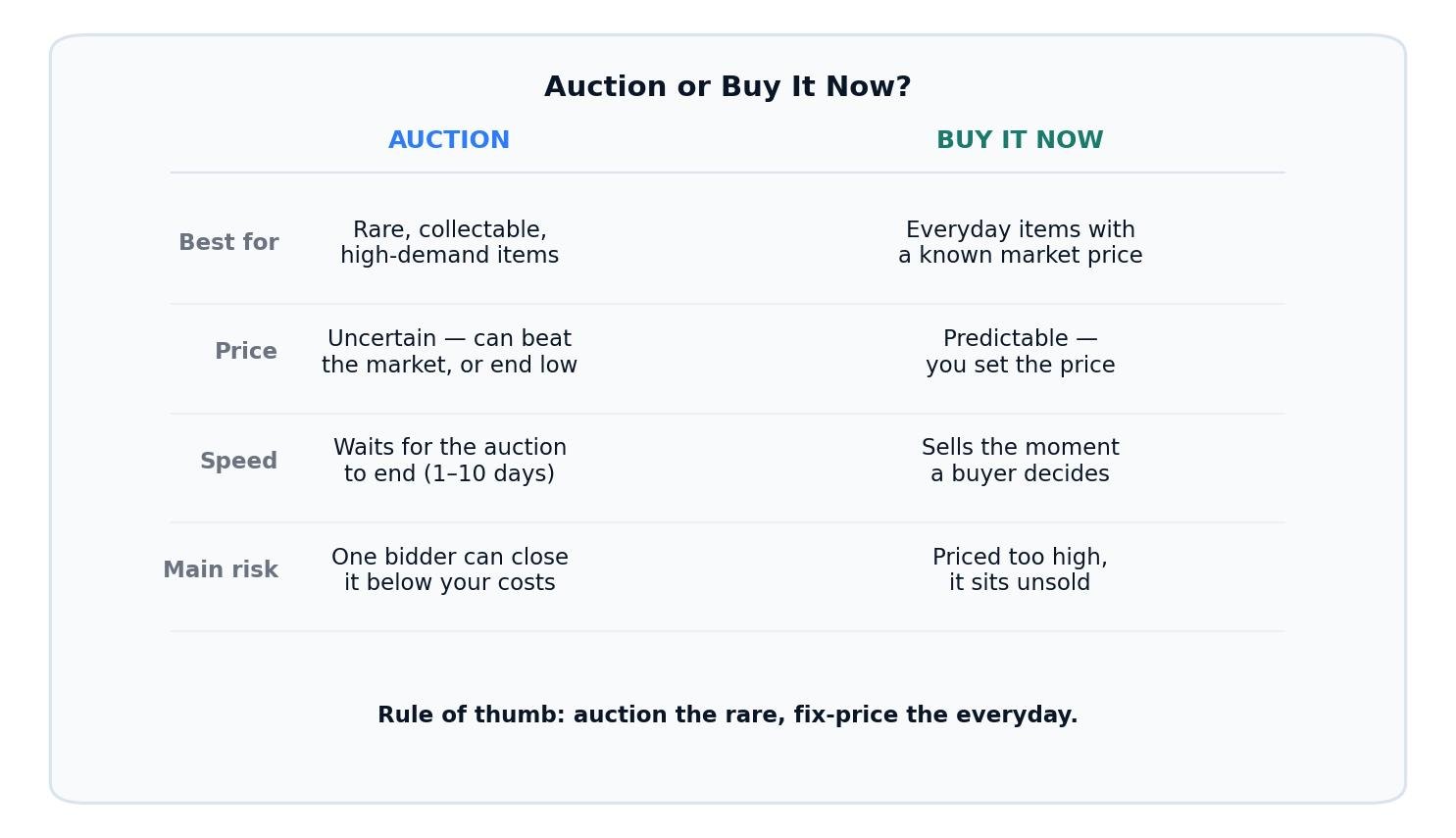
Auction vs Buy It Now: auctions suit rare items where buyers compete; fixed price suits everyday items with a known market value.
Use an auction when the item is genuinely scarce or collectable and several buyers are likely to want it at the same time — vintage items, limited editions, rare parts. Start the auction at the lowest price you would accept, not at 99p, unless you can afford the loss if only one person bids. A reserve price protects you, but eBay charges for it and buyers can see a reserve exists, which puts some of them off. For most standard items, Buy It Now earns more: the buyer pays the researched market price immediately instead of waiting a week and possibly forgetting the auction exists.
You can also add a Buy It Now price to an auction listing, which gives impatient buyers a way out and sets a ceiling on what the auction can reach. Once a bid is placed, the Buy It Now option disappears, so it mainly helps in the first day or two.
How Does Best Offer Work on eBay Pricing?
Best Offer lets buyers propose a lower price on a fixed-price listing, and it is a pricing tool in its own right rather than just a discount button. You can set automatic accept and decline thresholds — for example, automatically accept any offer at or above £25 on a £30 listing, and automatically decline anything below £20 — so you never have to watch the inbox. Offers you neither accept nor decline expire after 48 hours.
Price with Best Offer in mind. If your researched market value is £30 and you list at £32 with Best Offer on, buyers feel they negotiated a win at £30 and you still get the market price. List at exactly £30 with Best Offer on and the first offer will be £25, because the button invites it. A good rule is to list 5–10% above your target when Best Offer is switched on, and to decline quickly and politely when an offer is far below the value — a fast decline tells the buyer the price is firm without burning the sale.
When Should I Lower My eBay Price?
A price is wrong when the listing’s behaviour tells you so. The signals are clear, and each one points at a different fix:
- No views in 72 hours: this is usually a visibility problem, not a price problem — but price is part of visibility, because eBay shows competitively priced listings first. Check your title and category first, then compare your price with the sold average again. If you are 20% above it, lower the price.
- Views but no watchers and no sales after two weeks: buyers are finding the listing and walking away. The price is too high for the condition or the photos. Lower it by 10–15% and watch what changes.
- Watchers but no offers or purchases: the item is wanted at a lower price. This is the exact situation Best Offer is for — switch it on, or drop the price to just under the watcher count’s implied level.
- Selling fast, within hours: the price was too low. Next time, list identical items 5–10% higher and let the market tell you where the ceiling is.
To change a price, open the listing in Seller Hub, choose Revise, and edit the price directly — the change is live immediately. For several listings at once, use the bulk edit tool in Seller Hub rather than opening each one. And do not lower a price by pennies: a £30 listing dropped to £29.50 signals nothing to anyone. Move it by at least 5%, or change the format instead — add Best Offer, or switch a stale fixed-price listing to an auction with a sensible start.
Common eBay Pricing Mistakes to Avoid
Pricing from active listings. The most expensive mistake on eBay. Active listings show unsold items at hopeful prices — often the same overpriced items relisted for months. Only sold listings show what buyers actually pay.
Forgetting the fees. A £30 sale is not £30 of revenue. For a UK business seller in a 9.9% category it is £25.83 after eBay’s fees, before product and postage costs. For the full fee breakdown by category, see our guide to how much eBay takes from a sale — and remember the VAT charged on the fees themselves, which adds nearly 3% of the sale price on top of the headline rate. Our eBay VAT on fees guide works through that layer with its own £100 and £50 examples.
Offering free postage without costing it. Free postage sells — eBay’s own figures say more than 70% of transactions ship free — but the postage still comes out of your margin. Either build the real postage cost into the price before listing, or charge postage separately at the exact rate it costs you. Guessing postage is how a £9.83 profit becomes a £2 loss.
Copying a competitor’s price without checking the category. Two identical items can carry different fees if they sit in different categories — 9.9% for clothes against 12.9% for “Everything Else” is a £1.08 difference on a £30 sale. Check your category when you list, because the fee follows the category, not the item.
Never testing the ceiling. If every item sells within hours, your prices are too low. Raise the next identical listing by 5–10% and see whether it still sells. The market, not your caution, sets the ceiling.
Frequently Asked Questions About Pricing Items on eBay
What is the best way to price items on eBay?
The best way to price items on eBay is to research at least 10 identical sold listings from the last 90 days, average their sold prices, then add your product cost, postage, packaging and eBay fees and set your target profit on top. Use Buy It Now for everyday items and auctions only for rare or collectable ones.
How do I see what items sold for on eBay?
Search for your exact item on eBay, then filter to sold listings: on desktop use Advanced Search and tick “Sold listings”, or in the eBay app tap Filter, then “Show only”, then “Sold items”. Only sold prices show what buyers actually paid — active listings show asking prices, which are often far higher.
How do I change the price of an item on eBay?
Open the listing in Seller Hub, choose Revise, and edit the price — the change goes live immediately. To change several listings at once, use the bulk edit tool in Seller Hub. A meaningful drop of 5% or more is what gets a stale listing moving again.
How do I lower the price of an item on eBay?
Revise the listing in Seller Hub and set the new price, dropping it by at least 5% so the change is visible to buyers. Lower it when the listing has views but no watchers after two weeks, or watchers but no sales — both mean buyers want the item cheaper. Adding Best Offer can work instead of a cut.
Should I price my item as an auction or Buy It Now?
Use Buy It Now for everyday items with a known market price — it sells the moment a buyer decides and the price is predictable. Use an auction only for rare, collectable or high-demand items where several buyers are likely to compete, and always start it at the lowest price you would accept.
How do I price high-value items on eBay?
Price high-value items from sold listings of the exact model and condition, never from asking prices, and collect more comps than usual because one outlier skews the average. In the US the final value fee drops to 2.35% on the part of a sale above $7,500, so very high-value items keep more of the price than the headline 13.6% suggests.
The short version of all of this: price from what sold, not from what is listed; cover every cost before you set the number; and let the listing’s behaviour tell you when the price is wrong. Do that on every listing and the profit takes care of itself. Zyrro’s eBay Fee & Profit Calculator runs the fee maths for any price in either market, and the eBay tools hub has the rest of the fee and profit tools in one place.