How to Cancel an Order on eBay as a Seller: Steps, Fees & 30 Days (2026)

Short answer: To cancel an order on eBay as a seller, go to Seller Hub > Orders (or My eBay > Sold), find the order, choose More actions > Cancel order, pick a reason and submit. You can cancel up to 30 days after the sale, even if the buyer already paid, and eBay refunds the buyer in full automatically.
How to Cancel an Order on eBay as a Seller
Sooner or later, every eBay seller needs to cancel an order. The buyer asks to cancel because they ordered the wrong size. The item turns out to be damaged when you go to pack it. The buyer never pays. Or you simply cannot fulfil the order and the honest move is to cancel it cleanly rather than ship late and earn a defect anyway. The cancellation itself takes about a minute once you know where the button sits. What takes longer — and what actually costs you money — is everything around it: picking the right reason, knowing what happens to your fees, and understanding when cancelling is safe and when it puts a mark on your account.
This guide walks through the whole process for UK and US sellers, using eBay’s own help pages as the source — read on 4 November 2026 — with worked examples showing exactly what a cancellation costs on a $50 or £50 sale. Zyrro’s free eBay Fee & Profit Calculator uses the same fee rates, so you can run any sale through it before you decide whether cancelling or fulfilling is the cheaper option. One warning first: most of the guides currently ranking for this question are two to three years old, forum threads, or short videos rather than written steps — and a few still describe the old PayPal-era refund flow, which no longer applies because eBay now handles all payments itself. The steps below are the current ones.
How to Cancel an Order on eBay as a Seller in Seller Hub (Step by Step)
There are two places to cancel: Seller Hub, which is the route eBay documents, and My eBay, which works the same way. Use Seller Hub if you sell regularly — it shows all your orders on one screen and it is where eBay puts the cancel button.
- Open Seller Hub and go to Orders. Sign in to eBay, open Seller Hub, and click Orders in the left-hand menu. If you prefer My eBay, go to Selling and then Sold instead — the rest of the steps are identical.
- Find the order you want to cancel. Use the search box or the date filter if you have a lot of orders. Check the order status first: if it already shows as shipped, stop — you cannot cancel a shipped order (see the section on why you cannot cancel, below). The cancel option only works on orders that have not shipped yet.
- Open the More actions menu and select Cancel order. Next to the order you will see a More actions dropdown. Click it and choose Cancel order. eBay takes you to the cancellation screen.
- Choose a reason for the cancellation. This is the step that matters most, because the reason you pick decides whether the cancellation counts against your seller standing. The options include “Buyer asked to cancel”, “Buyer hasn’t paid”, “Out of stock or damaged”, and “Issue with buyer’s address”. Pick the one that is actually true — the reason table later in this guide explains what each one costs you.
- Submit. Click Submit to finish. eBay notifies the buyer, and if the buyer already paid, a full refund is issued automatically to their original payment method. You do not need to send a separate refund — cancelling the order does that for you.
- Check the relist prompt. If the listing was a single-quantity Buy It Now item, eBay will automatically relist it for you unless you select No next to “Relist item?” on the cancellation screen. Say Yes if you still have the item and want it back on sale; say No if the item is damaged, lost, or you no longer want to sell it.
That is the whole process. The order disappears from your active orders, the buyer gets their money back, and the fees are sorted out on your statement — which is covered in the worked examples below.
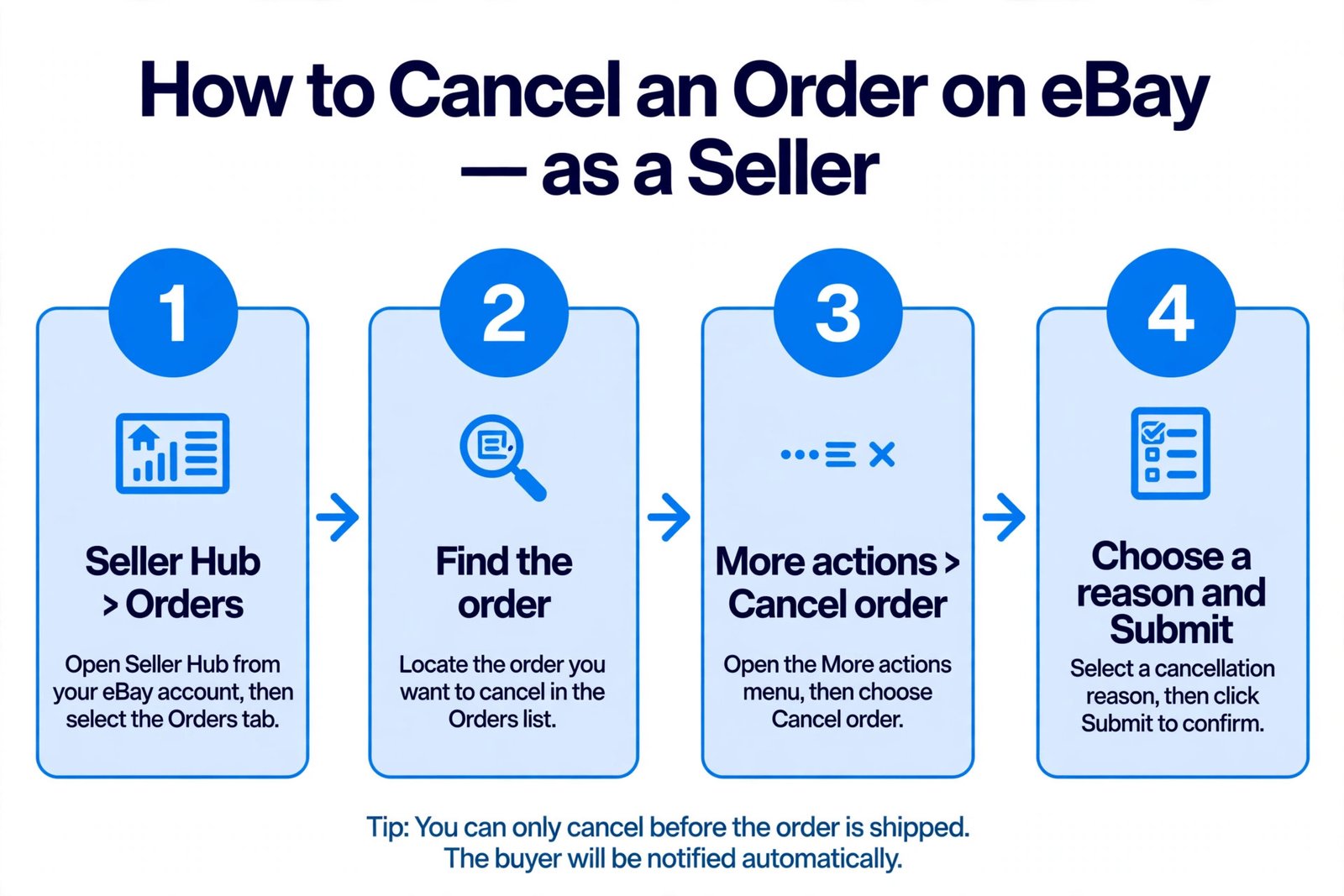
Cancel in Seller Hub: Orders → More actions → Cancel order → choose a reason → Submit. You can only cancel before the order ships.
If the buyer asked you to cancel, message them first to confirm, and keep the message polite and short: a one-line apology and a confirmation that you have cancelled the order is enough. Buyers who feel ignored are the ones who leave negative feedback, and a cancelled order with a polite message almost never produces any.
How to Cancel an Order on eBay as a Seller on the App
The eBay app does not have a dedicated cancel button on the order screen in the same way the desktop site does, but you can still cancel from your phone — you just do it through the mobile site or through the app’s order menu. The steps below work on iPhone and Android.
- Open the eBay app and go to Selling. Tap Selling at the bottom of the screen, then find the sold item in your sold listings.
- Open the order. Tap the item to open its order details. Look for the order menu — the three-dot or More actions option on the order.
- Choose Cancel order and pick a reason. Select Cancel order, choose the reason that matches the situation, and submit. The same 30-day window and the same reason rules apply as on desktop.
If you cannot find the cancel option in the app, open eBay in your phone’s browser instead and switch to the desktop view — Seller Hub works in a mobile browser, and the Orders > More actions > Cancel order path is identical to the desktop steps above. Do not try to cancel by messaging the buyer and asking them to open a return: that is slower, it creates a return case on your account, and it is not how eBay expects a pre-shipment cancellation to be handled.
Can a Seller Just Cancel an Order on eBay?
Yes — a seller can cancel an order on eBay, and eBay’s own help pages say so plainly: sellers are obligated to complete a sale, but eBay understands there are circumstances in which orders need to be cancelled. You do not need the buyer’s permission to cancel an unshipped order. You open the order, choose a reason, and submit. The buyer is notified and refunded automatically.
That said, “can” is not the same as “should, as often as you like”. Every cancellation is recorded, and eBay warns that cancelling an order may result in a transaction defect, which can affect your seller performance level. The defect risk is not the same for every reason — that is why the reason you pick matters more than the cancellation itself. Cancelling because the buyer asked you to is treated very differently from cancelling because you ran out of stock. A seller who cancels one order in a hundred because the buyer changed their mind will not notice any effect. A seller who cancels one order in ten because items keep turning out to be out of stock will see their defect rate climb, and that is what can push an account from Above Standard to Below Standard, with higher fees and lower search visibility to follow. For the full picture on what counts against you, see our guide to eBay selling limits — the same performance standards decide both.
Which Cancellation Reason Should You Pick on eBay?
eBay gives you a short list of reasons when you cancel, and the one you choose is the single most important decision in the whole process. It decides whether the cancellation counts as a transaction defect, whether the buyer can leave feedback about it, and in some cases whether your fees come back. Pick the reason that is actually true — but understand what each one means before you click.
| Reason | When to use it | Effect on your standing |
|---|---|---|
| Buyer asked to cancel | The buyer messaged you asking to cancel, changed their mind, or ordered the wrong item. | The safe reason. This is the one that protects your seller standing — a cancellation at the buyer’s request does not count against you the way a stock problem does. |
| Buyer hasn’t paid | The buyer committed to buy but never paid. Only appears after 4 full calendar days. | No effect on your standing. eBay also removes any feedback the buyer leaves, and your seller standards are not affected. |
| Out of stock or damaged | The item is gone, broken, or you cannot fulfil the order for your own reasons. | The risky one. Cancelling for stock issues can count as a transaction defect and affect your performance level. Use it only when it is genuinely true. |
| Issue with buyer’s address | The delivery address is incomplete or undeliverable. | Available in most cases — but eBay has removed this reason for items sold through Authenticity Guarantee or eBay international standard delivery programs, so do not expect to see it there. |
Two rules follow from that table. First, never pick “Out of stock or damaged” when the truth is “the buyer asked me to cancel” — that turns a harmless cancellation into a defect for no reason. Second, never pick “Buyer asked to cancel” when the buyer did no such thing. If the buyer later disputes it, the mismatch is visible to eBay, and a pattern of cancelling with the wrong reason is exactly the kind of behaviour that draws a closer look at an account. Honest reasons, chosen carefully, are the whole game.
How Bad Is It to Cancel an Order on eBay as a Seller?
One cancellation is not bad at all. eBay expects sellers to cancel occasionally — buyers change their minds, addresses go wrong, stock gets damaged. A single cancellation, especially with the reason “Buyer asked to cancel”, is a normal part of selling and will not show up anywhere a buyer can see. The problem is only ever volume and pattern.
What actually hurts is a transaction defect. A defect is recorded when eBay judges that the seller failed the buyer — and cancelling because you are out of stock is one of the ways to earn one. Defects feed into your seller performance level, which eBay evaluates every month. Fall below standard and you pay higher final value fees, your listings rank lower in search, and in the worst case your selling limits can be cut. That is why sellers who cancel often treat it as a last resort: first message the buyer and ask if they will wait, first check whether you can source a replacement, and only cancel when there is genuinely no way to fulfil the order. If you do have to cancel for stock reasons, do it quickly — cancelling on day one is better than cancelling on day five after the buyer has already asked where their parcel is, because a buyer who has waited five days is far more likely to leave negative feedback as well.
There is also a quieter cost: a cancelled order is a lost sale and a lost customer. The buyer who cancelled once may buy from you again if the experience was smooth; the buyer who had to chase you for a week will not. So the real answer to “how bad is it” is: one cancellation, handled politely and quickly, costs you 40 cents or 40p in unrefunded fees and nothing else. A habit of cancelling costs you your standing.
What Happens After You Cancel an Order on eBay?
Four things happen automatically once you submit a cancellation, and none of them needs any further action from you unless something goes wrong.
First, the buyer is refunded in full. eBay issues a full refund to the buyer’s original payment method automatically — you do not send a separate refund, and you should not try to refund the buyer outside eBay. A refund sent outside eBay does not count, it does not close the order, and it can cost you your seller protection. If there is an issue with the refund, eBay notifies you and asks you to try again with the Retry refund button; if the buyer still has not received the refund within 10 days, they can report it through eBay Money Back Guarantee, and the refund can then be issued through that case.
Second, your fees are credited back — mostly. eBay says you may be eligible for a fee credit under its fee credits policy, and in practice the final value fee comes back. The per-order fee does not: eBay’s own returns page states that the per-order fee is not refunded, so that is the cost of cancelling. The worked examples in the next section show the exact numbers for a $50 US sale and a £50 UK sale.
Third, the item is relisted if it was a single-quantity Buy It Now listing. eBay automatically relists the item unless you selected No next to “Relist item?” on the cancellation screen. If the item was an auction or a multi-quantity listing, nothing is relisted — multi-quantity listings simply stay live with one fewer sale against them.
Fourth, the cancellation is recorded on your account. As covered above, whether it counts as a defect depends on the reason you chose. Cancellations because the buyer did not pay have an extra benefit: eBay removes any feedback the buyer leaves about that transaction, and your seller standards are not affected.
What Does Cancelling an Order on eBay Cost? Worked Examples
The cost of cancelling is small, but it is not zero — and it is worth knowing the number before you click, because it changes the maths of “cancel versus fulfil”. The examples below use the same fee rates as our eBay Fee & Profit Calculator: a US sale pays a 13.6% final value fee plus a $0.40 per-order fee, and a UK business sale in the “Everything Else” category pays a 12.9% final value fee plus a 0.35% regulatory operating fee, a £0.40 per-order fee, and 20% VAT on the fees.
US example: cancelling a $50 sale
| Fee | Charged on the sale | Credited back on cancel |
|---|---|---|
| Final value fee (13.6% of $50) | $6.80 | $6.80 |
| Per-order fee | $0.40 | $0.00 — not refunded |
| Total | $7.20 | $6.80 |
Cost of cancelling: $0.40. The buyer gets their full $50 back, you get the $6.80 final value fee credited, and the 40-cent per-order fee is the only money you lose. One thing to watch: if you already bought and printed a shipping label before cancelling, that label cost is lost too. A $4.50 label — an assumed figure, not an eBay rate — would take the real cost of cancelling to $4.90. So cancel before you buy the label, not after.
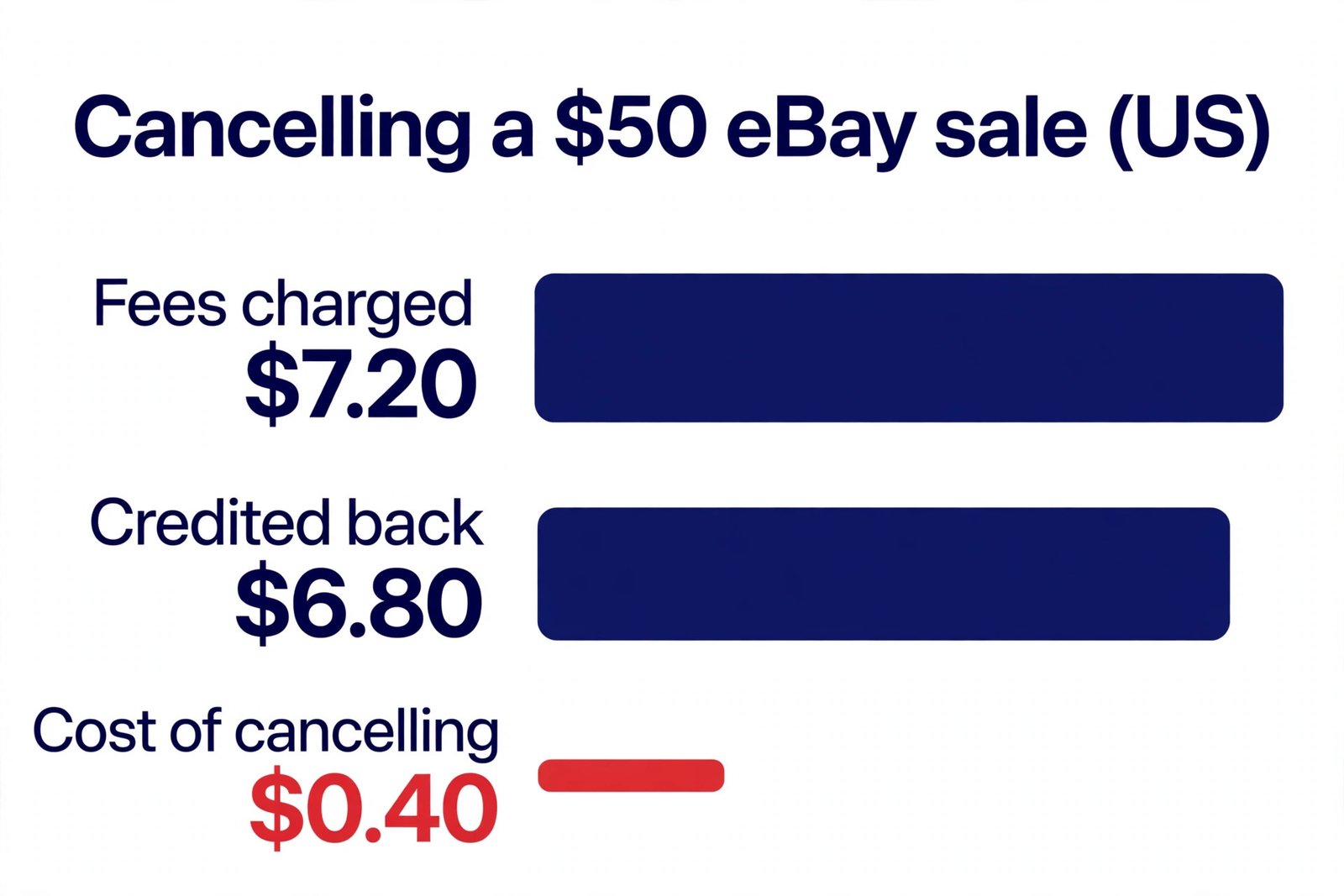
On a $50 US sale, cancelling costs you only the 40-cent per-order fee — the $6.80 final value fee comes back.
UK example: cancelling a £50 sale
| Fee | Charged on the sale | Credited back on cancel |
|---|---|---|
| Final value fee (12.9% of £50) | £6.45 | £6.45 |
| Regulatory operating fee (0.35% of £50) | £0.18 | £0.18 |
| Per-order fee | £0.40 | £0.00 — not refunded |
| VAT on fees (20%) | £1.41 | £1.41 |
| Total | £8.43 | £8.03 |
Cost of cancelling: £0.40. The buyer gets their full £50 back, and £8.03 of the £8.43 in fees comes back to you — the final value fee, the regulatory fee, and the VAT charged on those fees are all reversed on your statement. Only the 40p per-order fee stays with eBay. (A note on the arithmetic: eBay calculates on unrounded values, so the rounded lines add to £8.44 while the statement total is £8.43 — the 40p cost is the same either way.) As with the US example, a shipping label already bought is lost money: a £3.50 label — again an assumed figure, not an eBay rate — would take the real cost of cancelling to £3.90. If you have already packed the item but not shipped it, cancelling costs you nothing but the 40p. If you have already shipped it, you cannot cancel at all — which brings us to the next section.
The comparison that matters is cancel versus fulfil-and-return. If you fulfil a £50 sale and the buyer then returns it, you lose the outbound postage, the return postage, and the per-order fee — far more than the 40p a clean cancellation costs. That is why experienced sellers cancel quickly when they know they cannot fulfil an order, rather than shipping late and hoping for the best.
Why Can’t I Cancel an Order on eBay as a Seller?
If the Cancel order button is missing or greyed out, one of four things is usually going on — and three of them have a fix.
The item has already shipped. This is the most common reason. Once an order is marked as shipped, it cannot be cancelled at all — it becomes a return instead. The buyer has to send the item back, you inspect it, and then you refund them. That is a slower and more expensive route than a cancellation, which is why cancelling early matters. If you have not actually shipped yet but the order shows as shipped because you printed a label, check whether the label has been scanned by the carrier: if it has not left your hands, you may still be able to cancel, but message the buyer first and be ready for eBay to treat it as shipped.
More than 30 days have passed since the sale. eBay only allows cancellations within 30 days of the sale, even if the buyer has already paid. After day 30 the Cancel order option disappears, and your options become a refund through the returns flow or a manual refund. Our guide to how to refund a buyer on eBay covers that route step by step, including the 90-day refund window and which fees come back.
A cancellation, return, case or dispute is already open on the order. While any of those is open, the standalone cancel option is unavailable — the refund has to go through the open request instead. Close or resolve the open request first, or refund through it.
You are looking in the wrong place. The cancel option lives under More actions on the individual order in Seller Hub > Orders or My eBay > Sold. It is not on the listing page and not in the bulk-edit tools. If you are on the listing itself, go back to the order.
What If the Buyer Asks to Cancel the Order?
Buyer-requested cancellations are the easiest kind to handle, because the buyer is already on your side — they want out, and you want the order closed cleanly. When a buyer asks to cancel, eBay sends you a notification, and you have 3 days to accept or decline the request. Do not leave it sitting: if you do not respond within those 3 calendar days, eBay closes the request itself, and what happens next depends on whether the buyer has paid. If the buyer has not paid, the order is cancelled automatically. If the buyer has paid, you will need to fulfil the order — the cancellation window has closed, and you are back to shipping the item or handling a return.
The practical steps are simple: reply to the buyer’s message the same day, confirm you will cancel, then cancel with the reason “Buyer asked to cancel”. That reason protects your standing, the buyer gets a full refund automatically, and your final value fee comes back. There is one exception to watch for: if the buyer asked to cancel after you shipped, you cannot cancel — the order has to go through the returns process, and the buyer will need to send the item back. Tell them that plainly and promptly rather than leaving them waiting: “The item has already shipped, so I can’t cancel the order — but you can return it for a full refund when it arrives, and I will send the return label.” A buyer who hears that on day one is far less likely to open a case than a buyer who hears nothing for a week.
How to Cancel an Order When the Buyer Hasn’t Paid on eBay
Unpaid buyers are the one cancellation scenario where eBay is entirely on your side. When a buyer commits to buy and then never pays, you do not have to chase them forever — but you do have to wait a short while first. The reason code “Buyer hasn’t paid” only becomes available after 4 full calendar days from the sale. Before those four days are up, the option simply is not there.
Once the four days have passed, cancel exactly as above — Seller Hub > Orders, More actions > Cancel order, reason “Buyer hasn’t paid” — and three helpful things happen: the order is cancelled, any feedback the buyer leaves about the transaction is removed, and your seller standards are not affected. You also get your final value fee credited back, as with any cancellation. While you wait out the four days, send the buyer one polite message and one payment reminder through eBay’s own unpaid-item flow — some buyers genuinely missed the payment email and will pay on the reminder. Do not open a second account to dodge the limit, and do not relist the item until the cancellation is complete, or you risk selling the same item twice. For the wider picture on how unpaid orders interact with your account, see our guide to eBay selling limits.
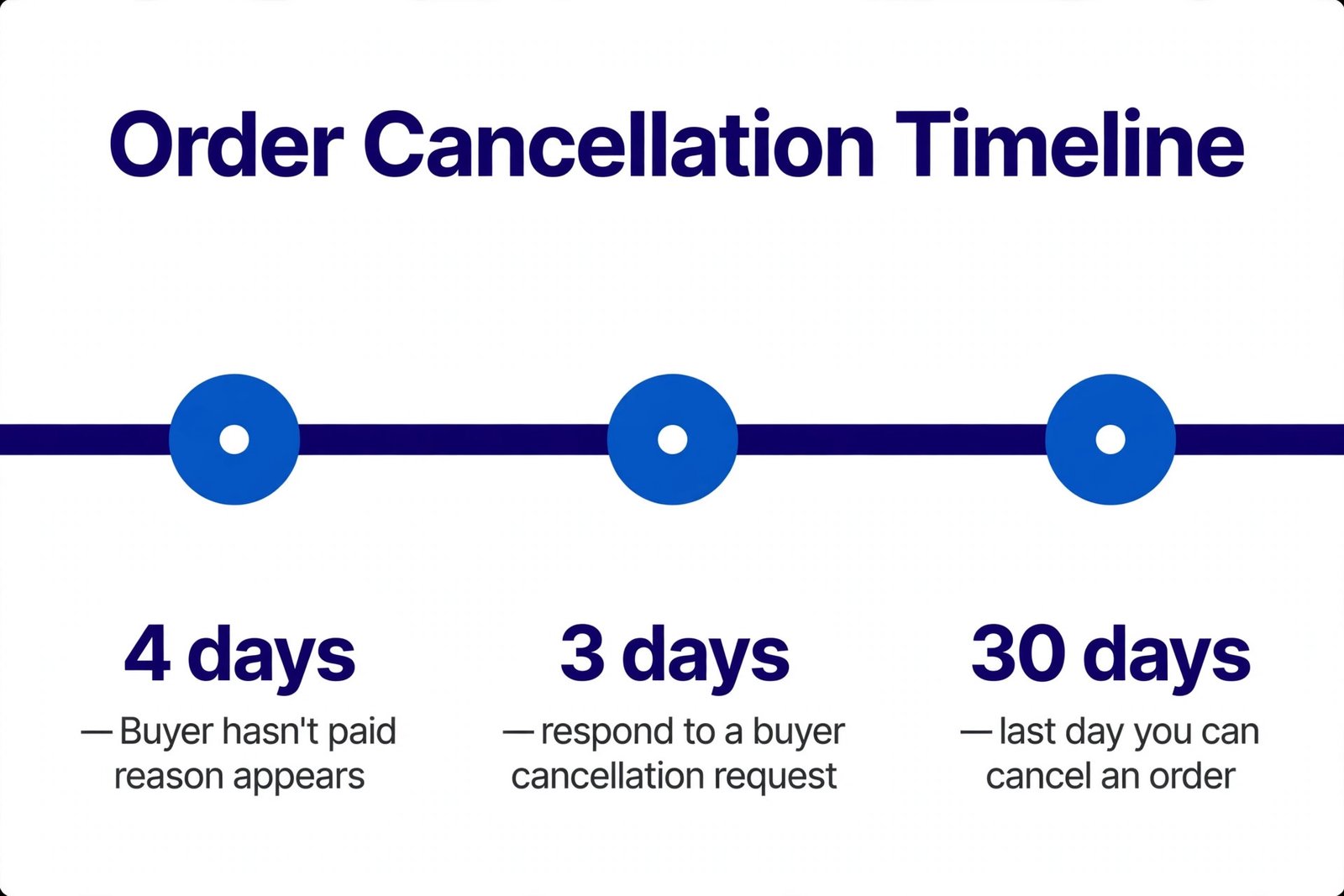
The three deadlines that matter: 4 days, 3 days, 30 days.
How to Cancel an Order on eBay as a Seller Without Penalty
There is no trick that makes every cancellation free — but there is a short checklist that keeps cancellations from ever becoming a penalty. Follow it and a cancellation costs you 40 cents or 40p and nothing else.
- Cancel before you ship, and before you buy the label. A cancellation on an unshipped order is quick, cheap, and usually harmless. A cancellation after shipping is impossible, and a label already bought is money lost.
- Use the true reason — and prefer “Buyer asked to cancel” when it is true. That reason protects your standing. Never use it when the buyer did not ask, and never use “Out of stock” when the buyer did ask.
- Message the buyer first. One short, polite message before you cancel — what happened, that you have cancelled, that the refund is on its way — prevents most negative feedback. Buyers leave bad feedback when they feel ignored, not when an order is cancelled cleanly.
- Answer buyer cancellation requests within 3 days. Letting a request expire turns a simple cancellation into an order you must fulfil.
- Keep cancellations rare. One in a hundred orders is normal. One in ten is a pattern, and patterns are what eBay’s performance system notices. If you are cancelling often because stock keeps running out, fix the stock problem — check quantities before listing, and delist items the moment they sell elsewhere.
- Do not cancel to dodge a difficult buyer. Cancelling an order does not block the buyer, and it does not stop them buying from you again. If a buyer is genuinely a problem, blocking them is the right tool — not cancelling their order and hoping they go away.
Handled that way, cancelling an order is just admin: a minute of clicking, a 40p or 40-cent fee, and a buyer who got their money back without a fuss. It only becomes a problem when it is slow, unexplained, frequent, or done with the wrong reason — and every one of those is in your control.
Frequently Asked Questions About Cancelling an Order on eBay as a Seller
Why can’t I cancel an order on eBay as a seller?
Usually because the item has already shipped — shipped orders cannot be cancelled and must go through a return instead. The other common causes are that more than 30 days have passed since the sale, or that a cancellation, return, case or dispute is already open on the order. If none of those apply, check you are on the order itself in Seller Hub > Orders or My eBay > Sold, under More actions — the cancel option does not appear on the listing page.
Can a seller just cancel an order on eBay?
Yes. A seller can cancel any unshipped order within 30 days of the sale, without the buyer’s permission, by going to Seller Hub > Orders or My eBay > Sold and choosing More actions > Cancel order. eBay notifies the buyer and refunds them in full automatically. The cancellation may count as a transaction defect if the reason is a stock problem, so choose the reason carefully.
How bad is it to cancel an order on eBay as a seller?
One cancellation is not bad at all — it costs you only the per-order fee (40 cents in the US, 40p in the UK) and, if the buyer asked to cancel, it does not count against your standing. It becomes a problem only when cancellations are frequent or the reason is “Out of stock”, because those can count as transaction defects and affect your seller performance level, fees and search visibility.
How do I cancel an item I am selling on eBay?
Go to Seller Hub > Orders or My eBay > Sold, find the order, open More actions and select Cancel order. Choose the reason that matches the situation — “Buyer asked to cancel” if the buyer asked, “Buyer hasn’t paid” if they never paid — and submit. eBay refunds the buyer in full automatically. You can only cancel before the item ships and within 30 days of the sale.
How to cancel an order on eBay as a seller without penalty?
Cancel before shipping and before buying a label, use the true reason (prefer “Buyer asked to cancel” when the buyer asked), message the buyer first, answer buyer cancellation requests within 3 days, and keep cancellations rare. Done that way, a cancellation costs only the 40-cent or 40p per-order fee and does not count as a transaction defect.
How to cancel an order on eBay as a seller on the app?
In the eBay app, go to Selling, open the sold item, and choose Cancel order from the order menu, then pick a reason and submit. If the cancel option is not visible in the app, open eBay in your phone’s browser and use Seller Hub > Orders > More actions > Cancel order instead — the steps and the 30-day window are the same as on desktop.
Cancelling an order is one of those small seller skills that feels stressful the first time and routine after that. The steps take a minute, the cost is 40 cents or 40p, and the buyer gets their money back without a dispute — as long as you cancel early, pick the honest reason, and tell the buyer what happened. Zyrro’s eBay Fee & Profit Calculator can show you the exact fees on any sale before you decide, and our guide to refunding a buyer covers the cases where cancelling is no longer possible and a refund is the right route instead.
Cancellation steps, deadlines and fee-credit rules in this article were verified against eBay’s own help pages on 4 November 2026: “How sellers can cancel an order” (eBay export seller pages). UK and US fee rates are the verified figures from Zyrro’s earlier eBay fee guides: UK business sellers pay 5% to 14.9% final value fee by category plus a 0.35% regulatory fee, a £0.40 per-order fee and 20% VAT on fees; US sellers pay 13.6% plus a $0.40 per-order fee. Postage figures in the worked examples ($4.50 and £3.50) are stated assumptions, not eBay rates — substitute your real postage costs. The buyer’s refund can take up to 10 days to arrive; always check your Transaction report for the fee credit. eBay can change its fees and policies, so confirm the current rules on eBay’s help pages before acting. This article is general information, not financial advice.