How to Report a Buyer on eBay: Steps, Scams to Report & What Happens Next (2026)

Short answer: Report a buyer on eBay from Seller Hub — open Orders, find the order, choose Report buyer from the Leave Feedback dropdown, and pick the policy the buyer broke. eBay only acts on policy violations such as non-payment, false claims, scams or abuse. Reporting flags the account for review; it does not cancel the order.
Most eBay sellers meet a problem buyer sooner or later: the one who pays, then claims the item never arrived when tracking says delivered. The one who demands a partial refund for damage that does not exist. The one who wins your auction and never pays, then does it again next week. The instinct is to block them and move on — and blocking has its place — but blocking alone does nothing to the buyer’s account. Reporting is the tool that does. It puts the behaviour in front of eBay’s review team, and when eBay agrees the buyer broke its rules, it can remove the feedback and defects that buyer caused, limit their returns, or suspend them. This guide works through the whole process the way eBay actually runs it in the US and the UK: what reporting does and does not do, the six behaviours eBay will act on, the exact steps in Seller Hub, what evidence to attach, what happens after you file, and what a cancelled $50 order actually costs you. Zyrro’s eBay Fee & Profit Calculator runs the same fee maths for any price, so you can check the cost of cancelling a bad sale before you decide how to handle it.
What Does Reporting a Buyer on eBay Actually Do?
Reporting a buyer is a flag, not a fix. You are telling eBay that a specific buyer broke a specific policy on a specific order, and asking its review team to look at the account. eBay weighs the report against the buyer’s history and the evidence you attach, then decides what — if anything — to do with that buyer. It does not cancel the order, refund you, or stop the buyer from messaging you. Those are separate tools, and sellers who mix them up waste the report and leave the actual problem unsolved. The table below is the decision that matters most in this guide: pick the right tool for the problem in front of you.
| Tool | What it does | What it does NOT do | Use it when |
|---|---|---|---|
| Report a buyer | Flags the buyer’s account for eBay’s review; can lead to a warning, loss of buyer protection, return limits or suspension | Does not cancel the order, does not refund you, does not stop future purchases or messages | The buyer broke a policy — false claim, scam, abuse, non-payment pattern |
| Block a buyer | Stops that username bidding on or buying any of your listings, instantly, up to 5,000 names | Does not cancel an existing order, does not punish the account, does not stop messages by default | You never want that buyer to buy from you again |
| Cancel the order | Ends that sale; a full refund is issued automatically; the final value fee is credited | Does not flag the buyer; a bad reason code can count as a defect against you | The order cannot or should not be fulfilled — buyer has not paid, item is gone, address is wrong |
| Open a case (Resolution Center) | Resolves a specific order problem — unpaid item, return, item not received | Does not punish the buyer or record a policy violation | You need money or the item resolved, not a punishment |
| Message the buyer | Clears up honest mistakes fast and creates a written record | Does not protect you if the buyer is acting in bad faith | Always first, when the problem might be a misunderstanding |
The important combination is report plus the tool that fixes the order. A buyer who files a false “item not received” claim needs two actions from you: report them for the false claim, and answer the claim itself through the Resolution Center. A buyer who never pays needs a cancellation after four days, and a report only if the non-payment is part of a pattern. Reporting without fixing the order leaves the order open; fixing the order without reporting leaves the buyer free to do the same thing to the next seller. Do both, in that order — fix the order first so nothing times out, then file the report while the evidence is fresh.
One more thing reporting does that sellers miss: it creates the paper trail eBay’s own seller protections depend on. eBay’s seller-protection pages state that when it determines a buyer has violated its abusive buyer policy, it removes the related negative or neutral feedback and defects, including open cases in your service metrics. That removal is tied to the violation being established — and the report is how the violation gets in front of eBay in the first place. Seller guides that track these protections put it bluntly: the report is the trigger. File it before you refund, not after, so the protection is in place when the feedback or the defect lands.
When Should You Report a Buyer on eBay?
eBay’s own help page is clear about the test: report a buyer only if you think they are violating eBay’s policies. A buyer you find annoying is not a policy violation. A buyer who asks a question you do not like is not a policy violation. The six behaviours below are the ones eBay lists — if what happened to you is not on this list, the right move is almost certainly a message, a cancellation, or a case, not a report.
| Reportable behaviour | What it looks like in practice |
|---|---|
| 1. Demanding something not in the listing | Asking for free express shipping you never offered, a different item, a discount after the sale, or an extra thrown in — then threatening consequences if you refuse. |
| 2. Making false claims | Claiming the item never arrived when tracking shows delivery to the address on the order, or claiming it is “not as described” when the listing and photos show exactly what was sent. |
| 3. Misusing returns or buyer protection | Returning a different item from the one you sent, returning an item after using or damaging it, or opening duplicate claims across eBay and a payment provider for the same order. |
| 4. Abusing bidding, messaging or cancellation | Repeatedly bidding and then retracting bids, sending messages to force or intimidate you into something outside the original agreement, or messaging far more than normal with no intention of buying. |
| 5. Abusing payment disputes | Filing a chargeback after receiving a refund, or opening a payment dispute as a second attempt after eBay already decided the case. |
| 6. Not paying for items | Winning or buying and never paying — buyers must pay within 4 calendar days — or a pattern of unpaid items across your listings. |
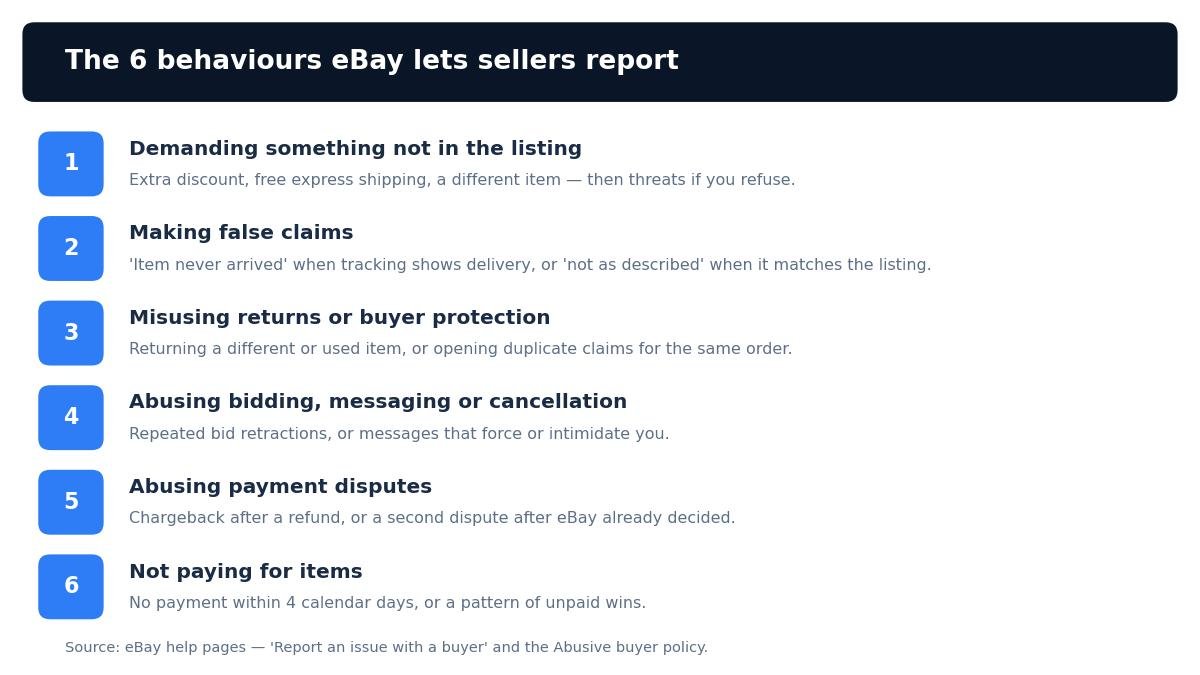
The six reportable behaviours from eBay’s own help pages. If what happened is not on this list, a message, a cancellation or a case is the right tool — not a report.
There is a seventh behaviour worth knowing by name, because it is the one sellers meet most often and report least often: feedback extortion. That is a buyer threatening to leave negative feedback unless you do something you never promised — a partial refund, a discount, free postage, a return outside your policy. eBay’s own rules for buyers state plainly that threatening negative feedback to force something not promised in the listing is against its policy. It sits inside the abusive buyer policy, and it is reportable. The practical test is simple: if the message says “do this or I leave a negative”, screenshot it before you reply, report it, and do not give in — giving in once teaches that buyer, and every buyer they tell, that the threat works.
Notice what is not on the list. A buyer who changes their mind before paying is not reportable — that is a cancellation. A buyer who opens a return you disagree with is not automatically reportable — that is a return to handle, and it only becomes reportable if the return itself is misused, for example if a different or used item comes back. A buyer who leaves honest negative feedback is not reportable — feedback is only removed when it breaks a policy or when the buyer behind it is found to have violated the abusive buyer policy. And a buyer who is simply slow to pay, inside the four-day window, is not reportable yet — they still have time.
When Should You NOT Report a Buyer on eBay?
Reporting the wrong thing costs you twice: eBay ignores the report, and the real problem keeps running while you wait for an answer that never comes. eBay’s help pages warn sellers directly on this point — they take all reports seriously, but sellers must make sure their claims are accurate, and there is a separate page on false reporting of policy violations. A report that is really a complaint about a slow buyer, a return you dislike, or a feedback comment you disagree with does not just fail; it teaches eBay’s reviewers to take your next report less seriously. Use this checklist before you file.
| Situation | Report? | Do this instead |
|---|---|---|
| Buyer has not paid yet, inside 4 days | No | Send one polite reminder, wait the full 4 calendar days, then cancel with the “Buyer hasn’t paid” reason. |
| Buyer changed their mind and asked to cancel | No | Cancel the order — see our guide to cancelling an order on eBay as a seller. A buyer asking to cancel is not a violation. |
| Buyer opened a return you think is unfair | Not yet | Handle the return through the returns process. Report only if the return is misused — a different item, a used or damaged item, or a duplicate claim. |
| Buyer left negative feedback you disagree with | Not on its own | Report only if the buyer violated the abusive buyer policy — the feedback is then removed as part of that finding. Otherwise use a feedback revision request or a calm public reply. |
| Buyer asked a question you found rude | No | Answer briefly and factually, or do not answer at all. One rude message is not a policy violation. |
| Buyer is a competitor, or you just dislike them | No | Block them so they cannot buy from you again. Reporting someone for who they are, rather than what they did, is a false report. |
| You want eBay to punish a buyer faster | No | There is no way to speed up a review. File an accurate report with evidence and move on — the decision is eBay’s, on its own timetable. |
The pattern to remember is that eBay has two separate systems and they do not substitute for each other. The Resolution Center fixes order problems: unpaid items, returns, cases, refunds. The report form flags account behaviour: scams, abuse, false claims, patterns. If your problem is “I need this order resolved”, you are in the Resolution Center. If your problem is “this buyer should not be allowed to keep doing this”, you are in the report form. Most real incidents need both, one after the other — and that is fine, as long as each one goes to the right place.
How to Report a Buyer on eBay: Step by Step
Reporting takes about five minutes once you know where the form lives. There are two routes to the same form: from the order itself, which is the route eBay documents, and from eBay’s help pages, which is the faster route when you already know the order number. Both end in the same place. Do it on a desktop browser — eBay’s reporting form opens in a browser window, and seller guides consistently report that the app does not offer the reporting flow directly, so on a phone use your mobile browser rather than the app.
Step 1 — Fix the order first. Before you report, deal with whatever is still open on the order: answer a case before its deadline, accept or decline a cancellation request, start the return if one is due. Reporting does not pause any deadline, and an unanswered case will be decided against you while your report is still waiting in a queue. The report is about the buyer’s account; the order still needs its own answer.
Step 2 — Gather the evidence. Open the order and the message thread and collect the proof before you start the form, because a report with evidence attached is a different thing from a report that only describes what happened. You need the order number, the buyer’s username, screenshots of the messages with dates visible, tracking or delivery proof for any “not received” claim, and photos of what you sent versus what came back if the return is the issue. Write a short timeline — what happened, on which dates, in which order — so the description you paste into the form reads as facts, not feelings.
Step 3 — Open the report form from the order. In Seller Hub, go to Orders and find the order. Next to the item, open the dropdown beside Leave Feedback and choose Report buyer. That opens the reporting form already tied to that transaction — which matters, because the reporting tool is transaction-specific: seller guides report that you need an actual order with the buyer to use it, so you cannot report a stranger who only messaged you about a listing.
Step 4 — Pick the violation that actually matches. eBay shows categories aligned with the six behaviours in the table above. Pick the one that fits what happened, not the one that sounds most serious. A buyer who never paid is “not paying”, not “fraud”. A buyer who returned a different item is “misusing returns”, not “scamming”. The category decides which team reads the report and what evidence they look for, so a wrong category is the fastest way to get a report dismissed.
Step 5 — Describe it factually and submit. Write two or three short sentences: what the buyer did, when, and which part of the listing or policy it breaks. Attach the screenshots and the tracking proof. Quote the message rather than summarising it — “on 3 November the buyer messaged: pay me £20 or I leave a negative” is evidence; “the buyer was rude and threatening” is an opinion. Then submit, and keep a copy of what you sent: screenshot the confirmation if one appears, and save your timeline and screenshots in the order’s folder. If the buyer comes back with feedback or a case later, that file is what turns a report into a removal.
The faster route, for the next time, is eBay’s help page “Report an issue with a buyer”, which carries a Report a buyer button that opens the same form. Seller guides also report a direct link, spd.ebay.com/RBASellerHub, that jumps straight to the form — that link is third-party-reported rather than read on an eBay page by us, so if it ever fails, go through Help & Contact and search “Report a buyer” instead. Either way, the form is the same, the categories are the same, and the evidence you attach is what decides the outcome.
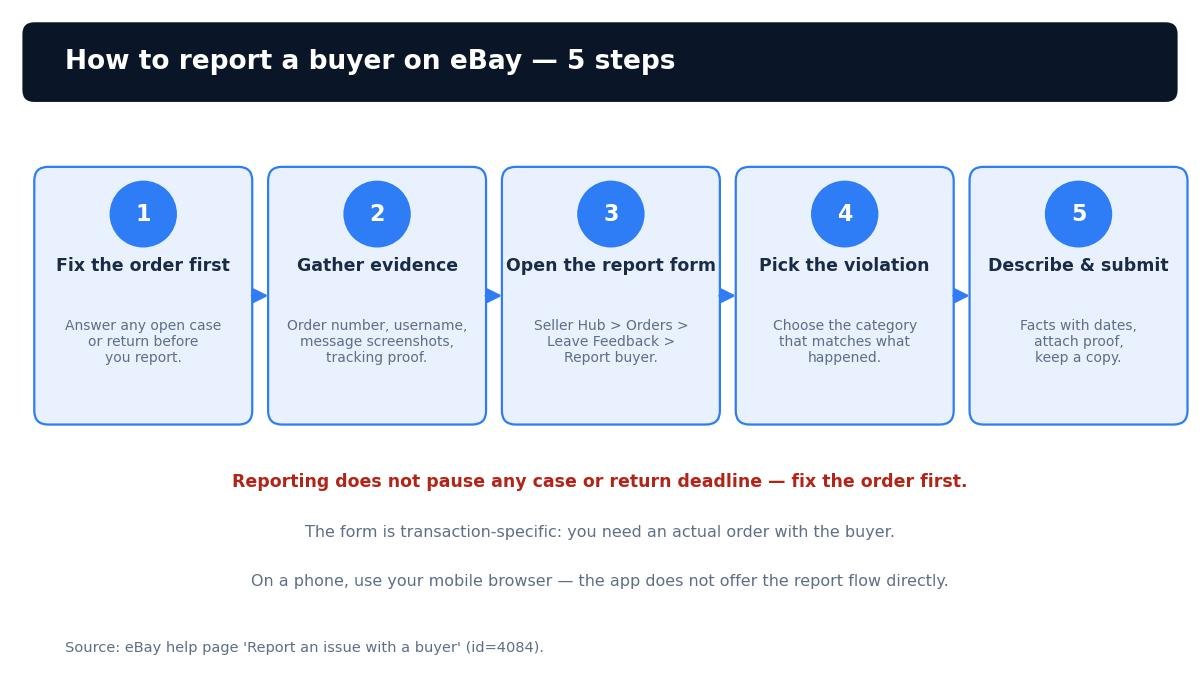
The five steps, in order. Fix the order first — reporting does not pause any case or return deadline — then file the report while the evidence is fresh.
How Do I Report a Non Paying Buyer on eBay?
Non-payment is the most common reason sellers reach for the report form, and it is also the one where the report is usually the wrong first move. A buyer who has not paid is not automatically a policy violator: eBay’s own policy gives buyers 4 calendar days to pay, and the seller’s remedy inside that window is patience plus one polite message. The sequence that actually works is message, wait, cancel — and the report only enters the picture when the non-payment is part of a pattern.
Day 0–4: message once, then wait. Send a single short message through eBay: the item is ready, here is the total, payment is due within four days. Do not send a second message, do not threaten, and do not open a case yet. Some buyers pay on day three because their payday is day three. Chasing them does not make them pay faster, and a second message that reads as a threat is the kind of thing a buyer can screenshot back at you.
After 4 full calendar days: cancel the order. Once four full calendar days have passed with no payment, cancel the order with the reason “Buyer hasn’t paid”. Our guide to cancelling an order on eBay as a seller walks through the exact clicks: Seller Hub, then Orders, then More actions, then Cancel order, then the reason, then Submit. The important part is what that reason code buys you: when you cancel because the buyer did not pay, any feedback the buyer left is removed and your seller standards are not affected. You can cancel up to 30 days after the sale, and a full refund is issued automatically if any payment was taken. The final value fee is credited back to you; the small per-order fee is not, which is why the worked example below puts the cost of a cancelled $50 order at forty cents.
When to report a non-payer: report when the same buyer does it repeatedly, or when the non-payment is clearly deliberate — they won three of your auctions in a week and paid for none of them, or they told you in messages that they never intended to pay. eBay’s policy is explicit that buyers with excessive unpaid items or unpaid cancellations may have buying limits or restrictions imposed on their account and any linked accounts. That is the pattern the report exists for. A single non-payment from a buyer you have never seen before is a cancellation, not a report — file the report for the pattern, and cancel the order for the sale.
One practical note: after you cancel for non-payment, relist the item. The cancellation does not relist it for you unless you tick the relist option, and an item sitting in your unsold pile is a second loss on top of the wasted four days. Our guide to relisting an item on eBay covers the relist-versus-sell-similar choice and the 90-day unsold window, so the item is back in front of buyers the same day.
How Do I Report a Buyer on eBay for Scamming?
Scams on eBay follow a small number of scripts, and learning the scripts is what lets you spot one early enough to report it with evidence instead of discovering it after the money is gone. The four below are the ones that show up most often in seller reports, and each one maps to a specific policy violation — which is exactly what the report form asks you to pick.
The off-eBay payment. The buyer asks to complete the sale outside eBay — a bank transfer, a gift card, a payment app, “to save us both the fees”. This is the clearest violation on the list: eBay’s own report page names it directly. Do not agree, do not move the conversation off eBay, and do not accept any payment outside the platform. Report the buyer, keep the messages on eBay where they are evidence, and cancel the order if it is still unpaid. A buyer who wanted a legitimate deal does not need to leave eBay to get one, and a sale completed off eBay has no seller protection at all.
The false “item not received” claim. Tracking shows delivery to the address on the order details page, and the buyer opens a claim saying the item never arrived. This is the textbook false claim in eBay’s abusive buyer policy. Do not refund on the spot. Answer the case with the tracking evidence — delivery scan, date, address — and report the buyer for the false claim in parallel. eBay’s policy also lists claiming an item was not received when there is proof of delivery as one of the behaviours that can cost a buyer their Money Back Guarantee coverage.
The return scam. The buyer returns a different item from the one you sent, returns your item after using or damaging it, or returns an empty box. This is misuse of the returns system, and it is reportable — but handle the return itself through the returns process first. If an item comes back used or damaged, eBay’s own help pages note that eligible sellers can deduct an amount from the buyer’s refund to recover the lost value, and our guide to refunding a buyer on eBay covers the deduction rules and the partial-refund maths. Photograph everything the moment the parcel is opened — the box, the item, the labels — before you touch anything, because the photos are the evidence the report and any appeal will stand on.
The chargeback after a refund. You refunded the buyer, and then they file a chargeback with their card issuer or payment provider for the same order. eBay’s policy names this directly: opening a payment dispute after receiving a refund, and opening duplicate claims across buyer protection programs, are both abusive behaviours. Report it, attach the refund record and the chargeback notice, and let eBay and the payment provider sort out the duplicate. Do not refund a second time — a second refund does not stop a chargeback, it just doubles your loss.
Two rules cover all four scripts. First, never refund outside eBay: a refund sent off-platform is not recorded, not protected, and not evidence of anything except that you paid someone. Second, keep every message on eBay: the moment a buyer moves the conversation to email, text, or a messaging app, your evidence leaves the platform, and eBay’s reviewers can only act on what they can see. A scammer who insists on moving off eBay is telling you exactly what they are.
How Do I Report a Rude Buyer on eBay?
Rudeness on its own is not a policy violation — but the behaviours that usually travel with it are. A buyer who sends one blunt message is not reportable. A buyer who sends threatening, abusive or harassing messages, who messages you repeatedly to force you into something outside the original agreement, or who threatens negative feedback unless you give them something you never offered, is reportable under the abusive buyer policy. The distinction is not how the message made you feel; it is what the message asks you to do. “This item is rubbish, I want my money back” is a complaint, and complaints go through the returns process. “Give me a £20 partial refund or I leave a negative and report your shop” is feedback extortion, and that is a report.
When the messages cross that line, do three things. First, do not reply in anger — a heated reply becomes the buyer’s evidence, and eBay’s reviewers read both sides. A single factual reply is enough: “The listing states the condition and the returns policy. If you would like to return the item, please open a return.” Second, report the buyer for messaging abuse, attaching screenshots with the dates visible. Third, stop the messages from continuing: if the buyer is already on your blocked list, open Buyer requirements in your selling preferences and tick “Don’t allow blocked buyers to contact me” — by default, blocked buyers can still message you, and that setting is the one that actually stops them. Block the buyer as well, so they cannot buy from you again while the report is being reviewed.
If the messages include threats to your safety rather than to your feedback score, treat that as a safety matter, not a marketplace matter: save everything, report it to eBay, and contact your local police. eBay can suspend an account; it cannot protect you offline. That sounds obvious, but sellers who have been threatened tend to focus on the listing and forget the more important step.
What Happens When You Report a Buyer on eBay?
After you submit, eBay’s review team weighs your report against the buyer’s account history and the evidence you attached. The possible outcomes, in increasing order of severity, are the ones eBay’s own policy and seller-protection pages describe: a warning to the buyer; loss of Money Back Guarantee coverage for that buyer; being blocked from requesting returns or refunds, or from opening claims; buying limits or restrictions on the account and any linked accounts; and account suspension for serious or repeated abuse. If eBay determines the buyer violated the abusive buyer policy, it also removes the related negative or neutral feedback and defects — including open cases in your service metrics — which is the outcome most sellers are actually chasing.
Three honest limits belong in this section, because every guide that skips them sets sellers up for disappointment. First, eBay does not usually tell you what it did. Seller guides consistently report that you may never hear the outcome of your report, and eBay publishes no notification promise to the reporter. You will know it worked when the feedback disappears, the defect lifts, or the buyer stops appearing in your orders — not from an email confirming the suspension. Second, there is no published timeline. eBay does not state how long a review takes, and it varies with the complexity of the case and the volume of reports. A clear report with screenshots attached is decided faster than a vague one, but neither comes with a date. Third, a report is not a guarantee. eBay can review the same messages you found outrageous and decide they do not cross the policy line, or that the evidence is not enough. When that happens, the answer is not to file the same report again — it is to block the buyer, tighten your buyer requirements, and move on. A second identical report is not an appeal; it is noise.
If eBay sides with the buyer, the practical fallout is limited to the order itself: handle the return, refund or case on its own merits, and treat the loss as the cost of the sale rather than proof the system is rigged. The report stays on the buyer’s record even when it does not produce an immediate action, and a buyer who collects reports from several sellers is the one who eventually loses their account. Your report is one entry in that pattern — which is why filing accurate reports matters even when your own case does not go your way.
How Much Does Reporting a Buyer Cost You?
Reporting itself is free. What costs money is the order behind the report — and the cost depends almost entirely on whether you cancel before or after you have spent money on the sale. The table below works through the same $50 US and £50 UK sale our other eBay guides use, for a paid order you cancel after reporting the buyer. The fee rule comes from eBay’s own fee-credits policy, as covered in our refund and cancellation guides: when an order is cancelled or refunded, the final value fee is credited back to you, and the small per-order fee is not.
| US — $50 sale | UK — £50 business sale (12.9% category) | |
|---|---|---|
| Final value fee charged on the sale | $6.80 (13.6%) | £6.45 (12.9%) |
| Per-order fee | $0.40 | £0.40 |
| Regulatory fee + VAT on fees | Not charged | £0.18 + £1.41 (total fees £8.43) |
| Final value fee credited on cancel | $6.80 back | £6.45 back |
| Your net cost if you cancel before buying a label | $0.40 | £0.40 |
| Your net cost if you already bought a label* | $4.90 ($0.40 + $4.50 label) | £3.90 (£0.40 + £3.50 label) |
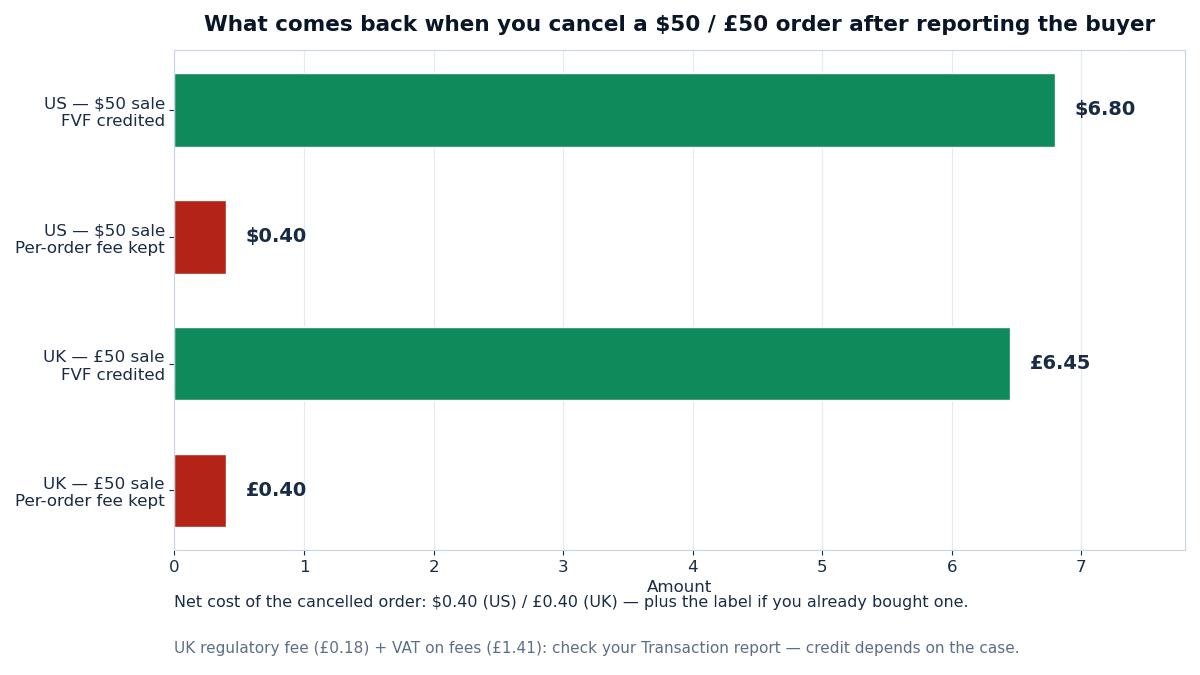
What a cancelled order costs after a report: the final value fee comes back, the per-order fee does not. The label is the expensive part — cancel before you buy one whenever you can.
The UK row carries one honest caveat. The final value fee credit of £6.45 is the certain part. Whether the 0.35% regulatory fee and the 20% VAT on fees also come back depends on how eBay’s fee-credits policy treats your case, so check your Transaction report rather than counting them as refunded. The per-order fee of 40p is not refunded, matching the US rule. Run the same maths for your own prices in Zyrro’s eBay Fee & Profit Calculator — change the category rate to 9.9% for clothes, homeware, media or toys, and the credit changes with it.
Compare that forty cents with the cost of not reporting. A buyer who files a false claim and gets a full refund costs you the whole sale price plus the return postage. A buyer who returns a used item and you refund in full without a deduction costs you the item. A negative feedback from an abusive buyer that stays on your profile because the abuse was never established costs you future buyers — and there is no fee table for that, only a conversion rate that quietly drops. The report is free, the cancellation costs forty cents, and the protection it switches on is worth far more than either. That is the whole economic case for reporting: it is the cheapest insurance on eBay, and it is the only one that can also remove the damage after the fact.
Stopping Problem Buyers Before They Order
Reporting is reactive. The sellers who report least are the ones who filter most, and eBay gives you two filters that cost nothing and run on every listing without you touching them again. The first is buyer requirements: in your selling preferences you can block buyers who have unpaid-item strikes, who have a delivery address in a location you do not ship to, or who have too many policy violations. The second is the blocked buyer list itself — up to 5,000 usernames, added one at a time from the Block bidders or buyers page, instant and silent. Every buyer you report and then block is a buyer who cannot do the same thing to you twice, and every buyer you block after a bad first order is a report you will never need to file.
The habit to build is a short one: when a sale goes wrong, fix the order, file the report if a policy was broken, block the buyer, and check whether a buyer requirement would have caught them. Four steps, five minutes, and the next problem buyer meets a closed door instead of an open listing. Do that consistently and the reports get rarer — which is the point. A seller who reports every week has a filtering problem, not a buyer problem, and the buyer requirements page is where that gets fixed.
Problem buyers are part of selling on eBay, not a sign you are doing it wrong. Every high-volume seller has a blocked list in the thousands and a folder of reports that went nowhere and reports that removed a feedback or saved a defect. The difference between the sellers who get hurt by problem buyers and the sellers who do not is rarely the buyers they meet — it is whether they knew which tool to reach for, and reached for it the same day. Reporting is that tool when a policy is broken. Use it accurately, use it with evidence, and use it early, and the next buyer who tries the same script will find that eBay already knows their name. Zyrro’s eBay hub has the fee calculator and the rest of our seller guides — cancelling, refunding, relisting and shipping — for the orders around the report.
Frequently Asked Questions About Reporting a Buyer on eBay
How do I report a non paying buyer on eBay?
Wait the full 4 calendar days eBay gives buyers to pay, sending one polite reminder. After that, cancel the order with the non-payment reason — the buyer feedback is removed and your seller standards are not affected. Report the buyer only if the non-payment is part of a pattern, such as several unpaid wins from the same account.
How do I report someone on eBay as a buyer?
In Seller Hub, open Orders, find the order from that buyer, open the dropdown beside Leave Feedback and choose Report buyer. Pick the policy they broke, describe what happened with dates, attach screenshots or tracking proof, and submit. The form needs an actual order with the buyer — you cannot report someone who only messaged you.
How do I report a buyer on eBay for scamming?
Report the buyer from the order in Seller Hub and pick the violation that matches — off-eBay payment, a false item-not-received claim, a return scam, or a chargeback after a refund. Attach the message screenshots, tracking proof or photos, and keep everything on eBay. Never refund outside eBay and never agree to move the payment off the platform.
How do I report a rude buyer on eBay?
One rude message is not a policy violation, so start by answering briefly and factually or not at all. Report the buyer when the messages turn into threats, harassment, or feedback extortion — demanding something you never offered in exchange for not leaving a negative. Attach screenshots with dates, then block the buyer and stop their messages in Buyer requirements.
What happens when you report a buyer on eBay?
eBay review team weighs your report against the buyer history and your evidence. Outcomes range from a warning to loss of Money Back Guarantee coverage, return limits, buying restrictions or suspension for serious or repeated abuse. If abuse is confirmed, related negative feedback and defects are removed. eBay does not usually tell you what action it took.
How to block a buyer on eBay?
Open the Block bidders or buyers page, type the buyer username — one per line, up to 5,000 names — and select Submit. The block starts immediately and applies to all your listings, and eBay does not tell the buyer. Blocked buyers can still message you unless you tick the setting that stops blocked buyers contacting you in Buyer requirements.
Related guide: How to Block a Buyer on eBay — the 3-step block process, the 5,000-name limit, and when to block vs report.