How to Offer Local Pickup on eBay: Setup, Pickup Code, Fees & No-Shows (2026)

Local pickup on eBay lets a buyer pay online, collect the item from you in person, and confirm the handover with a QR code or 6-digit code — no parcel, no label, no postage. This guide shows how to set it up, how the pickup code works, what eBay charges, and what to do when a buyer never shows up.
How Do I Offer Local Pickup on eBay?
Offering local pickup takes about a minute when you create the listing, and eBay gives you the option on every listing. Here are the steps.
- Start a listing as normal. Add your title, photos, price and item details.
- Go to the delivery section. When you create a new listing, you will see Postage and local pickup as the default delivery option.
- Choose your delivery options. You can keep the default (Postage and local pickup), or select Postage only or Pickup only if you prefer.
- Set your item location correctly. eBay sets a default location from your account settings, but you can update it to the postcode where the buyer will pick the item up. Buyers see “Free pickup from [postcode]” in search results and on the listing page — your full address is never shown publicly.
- Add pickup notes to the listing. Tell buyers what they need to prepare for: heavy or bulky items (“bring help to lift”), large dimensions, stairs or narrow doorways, and whether they can test electronics at pickup.
- Publish the listing. Local buyers can now find it by filtering for local pickup items, or in map view.
One rule matters more than the rest: never put your full address in the listing. Share the exact pickup location only after the buyer has paid, when you are arranging the pickup through eBay Messages. That keeps your address private until a real sale exists.
If you are listing an item you already have live, you can edit the listing and change the delivery options the same way — the pickup choice is a delivery setting, not a one-time decision at creation.
Can You Offer Local Pickup Only on eBay?
Yes. When you create a listing you can choose Pickup only, and the buyer will have no postage option at checkout. The question is whether you should.
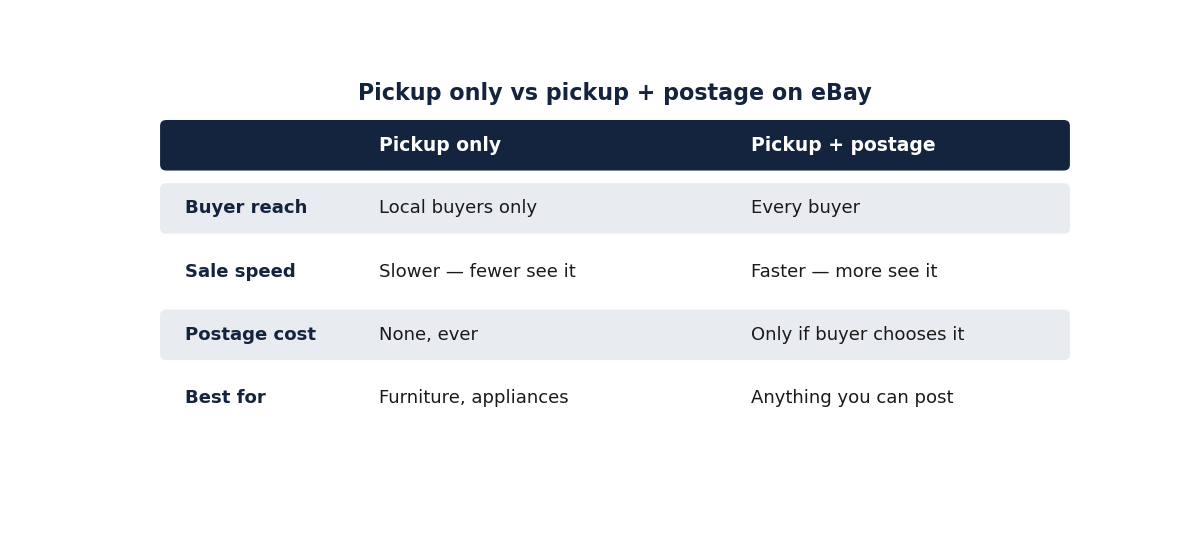
| Pickup only | Postage and local pickup | |
|---|---|---|
| Who can buy it | Local buyers only | Anyone, local or not |
| Buyer reach | Small — only people near you | Largest — every buyer |
| Sale speed | Slower — fewer buyers see it | Faster — more buyers see it |
| Postage cost | None, ever | Only if the buyer chooses postage |
| Best for | Furniture, appliances, bikes, gym equipment | Anything you can also post |
eBay’s own guidance warns about the trade-off: buyers often filter by postage, so they may miss items that only offer local pickup. Offering both methods boosts the chance of a faster sale. That is the practical rule most sellers follow: pickup-only for items you genuinely cannot post (a sofa, a piano, a washing machine), and both options for anything that fits in a box.
There is one more reason to offer both. A buyer who lives an hour away might still choose pickup to save the postage, and a buyer three states away can buy the same listing with postage. One listing, two audiences. Pickup-only closes the second one off entirely.
If your item is small and cheap, think twice before offering pickup at all. Meeting a stranger to hand over a $5 item costs you more in time than the sale is worth. Local pickup earns its keep on bulky, heavy, fragile or high-value items — the ones where postage would eat your profit or risk damage.
How Does the eBay Local Pickup Code Work?
The pickup code is what turns a casual meetup into a verified sale. Without it, eBay cannot prove the buyer ever received the item.
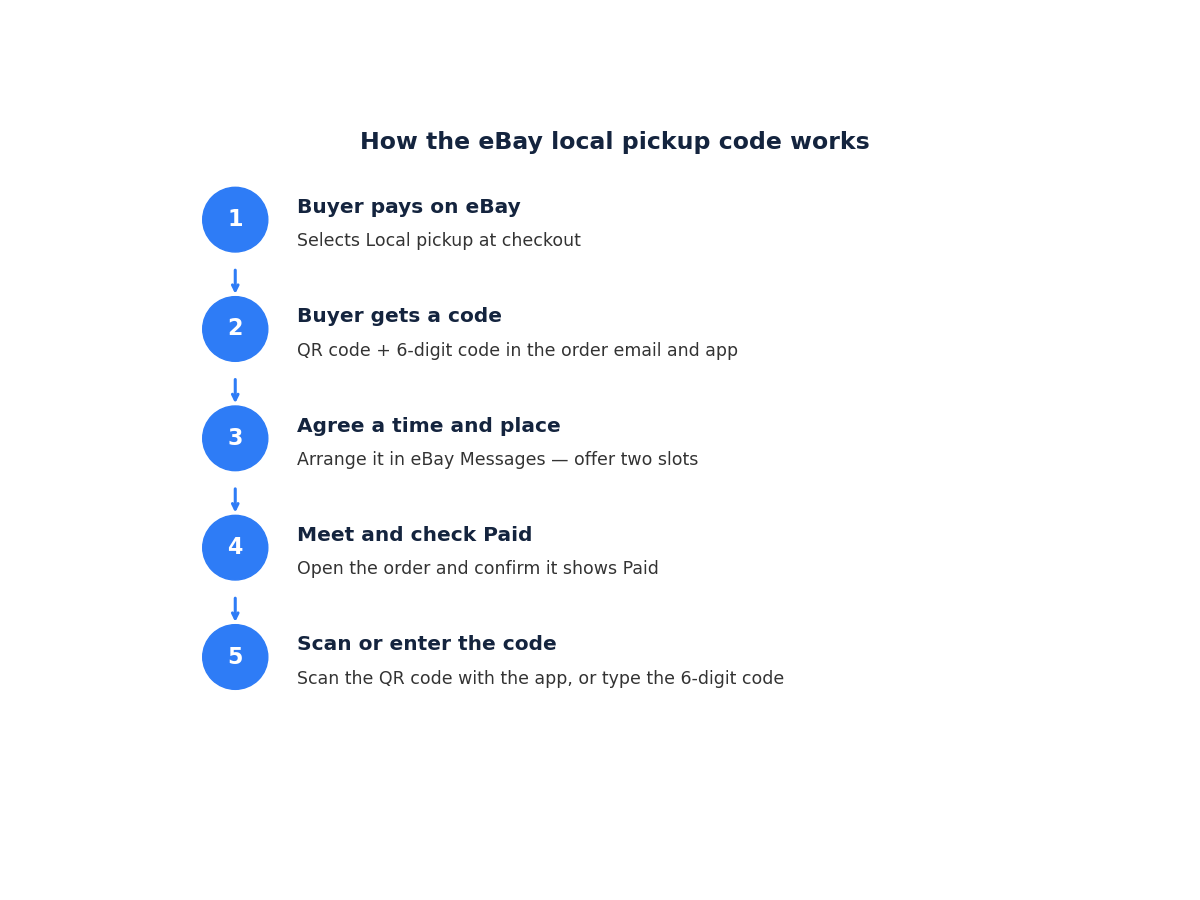
Step 1 — The buyer pays on eBay. For most local pickup transactions, the buyer completes payment securely at checkout and selects Local pickup as the delivery option. Paying in advance is what makes the pickup safe: there is no need for change or last-minute haggling.
Step 2 — The buyer gets a unique code. Once payment is confirmed, eBay gives the buyer a QR code and a 6-digit code. The buyer will bring the code to the pickup — it is in their order confirmation email and in Purchases under My eBay in the app.
Step 3 — You arrange the meeting. Use the Contact buyer button to reach out through eBay Messages and agree on a time and place. Offer at least two realistic slots, remind the buyer to bring their pickup code, and set expectations for the pickup itself (heavy items, assembly information, a power outlet to test electronics). Before handing anything over, check that the order shows Paid in your order details, where it will also show as Awaiting pickup.
Step 4 — The buyer inspects the item. Give the buyer a chance to look the item over. If they are satisfied, ask them for the pickup code.
Step 5 — You scan or enter the code. Scan the buyer’s QR code with the eBay app, or type the 6-digit code into your Order details page. This step finalises the transaction and provides delivery confirmation, which can help you receive your funds faster. When you confirm the code, the order status becomes Picked up and your funds will usually be available within 48 hours.
That code is your protection. If the buyer later files a case saying they never received the item, you are protected when eBay can confirm the pickup code was scanned. If the code was never confirmed, you may not be protected, because the handover cannot be verified. Never hand over an item without recording the code — even if the buyer seems trustworthy, and even if they offer cash instead.
Three things go wrong with the code in real life, and all three have a fix straight from eBay’s own troubleshooting:
- The scanner will not read the QR code. Select Enter code manually and type in the 6-digit code.
- You forgot to scan the code at the meetup. Message the buyer as soon as possible and ask for their 6-digit code, then enter it on your Order details page.
- No mobile signal at the pickup. Write the code down clearly or take a picture of it, then enter it on your Order details page as soon as you are online. Use your own judgement about handing over the item before the code is entered — if in doubt, reschedule and confirm through Messages.
If the buyer cannot find their code at all, ask them to open Purchases under My eBay in the app and open the order details, or check their order confirmation email. Refreshing the app or signing out and back in usually brings it back.
Does eBay Take a Fee for Local Pickup?
Yes — local pickup saves you the postage, not the eBay fees. This is the single most common misunderstanding about pickup, so here is the rule in full.
eBay still charges its final value fee on the item price. The fee is calculated on the total sale amount, and for a pickup order the total sale amount is just the item price — there is no postage for eBay to take a percentage of. That is where the saving actually comes from: you keep the final value fee you would have paid on the postage, and you never buy a label.
The rates are the same as any other sale. In the US, the final value fee is 13.6% of the total sale, plus a $0.40 per-order fee (eBay US fees page, verified 31 Oct 2026). In the UK, business sellers pay 12.9% in most categories, plus a 0.35% regulatory fee and a £0.40 per-order fee, with 20% VAT charged on eBay’s fees (eBay UK “Fees for business sellers”, verified 31 Oct 2026). UK private sellers pay no final value fee on most sales — local pickup or not, their fee is £0.
Two details sellers often miss:
- The per-order fee still applies. The $0.40 (US) or £0.40 (UK) is charged on every order, pickup included. It is small, but it is not zero.
- Cash does not dodge the fee. If a buyer pays cash at pickup — allowed for vehicles, and possible on some listings when immediate payment is off — eBay still takes its selling fee from the funds in your account. The fee is charged once the transaction is complete, and the buyer loses their eBay protection when they pay cash. Keep payment on eBay unless you are selling a vehicle.
You can check the exact fee on any pickup order before you list it. Zyrro’s free eBay fee and profit calculator lets you enter the item price with zero postage and see the fee and profit in seconds.
Pickup vs Shipped: What the Maths Says
The saving from local pickup is exactly one thing: the final value fee on the postage you never charged, plus the label you never bought. Here is what that is worth on real numbers. All figures below were recalculated for this guide; the item cost is an example assumption, labelled with an asterisk.
US examples
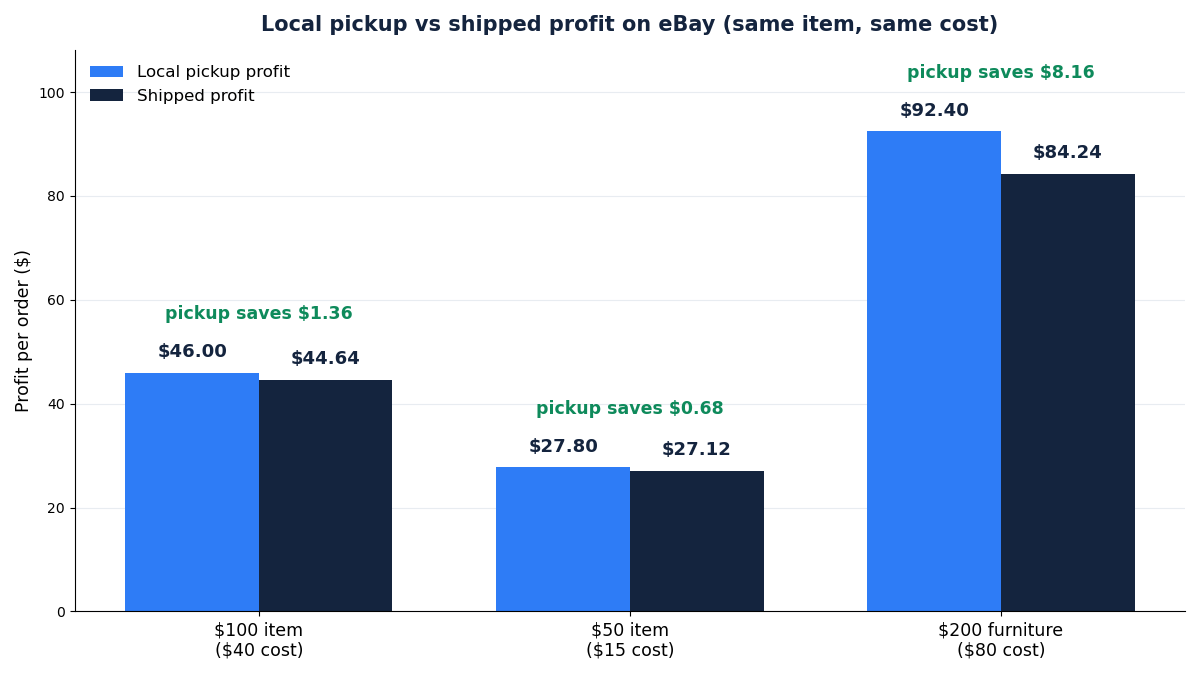
| Sale | Pickup profit | Shipped profit | Pickup saves |
|---|---|---|---|
| $100 item, $40 cost* | $46.00 | $44.64 | $1.36 |
| $50 item, $15 cost* | $27.80 | $27.12 | $0.68 |
| $200 furniture, $80 cost* | $92.40 | $84.24 | $8.16 |
Take the $100 sale. With pickup, the revenue is $100: final value fee 13.6% is $13.60, plus the $0.40 per-order fee, so you keep $46.00 after the $40 cost. Shipped, the buyer pays $10 postage, so the revenue is $110 and the fee is charged on the full $110 — $14.96 plus $0.40 — and you also pay the $10 label (how to print a shipping label on eBay), leaving $44.64. The $1.36 difference is exactly 13.6% of the $10 postage. The pattern is the same at every price: the bigger the postage, the bigger the saving, which is why a $200 piece of furniture saves $8.16 while a $50 item saves $0.68.
Top Rated Sellers do slightly better again. With the 10% final value fee discount, the $100 pickup order keeps $47.36 instead of $46.00 — the discounted fee is $12.24 instead of $13.60.
UK examples
| Sale | Pickup profit | Shipped profit | Pickup saves |
|---|---|---|---|
| £100 item, £40 cost*, business seller | £43.62 | £42.82 | £0.80 |
| £100 item, £40 cost*, private seller | £60.00 | £60.00 | £0.00 |
The UK business example: pickup fees are £16.38 (final value fee £12.90 + regulatory fee £0.35 + per-order fee £0.40 + 20% VAT on the fees £2.73), leaving £43.62. Shipped with £5 postage, the fees rise to £17.18 and the £5 label comes off too, leaving £42.82. The saving is £0.80.
The private seller row tells a different story. A UK private seller pays no final value fee, so pickup and shipped both leave £60.00. The seller gains nothing — but the buyer saves the £5 postage, which can be the difference between a sale and a watchlist. If you are a private seller, pickup is a buyer magnet, not a profit lever.
The real money in local pickup is not in these small savings, though. It is in the sales that would never happen with postage at all: the wardrobe nobody will pay $60 to ship, the exercise bike that costs more to pack than it is worth, the fragile mirror that would arrive in pieces. Those listings only exist because pickup exists.
Is Local Pickup on eBay Safe?
Local pickup is safe when the money moves on eBay and the handover is verified — and risky when either of those two things is skipped. Here are the rules that keep it safe, drawn from eBay’s own guidance.
Pay first, meet second. For most local pickup transactions the buyer pays securely on eBay before the pickup. That is what protects both sides: the seller knows the money is real, and the buyer knows eBay has a record of the sale. Never agree to a pickup where the buyer plans to pay on arrival, except for a vehicle, where eBay allows cash on pickup as an additional payment option.
Keep every message on eBay. Arrange the time and place through eBay Messages, not by text or phone before the sale. Messages create a record of what was agreed, and that record is what eBay looks at if anything goes wrong. After the sale is made, eBay itself says you can move to text or phone — but the agreement should already be in Messages.
Never share your exact address before payment. Your listing shows buyers “Free pickup from [postcode]” — enough for them to judge the distance, not enough to find your door. Share the full address only after the buyer has paid, while you are arranging pickup through Messages.
Meet somewhere sensible. If the item is small enough to carry, meet in a visible, well-lit public place such as a café, a shopping centre entrance or a store lobby, and stay within sight of others — especially at night. If the item is too big to move, meet at your home or workplace, but make sure there is a clear path for it, and consider having someone else there with you.
Check the order shows Paid before you hand anything over. Open the order in your Orders and confirm the status. Then scan or enter the pickup code. The code is the proof: without it, a buyer can later claim they never received the item and you have nothing to show eBay.
Decline anything that moves the sale off eBay. If the buyer asks to pay by bank transfer, asks for your phone number to “sort it out privately”, or suggests skipping eBay’s fees, decline. Moving a sale off eBay removes your protection and can get your account restricted. The same goes for cash: decline it unless you are selling a vehicle, and remember the buyer loses their eBay protection when they pay cash.
What If the Buyer Never Shows Up?
No-shows happen, and eBay’s own help page has a clear process for them. The key point: a no-show is a cancellation, not a sale you have to chase forever.
Step 1 — Message the buyer. Reach out through eBay Messages to reschedule or find out what happened. Offer a new time, keep the tone polite, and give them a fair chance — buyers sometimes need flexibility with travel or timing. If the buyer repeatedly cancels or stops responding, you can move to cancelling the order.
Step 2 — Cancel within 30 days of the sale. eBay’s guidance says you need to cancel the order within 30 days, selecting the appropriate cancellation reason — for example, “buyer failed to pick up”. When you cancel, a full refund is issued automatically and you may be eligible for applicable fee credits. Once the cancellation is complete, you can relist the item.
Step 3 — Never hand over the item without the code. Even if the buyer contacts you later proposing cash or a private exchange, do not hand the item over without the pickup code. The code is what proves the sale happened. Without it, you have no protection if the buyer later claims they never received it.
A few variations on the no-show are worth knowing in advance:
- The buyer wants to reschedule. Agree a new time through Messages. That is normal and costs you nothing.
- The buyer sends someone else. This is allowed, as long as the person has the pickup code. Scan or enter the code before handing the item over, exactly as you would with the buyer.
- The buyer is not happy with the item at the handover. They can request to cancel the order through the app or the eBay website. If the item is exactly as described and the buyer simply changed their mind, you are not required to accept the cancellation — though most sellers choose to, to avoid a return request. If you accept, the buyer gets a refund and you keep the item and can relist it. You can also offer a partial refund for a minor issue found at pickup, agreed through Messages and sent through the order’s partial refund option — see how to refund a buyer on eBay for the steps.
- The buyer is not responding at all. If you have reached out several times and heard nothing back, it is reasonable to cancel the order and relist the item. The 30-day window applies.
For the full cancellation rules, including when a seller cancellation can count against your account, see our guide on how to cancel an order on eBay as a seller.
Can I Change Shipping to Local Pickup on eBay?
This is one of the most asked questions about local pickup, and the answer catches sellers out: you cannot switch an existing order to local pickup after the buyer has paid.
The delivery option is chosen at checkout. When the buyer pays, they select either postage or local pickup, and eBay issues the pickup code only for a local pickup order. There is no button — for the buyer or the seller — that converts a paid postage order into a pickup order, or the other way around.
That leaves you with two practical routes:
- Before the sale: edit the listing. Delivery options are a listing setting, so open the listing, change the delivery option to Postage and local pickup or Pickup only, and save. Any buyer who buys after that gets the choice you set.
- After the sale: cancel and start again. If both you and the buyer agree, cancel the order and relist the item with the right delivery option so the buyer can buy it again. Read the cancellation rules first — cancelling as the seller can count against your account, so it is worth doing only when the buyer agrees and the saving is real. Our cancel-order guide walks through the reasons that are safe to use.
The cleanest way to avoid the problem is to offer both delivery options from the start. A buyer who wants pickup selects it; a buyer who wants postage selects that. Nobody needs to switch anything after payment.
What If the Buyer Wants It Shipped After Buying Pickup-Only?
This is the mirror-image problem, and it is the most common complaint in eBay’s own community forums: a buyer wins a pickup-only listing, then asks you to post it.
The situation is the same as the one above. The order was placed with no postage, so there is no postage to refund or redirect, and no way to add a shipping label to it after the fact. Your options are:
- Ask the buyer to cancel and re-buy. Cancel the pickup order, relist the item with postage added, and let the buyer buy it again. This only works if the buyer agrees — and remember, a seller cancellation can count against you, so agree the reason with the buyer first. If you do start posting items, our guide on how to ship items on eBay covers packaging, labels and tracking.
- Decline politely and keep the pickup. You listed the item as pickup-only, and the buyer chose it at checkout. You are not obliged to post an item you listed as pickup-only.
- Do not post it as a favour. Posting a pickup-only item off the books — taking postage money by bank transfer or PayPal, with no tracking on the eBay order — leaves you with no delivery proof. If the buyer then claims the item never arrived, eBay has no tracking and no pickup code to protect you with. The saving is a few pounds or dollars; the risk is the whole sale.
The lesson for your next listing is the same as before: if there is any chance a buyer might want the item posted, offer both options. Pickup-only should be reserved for items you truly cannot post — and when you do use it, say so clearly in the listing title or pickup notes, so nobody buys it expecting a parcel.
Which Items Should Not Offer Local Pickup?
eBay excludes some categories from local pickup outright, and a few more are a bad idea in practice.
Excluded by eBay: purchases covered by the Authenticity Guarantee, and items where age verification is required, such as alcohol. If your item falls in one of these categories, the local pickup option simply will not be available on the listing.
A bad idea in practice:
- Tiny, cheap items. If the item sells for $5, the meeting costs you more in time than the sale is worth. Post it instead.
- Items you cannot let a stranger inspect at home. If the item lives in a room you do not want buyers walking through, either meet in a public place or post it.
- Items with no local demand. A niche collectable with three buyers in the country will not sell faster with pickup-only. Offer both, and let the postage option carry the sale.
- Anything you have not photographed and described properly. Pickup buyers inspect the item in person, and a buyer who finds it different from the listing can cancel at the handover. Accurate photos and condition notes matter more for pickup than for posted sales, because the buyer sees the item before the code is scanned.
What pickup is genuinely best for is eBay’s own list: furniture, appliances, bikes, gym equipment, musical instruments, fragile items and collectables — the things that are difficult or expensive to post. If your item is on that list, pickup is not just an option, it is often the only way the sale happens at all.
Local Pickup on the eBay App vs Desktop
You can set up local pickup from either the eBay app or a desktop browser — the delivery options are the same on both. The difference is at the handover, and it matters.
Scanning the QR code needs the app. The QR code is scanned with the eBay app on your phone, at the moment of handover. eBay’s own community guidance is blunt about this: you need the eBay app if you are going to mark the transaction complete at the time it is complete, not later on. So before a pickup, make sure the app is installed, you are signed in, and your phone is charged.
Entering the 6-digit code works on desktop too. If you would rather use a computer, or the QR scan fails, select Enter code manually and type the 6-digit code into your Order details page. The code is the same one the buyer received — it is in their order confirmation email and in Purchases under My eBay.
For the handover itself, the app is the better tool: you scan the code, the order flips to Picked up on the spot, and there is nothing left to remember. If you do the handover with the code on paper and enter it later, write it down clearly or take a picture of it — and enter it as soon as you are online. An order that still shows Paid / Awaiting pickup is not confirmed yet, and your funds will not become available until it is.
One more app detail: you will get an email when an item sells with local pickup, and an app notification where applicable. Turn those notifications on — a pickup order you do not notice is a buyer waiting for a reply.
Local Pickup in the UK: What’s Different?
In the UK, the same feature is called collection in person, and the mechanics are identical: the buyer pays through eBay checkout, selects collection in person, and receives a QR code and a 6-digit backup code. At the handover, the seller scans or enters the code, and that is what confirms the item was collected.
Two UK differences are worth knowing:
- UK private sellers pay no final value fee. Since 1 October 2024 it is free to sell for UK-based private sellers — no transaction fees when the item sells. That is why the worked example above shows a UK private seller keeping the same £60.00 whether the item is collected or posted. For private sellers, collection is a way to win the buyer, not to save a fee.
- UK business sellers pay the same fee structure as any other sale. The 12.9% final value fee, 0.35% regulatory fee, £0.40 per-order fee and 20% VAT on the fees all apply to collection orders exactly as they do to posted ones. The saving is the same as in the US: no fee on postage that was never charged, and no label to buy.
Everything else — the code, the 30-day cancellation window, the “Free collection from [postcode]” display, the rule against sharing your full address before payment — works the same way in the UK as it does in the US and Australia, because it is the same eBay system. If you sell in both markets, you only need to learn the flow once.
7 Mistakes That Cost Pickup Sellers
- Putting your full address in the listing. Your listing should show a postcode area, not your door. Share the exact address only after payment, through Messages.
- Handing the item over without the code. The code is your proof of delivery. Without it, an “item not received” claim has nothing to answer it. Scan or enter the code before the buyer leaves.
- Accepting cash. Unless you are selling a vehicle, decline cash and keep the payment on eBay. Cash removes the buyer’s protection and eBay still charges its fee from your account.
- Moving the conversation off eBay. Arranging the pickup by text or phone before the sale leaves no record. Keep the agreement in eBay Messages.
- Forgetting to enter the code after the handover. An order stuck on “Awaiting pickup” is not confirmed, and your funds will not become available. If you forgot, message the buyer for the 6-digit code and enter it the same day.
- Listing a shippable item as pickup-only. You cut your buyers down to people nearby, and you will get messages asking you to post it. Offer both options unless the item genuinely cannot be posted.
- No pickup notes on a bulky listing. “Bring help to lift”, the dimensions, the stairs, whether the buyer can test it — write these in the listing. A buyer who turns up unprepared is a buyer who cancels at the handover.
FAQ
How do I offer local pickup on eBay?
When you create a listing, go to the delivery section and choose “Postage and local pickup” or “Pickup only”. Set the item location to the postcode where the buyer will collect it, add pickup notes such as “bring help to lift”, and publish. Buyers then see “Free pickup from [postcode]” and can select local pickup at checkout.
Does eBay take a fee for local pickup?
Yes. eBay still charges its final value fee on the item price — 13.6% plus $0.40 per order in the US, or 12.9% plus a 0.35% regulatory fee and £0.40 for UK business sellers. What you save is the fee on postage you never charged, plus the label you never bought.
Where can I find the eBay QR code for local pickup?
The buyer receives the QR code and a 6-digit code once they have paid. They can find it in their order confirmation email or in Purchases under My eBay in the app. As the seller, you scan their QR code with the eBay app or type the 6-digit code into your Order details page.
Is local pickup on eBay safe?
It is safe when the buyer pays on eBay before the pickup and you confirm the handover with the pickup code. Keep all messages on eBay, never share your full address before payment, check the order shows Paid, and meet in a public place for small items. Decline cash unless you are selling a vehicle.
Can you offer local pickup only on eBay?
Yes, you can select “Pickup only” when you create a listing. It works best for items you genuinely cannot post, such as furniture or appliances. For anything shippable, offer both options — buyers often filter by postage and may never see a pickup-only listing, so pickup-only can slow the sale.
What happens if the buyer never shows up for local pickup?
Message the buyer through eBay Messages to reschedule. If they keep cancelling or stop responding, you can cancel the order within 30 days of the sale, choosing a reason such as “buyer failed to pick up”. A full refund is issued automatically, you may be eligible for fee credits, and you can relist the item.
Sources
Pickup setup, the QR and 6-digit code, the “Awaiting pickup” to “Picked up” flow, excluded categories, the 30-day cancellation window and the no-show rules are from eBay’s official help page “Offering local pickup” (ebay.com.au, id 4181, read live 18 Nov 2026); the same page is published for US sellers under the same id, and the UK “collection in person” flow is confirmed by eBay UK’s selling pages. Fee rates are from eBay’s official US and UK fee pages as verified on 31 Oct 2026. Worked-example figures were recalculated for this guide with Python’s Decimal module. Where eBay’s own pages were unreadable in earlier runs (HTTP 403 on ebay.com), this guide relies on the official pages read live on 18 Nov 2026 plus the fee tables verified on 31 Oct 2026 — no rate or rule in this article was invented.
Add the Pickup Option Before Your Next Bulky Listing
Local pickup is the cheapest delivery option eBay offers, because the only cost is the fee you were going to pay anyway. It turns furniture, appliances and fragile items from unsellable into sellable, and it puts the buyer in front of the item before the sale is final — which means fewer surprises and fewer returns.
Set it up on your next bulky listing, write the pickup notes properly, and never hand an item over without the code. Zyrro’s free eBay fee and profit calculator will tell you exactly what a pickup sale keeps versus a posted one, so you can price with the real numbers in front of you. For the rest of the delivery side — posting, labels, handling time and refunds — the eBay seller hub has the guides in one place.