How to Write an eBay Title That Gets Clicks (80-Character Formula)

Short answer: An eBay title can be up to 80 characters, and eBay tells sellers to use all of them on the words a buyer would type: brand, product, model, size, colour and the feature buyers search for — in that order, with no filler, no repeated words and no special characters. A title built that way tells eBay’s search exactly what the item is and tells the buyer, in one line, why to tap it.
Your title does two jobs at once, and it is the only part of your listing that does both. eBay’s search, Best Match, reads it to decide whether your listing matches what a buyer typed. The buyer reads it to decide whether to tap. A title that fails the first job never gets seen; a title that fails the second gets seen and skipped. This guide works through both jobs: eBay’s own rules for the 80 characters, the formula that fits them, worked titles for six kinds of item with exact character counts, the words eBay bans, and what one better title is actually worth in pounds and dollars. At Zyrro, every fee figure below uses the same verified rates as our eBay Fee & Profit Calculator, so you can check any price before you list it.
How Many Characters Can You Have in an eBay Title?
80 characters — and eBay is unusually direct about what to do with them. Its Seller Center page on listing best practices says: “Remember to use all 80 characters and focus on relevant keywords.” Its “Create great listings” page says the same thing in plainer words: “You’ve got 80 characters to use, so use as many as you can in your title.”
That advice surprises new sellers, because 80 characters feels generous until you start writing. “Apple iPhone 13 Pro Max 256GB Unlocked Excellent Condition Space Gray” is 69 characters, and it still leaves out the carrier, the battery health and the box. Every word has to earn its place, because every word you spend on “great”, “look” or “bargain” is a keyword a buyer might have typed that you left out.
There is one more practical reason to spend the characters well. On a phone screen a title is cut off — how much shows depends on the device — so the words that decide the tap have to come first. eBay does not publish a fixed number of visible characters, so treat the first 60 characters as the part a buyer is most likely to see, and put the brand, the product and the model inside them. The worked examples below show exactly where the cut falls for each title.
What Is the Recommended Format for eBay Titles?
eBay gives the format in two places, and they agree. Its Seller Center “Create great listings” page says: “Include the brand, model or type, color, style, and even the model number. Avoid using special characters or irrelevant words.” Its export seller hub proposes the same shape as a fill-in-the-blanks format: “‘NEW’ [brand] [product name] [model No] [Variants — size, color] [additional keyword]”.
Put together, the working formula is:
| Position | What goes there | Example |
|---|---|---|
| 1 | Brand, exactly as the label spells it | Apple |
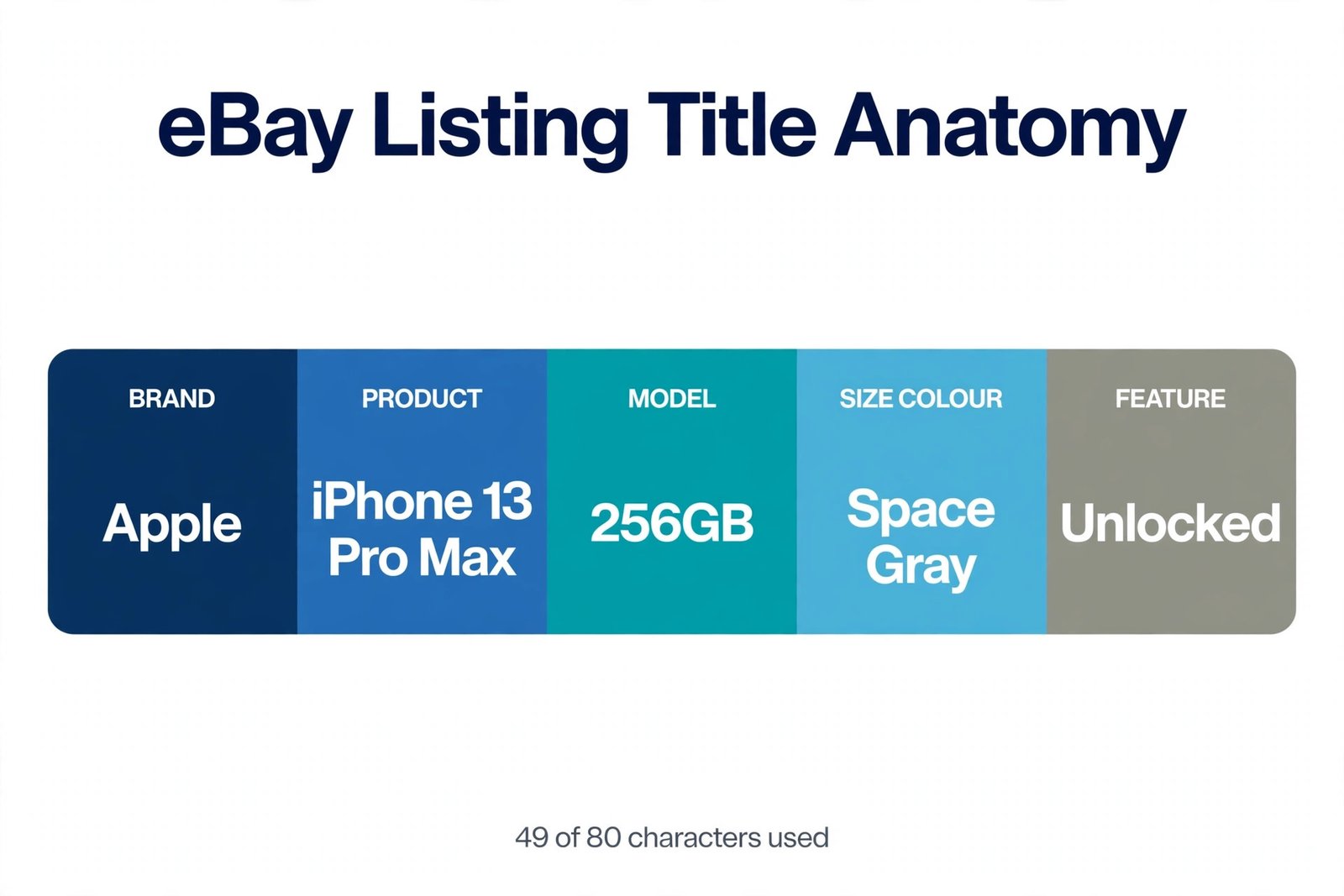
| 2 | Product name — the words a buyer types | iPhone 13 Pro Max |
| 3 | Model or part number | 256GB |
| 4 | Variant: size, colour, capacity | Space Gray |
| 5 | The feature or condition buyers search for | Unlocked Excellent |
Two of eBay’s own example titles follow this order exactly. “Apple iPhone 11 Pro 256GB Midnight Green Carrier Unlocked Grade A” is 65 characters: brand, product, storage, colour, carrier, condition. “Nike Boys Blue Lace-Up Sneakers Size 3 AB0011-234” is 49 characters: brand, who it is for, colour, style, size, model number. Neither wastes a character on “look”, “wow” or “rare”.
Notice what the formula leaves out. It leaves out the condition when the condition is already carried by eBay’s structured fields — but eBay’s own best-practices page lists condition among the title keywords (“Include keywords, including brand, item, size, and condition”), so including it is not wrong, it is a choice about characters. If the condition is the selling point — “Grade A”, “Sealed”, “Worn Twice” — it earns its place. If it is just “Used”, the item specifics already say so, and the characters are better spent on a model number.
How Do You Write an eBay Title, Step by Step?
Build every title from the facts outward, in five steps. The order matters: sellers who start with adjectives end up with 80 characters of adjectives and no model number.
Step 1: Write what the item is, in the words a buyer types. eBay’s best-practices page puts it as a question: “When you’re writing a title, think like a buyer. What would you type in the search box to find your item?” A buyer types “wireless headphones”, not “amazing sound experience”. Start with the plain product words.
Step 2: Put the brand in front of it, exactly as the label spells it. Brand is the first filter most buyers apply, and it is the first word in eBay’s own examples. Do not add a second brand to catch its searches — eBay’s search-manipulation policy bars adding a brand name when the item is not made or sold by that brand, and its intellectual-property policy bars using a trademark without permission. A generic case made for an iPhone listed under the brand name “Apple” is eBay’s own example of a violation.
Step 3: Add the model or part number. Buyers of electronics, parts and collectables search by number, and a model number is the cheapest way to beat every vague listing in the results. “WH-1000XM5” tells a buyer more in nine characters than “premium quality” tells them in fifteen.
Step 4: Add the variant — size, colour, capacity, set count. These are the words buyers use to filter, and they are the words that stop a buyer tapping a listing that is not their size. If the item comes in variations, eBay’s export hub says you do not need to list every variation in the title — the variants are indexed automatically — so name the one in the listing, or the most searched one.
Step 5: Spend what is left on the feature or condition buyers search for, then count. Stop at 80. If you are over, cut adjectives first, then the condition, then the least-searched feature — never the brand or the model number. eBay’s export hub gives the same fallback for choosing words: “If you’re not sure what words to choose, look through similar listings on eBay and check their titles” — and the sold listings, not the live ones, show which words actually sold.
How to Write an eBay Title: 6 Worked Examples With Character Counts
Every title below was counted character by character, spaces included. The “first 60” column shows what a buyer is most likely to see on a phone screen — anything past it still counts for search, but it may not be seen before the tap.
| Item | Strong title | Chars | What the buyer sees first (60 chars) |
|---|---|---|---|
| Headphones | Sony WH-1000XM5 Wireless Noise Cancelling Headphones Black | 58 | The whole title — nothing is cut |
| iPhone | Apple iPhone 13 Pro Max 256GB Unlocked Excellent Condition Space Gray | 69 | “…Excellent Condition S” — “Space Gray” is cut |
| Trainers | Nike Air Max 90 Mens Trainers UK 9 White Leather | 48 | The whole title — nothing is cut |
| Dress | Zara Womens Floral Midi Dress Size 12 Summer Cotton | 51 | The whole title — nothing is cut |
| LEGO | LEGO Star Wars Millennium Falcon 75192 UCS Sealed New | 53 | The whole title — nothing is cut |
| Watch | Casio G-Shock GA-2100 Carbon Core Mens Watch Black Resin | 56 | The whole title — nothing is cut |
The iPhone title is the lesson. At 69 characters it is legal, it is under the limit, and it still loses its colour on a phone screen, because “Space Gray” sits at characters 61 to 69. Reorder it and the problem disappears: “Apple iPhone 13 Pro Max 256GB Space Gray Unlocked” is 49 characters, keeps the colour where it can be seen, and leaves 31 characters spare for “Excellent” or the carrier. When a title runs past 60 characters, ask which of the last words a buyer actually needs before tapping — and move the rest forward or drop it.
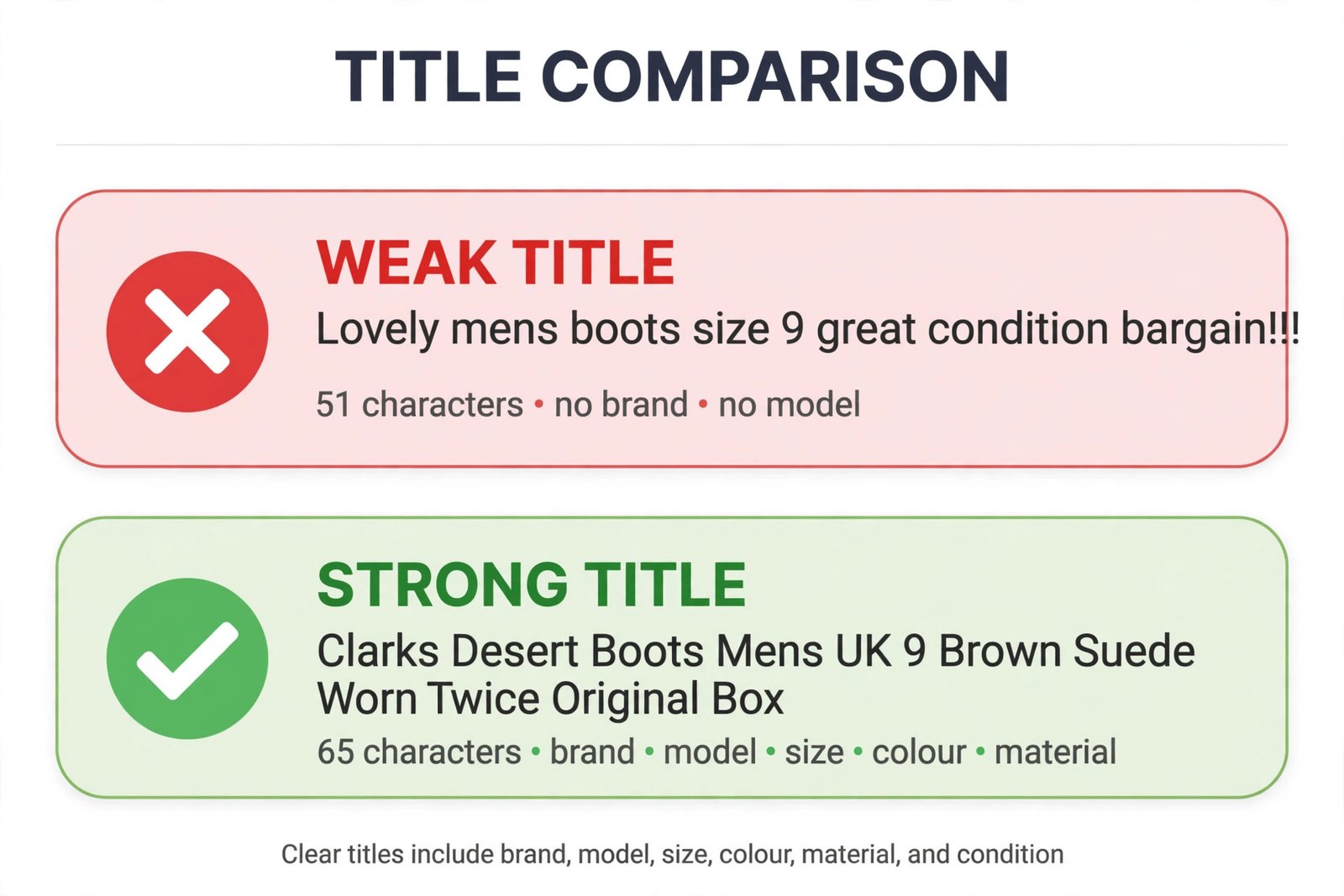
Compare the same boots written two ways. The weak title — “Lovely mens boots size 9 great condition bargain!!!” — is 51 characters, and not one of them is a brand, a model or a material. The strong title — “Clarks Desert Boots Mens UK 9 Brown Suede Worn Twice Original Box” — is 65 characters and names the brand, the exact model, the gender, the size, the colour, the material, the condition and the box. A buyer searching “Clarks Desert Boots UK 9” finds the second listing and never sees the first, because the first contains none of those words. That is the whole game: the title is a string of search terms a buyer might type, not a sentence.
Should You Use Commas in eBay Titles?
No — and not because eBay bans them. eBay’s pages do not forbid commas, and a comma in a title will not get a listing removed. The reason to skip them is arithmetic: a comma costs one of your 80 characters and adds nothing to search. eBay’s search reads words, not punctuation, so “Nike, Air Max, 90” and “Nike Air Max 90” match the same searches — but the first version spends two characters on commas that could have been a size or a model number.
The same logic covers every other piece of punctuation. eBay’s “Create great listings” page says to avoid special characters and irrelevant words, and its export hub warns against writing words in capital letters or with asterisks and other markers between them, because “these practices can lower your listing ranking in search results”. So “L@@K”, “WOW!!!”, rows of stars and “R@RE” are not just ugly — eBay says they can push the listing down. Plain words separated by single spaces are the format eBay’s own examples use, and they are the format its search is built to read.
What Does eBay Not Allow in a Title?
Most title mistakes are not policy violations — they are wasted characters. A few cross the line into eBay’s policies, and those carry real consequences: listing cancellation, limits on account privileges, account suspension and loss of PowerSeller status. The table below is drawn from the three eBay policy pages that govern titles, read on 19 November 2026.
| Do not put in a title | Why eBay bars it | What to do instead |
|---|---|---|
| Words that are inaccurate or misleading | Search manipulation policy: “brand new” when the item is used, or “authentic” when it is not, misleads buyers | Describe the item exactly as it is; let the condition field carry the condition |
| Comparisons — “better than”, “superior”, “the best”, “the cheapest” | Search manipulation policy bars making comparisons to your item or a competing item | Let the item’s own facts do the work: brand, model, condition |
| Another brand’s name to catch its searches | Search manipulation policy + intellectual-property policy: a generic iPhone case listed as “Apple”, or an adidas shoe with “Nike” added, are eBay’s own examples | Use only the brand that made the item |
| Repeated keywords — the brand name twice, the same word three times | Search manipulation policy: search counts a repeated word only once, so the repetition buys nothing | Use each keyword once; spend the freed characters on a word you have not used |
| Keywords that do not describe the item | Search manipulation policy bars adding keywords that do not accurately describe the item | If a buyer would not type it to find this item, leave it out |
| Compatible vehicle information | Search manipulation policy: it belongs in item specifics, not the title | Put fitment in the compatibility fields |
| Contact details, email addresses or URLs | Contact information sharing policy: no contact details in listings | Keep all contact inside eBay messages |
| ALL CAPS, asterisks, “L@@K”, “WOW!!!” | Export hub: these practices can lower the listing’s ranking; Seller Center: avoid special characters | Plain words, single spaces, normal capitalisation |
Two smaller rules catch sellers out. First, a subtitle cannot repeat any words used in the title, so do not buy a subtitle to restate the brand — use it for a word the title could not fit. Second, using different titles, item specifics or details to describe the same item or variation in different ways is itself listed as search manipulation, so keep one item’s wording consistent across its variations.
How Does the Title Work With Item Specifics?
The title is not the only place eBay reads keywords. Item specifics — the structured fields for brand, size, colour, material, model and the rest — power the filters down the side of the search results, and eBay’s own guidance says to fill every field it offers. The title and the specifics do different jobs, and confusing them is the most common structural mistake in a listing.
The title answers “what is this, in the buyer’s words”. The specifics answer “which exact one is it, in eBay’s fields”. A buyer searching “Clarks Desert Boots UK 9” finds the listing through the title; a buyer filtering the results to UK 9, brown, suede finds it through the specifics. Because eBay counts a repeated word only once across the title, subtitle, specifics and description, repeating the brand in all four places buys nothing — but it also costs nothing in search. What it costs is title characters, which is why the strongest titles spend their 80 characters on the words that are hardest to find anywhere else: the model number, the exact variant, the feature.
Practically: write the title first, then fill every item specific eBay offers for the category, including the optional ones. If a detail exists as a specific — size, colour, material, brand — it still earns a place in the title when buyers search for it, because the title is what the buyer reads before tapping. The specifics are what the buyer uses after the search. Both have to be right; neither replaces the other.
What Is One Better Title Worth?
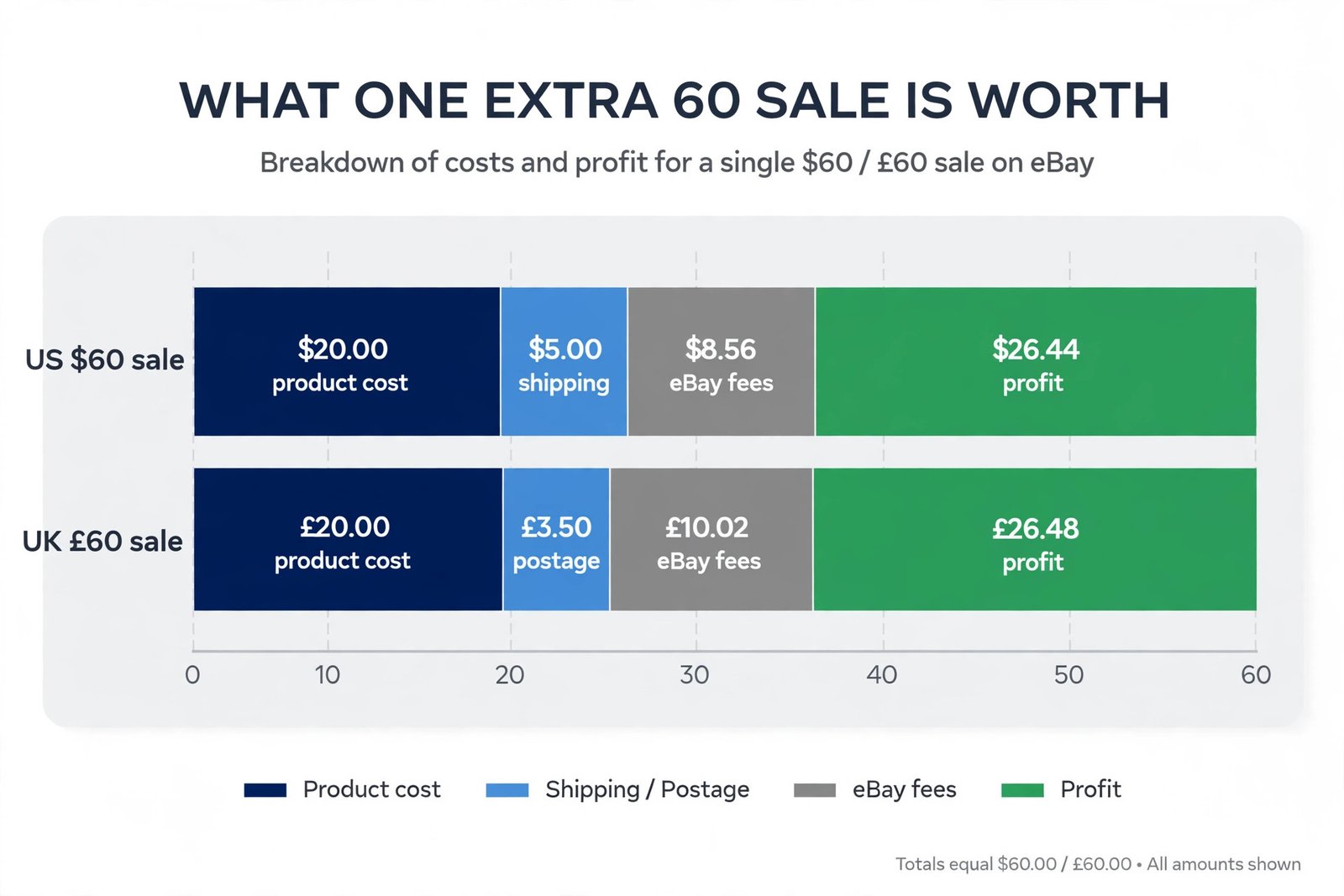
A better title earns its keep in extra sales, and the fee maths decides how much of each extra sale you keep. The examples below use the verified eBay fee rates — US sellers pay a 13.6% final value fee in most categories plus a $0.40 per-order fee; UK business sellers pay 12.9% plus a 0.35% regulatory operating fee, a £0.40 per-order fee and 20% VAT on the fees; UK private sellers pay no final value fee at all. Product costs and postage are stated assumptions, so substitute your real numbers — the fee figures are the verified ones. Run any price through Zyrro’s eBay Fee & Profit Calculator before you list it.
| One extra sale | Sale price | eBay fees | Profit after cost + postage* |
|---|---|---|---|
| US seller, $60 item | $60.00 | $8.56 (FVF $8.16 + $0.40) | $26.44 |
| UK business seller, £60 item | £60.00 | £10.02 (FVF £7.74 + £0.21 + £0.40 + £1.67 VAT) | £26.48 |
| US seller, $25 item | $25.00 | $3.80 (FVF $3.40 + $0.40) | $9.20 |
| UK private seller, £60 item | £60.00 | £0.00 | £36.50 |
*Profit assumes a $20 / £20 product cost and $5 / £3.50 postage. Fees are the verified rates: US 13.6% + $0.40; UK business 12.9% + 0.35% + £0.40 + 20% VAT on fees.
Ten extra sales a month on a $60 item is $264.40 of profit for a US seller — and the title cost nothing to fix. Compare that with buying the same visibility: if the extra sale comes through Promoted Listings at a 5% ad rate, the ad fee is $3.00 on a $60 sale, and the profit on that sale falls to $23.44 in the US and £22.88 in the UK (the UK ad fee carries VAT too, £3.00 plus £0.60). A title that earns the click for free beats an ad rate that charges for it, every time — which is why the title comes before the advertising budget, not after it. For the full picture on pricing those sales, see our guide to how to price items on eBay.
eBay Title Mistakes to Check Before You List
Run through this list on every listing before you publish. It takes thirty seconds, and it catches the errors that cost clicks for weeks.
1. The title is under 40 characters. eBay gives you 80 and tells you to use them. A 30-character title leaves half the search terms on the table. If you cannot fill 60 characters with true facts about the item, you have not looked hard enough at the model number, the variant or the material.
2. It starts with an adjective. “Lovely”, “great”, “stunning” and “bargain” are the first words a buyer sees and the last words they would type. Brand first, product second.
3. It repeats the brand or a keyword. Search counts a repeated word once. The second “Nike” is a wasted five characters that could have been the size.
4. It carries another brand’s name. Beyond wasted characters, this is a policy violation — eBay’s own example is an adidas shoe with “Nike” added to divert search results.
5. It is full of capitals, stars and exclamation marks. eBay says these practices can lower the listing’s ranking. Plain words, single spaces.
6. The colour or size sits past character 60. It still counts for search, but a buyer on a phone may never see it before deciding. Move the variant forward.
7. It promises something the listing does not deliver. “Brand new” on a used item and “authentic” on an unverified one are not marketing — they are misleading words under eBay’s search-manipulation policy, and they can end the listing.
8. The title and the photos disagree. A title that says “Original Box” on a listing whose photos show no box loses the sale and the trust. Titles work with photos, not instead of them — our guide to taking photos for eBay covers the other half of the click. And if a listing is already live with a weak title, you can fix it without starting over — see how to edit an eBay listing.
The title is the cheapest improvement on eBay. It costs no fee, no subscription and no ad budget — just 80 characters, spent on the words a buyer would type. Write it from the facts outward, count it, check it against eBay’s own rules, and let the search do the rest. For the rest of the seller toolkit — fees, pricing, photos and editing a live listing — see our eBay seller guides.
Frequently Asked Questions About Writing eBay Titles
How many characters can you have in an eBay title?
You can have up to 80 characters in an eBay title, and eBay tells sellers to use all of them on relevant keywords. Its Seller Center best-practices page says to use all 80 characters and focus on relevant keywords, so a 30-character title wastes half the search terms a buyer might type. Count spaces as characters and stop at 80.
What is the recommended format for eBay titles?
eBay’s export seller hub proposes this format: ‘NEW’ [brand] [product name] [model No] [Variants — size, color] [additional keyword]. Its Seller Center pages say the same thing in words: include the brand, model or type, colour, style and model number. Put the brand first, then the product, then the model number, then the size or colour.
Should you use commas in eBay titles?
No. eBay does not ban commas, but they cost one of your 80 characters each and add nothing to search, because eBay’s search reads words rather than punctuation. “Nike Air Max 90” matches the same searches as “Nike, Air Max, 90” while leaving two characters free for a size or model number. Use single spaces between keywords instead.
What is eBay’s recommended item title structure?
eBay’s Seller Center says to include the brand, model or type, colour, style and even the model number, and to avoid special characters and irrelevant words. Its export hub gives the same structure as a template: brand, product name, model number, variants such as size and colour, then one additional keyword buyers search for.
What is the correct punctuation for a title?
Use plain words separated by single spaces, with normal capitalisation. eBay says to avoid special characters and irrelevant words, and its export hub warns that writing whole words in capital letters or with asterisks and other markers can lower a listing’s ranking. Skip commas, exclamation marks, stars and “L@@K” — they cost characters and can push the listing down.
What are some good keywords to use on eBay?
Use the words buyers actually type: the brand, the exact product and model number, the size, colour and material, and the condition when it is a selling point. eBay’s advice is to think like a buyer and check similar listings — sold listings show which words actually sold. Never add a keyword that does not describe your item.
Sources: eBay Seller Center, “Listing best practices” and “Create great listings”; eBay export seller hub, “How to optimize your listings”; eBay Search Manipulation Policy, Intellectual Property Policy and Contact Information Sharing Policy — all read live on 19 November 2026. Fee rates verified 31 October 2026: US final value fee 13.6% + $0.40 per order; UK business 12.9% + 0.35% regulatory operating fee + £0.40 per order + 20% VAT on fees; UK private sellers pay no final value fee. Title character counts and fee maths were recalculated for this article. The note about titles being cut off on phone screens is practical seller guidance, not an eBay-published rule — eBay’s pages state the 80-character limit but no fixed mobile visibility number.