How to Send an Invoice on eBay

To send an invoice on eBay, open Seller Hub, go to Orders, find the order under Awaiting payment, and click Send invoice next to it. On the invoice screen you can adjust the shipping, add a discount or a note, then send it — the buyer gets the invoice by email and can pay straight from it.
Most eBay sales never need a manual invoice, because buyers pay at checkout. The invoice matters in exactly three situations: a buyer who won an auction and has not paid, a buyer who bought several items and should pay once with one shipping charge, and a sale where the shipping or payment details need changing before the buyer pays. At Zyrro, we checked the official eBay process and ran the fee maths on combined orders, so this guide covers the clicks and the money — including the $0.87 a combined invoice saves you on a typical US two-item order.
What is an eBay invoice, and when do you need one?
An eBay invoice is a revised payment request that eBay sends to your buyer by email. It replaces the checkout total with a total you have adjusted — usually because several items are being combined into one parcel, or because the shipping charge on the original listing was wrong. The buyer clicks Pay now in the email and pays through eBay’s managed payments, exactly as they would at checkout. The money then lands in your linked bank account on your normal payout schedule; nothing about the payment itself changes.
Here is the decision in one table: if your situation is not in the left column, you almost certainly do not need to send an invoice.
| Situation | Send an invoice? | Why |
|---|---|---|
| Buyer won an auction and has not paid | Yes | A polite payment reminder with the correct total attached |
| Buyer bought several items from you | Yes | Combine them into one payment and one shipping charge |
| Shipping charge needs changing before payment | Yes, at the buyer’s request | eBay says changes to shipping or payment method should only be made at the buyer’s request |
| Buyer accepted your Best Offer | Yes, if the total needs adjusting | A “Send the buyer invoice” link appears right after you respond to the offer |
| Buyer already paid at checkout | No — you cannot | Paid orders cannot be invoiced; use a partial refund instead (see below) |
| Buyer has not committed to buy anything | No — you cannot | There is no “send an invoice before purchase” option; the buyer must commit first |
| Custom order agreed in messages | Yes, with care | Create the sale through a listing first, then invoice the unpaid order — never take payment outside eBay |
Two rules from eBay’s own help page govern everything in this guide. First, the option to send an invoice is only available within 30 days from the end of the listing — that means 30 days from the auction win or from the offer being accepted. After that window closes, the option disappears and you will not see it for that item. Second, changing the shipping charges or the payment method on an invoice should only be done at the buyer’s request, so agree the change in messages before you send it. Both rules exist to stop sellers rewriting totals a buyer never agreed to.
How to send an invoice on eBay in Seller Hub
The standard path takes four steps, and it is the same whether you are invoicing one item or several. Use a desktop browser for this — the reliable path is Seller Hub on a computer (more on the app below).
1. Sign in to eBay and open Seller Hub. The Orders tab is in the top menu.
2. Under Orders, select Awaiting payment. This filters the list to orders that have not been paid yet — the only orders you can invoice.
3. Find the order and click Send invoice next to it. If you do not see the button, open the order and use the Actions menu instead.
4. On the invoice screen, review the item total and shipping, add any discount or a note to the buyer, then click Send invoice. The buyer receives the invoice by email with a Pay now link.
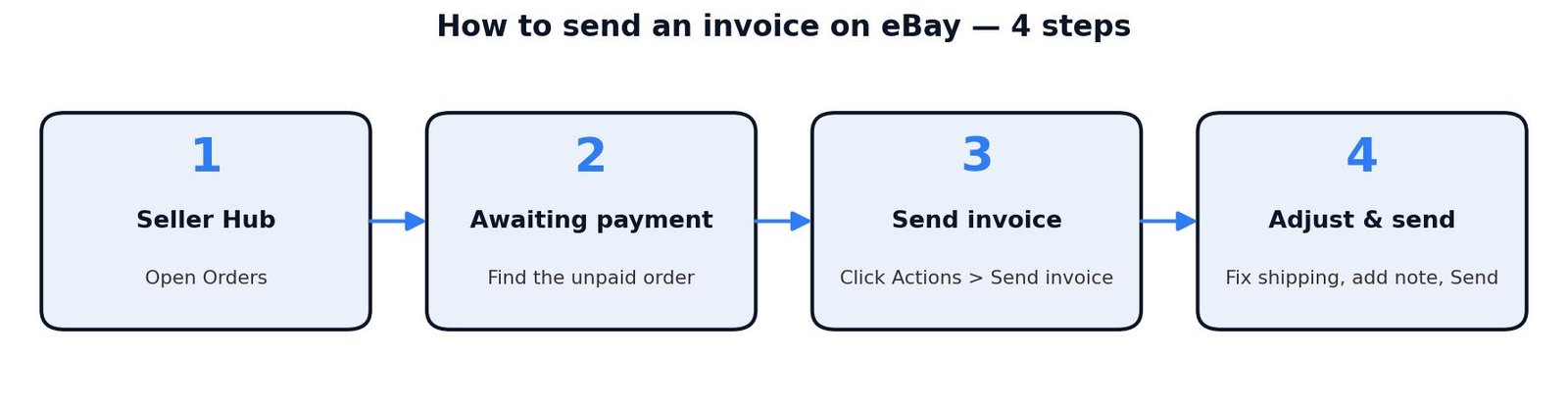
Four steps: Seller Hub, Orders, Awaiting payment, Send invoice — then adjust the shipping, add a note, and send.
You can do the same thing from My eBay instead of Seller Hub: go to My eBay, then Sold, find the item under Awaiting payment, and choose Send invoice from the Actions menu. The invoice screen is the same either way. If you have just responded to a Best Offer, eBay also shows you a “Send the buyer invoice” link right there in the interface, so you do not have to go hunting through Orders.
Before you click Send, check three things on the invoice screen. First, the item total — it should match what the buyer agreed to pay. Second, the shipping charge — this is the field you are most likely changing, and it is where the fee maths in this guide comes from. Third, the message box: a one-line note (“Thanks — combined shipping applied, one parcel”) prevents most “why did the total change?” messages. There is also a checkbox for “Email me a copy of the invoice” — tick it if you want your own copy for your records, because the invoice itself arrives by email.
How to send an invoice on eBay for multiple items
Combining several items into one invoice is the single most common reason to send one, and it is also the one that saves you real money. A buyer who buys two items from you and pays for each separately pays two shipping charges and generates two orders — which means two per-order fees for you. One combined invoice turns that into a single payment, a single shipping charge, and a single per-order fee.
Before the combined invoice will work, you need to switch the feature on in your account. eBay’s help page gives the exact path: on the My eBay Shipping Preferences page, select Edit beside “Allow combined payments and shipping”, check the box beside “Allow buyers to send one combined payment for all items purchased”, choose the time period during which you are willing to combine payments for purchased items, and select Save. Do this once and it stays on.
With that switched on, here is the combined-invoice flow:
1. In Seller Hub, select Orders — or in My eBay, select Sold.
2. Select Send invoice next to one of the items you want to include in the invoice.
3. On the next page, all items purchased by that buyer are displayed. Remove the check from any items you do not want to include.
4. Add the shipping charges for the combined parcel — one charge, not one per item.
5. Enter a message if you want to (optional): thank the buyer, mention the discount, and give clear instructions for payment, shipping, and returns.
6. Select the payment methods you accept.
7. Tick “Email me a copy of the invoice” if you want one.
8. Preview the invoice before sending, then select Send invoice.
The buyer receives an email shortly after you submit the invoice and can pay you based on the instructions and payment methods you specified. You can also start the same flow from the “Action needed” message eBay sends you when a buyer asks for a combined total — click the link in that message and you land on the invoice screen with the items already grouped.
Note what happens on the buyer’s side, because it affects whether they actually pay. When a buyer adds multiple items from your shop to their cart, eBay often prompts them to request a total from you. That request is the trigger for most combined invoices — so if a buyer messages you asking for a combined total, send the invoice promptly. A buyer who has already paid for items separately cannot be combined this way; the invoice option is gone once payment is made, and your only route then is a partial refund of the extra shipping (covered in our guide to how to refund a buyer on eBay).
How do you revise or resend an invoice on eBay?
An invoice is not final until the buyer pays it. If you spot a mistake — the wrong shipping charge, a missing item, a typo in the message — you can revise it from the same place you sent it: find the item in Seller Hub Orders or My eBay Sold, open Actions, select Send invoice again, make your changes, and send it. The revised invoice replaces the earlier one, so the buyer always sees your latest version.
Resending works the same way. If the buyer says they never got the email, or they let it sit unpaid for a few days, go back to the order, open Send invoice, check the total is still right, and send it again. The buyer gets a fresh email with a fresh Pay now link. There is no limit in eBay’s help pages on how many times you can revise or resend — the hard limit is the 30-day window from the end of the listing. Once that window has expired, the Send invoice option disappears entirely, and neither a revision nor a resend is possible.
That 30-day clock is the detail most sellers miss. An auction that ended 32 days ago with an unpaid buyer cannot be invoiced any more — your options at that point are to message the buyer, wait, or cancel the order as an unpaid item. So the practical rule is simple: send the invoice the same day the buyer commits, and resend it within a day or two if it goes unpaid. An invoice sent late is an invoice you may never be able to send.
How to send an invoice on eBay after the buyer paid
You cannot. Once the buyer has paid, the order leaves the Awaiting payment list, and the Send invoice button disappears — eBay’s system will not let you invoice a paid order. This is the most common “missing button” complaint, and it is not a bug: it is the design. An invoice is a pre-payment document, not a post-payment one.
What you can do instead depends on what needs fixing:
| What you wanted to change | Do this instead |
|---|---|
| Buyer paid separate shipping on two items you will ship together | Issue a partial refund of the extra shipping from Seller Hub — the refund guide linked below shows the clicks, and the final value fee is credited in proportion to the refund |
| Buyer overpaid because the shipping charge was wrong | Partial refund of the difference, same path |
| Buyer wants a copy of the invoice for their records | They already have one: eBay emails the buyer a receipt and order confirmation when they pay, and they can view the order in their purchase history |
| You need to change the item or the price after payment | You cannot change a paid order — cancel it (with the buyer’s agreement) and relist, or refund and start again |
The partial-refund route is worth knowing in detail, because it is how most experienced sellers handle the “already paid” case. Our full walkthrough — including how much of the final value fee eBay credits back on a partial refund — is in our guide to how to refund a buyer on eBay. The short version: open the order in Seller Hub, choose Send refund, enter the shipping amount you are returning, and the buyer keeps the item while you keep the sale.
Why is there no Send invoice button on eBay?
Nine times out of ten, the missing button is telling you something true about the order. Work through the causes in order before assuming eBay is broken.
| What you see | Most likely cause | What to do |
|---|---|---|
| No Send invoice button on the order | The buyer already paid | Check the Paid filter — paid orders cannot be invoiced; use a partial refund for any shipping adjustment |
| No Send invoice button on the order | The listing ended more than 30 days ago | The invoicing window has closed; message the buyer or cancel the order as an unpaid item |
| Order is not in Awaiting payment | You are looking at the wrong filter | Switch to Orders, then Awaiting payment — only unpaid orders appear there |
| Combined items are not listed on the invoice page | Combined payments are not enabled | Switch it on in My eBay, Shipping Preferences, “Allow combined payments and shipping” |
| Combined items are not listed on the invoice page | The items belong to different buyers, or one is already paid | You can only combine unpaid items from the same buyer into one invoice |
| Buyer says the invoice email never arrived | Spam filter, or a mistyped address on their side | Resend the invoice from Orders and ask the buyer to check spam; tick “Email me a copy” for yourself |
| You cannot change the item price on the invoice | Invoices change shipping and payment details, not the agreed price | Agree any price change with the buyer first, then cancel and relist if the price itself must change |
One more check that catches people out: if you are looking for the button in the eBay app, stop and use a desktop browser instead. Third-party guides disagree on whether the app can send invoices at all — one reports that it cannot and that you must use a computer, while others describe an in-app flow. eBay’s own help page describes the Seller Hub and My eBay paths only, so the desktop route is the one you can rely on. The buyer, meanwhile, can pay from the invoice email on any device, phone included.
How does a combined invoice change your eBay fees?
This is the part other guides skip, and it is the reason a combined invoice is worth doing even when the buyer does most of the asking. eBay’s final value fee is charged on the item price plus the buyer-paid shipping, and there is a per-order fee on every order. A combined invoice shrinks both numbers: the shipping total falls because one parcel costs less than two, and two orders become one, so you pay the per-order fee once instead of twice.
Take a US example. A buyer buys two $25 items from you. You paid $15.00 for each one. Posted separately, each item needs a $4.50 label; posted together in one parcel, a single label costs $5.50. Here is the full comparison.
| Two separate payments | One combined invoice | |
|---|---|---|
| Buyer pays for items | $50.00 | $50.00 |
| Buyer pays for shipping | $9.00 (2 × $4.50) | $5.50 (one parcel) |
| Buyer pays in total | $59.00 | $55.50 |
| Final value fee, 13.6% | $8.02 ($4.01 × 2) | $7.55 |
| Per-order fee | $0.80 (2 × $0.40) | $0.40 |
| Total eBay fees | $8.82 | $7.95 |
| Labels you buy | $9.00 | $5.50 |
| Item cost (2 × $15.00*) | $30.00 | $30.00 |
| Your profit | $11.18 | $12.05 |
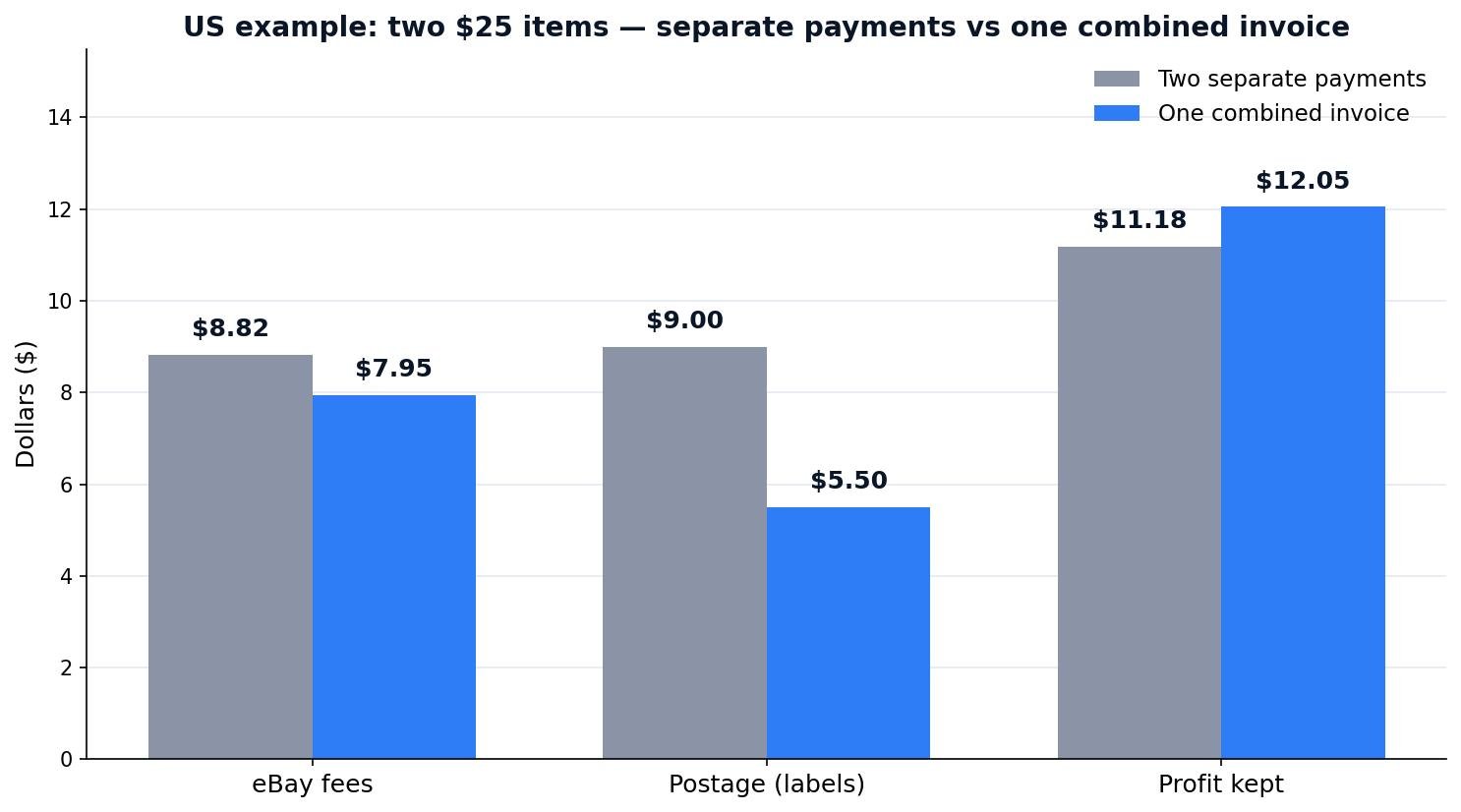
One combined invoice on two $25 items: $0.87 less in eBay fees and $0.87 more profit, even though the buyer pays $3.50 less.
Notice where the $0.87 comes from, because it is not the postage. The buyer saves $3.50 on shipping — but you also spend $3.50 less on labels, so the postage saving cancels out for you. Your entire gain is fees: $0.47 less final value fee, because the fee is charged on the smaller combined total, and $0.40 because one order carries one per-order fee instead of two. The buyer gets cheaper shipping, you keep more profit, and neither side loses anything. That is why you should offer the combined invoice before the buyer even asks.
The same maths works in the UK, where a business seller pays a 12.9% final value fee, a 0.35% regulatory fee, a £0.40 per-order fee, and 20% VAT on those fees. Take two £25 items, £15.00 cost each, £3.50 a label separately or £4.00 for one combined parcel.
| Two separate payments | One combined invoice | |
|---|---|---|
| Buyer pays for items | £50.00 | £50.00 |
| Buyer pays for shipping | £7.00 (2 × £3.50) | £4.00 (one parcel) |
| Buyer pays in total | £57.00 | £54.00 |
| Final value fee, 12.9% | £7.35 | £6.97 |
| Regulatory fee, 0.35% | £0.20 (£0.10 × 2) | £0.19 |
| Per-order fee | £0.80 (2 × £0.40) | £0.40 |
| VAT on fees, 20% | £1.67 | £1.51 |
| Total eBay fees | £10.02 | £9.07 |
| Labels you buy | £7.00 | £4.00 |
| Item cost (2 × £15.00*) | £30.00 | £30.00 |
| Your profit | £9.98 | £10.93 |
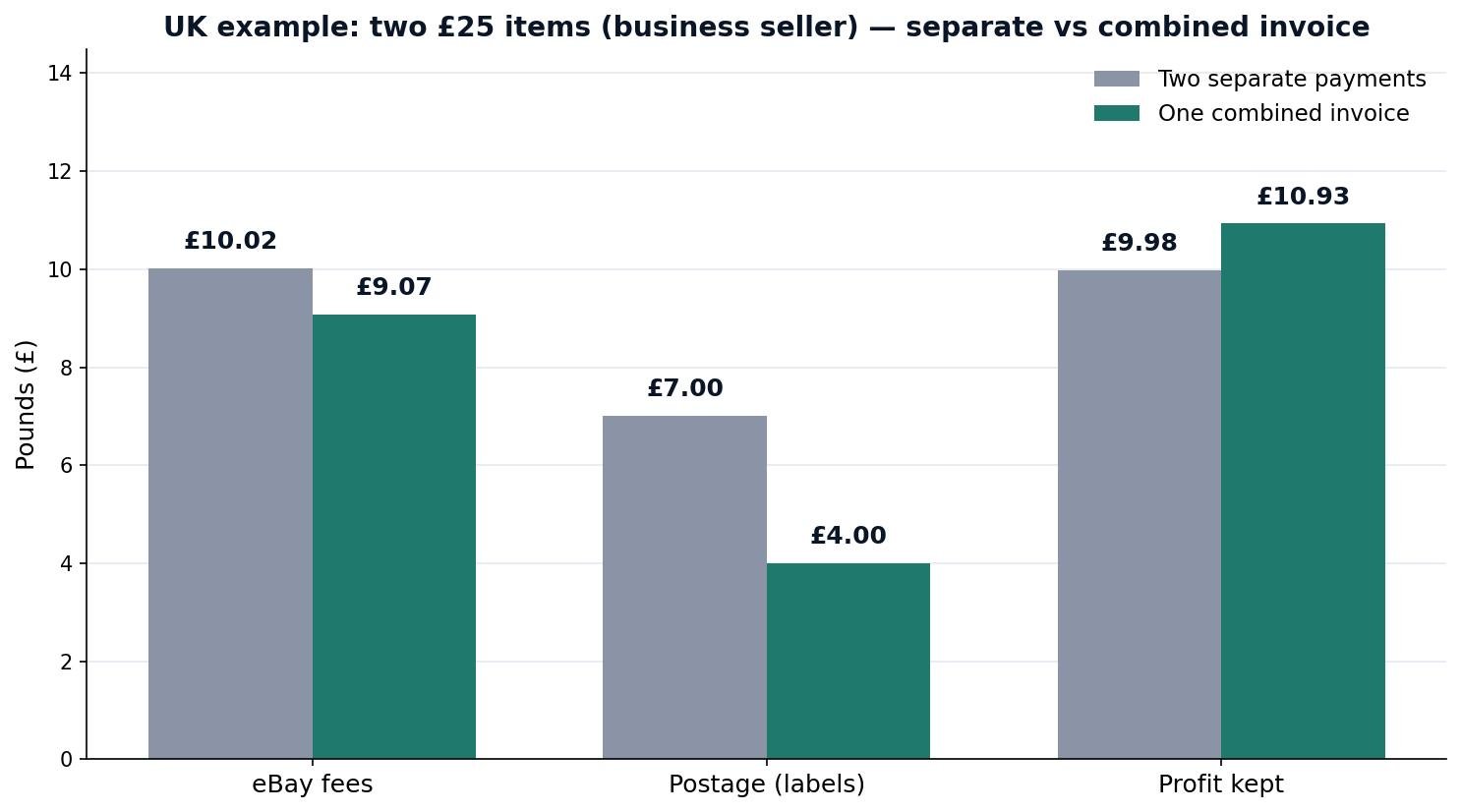
UK business seller, two £25 items: a combined invoice saves £0.95 in fees and adds £0.95 to profit. Components are rounded to the penny; eBay calculates on exact amounts, so a displayed line can sit 1p above the exact total.
The UK gain is £0.95, built the same way: £0.38 less final value fee, £0.01 less regulatory fee, £0.40 saved on the per-order fee, and £0.16 less VAT on fees. Per order, that is £3.68 of final value fee and £0.84 of VAT on fees — rounded to the penny, so the displayed per-order lines add to £5.02 while eBay’s exact per-order total is £5.01. And if you sell as a private seller in the UK, eBay charges you no fees at all either way — so a combined invoice changes nothing on fees, but the buyer still saves £3.00 on shipping and you still post one parcel instead of two. In the US there is no private-seller fee exemption, so the combined-invoice saving applies to every US seller.
Run your own numbers before you list — the fee lines above are the same ones our eBay fee and profit calculator works out for you, including the UK VAT and regulatory fee lines, so you can test a combined invoice against separate payments for your own prices and postage.
Should you use automatic combined shipping rules instead?
A manual combined invoice is not the only way to give buyers one shipping charge. eBay also lets you set automatic combined shipping rules — for example, full shipping on the first item and free or reduced shipping on every extra item — which apply themselves at checkout with no invoice needed. The two tools solve different problems, so pick by situation, not by habit.
| Automatic combined shipping rules | Manual combined invoice | |
|---|---|---|
| Set up | Once, in Shipping Preferences and your business policies | Per buyer, per order, when the need arises |
| When it applies | Buyer checks out with several Buy It Now items | Buyer has not paid yet — auctions, Best Offers, agreed changes |
| Shipping discount | A fixed rule you define in advance | Any amount you type on the invoice |
| Best for | High-volume shops with standard stock | One-off bundles, auctions, negotiated deals |
| Needs the buyer to ask? | No — it just works at checkout | Often starts with the buyer’s “request total” |
If you sell the same kinds of items every day, set the automatic rules up once and let them run — they are the reason many shops never send a manual invoice at all. But rules cannot help with an auction win, a Best Offer, or a buyer who wants a shipping charge corrected after the fact. That is the manual invoice’s job, and it is why every seller should know both paths. Our guide to how to offer free shipping on eBay covers the shipping side of the same decision — when free shipping pays and when it costs you — if you want to price the postage side properly too.
What happens after you send the invoice on eBay?
Once you submit the invoice, the buyer receives an email shortly after and can pay you based on the instructions and payment methods you specified. Payment runs through eBay’s managed payments into your linked bank account — never through PayPal details or bank details shared by hand in messages. Payouts are initiated daily by default, sent to your bank within two days of the buyer’s confirmed payment, and then take another one to three business days to clear. Our full payout walkthrough, including holds and how to get paid faster, is in our guide to when eBay pays sellers.
If the buyer does not pay, do not wait silently. Resend the invoice after a day or two — a fresh email with a fresh Pay now link is the gentlest nudge there is, and it is exactly what eBay’s own help page suggests for an unpaid buyer. If the buyer still does not pay, the buyer has 4 calendar days to pay before you can cancel the order as an unpaid item, and you can also set up automatic cancellation of unpaid orders so you do not have to chase each one by hand. Our guide to how to cancel an order on eBay as a seller covers the clicks and what a cancellation does to your account.
One last habit worth building: tick “Email me a copy of the invoice” every time you send one. It costs nothing, it gives you a dated record of exactly what total you agreed with the buyer, and it is the copy you will reach for if the buyer later questions the shipping charge. An invoice is a small document, but it is the document that turns “we agreed £54” from a memory into a record.
Frequently asked questions about sending an invoice on eBay
How to send an invoice on eBay to a buyer?
Open Seller Hub, go to Orders, select Awaiting payment, and click Send invoice next to the buyer’s order. Adjust the shipping, add a discount or a note if needed, then click Send invoice. The buyer receives the invoice by email with a Pay now link and pays through eBay’s managed payments.
How do I send an invoice on eBay?
From Seller Hub, go to Orders and select Awaiting payment, then click Send invoice next to the unpaid order. You can do the same from My eBay by going to Sold and choosing Send invoice from the Actions menu. Review the total and shipping on the invoice screen, then send it.
Can I send an invoice on eBay?
Yes, but only for an order where the buyer has committed to buy and has not paid yet — an auction win, a Buy It Now purchase, or an accepted Best Offer. You cannot invoice a buyer who has already paid, and the option is only available within 30 days of the listing ending.
How do I send an invoice to a buyer on eBay app?
Use a desktop browser instead of the app. eBay’s own help page describes the Seller Hub and My eBay paths only, and third-party guides disagree on whether the app can send invoices at all — one reports it cannot. The buyer can still pay from the invoice email on any device, phone included.
How to send an invoice on eBay after buyer paid?
You cannot send an invoice after the buyer has paid — the Send invoice button disappears once an order leaves Awaiting payment. Instead, issue a partial refund of the extra shipping from Seller Hub by opening the order, choosing Send refund, and entering the amount. The final value fee is credited in proportion to the refund.
How to send an invoice on eBay for extra postage?
Agree the extra postage with the buyer in messages first, then open the unpaid order in Seller Hub, click Send invoice, and raise the shipping charge to the agreed amount before sending. eBay says changes to shipping charges should only be made at the buyer’s request, so keep the agreement in messages as your record.
An eBay invoice is a one-minute job that does three useful things: it reminds an unpaid buyer with the correct total attached, it turns several items into one payment with one shipping charge, and — as the maths above shows — it saves you $0.87 on a typical US two-item order and £0.95 on a UK one, because one order means one per-order fee and a smaller total means a smaller final value fee. Send it the same day the buyer commits, tick “Email me a copy”, and let the combined invoice do the quiet work of keeping more of every multi-item sale. Before your next listing, run the numbers through the eBay fee and profit calculator on Zyrro, and browse our eBay seller tools hub for the rest of the fee, VAT, and profit guides.