How to Change eBay Username (2026 Guide)

Short answer: To change your eBay username, sign in on a desktop, go to Account Settings, then Personal Information, click Edit next to your username, type the new name and save it. The change is free, your feedback and listings move with you, and eBay lets you change it only once every 30 days.
Most sellers rename their eBay account for one of three reasons: the username they picked in a hurry no longer fits the shop, the business has moved into a new niche, or an old random username from registration day is still sitting on every listing. Whatever the reason, the change itself takes about five minutes — but the 30-day rule means a rushed rename can lock a bad name in place for a month. This guide walks through the exact clicks on desktop, iPhone and the app, the username rules eBay actually enforces, what happens to your feedback and listings after the change, and what a rename costs on a real order in the US and the UK.
Everything in this guide was checked against eBay’s own username policy page on 12 November 2026, and the steps were cross-checked against five independent seller guides that all describe the same path. Where eBay does not publish a detail — such as whether the app route works on every phone, or how long your old username stays reserved — this guide says so plainly instead of guessing. Zyrro’s eBay Fee and Profit Calculator uses the same verified fee rates quoted in the worked example below, so you can run your own prices through it before and after a rebrand.
How to change eBay username on desktop
The username lives in one place only: the Personal Information section of your Account Settings. eBay’s own policy page puts the value of the name plainly — your username is a valuable asset, like your feedback score, because buyers and sellers recognise you by it. The desktop route is the one every guide agrees on, and it is the route to use if anything else fails.
- Sign in to eBay on a desktop browser. Make sure you are signed in to the account you want to rename, not a second buying account. If you run a business and a personal account, check the name in the top corner before you start.
- Open Account Settings. Hover over your name in the top-left corner of the eBay homepage and click Account Settings in the menu. On some layouts the same page is reached through My eBay in the top-right corner, then Summary, then Account.
- Open Personal Information. This section sits near the top of the Account Settings page and holds your username, email, phone number and registered name. You may be asked to re-enter your password here as a security check — that is normal.
- Find your username and click Edit. Your current username is listed with the rest of your personal information. Click the Edit link next to it and the field becomes editable.
- Type the new username and check it against eBay’s rules. The name must be 6 to 64 characters, with no spaces, and it must be available. Check the rules table below before you type anything, because a name that breaks a rule gets rejected and costs you time.
- Click Save. The new username takes effect at once across your listings, feedback and messages. There is no review wait like a shop-name change — the name updates as soon as you save.
That is the whole process. There is no fee, no form to download and no support ticket — unless you are trying to change your legal registered name, which is a different job entirely and is covered later in this guide. If the Edit link is missing or greyed out, you are almost certainly inside the 30-day wait from your last change, or you are looking at the wrong field: your Store name and your registered name sit in different sections, and neither of them is the username.
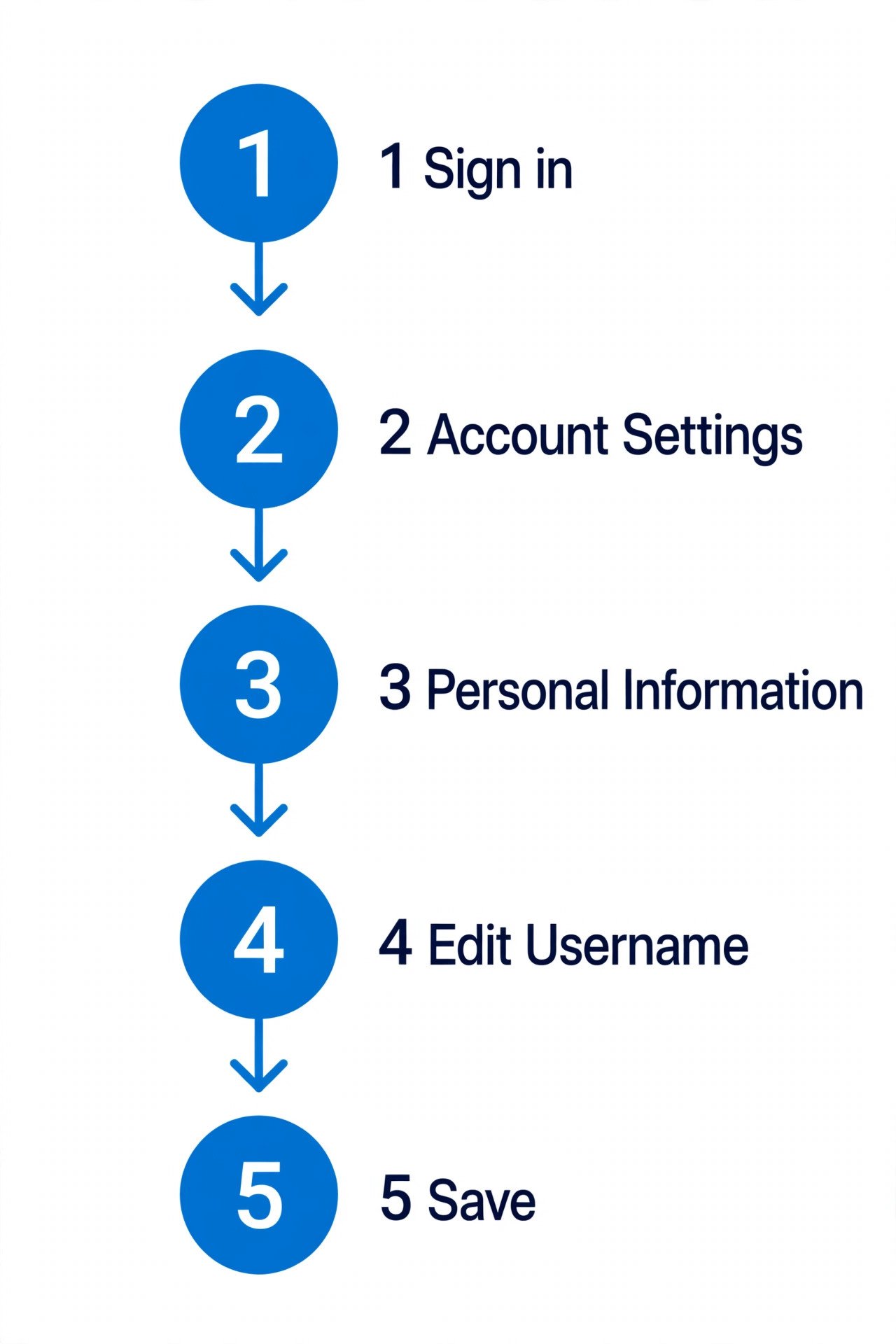
The five steps in order: sign in, Account Settings, Personal Information, Edit next to Username, type the new name and save.
How to change eBay username on app
You can change your eBay username in the app as well as on a desktop — that is what eBay’s own AI Overview states, and it matches the guide from LitCommerce, updated in August 2026. The path mirrors the desktop one, only the taps are in a different place.
- Open the eBay app and sign in. Make sure you are in the right account before you start.
- Tap the profile icon. This opens your account area.
- Go to Account Settings, then Personal Information. The same two sections as on desktop.
- Tap Edit next to your username, type the new name and save it. The same 6-to-64-character rules and the same 30-day limit apply.
One honest caveat: not every seller guide agrees the app route works. Zik Analytics, updated in 2026, says you cannot change your username in the eBay app at all and must use a mobile browser instead. If the option is missing in your app, do not waste time hunting for it — update the app first, and if it is still missing, use the mobile-browser route in the next section. The desktop site in a phone browser follows the exact same Account Settings path, so the rename still takes five minutes.
How to change eBay username on iPhone
iPhone sellers ask this more than any other version of the question — it is the top related search for this topic, and the autocomplete cluster is full of iPhone and mobile variants. The short version is that the app route above is the first thing to try, and the browser route is the reliable fallback.
- Try the app first. Open the eBay app, tap the profile icon, then Account Settings, then Personal Information, then Edit next to your username.
- If the option is not there, open Safari or Chrome on your iPhone and go to eBay. Sign in with your seller account.
- Request the desktop site. In Safari, tap the page settings icon in the address bar and choose Request Desktop Website. In Chrome, tap the three-dot menu and tick Desktop site.
- Follow the desktop path. Tap your name, then Account Settings, then Personal Information, then Edit next to your username, type the new name and save. If the page is hard to use on a small screen, rotate the phone sideways — the account settings layout is built for a wide screen.
On Android the same two routes apply: the app first, then a mobile browser with the desktop site if the option is missing. What you cannot do on any phone is change your registered legal name from the app — that needs eBay support, covered in the names-compared section below.
| Desktop browser | eBay app | iPhone / Android browser | |
|---|---|---|---|
| Username change | Yes — Account Settings, Personal Information, Edit | Yes — profile icon, Account Settings, Personal Information, Edit | Yes — request the desktop site, same path as desktop |
| Registered (legal) name | No — contact eBay support | No — contact eBay support | No — contact eBay support |
| Store name | Yes — Seller Hub, Store tab, Edit store | Via Seller Hub in the browser | Yes — Seller Hub in the browser |
| 30-day limit | Yes — one change per 30 days | Yes — same limit | Yes — same limit |
| Fee | Free | Free | Free |
What are eBay’s username rules?
Before you pick a new name, read eBay’s own username policy. It is short, specific, and it is the document eBay enforces — the table below reproduces it faithfully from the official policy page, read on 12 November 2026. Most rejected names fail on one of three points: the name is too short, it contains a banned character, or it looks like a web address.
| Rule | What eBay says |
|---|---|
| Length | 6 to 64 characters |
| Allowed characters | Letters (a–z, A–Z), numbers (0–9), and the symbols star (*), hyphen (-), dot (.) and underscore (_) |
| Spaces | Not allowed — no spaces or tabs |
| Word “eBay” | Not allowed, unless you are an eBay employee |
| Web addresses | Not allowed — no email address, web address, or elements that imply one, such as .com, .net or .org (including _com or -com) |
| Phone numbers | Not allowed, numeric or alphanumeric — and a username cannot be entirely numeric |
| Leading characters | Cannot start with an underscore, hyphen or period |
| Consecutive underscores | Not allowed (no __ inside a name) |
| Letter “e” + numbers | Not allowed — a name cannot be the letter e followed by numbers |
| Trademarks | Not allowed — no third party’s trademark or brand, and nothing similar to one (for example, a name built on CocaCola) |
| Other members | Cannot be the same as another seller’s username, or similar to an eBay Store name |
| Offensive language | Not allowed — no obscene or profane words |
| Email ID | Cannot be the same as your email ID |
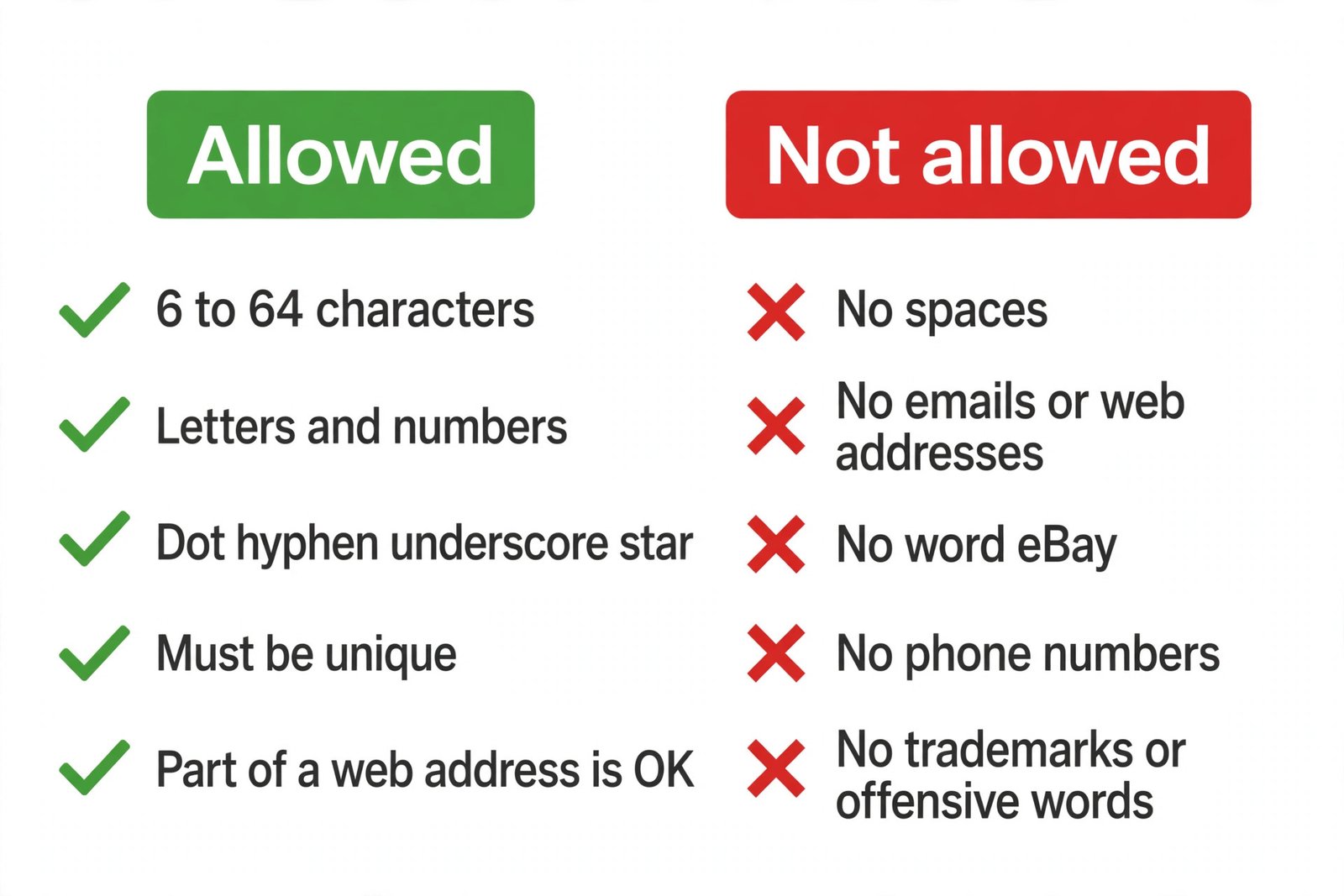
eBay’s username rules at a glance: 6 to 64 characters, letters, numbers and four symbols allowed — no spaces, no web addresses, no trademarks, no “eBay”.
Two details catch sellers out. First, the star (*) is allowed, which surprises people who only expect hyphens and underscores — but a name full of stars is hard to read and harder to remember, so treat it as permitted, not recommended. Second, a name that is only an element of your web address is allowed — eBay’s own example is that if your website is www.mikes_bikes.com, your username can be mikes_bikes — but the full address, or anything ending in .com, is banned. If eBay detects a name that breaks the policy, it can remove content, restrict the account or suspend it, so a borderline name is not worth the risk.
How to pick a good eBay username
A good username does three jobs: buyers can spell it, it says what you sell, and it still fits in a year when your stock changes. “eBay username ideas” is one of the top related searches for this topic, and the pattern in the guides is consistent — short, readable, and tied to a niche rather than a single product.
- Keep it short and pronounceable. A name buyers can say out loud is a name they can type from memory. Long strings of words joined with underscores are hard to read on a phone.
- Name the niche, not one product. “VintageCameraFinds” survives a move from cameras to lenses; “CanonEOS5DDeals” does not. The same logic applies to the shop-name guides: a narrow name is a rebrand waiting to happen.
- Use one separator at most. A single hyphen or underscore between two words reads cleanly. Two or three separators, or a mix of dots and underscores, looks like a generated name.
- Check it everywhere before you commit. Search the exact name on eBay, check the matching Store name is free, and check the domain and social handles if you plan to brand outside eBay. You only get one change per 30 days.
- Avoid numbers that date you. A year, a “247” or a “4u” in the name reads stale within a season and is hard to explain to buyers.
How often can you change your eBay username?
Once every 30 days. eBay’s own username policy states it in one sentence: “You can only change your username once in a 30-day period.” The reason given is to prevent confusion for other eBay members and to guard against fraud — a seller who could rename daily could dodge a bad reputation simply by changing names.
The 30-day clock starts the moment you save the change, not the day you first think about it. Two consequences follow that the official policy page does not spell out, but three independent seller guides all report, so this guide states them as seller-guide reports rather than official wording:
- A changed-username icon appears next to your new name for 30 days. Buyers browsing your listings or feedback see a small marker showing the name was recently changed. It disappears automatically when the 30 days end.
- Your old username stays reserved to you for 30 days. Nobody else can register it during that window. After the window closes, the old name becomes available to anyone — which is why the next section on changing back matters.
The practical lesson is to treat the rename as a one-shot decision. Type the new name, read it back letter by letter, check it against the rules table above, and only then save. A typo costs you a month, and a name you regret costs you a month too.
Will changing your eBay username affect your feedback, listings or sales?
No — and this is the question sellers worry about most. It is also one of the top related searches (“Can you change your eBay name without losing feedback”), so here is the plain answer: changing your username does not change your feedback score, your feedback comments, your listings, your sales history, your watchers or your selling limits. Everything transfers automatically to the new name, because the username is only the label on the account — the account itself, with all its history, stays the same.
What does change, in practice, is recognition. Regular buyers who search for your old name will not find it, and anyone who bookmarked your seller page under the old name may land on an error until they search again. That is a branding cost, not a fee cost, and it is why the checklist below exists. Three things to be clear about:
- Your feedback stays, word for word. Old feedback comments keep their text; only the name attached to them changes. The changed-name icon covers the first 30 days so buyers can see the name is new while the feedback still speaks for itself.
- Your listings stay live. Active listings are not ended, relisted or re-priced by a rename. If you need to change a listing itself — its price, photos or description — that is a separate job, covered in our guide to how to edit an eBay listing.
- Your Store URL does not change. The username and the Store name are different fields. Your storefront address (ebay.com/str/yourstorename) follows the Store name, not the username, so renaming your username leaves your store link intact. Renaming the Store name is the change that breaks links — see the comparison below.
eBay username vs Store name vs legal name — what’s the difference?
This is where most sellers get confused, because eBay has three different names and each one changes in a different place with different rules. The autocomplete cluster for this topic is full of the confusion: “how to change ebay account holder name”, “how to change ebay seller name”, “how to change ebay business name” and “how to change ebay store name” are all separate searches for separate fields.
| Username | Store name | Legal (registered) name | |
|---|---|---|---|
| What buyers see | On listings, feedback and messages — your public identity on eBay | On your storefront header and in your store URL (ebay.com/str/yourstorename) | Nowhere public — used for verification, payouts and official mail |
| Length and format | 6 to 64 characters, no spaces; letters, numbers, *, -, ., _ | Up to 35 characters; spaces and symbols such as & allowed | Your real personal or business name, as on your ID or registration |
| Where to change it | Account Settings, Personal Information, Edit | Seller Hub, Store tab, Edit store, pencil button by Store name | Contact eBay support — not a self-serve field |
| How often | Once every 30 days (official policy) | No fixed limit published; eBay advises against frequent changes | Only when your legal details genuinely change; proof may be required |
| Cost | Free | Free (needs a Store subscription to have one at all) | Free, but support review takes time |
| What breaks | Old-name searches and bookmarks; listings and feedback unaffected | Bookmarks, tags and shared links to the old store URL stop working; search engines may treat the store as a new site | Nothing public — but payouts can pause if details do not match |
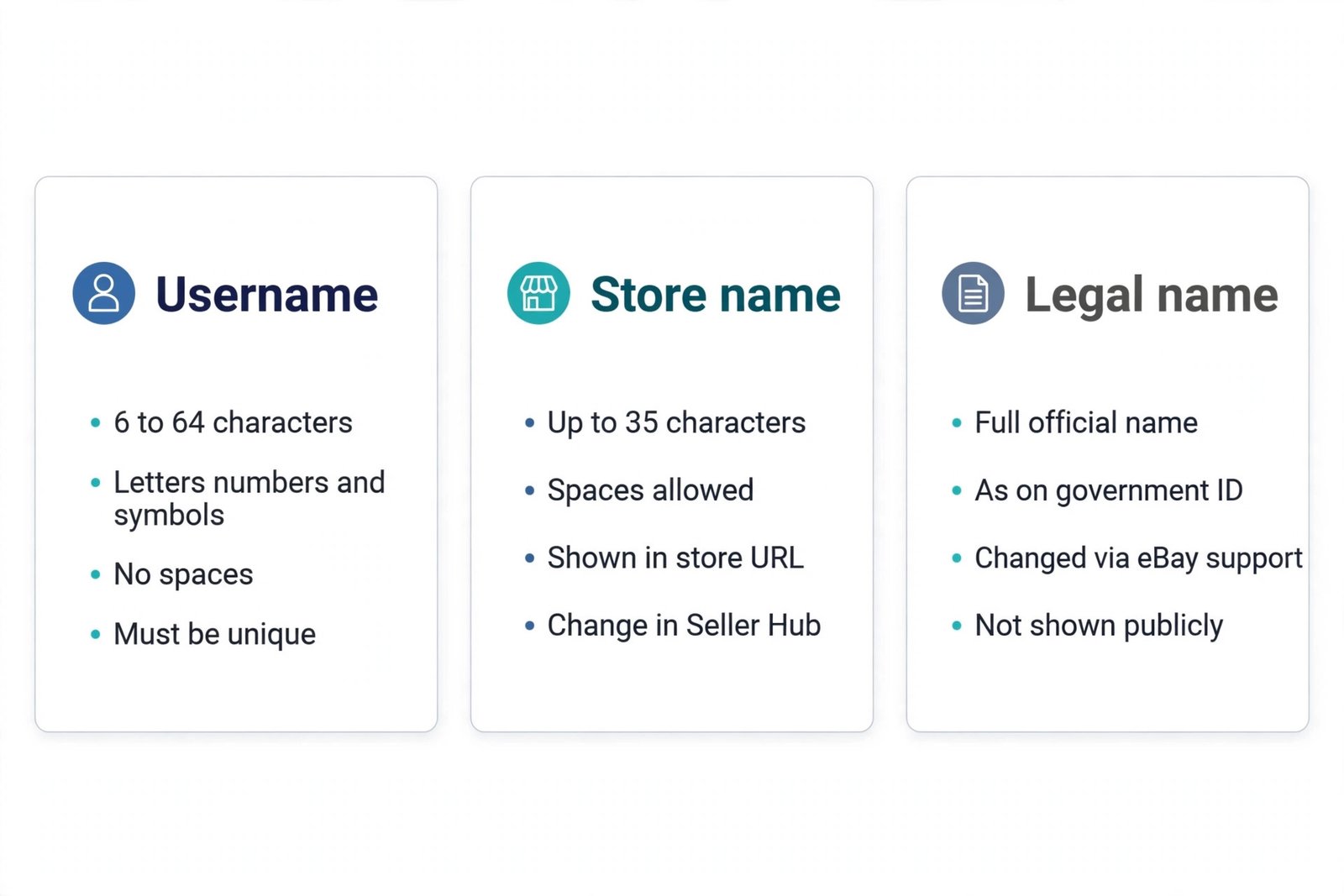
Three different names, three different places: username in Personal Information, Store name in Seller Hub, legal name through eBay support.
The Store name deserves a warning of its own. eBay’s official guide to customising your Store says plainly that while you can change the name in Seller Hub, eBay does not advise it, “because since then, any bookmarks, tags or links created by your buyers won’t work and your store will be considered as a new site by some search engines.” A username change is the cheap rebrand; a Store name change is the expensive one. If you are weighing up whether a Store subscription is worth it at all, our guide to whether an eBay Store is worth it runs the break-even maths for US and UK sellers.
The legal name is the third field and the one sellers most often mix up with the username. Your registered name is the name on your account for identity checks and payouts; changing your username does not change it, and changing it does not change your username. If your legal name has genuinely changed — marriage, a business rename, a correction — contact eBay support and expect to provide proof. The related search “how to change name on eBay bank account” points at the same split: your payout bank details live in a different part of Seller Hub (Payments), not in Personal Information, and the name on them must match the account holder, not your username.
What to do before you change your eBay username
A rename takes five minutes; a rebrand takes an afternoon. Run through this checklist first and the rename will not cost you sales, links or a month of regret.
| When | Step | Why it matters |
|---|---|---|
| Before | Check the new name is free — search it on eBay and check the matching Store name | eBay rejects names that are taken or too similar to another seller’s name or Store name |
| Before | Check it against the rules table — length, characters, no .com, no trademark | A rejected name wastes the attempt; a borderline name risks a policy strike |
| Before | Check the domain and social handles if you brand outside eBay | A username you cannot match elsewhere fragments your brand |
| Before | Pick a quiet moment — not mid-auction, not during a promotion | Regular buyers searching the old name during a live auction will not find you |
| Before | Warn repeat buyers — a message or a note in your listings | Recognition is the one thing a rename costs; a heads-up keeps it |
| After | Update your listings’ branding — photos, banners and descriptions that show the old name | The username field updates itself; text inside your listings does not |
| After | Update links outside eBay — social bios, your website, business cards | Links to your seller page under the old name may stop resolving |
| After | Leave the Store name alone unless you have a separate reason to change it | A Store rename breaks bookmarks and search-engine trust; a username rename does not |
If you also sell on TikTok Shop, the same thinking applies there — our guide to how to change your TikTok Shop name covers its own 30-day rule and the four different TikTok names, so a rebrand across both platforms stays consistent.
Why can’t I change my eBay username?
If the Edit link is missing, the save fails, or eBay shows an error, the cause is almost always one of the rows in this table. Work down it in order — the first two rows cover most cases.
| Problem | Likely cause | What to do |
|---|---|---|
| Edit link missing or greyed out | You changed your username within the last 30 days | Wait out the 30 days — there is no workaround, and eBay’s policy states the limit plainly |
| “This username is not available” | Another member has it, or it is too similar to a Store name | Try a variation: add a word for your niche, or a single hyphen or underscore — never a trademark |
| “This username is not allowed” | It breaks a rule — too short, a space, a banned character, a .com element, or the word eBay | Check the name against the rules table above, character by character |
| No username option in the app | Older app version, or the option is not offered on your phone | Update the app; if it is still missing, use a mobile browser with the desktop site |
| Password prompt loops or sign-in fails | Security check, or you are in the wrong account | Confirm you are in the right account, reset the password if needed, then retry |
| Account restricted | eBay has limited the account for a policy or verification issue | Resolve the restriction first — a rename will not fix it, and support must clear it |
| You want the legal name changed | That is a different field, not the username | Contact eBay support with proof; the username field cannot do it |
One error that deserves a special note: if eBay tells you the name is unavailable but you cannot find any seller using it, the name may be reserved — either it is someone’s previous username inside their 30-day reservation window, or it is held for another reason eBay does not disclose. There is no way to force it free; pick a variation and move on.
Does changing your eBay username cost anything?
No. eBay charges no fee to change your username, in the US or the UK, and the rename does not change your selling fees either. Your final value fee, per-order fee and — for UK business sellers — VAT on fees are all calculated on the sale, not on the name attached to the account. The worked examples below prove it: the same sale, before and after a rename, produces the same profit to the cent.
Take a US sale first. A $100 item with $10 of buyer-paid postage, a $40.00 product cost and a $10.00 shipping label. eBay’s US final value fee is 13.6% of the total sale amount plus a $0.40 per-order fee on orders over $10. Revenue is $110.00, the final value fee is $14.96, the per-order fee is $0.40, and profit is $44.64. Change the username and run the same sale again: revenue $110.00, fee $14.96, per-order $0.40, profit $44.64. The rename costs $0.00.
| US $100 sale | Before rename | After rename |
|---|---|---|
| Sale price + buyer postage | $100.00 + $10.00 = $110.00 | $100.00 + $10.00 = $110.00 |
| Final value fee (13.6%) | $14.96 | $14.96 |
| Per-order fee | $0.40 | $0.40 |
| Product cost* | $40.00 | $40.00 |
| Shipping label* | $10.00 | $10.00 |
| Profit | $44.64 | $44.64 |
| Rename cost | — | $0.00 |
A smaller US sale shows the same pattern. A $50 item with $10 of buyer postage, a $15.00 product cost and a $10.00 label: revenue $60.00, final value fee $8.16, per-order fee $0.40, profit $26.44 — identical before and after the rename.
For a UK business seller the fees are higher but the rename is just as free. A £100 item with £5 of buyer-paid postage, a £40.00 product cost and a £5.00 label: revenue £105.00, final value fee £13.55 (12.9%), regulatory fee £0.37 (0.35%), per-order fee £0.40, and 20% VAT on those fees of £2.86 — total fees £17.18 and profit £42.82. A UK private seller on the same sale pays no final value fee at all, so profit is £60.00. Rename or not, every figure is unchanged.
| UK £100 sale | Business seller | Private seller |
|---|---|---|
| Sale price + buyer postage | £100.00 + £5.00 = £105.00 | £100.00 + £5.00 = £105.00 |
| Final value fee | £13.55 (12.9%) | £0.00 |
| Regulatory fee (0.35%) | £0.37 | £0.00 |
| Per-order fee | £0.40 | £0.00 |
| VAT on fees (20%) | £2.86 | £0.00 |
| Product cost* | £40.00 | £40.00 |
| Shipping label* | £5.00 | £5.00 |
| Profit | £42.82 | £60.00 |
| Rename cost | £0.00 | £0.00 |
* Product cost and label cost are example assumptions, labelled as such. Fee rates are eBay’s published US and UK rates as used across Zyrro’s eBay guides: US final value fee 13.6% plus $0.40 per order over $10; UK business 12.9% plus 0.35% regulatory fee plus £0.40 per order plus 20% VAT on fees; UK private sellers pay no final value fee. Run your own prices through the eBay Fee and Profit Calculator before you list — it uses the same rates.
The only real cost of a rename is the afternoon in the checklist above: updating photos, banners, descriptions and links that carry the old name. Budget that time, not money.
Can you change your eBay username back to the old one?
Yes — but only after 30 days have passed since your last change, and only if the old name is still free. Seller guides report that eBay reserves your previous username for 30 days after a change, so nobody else can take it inside that window. After the window closes, the old name becomes available to anyone, including a competitor who noticed it was free. So if you renamed in haste and want the old name back, wait out the 30 days and then change it back quickly, before someone else claims it.
There is one more limit worth knowing: you cannot change your username to a name that is already in use as someone else’s Store name, or confusingly similar to one. So if you renamed your username to free up a name for a Store, or the other way round, check both fields before you save either change.
Frequently asked questions about changing your eBay username
How to change ebay username on iphone
Open the eBay app, tap your profile icon, then Account Settings, then Personal Information, then Edit next to your username, type the new name and save it. If the app does not show the option, open eBay in Safari or Chrome, request the desktop site, and follow the same path. The change is free and takes effect immediately.
How to change ebay username on app
Tap the profile icon in the eBay app, then Account Settings, then Personal Information, then Edit next to your username. Type a new name that follows eBay’s rules — 6 to 64 characters, no spaces — and save it. If the option is missing, update the app or use a mobile browser with the desktop site instead.
Can you change your eBay name without losing feedback
Yes. Changing your eBay username does not touch your feedback score, your feedback comments, or your sales history — everything moves to the new name automatically. Seller guides also report that eBay shows a changed-name icon next to your new username for 30 days, so buyers can see the name is new while your feedback still speaks for itself.
How often can you change your ebay username
Once every 30 days. eBay’s username policy says you can only change your username once in a 30-day period, to prevent confusion and fraud. A typo locks you in for a month, so check the spelling twice before you save. Your old username stays reserved to you for those 30 days, seller guides report, then anyone can take it.
Does changing your ebay username cost anything
No. eBay charges no fee to change your username, in the US or the UK, and the rename does not change your selling fees either. On a $100 US sale your final value fee stays $14.96 plus the $0.40 per-order fee, and £17.18 on a £100 UK business sale. The only cost is your time updating links and branding.
Can I change my eBay username back
Yes, but only after 30 days have passed since your last change, and only if the old name is still free. Seller guides report eBay reserves your previous username for 30 days, so nobody else can take it in that window. After that, the old name is open to anyone, so change it back quickly if you want it.
Changing your eBay username is one of the simplest jobs in selling: five minutes in Account Settings, no fee, and your feedback and listings come with you. The only thing that makes it expensive is rushing it — a typo, a name that breaks a rule, or a rebrand you regret all cost you 30 days. Pick the name with the rules table open, run the checklist, and save once. Zyrro’s eBay seller hub has the fee calculator and the rest of our eBay guides — including how to edit an eBay listing and how to schedule an eBay listing — if the rename is part of a bigger tidy-up of your shop.