How to Manage Returns on TikTok Shop: Deadlines, Costs & Auto-Approval Rules (2026)
Short answer: Managing returns on TikTok Shop means checking Seller Center > Orders > Manage Returns, answering each request inside TikTok’s deadlines — 4 business days for a return, 2–4 for a refund — inspecting what comes back, and setting auto-approval rules for low-value cases. Miss a deadline and TikTok approves the refund automatically, and seller-fault returns lower your Shop Performance Score.
Returns are the part of selling on TikTok Shop that nobody plans for and everybody pays for. A buyer changes their mind, a size does not fit, a parcel arrives damaged — and suddenly the sale you already counted is going backwards, with shipping paid twice and a fee kept by the platform. The sellers who survive returns are not the ones who never get them; they are the ones who answer fast, know exactly what each return costs, and let TikTok’s own automation handle the cheap cases. This guide works through the whole system the way TikTok actually runs it in the US and the UK: the deadlines, who pays what, the auto-approval rules worth switching on, and what a $50 return really costs you. Zyrro’s TikTok Shop Fee & Profit Calculator runs the same maths for any price, so you can check a return’s cost before you decide how to handle it.
How Does TikTok Shop Handle Returns?
TikTok Shop splits every product into two groups, and the group decides almost everything that follows. Returnable products are most ordinary items: the buyer has 30 calendar days from the delivery date to ask for a return and refund, and then 30 days to ship the product back. TikTok automatically accepts return requests for returnable products, so the request lands in your queue already approved in principle — your job is to handle the item and the refund, not to argue about whether a return is allowed. Non-returnable products are items that cannot be returned because of what they are, such as perishable food and drinks. A buyer can still ask for a refund on those, but no item comes back, and you decide within 2 business days for orders of $100 or less, or 4 business days above $100.
Once a return request exists, it follows one of two paths. On the seller-managed path, the buyer ships the item back to you, you inspect it when it arrives, grade its condition, and then approve the refund, offer a partial refund, or reject the request with evidence. On the Fulfilled by TikTok (FBT) path, the return goes to a TikTok warehouse instead: TikTok inspects it and decides the refund using the warehouse inspection evidence, and you do not handle the item at all — though you can still review and appeal eligible decisions in Seller Center. Either way, the clock is the same: miss the deadline and TikTok approves the refund without you.
Three more mechanics shape the whole process. First, some refunds are advanced at drop-off — TikTok pays the buyer back when the buyer hands the parcel to the carrier, before you ever see it. You can appeal those with evidence if the item comes back damaged, wrong, or ineligible. Second, returnless refunds exist for cheap items: TikTok’s own rule refunds returnable products priced at $10 or less without requiring the item back, because the return label costs more than the product. Third, the holiday season changes the rules temporarily: during the holiday shopping season TikTok applies an extended return window to most items, and your own configured return window is overridden until the season ends.
How to Manage Returns on TikTok Shop Step by Step
Everything a seller does with returns happens in one place: Seller Center > Orders > Manage Returns & Refunds. Open it daily — the deadlines below are short, and a request you first see on day three is already nearly lost. The page has an “Awaiting Your Action” tab that shows only the requests waiting on you; work that tab first, oldest first.
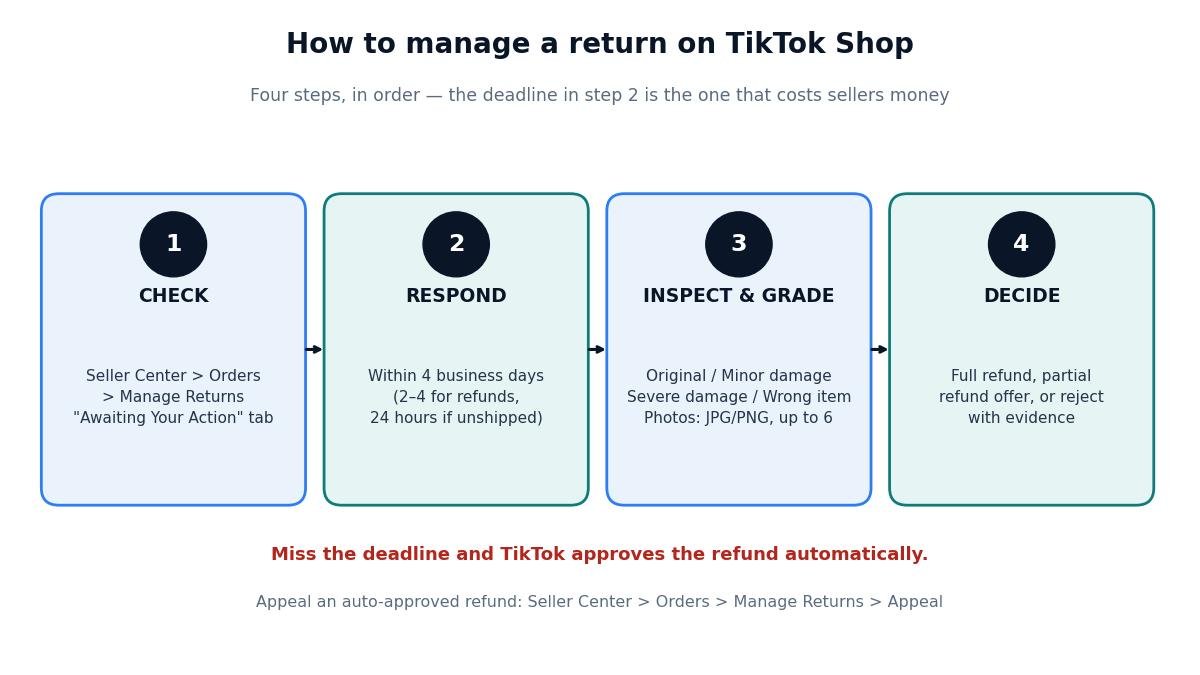
The four steps of every TikTok Shop return: check, respond, inspect, decide. The deadline in step two is the one that costs sellers money — everything after it is just paperwork.
Step 1 — Find the request. In Seller Center, go to Orders and open the Manage Returns page. The “Awaiting Your Action” tab lists every return, refund and replacement request that needs a decision from you, with the deadline shown against each one. Click a request to see the buyer’s reason, the order details, and any photos or messages the buyer attached.
Step 2 — Respond inside the deadline. For a returnable product, you have 4 business days to respond to the return request. For a refund-only request on a non-returnable item, you have 2 business days if the order is $100 or less and 4 business days if it is more. For a refund on an order that has not shipped yet, you have just 24 hours. If you do nothing, TikTok approves the request automatically — and an approval you did not make is much harder to undo than one you did.
Step 3 — Inspect and grade what comes back. When the returned parcel arrives, open it and grade the item’s condition using TikTok’s Returns Grading Framework: Original, Minor damage / Functional, Severe damage / Unsellable, or Buyer shipped the wrong item. The grade decides what you can do next — a severely damaged item justifies a partial refund or a rejection, an original-condition item does not. Take photos of what you received before you decide anything; if you later need to reject or appeal, photos are the evidence TikTok asks for.
Step 4 — Refund, offer a partial refund, or reject with evidence. From the Manage Return/Refund page, click “Respond” or “Appeal” depending on the case type. Issue a full refund, make a partial-refund offer (the buyer can accept it and keep the item, or decline and proceed with the standard return), or reject the request with the correct reason and supporting photos. If a request was auto-approved and you disagree, appeal from the same page: Seller Center > Orders > Manage Returns > Appeal.
Two details catch new sellers out. First, each item is eligible for only one exchange or replacement per original order — a buyer cannot ask for a second replacement of the same item. Second, if a return parcel is confirmed received by the carrier but never reaches you, TikTok approves the refund automatically 30 calendar days after the carrier’s confirmed receipt date, so a lost return is not a reason to leave the request unanswered — respond, and let the 30-day rule do its work.
What Are the Return Deadlines for TikTok Shop Sellers?
The deadlines are the single most expensive thing to get wrong, because every one of them ends in an automatic approval against you. The table below covers the US rules from TikTok’s own Seller Center pages, and the UK rules beside them — note the UK uses calendar days where the US uses business days, and the UK buyer’s statutory rights sit underneath the platform rules.
| Deadline | US | UK |
|---|---|---|
| Buyer asks for a return after delivery | 30 calendar days (returnable products) | 30 days extended returns period; 14-day statutory cancellation right from receipt |
| Buyer ships the item back | 30 days from the request (returnable products) | 14 days after notifying cancellation (change-of-mind, UK consumer law) |
| You respond to a return request | 4 business days | 2 calendar days to decide on refunds (reported by returns specialists) |
| You respond to a refund-only request (non-returnable) | 2 business days (order $100 or less); 4 business days (over $100) | 2 calendar days to decide on refunds (reported by returns specialists) |
| You respond to a refund on an unshipped order | 24 hours | Confirm in Seller Center — TikTok’s UK pages do not publish a separate figure |
| You approve a replacement request | 1 business day | Confirm in Seller Center — TikTok’s UK pages do not publish a separate figure |
| Refund paid to the buyer | 3–10 business days after TikTok receives and processes the return | Within 14 days of receiving the goods back (UK consumer law) |
| Your return window (adjustable) | 14 / 30 / 45 / 90 days; default 30 calendar days from delivery | Minimum 14 days; 30 days recommended by the platform |
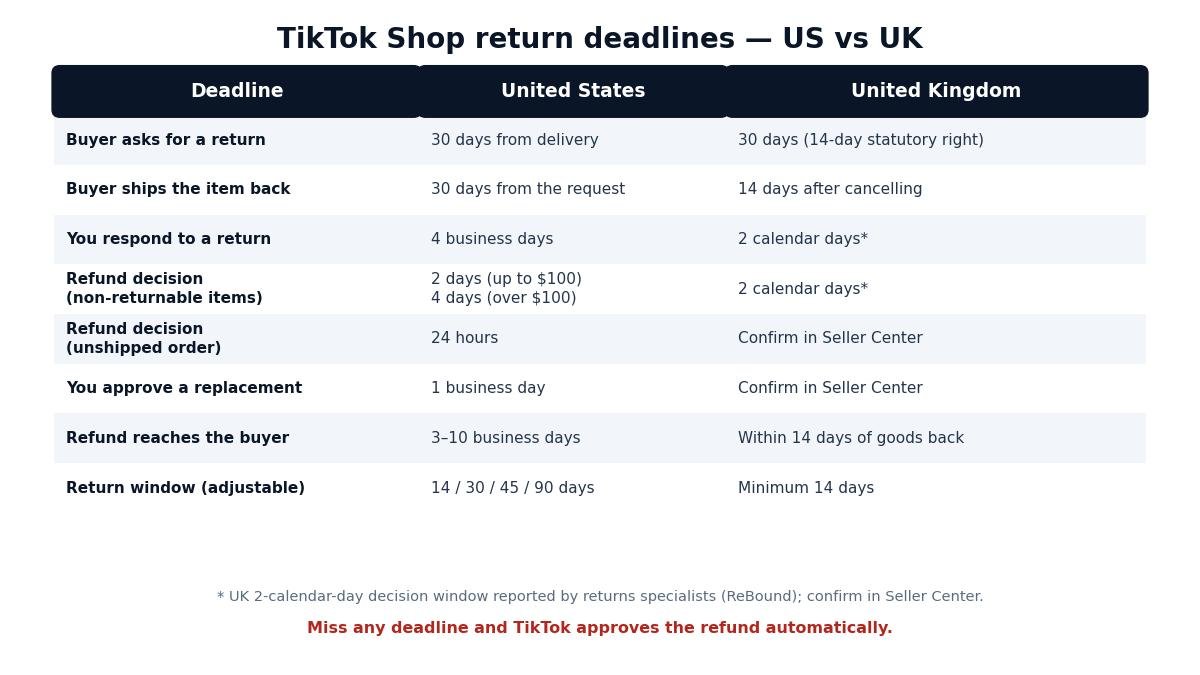
US vs UK return deadlines. The UK’s 2-calendar-day decision window is shorter than the US 4-business-day window — a UK seller who checks returns “every few days” will miss it.
Two deadline traps deserve emphasis. The first is the unshipped-order refund: if a buyer asks for a refund before the order has shipped, you have 24 hours, not 4 days — and if the order moves to “Transit to Ship” inside that window, the in-transit rules take over instead. The second is the undelivered order: if an order is still undelivered more than 6 days after the estimated delivery time, TikTok may automatically approve a refund for electronic products of $60 or less and all other products of $100 or less — unless the delay is the buyer’s fault, for example because they rescheduled delivery, changed the address in transit, refused the parcel, or gave a wrong address. For higher-value undelivered orders you get a review window instead: 2 business days for electronics between $60 and $100, and 4 business days for all products over $100.
One more timing point for UK sellers selling now: TikTok’s UK Cancellation and Returns Policy extends the return window for the 2026 holiday season — items bought between 6 November and 31 December 2026 can be returned until 31 January 2027, except electronics, pre-owned items, jewellery and auction orders. If you sell in the UK, expect a longer tail of returns in January and do not promise buyers a shorter window than the policy gives them.
Who Pays for Return Shipping on TikTok Shop?
In the US, TikTok’s own returns page is blunt: sellers are responsible for all return-related costs, whether the return is the buyer’s fault (no longer needed, does not fit) or the seller’s fault (quality issues, packaging damage). The return label is on you either way. That is the single most important cost fact in this guide, because it means a “change of mind” return costs you just as much in postage as a defective-product return — the only difference is what it does to your Shop Performance Score, covered below.
Forward shipping — the label that got the order to the buyer in the first place — is handled separately: TikTok’s policy says responsibility for forward shipping costs depends on the return reason, and points sellers to a Forward Shipping Costs table in the policy itself. Check that table for your exact reason rather than assuming the buyer covers it; the safe assumption when pricing is that you have already spent the forward postage and will not get it back.
In the UK the position is different, because UK consumer law sits underneath TikTok’s platform rules. Under the Consumer Contracts Regulations, a buyer who changes their mind can cancel within 14 days of delivery, and the buyer generally bears the cost of sending the item back — unless the seller did not tell them in advance that they would have to pay it, in which case the seller may have to cover it. TikTok’s platform rules can add requirements on top of the statutory position, so UK sellers should state their return-postage position clearly in their shop before the buyer orders, and confirm the current platform rule in Seller Center. What is consistent in both markets is the refund itself: the buyer gets their money back, and the seller absorbs the postage.
There is one exception worth knowing on the US side. For orders shipped with a TikTok Shipping label, TikTok offers third-party shipping insurance through U-PIC for carrier-caused problems — lost, damaged, or short parcels. Claims must be filed within 90 days of the shipment date, and the order must have been shipped on the TikTok Shipping label and scanned by the carrier. But customer returns are explicitly not covered: the insurance covers packages shipped to buyers, including parcels returned to sender because of carrier problems. A return is a cost you carry, not a claim you file.
What Does a Return Actually Cost? A Worked $50 Example
Most sellers think a return costs them the refund. It does not — the refund is money you never kept. The real cost is everything around it: the fee TikTok keeps, the postage paid twice, and the product if it cannot be resold. Here is the maths on a $50 beauty product sold in the US, self-fulfilled, with a 6% referral fee. The product cost, forward postage and return postage are example assumptions, marked with an asterisk — your numbers will differ, but the structure is the same for every return.
| What happens | Money in / out | Running cost of the return |
|---|---|---|
| Original sale | $50.00 sale; 6% referral fee $3.00; payout $47.00 | — |
| Buyer returns it (“no longer needed”), item back in original condition | Refund $50.00 to buyer; referral fee returned minus 20% admin fee ($0.60), so $2.40 comes back; return postage $4.50* | $9.60 ($0.60 admin fee + $4.50* forward postage + $4.50* return postage). Item back in stock to resell. |
| Same return, but the item comes back unsellable | As above, plus the $15.00* product cost is lost | $24.60 |
| Partial refund instead (20% deduction, buyer keeps the item) | Refund $40.00, you keep $10.00; admin fee on the $40 refund is $0.48; no return postage | $9.98 net against the original sale — and no item back. |
| $8 item, returnless refund (TikTok’s $10 rule) | Refund $8.00; admin fee $0.10; no return postage | Returning it would have cost a $4.50* label to recover a $3.00* item — the label costs more than the product. |
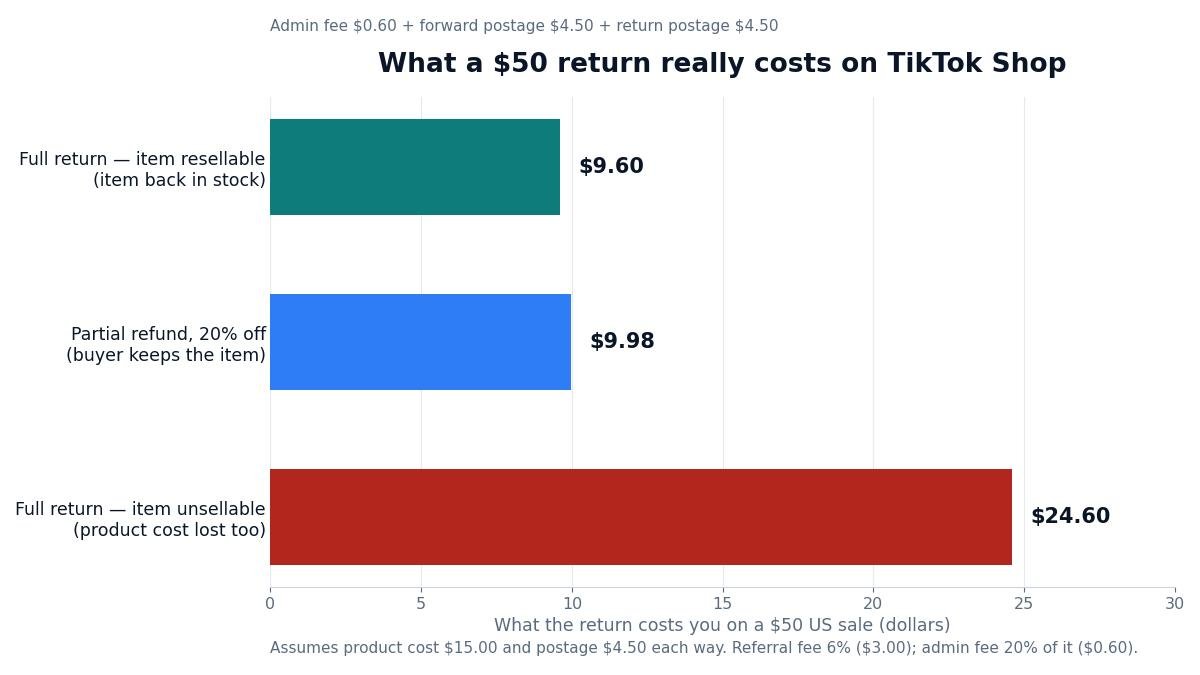
What a $50 return really costs. The gap between the resellable and unsellable cases — $15.00 of product cost — is why inspecting and grading the returned item matters more than the refund itself.
The comparison in that table is the decision that matters. A partial refund looks like giving money away, but compare it with the unsellable case: offering a 20% deduction ($10 kept, $40 refunded) leaves you $9.98 down with no item back, while taking back a damaged item leaves you $24.60 down. The partial refund is the better deal whenever the item would come back unsellable. But if the item would come back in original condition, taking the return is better: $9.60 down and the item back in stock, ready to sell again for $50. So the rule is simple — take the return when the item is resellable, offer a partial refund when it is not — and you can only apply it if you know the item’s condition, which is why the grading step exists.
Two more cost details. First, the refund administration fee: in the US, TikTok returns your referral fee minus 20% of it, capped at $5 per SKU — on a $50 sale that is 20% of $3.00, or $0.60. It is small, but it is why a refunded order never pays back the full amount. No refund administration fee was found on TikTok’s public UK pages, so UK sellers should check their own statements rather than assume one applies. Second, if you offered an affiliate commission on the order, seller guides report that the commission is clawed back from the creator’s next payout rather than from yours — check your own statements to confirm, because TikTok’s public pages do not state this. Run the same maths for your own prices with our TikTok Shop Fee & Profit Calculator: put in the price, the 6% US or 9% UK rate, and your product cost, and you will see the payout — and what a return takes back — before you list.
The UK version of the same example, for a £40 sale at the 9% UK commission rate: commission £3.60, payout £36.40. A full return with the item back in resellable condition costs £7.00 — £3.50* forward postage plus £3.50* return postage — because seller guides report that the commission is adjusted when an order is refunded, so you are not paying commission on revenue you did not keep. If the item comes back unsellable, add the £12.00* product cost and the return costs £19.00. The structure is identical to the US: postage twice, plus the product if it cannot be resold.
How Do I Set Up Auto-Approval Rules for Returns on TikTok Shop?
Answering every return by hand is the slowest way to manage returns, and the deadlines punish slowness. TikTok’s Seller Center lets you automate most of it, in Orders > Manage Returns > the Return settings tab. The settings live in two places — the Manage Returns page and the Return settings page under Orders — but they control the same rules. Four automations matter, and they are worth setting up before your next busy period, not during it.
Returnless refunds. You set your own rules for when a refund is issued without the item coming back, by product category, return reason and refund range, with an effective-from date and a maximum limit per customer over 30 days. Your rules take priority over TikTok’s platform rules, and you can switch them off at any time. Two warnings from TikTok’s own pages: TikTok does not subsidise seller-initiated returnless refunds — you carry the full refund amount — and if a refund is processed automatically under your own rules, you cannot appeal it. Start narrow: low-value items, “no longer needed” reasons, and a per-customer cap.
Auto-approve refunds. The same setup, for refund-only requests — the typical reasons are “did not receive order” or “wrong product delivered”. Again you set the policy name, reasons, category, refund range and effective dates. The same no-appeal warning applies to refunds your own rules approve.
Auto-approve returns. This approves the return itself once the buyer ships the item back, so you do not have to touch routine returns at all. You choose the starting point — when the buyer drops the parcel off with the carrier, or when it is delivered to your warehouse — and the delay before approval: immediately, or a custom wait of 1 to 24 hours. A short custom delay is the sensible default: it gives you time to spot a problem case before the approval fires, while still keeping the routine cases off your desk.
Replacements. If you want buyers to be able to choose a replacement instead of a refund, switch on “Allow replacements” in the Replacement settings row, set a maximum replacement amount and a maximum number of replacement requests, then set up the replacement automation the same way — policy name, reasons, category, refund range, effective dates, and the auto-approval method. A replacement keeps the customer and the sale; a refund keeps neither.
Two settings sit underneath all four automations and should be left alone unless you have a reason to change them. The abuse and fraud protections — “Reject high-risk refund requests” and “Review abuse or suspected high-risk requests” — are both switched on by default, and they apply to every automatic approval tool at once; you cannot set a different protection preference for each tool. If a request is flagged “Review recommended”, TikTok is telling you to look at it promptly — the label does not confirm fraud, but it does mean the request would otherwise have been auto-approved. If TikTok itself rejects a request under these protections, the order shows “Return not authorized” and “Rejected by TikTok Shop”, and you can still issue a full refund from the order page if you choose to.
Finally, the adjustable return window: you can set a custom window of 14 days (selected categories only), 30 days, 45 days or 90 days, with one window per category. If you set nothing, the default is 30 calendar days from the delivery date. A longer window is a selling point for higher-priced items — buyers trust a 45- or 90-day window — but it also extends the period in which returns can arrive, so match the window to the product: longer for durable goods, default for fast-moving cheap items.
How Do Partial Refunds Work on TikTok Shop?
A partial refund is the middle option between a full refund and a rejection, and it is the tool most new sellers underuse. TikTok offers it in three forms. First, automated partial-refund rules: you set them up in Seller Center under Preference settings, for returnable items priced between $10 and $100, for the reasons wrong item, damaged or defective, missing parts, or not as described. The refund range is a minimum of 10% or $5 (whichever is higher) and a maximum of 50% or $50 (whichever is lower). Returnless refunds take priority over partial refunds, and you can appeal an automated partial refund only if it was not caused by your own rule setup. Second, the partial-refund offer: when a return or refund request arrives, you can offer the buyer a partial refund on the spot. If the buyer accepts, the request closes and the partial refund is issued without the item coming back. If the buyer declines, or does not respond within 48 hours, the standard return process continues. Note that if the original request is a refund-only request, your partial-refund offer may be rejected automatically and the buyer can continue with a full refund request. Third, the partial refund after return: once you have received and inspected the returned item, you can deduct part of the refund based on its condition — between 10% and 50% of the item price for non-sellable items, depending on how bad the damage is. This one applies only to returns for customer-preference reasons, and not when the refund was already triggered at drop-off.
The practical use is the one from the worked example: the buyer says the item is damaged, the item is worth $50, and you would rather keep $10 of the price than pay $4.50 to ship a damaged item back to yourself. Offer 20%. If the buyer accepts, you have spent $40 plus a $0.48 admin fee and kept a customer who did not have to pack anything. If they decline, you are back to the standard return — you have lost nothing but 48 hours.
How Do I Reject or Appeal a Return on TikTok Shop?
Not every return request deserves approval, and TikTok gives you a structured way to say no — but only with evidence. When you reject a refund request, pick the correct reason and attach what proves it. TikTok’s own guidance lists the reasons and the evidence for each: for a failed delivery attempt, upload photos from your carrier showing they tried to deliver; for an item shipped in multiple packages, give the tracking details of the other packages; for a replacement already shipped, give the replacement’s order ID and delivery date; for a wrong item returned, upload photos of the wrong product and the buyer’s return package; for missing parts, photograph what you received with the missing components visible; for a damaged or used item, upload photos of the use or damage and explain why it cannot be reused.
The evidence rules are strict and worth memorising, because a rejection with bad evidence fails: photos in JPG or PNG format only (no videos), each file no larger than 5 MB, up to 6 images, plus an optional additional-comments field. Take the photos the moment you open the return, before you handle the item further — a photo taken after you have repacked it proves nothing.
The grading framework is what turns a rejection from an opinion into a decision. When the item arrives, grade it as Original, Minor damage / Functional, Severe damage / Unsellable, or Buyer shipped the wrong item. A “Severe damage / Unsellable” grade with photos supports a partial refund or a rejection; an “Original” grade does not, and rejecting an original-condition return is likely to be overturned on appeal. If a refund was already auto-approved — for example a speedy refund advanced when the buyer dropped the parcel off — you can still appeal it from Seller Center > Orders > Manage Returns > Appeal, with the same photo evidence. And remember the two guardrails: refunds processed automatically under your own auto-approval rules cannot be appealed, and a rejection that TikTok overturns can still cost you the refund plus the hit to your performance score.
How Do FBT Returns Work on TikTok Shop?
If you use Fulfilled by TikTok, returns work differently — and mostly in your favour. A returned FBT order goes back to a TikTok warehouse, not to you. TikTok’s warehouse inspects the item and decides the refund using the inspection evidence, so you never handle the returned stock and never have to grade it yourself. You can still review and appeal eligible decisions in Seller Center, and a partial refund after return is not available for this flow — the warehouse inspection result decides the outcome and the responsible party.
The compensation side is where FBT earns its fee. If TikTok’s Customer Service approves a refund because the package was lost or the item was damaged, TikTok automatically processes your reimbursement after issuing the refund to the customer — you do not need to open a claim. The same applies when the package or product is damaged, and when a return goes back to the warehouse with only the shipping box damaged but the item undamaged. The one case that needs a claim ticket is a box-damaged return sent back to you, the seller, rather than to the warehouse. That is the trade-off to price into the FBT decision: you pay the fulfilment fee, but lost and damaged returns stop being your problem. Our TikTok Shop Fee & Profit Calculator includes the FBT fee so you can compare the two paths on the same sale.
How Do Returns Affect Your Shop Performance Score?
Returns are not just a cost — they are a performance metric. TikTok measures the Non-Buyer Fault Return and Refund Rate (NBFR): the percentage of delivered orders in the past 60 days that led to a return or refund because of a problem caused by you or your logistics provider, such as a damaged item, the wrong item, or a late delivery. Orders that were cancelled do not count; only delivered orders that came back for a seller or logistics fault.
NBFR is part of your Shop Performance Score (SPS), and SPS decides how fast you get paid. A high NBFR lowers your SPS, which can push your settlement tier down — from 5 days back to 8, or from 8 back to the 31-day Introductory tier — and can cost you eligibility for premium subsidies. TikTok can also apply other control measures to shops with high order-defect rates, such as reducing traffic or product visibility. A change-of-mind return does not count against NBFR, which is exactly why the return reason matters: a buyer who picks “no longer needed” costs you postage, but a buyer who picks “damaged” costs you postage and performance. That is the real reason to fix the listing, the packaging and the quality control that produce seller-fault returns — not the postage, but the tier.
The link runs both ways. Handling returns fast protects the same score: our guide to when TikTok Shop pays sellers explains how the settlement tiers work and why a falling SPS can move your shop back to the 31-day tier. And the reverse is also true — the fastest way to protect your payout speed is to answer return requests the same day they arrive.
How to Cut Your TikTok Shop Return Costs
You cannot eliminate returns, but you can cut what they cost. The measures below are ordered by how much they save, not by how easy they are.
Fix the listing before you fix the return. Most seller-fault returns start as a listing that promised something the product is not: a wrong size chart, a colour that looks different in the photo, a description that omits a key detail. Accurate titles, real photos and honest measurements are the cheapest return prevention there is. Our guide to how to add products to TikTok Shop covers the image and title rules TikTok enforces.
Offer a partial refund before you offer a return label. When the item would come back unsellable, a 20% deduction beats a $4.50 label and a $15.00 lost product — the maths is in the worked example above. Make the offer as soon as the request arrives, while the buyer is still deciding.
Set a returnless-refund rule for cheap items. Anything at or under $10 is already covered by TikTok’s platform rule, but extend the logic yourself: for low-value items where the return label costs more than the product, a returnless refund is cheaper than a return, and it closes the case in minutes instead of days.
Answer the same day. Every day a request sits unanswered is a day closer to auto-approval, and an auto-approved refund is the most expensive outcome because you lose the chance to offer a partial refund or a replacement first. Check the “Awaiting Your Action” tab daily, even on days with no new orders.
Offer a replacement instead of a refund. A replacement keeps the customer and the sale, and you pay only the replacement shipping. Switch replacements on in Return settings and set up the automation, so the option is offered before the buyer settles on a refund.
Photograph everything that comes back. A graded item with photos is evidence; a graded item without photos is an opinion. The photos cost you thirty seconds and are the difference between a rejection that stands and one that is overturned.
Watch your NBFR weekly, not monthly. The rate is measured over 60 days of delivered orders, so a bad week of damaged parcels can move it before you notice. If it climbs, find the cause — a supplier, a carrier, a listing — and fix that, not the returns queue.
Frequently Asked Questions About Managing Returns on TikTok Shop
How does TikTok Shop handle returns?
TikTok Shop automatically accepts return requests for returnable products, and buyers have 30 calendar days from delivery to request a return and 30 days to ship the item back. You then have 4 business days to respond, inspect the item when it arrives, and approve the refund, offer a partial refund, or reject it with photo evidence.
How do I change the return method on TikTok Shop?
Go to Seller Center, then Orders, then Return settings, and open the Returns and refunds tab. There you can change your return window (14, 30, 45 or 90 days), set returnless-refund and auto-approval rules, and switch replacements on or off. Only one return window is allowed per category, and the 14-day option is limited to selected categories.
How do I cancel a return on TikTok Shop?
A buyer cancels their own return request in the TikTok app, under Your Orders then Return/Refund Details, using the Cancel button — but only before the seller processes it. As a seller you cannot cancel a buyer’s request yourself; you respond to it, and if you both agree the return should stop, the buyer cancels it.
How to see returns on TikTok?
In Seller Center, go to Orders and open Manage Returns & Refunds. The ‘Awaiting Your Action’ tab shows every return, refund and replacement request waiting on you, with the deadline against each one. You can also check the Finances module, where refunds deducted from your balance appear in your statements.
How to process a return on TikTok Shop?
Open the request in Seller Center under Orders, then Manage Returns & Refunds. Respond within 4 business days, wait for the item to arrive, grade its condition using the Returns Grading Framework, then issue a full refund, offer a partial refund, or reject it with photos as evidence. Refunds usually arrive within 3–10 business days after the return is received.
Who pays for return shipping on TikTok Shop?
In the US, the seller pays for return shipping on TikTok Shop, whether the return is the buyer’s fault or the seller’s fault — TikTok’s own returns page says sellers bear all return-related costs. In the UK, the buyer generally bears return postage for a change-of-mind return under consumer law, unless the seller did not state this in advance.
Returns will never be free, and they should not be the thing you optimise your shop around — but the sellers who treat them as a system, with a daily check, a deadline discipline, auto-approval rules for the cheap cases, and a clear sense of what each return costs, spend less money and less time on them than the sellers who treat each one as a surprise. The numbers in this guide are the system: 4 business days to answer, 30 days for the buyer to send it back, $0.60 kept by TikTok on a $50 refund, and $9.60 of real cost when the item comes back resellable. Know those, set the rules once, and check the queue every day. Zyrro’s TikTok Shop seller tools — the fee and profit calculator and the affiliate commission calculator — help you price every sale with the return already in mind, so the refund never comes as a surprise.