How to Add a Video to an eBay Listing: Free Upload in 4 Steps (2026)

Short answer: Yes — you can add a video to an eBay listing free of charge. Upload one MP4 or MOV file of up to 150 MB and about one minute long from the Photos & Video section. eBay reviews it and posts it within 48 hours, second in the gallery, and you can reuse the same clip on other listings.
A listing video does the job photos cannot: it shows the item moving, working, or being held at real size. A buyer who cannot tell from six still photos whether a jacket is stiff or soft, whether a watch actually ticks, or whether a games console powers on will tap away and buy the listing that shows them. eBay knows this — its own help page calls adding a video “one of the easiest ways to increase buyer engagement” — and it charges nothing for it. This guide works through eBay’s own rules, the upload steps on a computer and on a phone, how to add a video to a listing that is already live, the reasons the Add video button sometimes never appears, what to film in your 60 seconds, and what a single extra sale is actually worth once eBay’s fees are paid. At Zyrro, every fee figure below uses the same verified rates as our eBay Fee & Profit Calculator, so you can check any price before you list it.
Does eBay Accept Videos on Listings?
Yes. eBay accepts videos on listings, and it is a free feature available to all sellers in the eBay app, the mobile browser and the web browser. That sentence comes from eBay’s own help page, “Adding a video to your listing”, and it matters because a surprising amount of advice on this topic is out of date. Several guides still in Google’s results tell sellers that eBay does not host videos at all and that the only way to show a video is to upload it to YouTube and paste an embed code into the listing description. That was never the current system, and it is wrong now: eBay hosts the video itself, plays it inside the listing’s image gallery, and does not accept YouTube or any other external video link as a substitute.
There are three limits to know before you start filming. First, you can add only one video per listing — but you can use the same video on multiple listings, so a single clip of a product you sell repeatedly does the work everywhere. Second, the video appears second in the gallery, right after your main photo, and you cannot rearrange it. Third, eBay reviews every video before buyers can see it, so the video does not appear instantly: it is posted to your listing within 48 hours, and during occasional peak periods the review can take up to seven business days. Plan for that wait. If a listing is going live on Friday and the video is still under review, the listing sells on its photos alone until eBay clears the clip.
One more thing the help page makes clear: a video is an addition to your photos, not a replacement for them. The gallery still needs its photos — the video is the second slot, and buyers who scroll past it still judge the listing on the still images. If your photos are weak, fix them first; our guide to taking photos for eBay covers the other half of the click, and the title that gets buyers to tap in the first place is covered in our guide to writing an eBay title that gets clicks.
What Are eBay’s Video Requirements?
eBay’s requirements are short and exact, and every one of them is stated on its own help pages. Film to these numbers and the upload will not bounce.
| Requirement | eBay’s rule | What it means in practice |
|---|---|---|
| Cost | Free of charge | No listing upgrade fee, no per-video charge |
| Videos per listing | 1 | One clip only; reuse the same clip on other listings |
| File format | MP4 or MOV | Anything else must be converted first |
| Maximum file size | 150 MB | A one-minute phone clip is usually well under this |
| Maximum length | About 1 minute | Plan for 60 seconds; do not film a five-minute tour |
| Position in gallery | Second, after the main photo | Cannot be rearranged — your main photo still leads |
| Review time | Within 48 hours; up to 7 business days in peak periods | Upload early; the listing goes live without the video until it clears |
| External links | Not supported | YouTube and other hosted links cannot be used instead |
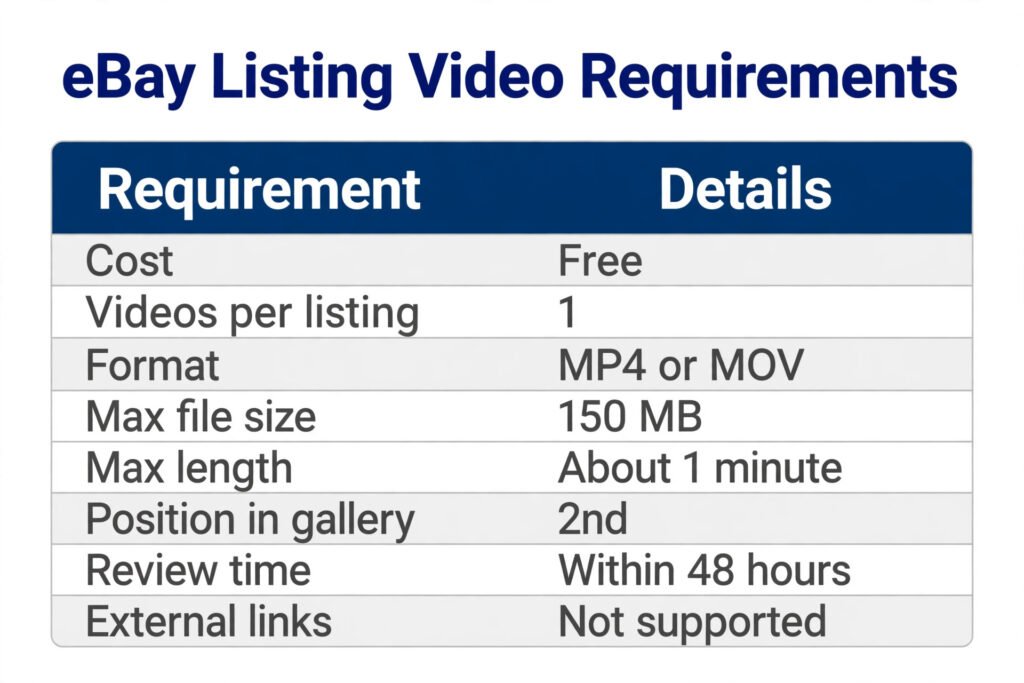
Two of these numbers deserve a closer look. “About one minute” is eBay’s own wording — it is not a hard 60-second cut-off printed anywhere on the help page, but every guide that has tested the limit, and eBay’s own summary answers, treat one minute as the working maximum. Film to 60 seconds and you will not be caught out. The 150 MB cap is generous for a one-minute clip: a minute of 1080p phone video is usually 60–130 MB, so most phones will pass without compressing. If your file is over the cap, trim the length before you lower the quality — a shorter, sharp clip beats a long, blurry one.
The content rules are the same as for the rest of the listing. The video must be footage you created yourself — no clips copied from websites or searches, no third-party content or intellectual property without written permission, no poor-quality video, and nothing that directs buyers off eBay, including contact information or web links. eBay reviews the video before it goes live, and a clip that breaks those rules is the most common reason a review stretches past the usual 48 hours or never posts at all.
How to Add a Video to an eBay Listing on a Computer
The web browser is the most reliable way to add a video, and it is the route eBay documents first. It works the same way whether you are creating a new listing or revising one that is already live.
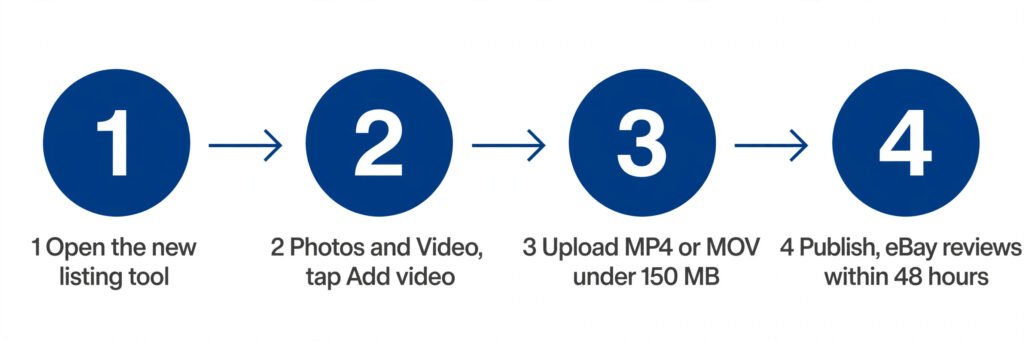
Step 1: Open the listing form in the new listing tool. From Seller Hub, choose Create listing and then Single listing, or open an existing listing and choose Revise. If you do not see an Add video button anywhere in the form, you are probably still on eBay’s classic view — click “Try the new listing tool” in the top right corner of the page and the video option appears.
Step 2: Find the Photos & Video section. Scroll to the section where you add your photos. The video control sits in the same place: a button labelled Add video.
Step 3: Upload the file. Click Add video and choose the file on your device, or drag and drop the video onto the web page. eBay also offers Import from mobile and Import from web buttons if the clip lives on your phone or in cloud storage. The file must be MP4 or MOV and under 150 MB.
Step 4: Finish and publish the listing. Fill in the rest of the listing as normal and publish. The video is uploaded with the listing, reviewed by eBay, and posted to the gallery within 48 hours — up to seven business days during peak periods. You do not need to do anything else; there is no separate “publish video” step.
If you list in bulk or through software, eBay offers two other routes. You can integrate directly with eBay’s Media API to upload videos and attach them to listings, following its “Managing videos” documentation, or you can list through certain third-party providers — check with your provider whether videos are supported and how to upload them. For most sellers the browser upload is the whole job.
How Do I Add a Video to an eBay Listing From My iPhone?
This is where sellers get confused, because the answer depends on which eBay app you are using — and eBay’s own help page draws the line plainly.
My eBay app users can upload a video. When you are listing an item in the eBay app, tap the + symbol in the Photos and video section of the Listing summary page and choose your clip. The same limits apply: MP4 or MOV, 150 MB, about one minute.
Seller Hub app users cannot — yet. eBay’s help page says video upload in the app is not currently available for Seller Hub users, though it will be available soon, and that Seller Hub users should list using a web browser to upload a video in the meantime. If you manage your shop in the Seller Hub app and the video option is missing, that is why. It is not a fault with your account or your phone.
The practical workaround takes about a minute. Open eBay in your phone’s web browser — Safari on an iPhone, Chrome on Android — sign in, and open the listing form there. The mobile browser version of the listing tool has the same Photos & Video section and the same Add video button as the desktop site, and the upload works the same way. If the clip is already on your phone, the browser upload picks it straight from your photo library. Film on the phone, upload through the browser, and you never need to move the file to a computer.
One warning for phone filming: check the file before you upload it. iPhones record in MOV by default, which eBay accepts, but a long 4K clip can pass 150 MB in under a minute. If the upload refuses the file, trim the clip to 60 seconds or drop the recording quality to 1080p and try again — do not keep re-uploading the same oversized file and assuming the button is broken.
How to Add a Video to an Existing eBay Listing
You do not need to end a listing and start again to add a video. Open the live listing, choose Revise, and go to the Photos & Video section of the listing form. The Add video button is there in exactly the same place as when you created the listing. Upload the clip, save the revision, and eBay reviews the video before it appears — the same 48-hour window applies, up to seven business days in peak periods.
Two details matter here. First, if the listing was created in eBay’s classic view, you will not see the Add video button until you switch to the new listing tool — click “Try the new listing tool” in the top right corner, and the option appears. Second, the video is reviewed even on a listing that is already live and selling. The listing stays up while the review runs; only the video is held back. Buyers see the photos as normal, and the video appears in the second gallery slot once eBay clears it.
This makes video a cheap way to refresh a stale listing. A listing that has sat unsold for weeks with photos alone can gain a video without losing its watchers, its views or its sales history — and if you want to know what else to fix on a listing that is not moving, our guide to editing an eBay listing covers the rest of the levers.
Why Can’t I Add a Video to My eBay Listing?
“Why can’t I add a video to an eBay listing?” is one of the most asked questions about this feature, and it has a short list of real causes. Work through them in this order before assuming eBay is broken.
1. You are in the classic listing view. The Add video button only exists in the new listing tool. If the button is missing entirely, look for “Try the new listing tool” in the top right corner of the listing form and click it. This is the single most common cause, and it is the one eBay’s own help page calls out.
2. You are using the Seller Hub app. Video upload is not currently available in the Seller Hub app. My eBay app users can upload, but Seller Hub users must use a web browser — on a computer or on the phone’s browser. Switching to the browser fixes this instantly.
3. The listing already has a video. eBay allows one video per listing. If a video is already attached — even one still under review — there is no second Add video button. To change it, remove or replace the existing video first.
4. The file is the wrong format or too large. Only MP4 and MOV are accepted, and the cap is 150 MB. A file in another format, or a long 4K clip over the cap, will not upload. Convert or trim the file and try again. The same applies to length: aim for about one minute.
5. The video is still under review. “Why isn’t my video uploading to eBay?” is usually this in disguise. The upload worked, but eBay reviews every video before it appears, and the review takes up to 48 hours — up to seven business days in peak periods. A video that is not visible on day one is not a failed upload; it is a video in the review queue. Wait the 48 hours before re-uploading, because uploading the same clip twice only restarts the queue.
6. The listing type does not support video. eBay’s help pages do not publish a full list of excluded categories, but videos are not supported on variation listings — where one listing holds many variants, a single video cannot represent them all. If the Add video button is missing on a variation listing while it appears on your other listings, that is the reason.
If none of these apply, the fault is usually on eBay’s side — a temporary listing-tool problem — and the fix is to try again later from the web browser rather than the app. The eBay Community threads on this question are full of sellers who found the button after switching from the app to the browser, or from classic view to the new tool, which is why those two checks come first.
What Should Your eBay Listing Video Show in 60 Seconds?
You have about one minute, one clip, and a buyer who is deciding in the first few seconds whether to keep watching or tap back to the search results. Film the video like a buyer would watch it: front-load the proof, and leave the detail for the end.
Seconds 0–10: the item, whole, in good light. Start with a slow turn of the item on a plain background, the way your main photo shows it. The buyer should recognise the listing they just tapped within two seconds. If the item is clothing, hold it up at full length. If it is electronics, show the front and the screen on.
Seconds 10–30: the thing photos cannot show. This is the whole point of the video. Switch the item on. Open and close it. Zip the jacket, spin the wheels, play the instrument, show the clasp working. A watch that ticks, a lamp that lights, a bag whose zip runs smoothly — these are the proofs a still photo cannot give, and they are what kill a buyer’s doubt.
Seconds 30–45: condition, honestly. Move the camera slowly over the wear a buyer would ask about: the scuff on the corner, the faint mark on the screen, the stitching on a used bag. Showing a flaw on video does two jobs at once — it stops the return that comes from a surprise, and it tells the buyer the rest of the listing is honest too.
Seconds 45–60: scale and the extras. Hold the item next to a hand or a familiar object so the buyer can judge the size, then show what comes with it: the box, the charger, the strap, the manual. End on the item at rest, the way the main photo shows it.
Film in daylight or under one bright lamp, keep the phone steady — prop it on a stack of books if you have no tripod — and do not add music. eBay reviews the video, and a clip with copyrighted music is a clip that can be held up in review. Your own voice describing the item is fine, but silence with clear pictures is better than a soundtrack that risks the upload. eBay itself suggests the same kinds of clips for sellers who are stuck for ideas: product instructions and how-to videos, installation guides, do-it-yourself videos, unboxing videos, and videos that clarify an item’s condition, such as showing scuffs, nicks or tears.
Can You Add a YouTube Video to an eBay Listing?
No. You cannot add a YouTube video to an eBay listing, and you cannot link to a video hosted anywhere else instead of uploading a file. eBay’s help pages say external video links are not supported, and the upload form accepts only a file from your device — MP4 or MOV, under 150 MB. A YouTube link pasted into the listing description will not play as a video, and a listing that promises a video the buyer has to leave eBay to watch is a listing that loses the buyer.
This matters because the wrong advice is still ranking. One guide still in Google’s results tells sellers that eBay does not host videos and that the correct method is to upload to YouTube, set the video to unlisted, and paste the embed code into the listing’s HTML description. That advice was written for a system that no longer exists — eBay now hosts the video itself, plays it in the gallery, and reviews it before it goes live. Following the old advice wastes an afternoon and leaves the listing with a dead embed where the video should be. Upload the file to eBay directly; that is the only route that works.
The same rule applies to messages. Sellers sometimes ask whether they can send a video to a buyer through eBay messages — for example, to show a fault or demonstrate the item before dispatch. eBay’s video help pages say nothing about sending videos in messages, and the video rules bar any clip that directs buyers off eBay, so do not work around the listing to share one. If a buyer asks for a video, add it to the listing itself, where every buyer can see it and eBay’s review has cleared it.
Is Adding a Video to Your eBay Listing Worth It?
The video costs nothing — eBay says so on its own help page — so the question is not what it costs but what it returns. A video that turns one extra viewer into one extra buyer pays for itself in a single sale, because there is no video fee to pay back. The maths below uses the same verified fee rates as the rest of this site: in the US, a final value fee of 13.6% of the total sale plus $0.40 per order; in the UK, for business sellers, 12.9% plus a 0.35% regulatory operating fee plus £0.40 per order plus 20% VAT on the fees. UK private sellers pay no final value fee at all.
| One extra sale | Sale price | Your cost* | Postage label* | eBay fees | Your profit |
|---|---|---|---|---|---|
| US — $60 item | $60 | $20 | $5 | $8.56 | $26.44 |
| US — $25 item | $25 | $10 | $2.50 | $3.80 | $8.70 |
| US — $100 item | $100 | $40 | $8 | $14.00 | $38.00 |
| UK business — £60 item | £60 | £20 | £3.50 | £10.02 | £26.48 |
| UK business — £25 item | £25 | £10 | £2.50 | £4.46 | £8.04 |
| UK business — £100 item | £100 | £40 | £5 | £16.38 | £38.62 |
| UK private — £60 item | £60 | £20 | £3.50 | £0.00 | £36.50 |
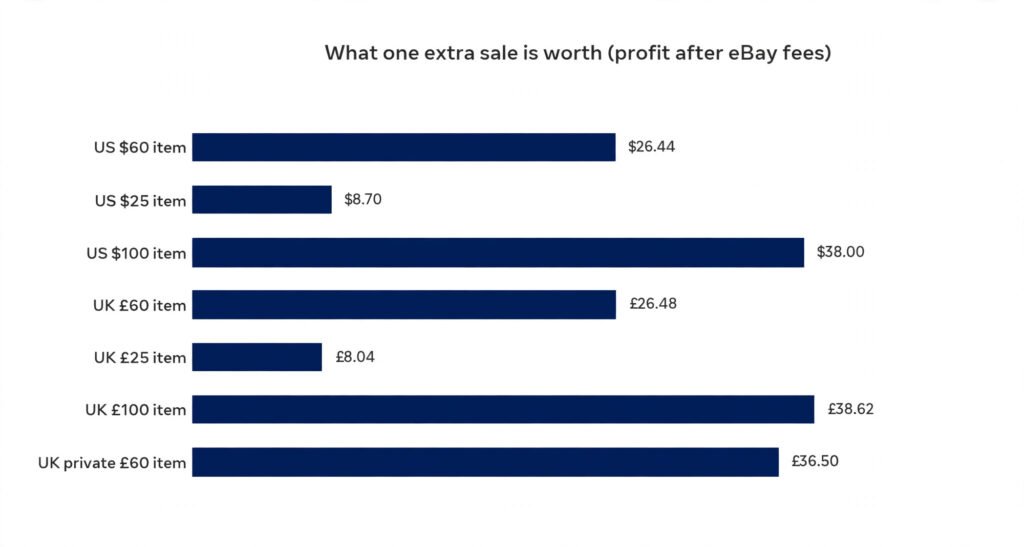
Read the table as the value of a single converted viewer. On a $60 item in the US, one extra sale is $26.44 of profit after fees; on a £60 item for a UK business seller it is £26.48, and for a UK private seller — who pays no final value fee — it is £36.50. Ten extra sales at $60 is $264.40 of profit in the US and £264.80 in the UK. The examples assume free postage to the buyer, so the label cost is yours; the starred figures are example assumptions, labelled here and in the calculator.
Run your own numbers before you list — the eBay Fee & Profit Calculator takes any sale price, postage and costs and shows the same fee breakdown, so you can see what one extra sale is worth on your own items. The honest limit is that eBay publishes no figure for how much a video lifts conversion, and this article does not invent one: some guides quote figures like “up to 35%”, but eBay itself gives no such number, so treat any percentage you see as a guess. What is certain is the cost side of the equation — zero — and the fee side, which the table above shows exactly. A free feature that can only add a sale, on a listing you have already written, is the cheapest improvement on eBay after the title itself.
Frequently Asked Questions About Adding Videos to eBay Listings
How do I add a video to an eBay listing from my iPhone?
In the My eBay app, tap + in the Photos and video section of the Listing summary page and pick your MP4 or MOV clip. The Seller Hub app cannot upload video yet, so use your phone’s web browser instead and tap Add video in the Photos & Video section. Same limits: one video, 150 MB, about one minute.
Does eBay accept videos?
Yes, eBay accepts videos on listings as a free feature for all sellers, in the app, the mobile browser and the web browser. The video must be MP4 or MOV, under 150 MB and about one minute long, and eBay reviews it before buyers can see it. Only one video per listing, shown second in the gallery.
How long of a video can you add to an eBay listing?
About one minute. eBay’s help pages give the limit as “about one minute long” alongside a 150 MB file-size cap, so film to 60 seconds and you will stay inside it. A one-minute phone clip at 1080p is usually 60–130 MB, so it fits the size cap as well. Longer clips risk being refused at upload or held in review.
What video format can I upload to eBay?
eBay accepts MP4 and MOV files only, under 150 MB and about one minute long. The clip must be footage you created yourself — no borrowed clips, no third-party content and no copyrighted music. Convert any other format first; YouTube and other external video links are not accepted as a substitute for uploading a file.
Why can’t I add a video to an eBay listing?
The form is in eBay’s classic view: click “Try the new listing tool” to reveal the Add video button. Or you are in the Seller Hub app, where video upload is not available yet — use a web browser. Also check for a video already attached, a wrong-format or oversized file, or a clip still in the 48-hour review queue.
How many videos can I upload to eBay?
One video per eBay listing, shown second in the photo gallery. There is no published limit on how many listings can carry a video, and you can reuse the same clip on multiple listings — upload once, then attach it to each listing selling the same item. Each upload is reviewed separately and takes up to 48 hours to appear.
Sources: eBay help, “Adding a video to your listing” — US (ebay.com), UK (ebay.co.uk) and export (export.ebay.com) pages, all read live on 19 November 2026 with no errors. The “second in the gallery” position and the classic-view “Try the new listing tool” note are stated on eBay’s export page; the US and UK pages do not give a gallery position. eBay’s video pages say nothing about sending videos in messages. Fee rates verified 31 October 2026: US final value fee 13.6% of the total sale + $0.40 per order; UK business 12.9% + 0.35% regulatory operating fee + £0.40 per order + 20% VAT on fees; UK private sellers pay no final value fee. All fee maths in this article was recalculated for this article. The 60-second filming plan, the shot list, the file-size rule of thumb and the phone-browser workaround are practical seller guidance drawn from eBay’s stated rules, not eBay-published instructions. eBay publishes no figure for how much a video lifts conversion, and none is claimed here.