How to Add Discount on TikTok Shop Without Losing Money

To add discount on TikTok Shop, open Seller Center, go to Promotions, then Promotional Tools, then Product Discount, and click Create. Choose a percentage or fixed price, pick your products, and set a period of about 14 days. A 20% discount on a $50 product costs $9.40 of profit, so it only pays when orders rise by half.
A discount is the fastest lever a TikTok Shop seller has — and the easiest way to sell at a loss without noticing. The button is simple. The maths behind it is not. TikTok takes its referral fee on the price the customer actually pays, so a discount does shrink your fee bill slightly, but it shrinks your profit far more. That is the trade every discount hides: you are buying extra orders with your own margin. At Zyrro, we checked the official Seller Center help pages and ran the numbers on a $50 sale, so this guide gives you both halves — the exact clicks to set a discount up, and the exact point where a discount stops paying.
What is a Product Discount on TikTok Shop?
A Product Discount is TikTok Shop’s built-in tool for cutting a product’s price. According to TikTok’s Seller Center help page, it lets you set a percentage off (for example 20% off) or a fixed price (for example $20) on a product or a single variation of it, straight from Seller Center. Buyers see the discounted price and the original price crossed out on the product page, in your showcase, in short videos, and during a live broadcast — and they can buy at the discounted price right inside the live.
Two details from the same help page matter more than the setup itself. First, when several discounts apply to one product, TikTok shows the buyer the most favourable price automatically — and a Flash Deal always wins over a Product Discount. Second, the discount applies at product or variation level, so on a multi-variation listing you can discount one size or colour and leave the rest at full price. A fixed-price discount is the exception: on a multi-SKU product it applies to every SKU.
The discount rate you can set is 5% to 90%. TikTok’s own help page still carries older wording that says the range is 1% to 99% and changes to 5% to 90% after 30 September 2024 — that date has passed, so 5% to 90% is the range you will see in Seller Center today. If you sell through Shopify, note that fixed-price discounts do not work for Shopify sellers; percentage discounts do.
How to add discount on TikTok Shop
The whole setup takes about five minutes once your products are listed. Do it on a desktop if you can — the full Promotions menu is there, and bulk upload only works from a computer. The seller app can create a discount too, and the steps for that are below.
On desktop: Seller Center step by step
- Sign in to TikTok Shop Seller Center for your market (seller-us.tiktok.com in the US, seller-uk.tiktok.com in the UK).
- Open Promotions, then Promotional Tools, then Product Discount, then click Create.
- Fill in the basic information: a promotion name, the period, and the discount type — Percentage Off or Fixed Price.
- Set the period. TikTok’s own guidance is that discount periods are usually about 14 days: a shorter period creates urgency and drives immediate purchases, while a longer period suits products with low sales. Pick the length to match the job the discount is doing.
- Select your products. You can set the discount at product level or at SKU (variation) level. Click Select products, then set the discount details and the purchase limit for each one — individually, or in bulk by filling in the top row, ticking all products, and clicking Update.
- The purchase limit is per SKU, not per product: if you set a limit of 2, a buyer can buy 2 pieces of each variation, not 2 pieces in total.
- Click Submit. The discount goes live at the start time you set, and buyers see the reduced price with the original price struck through.
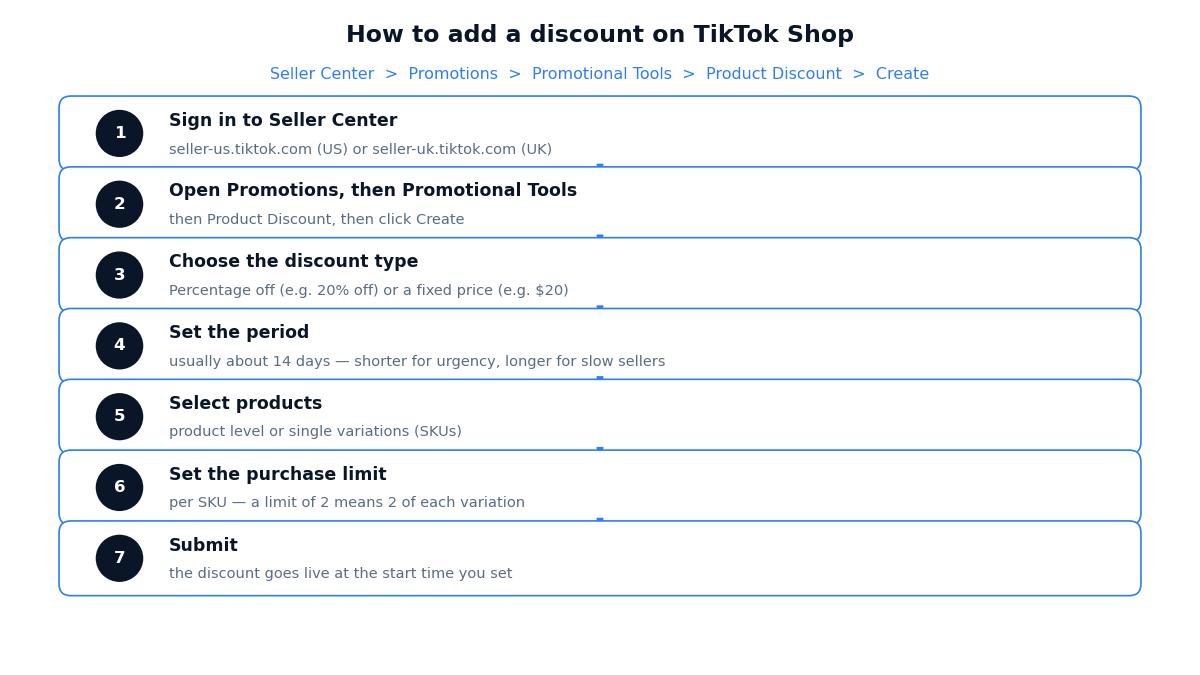
Figure 1: The click path to create a Product Discount in Seller Center. The same Promotions menu holds coupons, Flash Deals and bundle tools — see the comparison table below before you pick one.
How to add a discount on TikTok Shop in the seller app
If you are away from a desk, the TikTok Shop seller app supports the same tool. Open the app, go to Home, then Promotions, then Product Discount, then Create Product Discount, and fill in the same fields: name, period, discount type, products, purchase limit. The app is fine for one or two products. For a whole catalogue, use the desktop bulk upload below instead — tapping through dozens of listings on a phone is where mistakes creep in.
Adding discounts in bulk with an Excel upload
For ten products or more, bulk upload is the reliable route. On the Product Discount page, go to Select Products, then Bulk upload, then Download Template. You need the Product ID and SKU ID for every item, which you can export from Products, in the Batch Tool tab. Fill in the template — only .xlsx files are accepted — and upload it. If the upload fails in full or in part, TikTok returns a revised file that shows why each row failed, so fix the rows, remove the “reason for failure” column, and upload again. Rows that succeeded already appear in your Products list, so you only re-upload the failures.
How do I add a discount code on TikTok Shop?
This is the question sellers actually type into Google most often, and it has two different answers depending on what you mean by “code”. A Product Discount needs no code at all — the lower price is automatic, and every buyer sees it. A coupon is the code version: you create it under Promotions, buyers claim it or enter it at checkout, and it applies on top of the listing price. If you want every visitor to see a lower price, use a Product Discount. If you want to reward a specific audience — your followers, the buyers from one video, or the customers in a live — a coupon is the better tool, because only the people who have the code get the deal.
Buyers also get platform-funded vouchers from TikTok itself, which appear in their coupon wallet and stack with your seller discount in many cases. You do not control those, and you do not pay for them — TikTok funds them. The discount that comes out of your pocket is always the one you set yourself, so that is the one the profit maths below is about.
Product Discount vs coupon vs Flash Deal: which discount tool should you use?
TikTok Shop has four seller-facing promotion tools, and they do different jobs. Picking the wrong one is the most common discount mistake — a Flash Deal used like a permanent price cut, or a coupon used where an automatic discount would have converted better. The table below compares them on what TikTok’s own help pages and seller guides say about each.
| Tool | What the buyer sees | Best for | Watch out for |
|---|---|---|---|
| Product Discount | Lower price with the original crossed out, on the product page, in videos and in lives | A planned sale on chosen products; the everyday discount tool | Fixed price does not work for Shopify sellers; applies to all SKUs on multi-SKU products |
| Coupon | A code or voucher the buyer claims or enters at checkout | Rewarding followers, one video’s audience, or live viewers | Only buyers with the code benefit — it will not lift a cold listing |
| Flash Deal | A time-limited deep discount, shown as the deal price | Short bursts of urgency; clearing slow stock fast | Takes precedence over a Product Discount, so it overrides your other pricing while it runs |
| Bundle Deal | Two or three products sold together at one bundle price | Raising the average order value instead of cutting a single price | The bundle price must stay below the original total, and the buyer has to select the bundle — adding items separately does not apply it |
One rule covers all four: when several discounts stack on one product, TikTok shows the buyer the best price and a Flash Deal wins outright. That is convenient for the buyer and dangerous for the seller, because a Product Discount plus a coupon plus a Flash Deal can quietly add up to a price you never intended. TikTok now shows a real-time alert when your combined promotions reach 80% off or more — treat any alert like that as a stop sign, not a suggestion, and re-check the final price before you publish.
What does a discount actually cost you? The profit maths on a $50 sale
A discount feels free because no money leaves your account to set it up. It is not free. Every dollar you cut from the price comes straight out of your profit, minus one small saving: TikTok’s referral fee is charged on the price the customer actually pays, so a lower price means a slightly lower fee. That saving is small — 6% of the cut — and it never comes close to covering the cut itself. Here is the maths on a real example, so you can see the trade before you make it.
The example below is a $50 beauty product sold in the US. The assumptions are labelled: product cost $15.00, FBT fulfilment $4.28 (the lightest tier on TikTok’s FBT rate card effective 13 July 2026, as reported by seller guides — TikTok’s own card needs a Seller Center login, so confirm your rate). The referral fee is 6%, the standard US rate on TikTok’s public category table. Some seller reports claim the US rate rose to 8% in August 2026, but no official TikTok page confirms that, so 6% is used here — if your Seller Center shows 8%, your profit is lower than the figures below. Run the same numbers through our TikTok Shop Fee & Profit Calculator with your own cost and rate to get your exact figures.
Worked example: 20% off a $50 product in the US
| Full price $50 | 10% off — $45 | 20% off — $40 | 30% off — $35 | |
|---|---|---|---|---|
| Sale price | $50.00 | $45.00 | $40.00 | $35.00 |
| Referral fee (6%) | $3.00 | $2.70 | $2.40 | $2.10 |
| FBT fulfilment | $4.28 | $4.28 | $4.28 | $4.28 |
| Product cost | $15.00 | $15.00 | $15.00 | $15.00 |
| Profit per order | $27.72 | $23.02 | $18.32 | $13.62 |
| Profit margin | 55.4% | 51.2% | 45.8% | 38.9% |
Read the 20% column carefully, because it is the one most sellers get wrong. The price cut is $10.00, but the profit falls by $9.40 — from $27.72 to $18.32. The missing $0.60 is the referral fee saving: at $40 the fee is $2.40 instead of $3.00. So a 20% discount costs you about a third of your profit on this product. It only pays if it brings in enough extra orders to cover that gap, which is the next section’s question.
The maths gets worse the moment a creator is involved. TikTok’s affiliate commission is set by you, anywhere from 1% to 80%, and it is charged on the discounted price. At a 10% creator commission on the $40 discounted price, that is another $4.00, and your profit falls to $14.32 — a 35.8% margin. At 15% commission it is $6.00 and your profit is $12.32. Work out the combined cost before you stack a discount and a creator campaign on the same product: our TikTok Shop Affiliate Commission Calculator shows what each commission rate leaves you at any price.
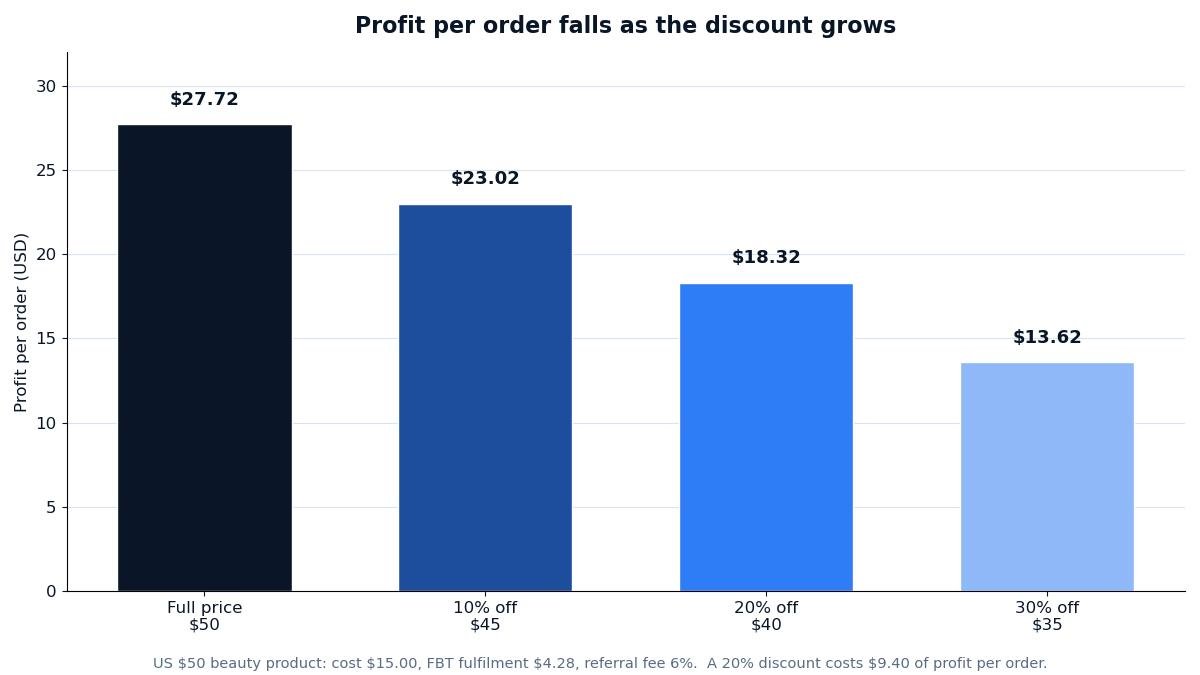
Figure 2: Profit per order on the $50 US example at 0%, 10%, 20% and 30% off. The fee saving from a discount is real but tiny — 6% of the cut — so profit falls almost dollar for dollar with the price.
Worked example: 20% off a £40 product in the UK
The UK maths works the same way, with one different rate: TikTok’s UK commission is 9%, inclusive of VAT, on most categories (selected Electronics and Beauty & Personal Care categories pay a reduced 5% — check your product’s category in Seller Center). The example is a £40 product with a £12.00 product cost and £3.50 self-fulfil postage, both labelled assumptions.
| Full price £40 | 10% off — £36 | 20% off — £32 | |
|---|---|---|---|
| Sale price | £40.00 | £36.00 | £32.00 |
| Commission (9%) | £3.60 | £3.24 | £2.88 |
| Postage | £3.50 | £3.50 | £3.50 |
| Product cost | £12.00 | £12.00 | £12.00 |
| Profit per order | £20.90 | £17.26 | £13.62 |
| Profit margin | 52.2% | 47.9% | 42.6% |
A 20% discount on the £40 product gives up £7.28 of profit per order — the £8.00 price cut minus a £0.72 commission saving. UK sellers should also remember that a discounted order that gets returned still costs money: the return shipping and the refund handling come out of your side, so a discount that only just breaks even on a kept order loses money on a returned one. Our guide to how to manage returns on TikTok Shop covers the return deadlines and costs that sit behind every sale.
What is the biggest discount you can offer before you lose money?
The break-even discount is the point where the sale price exactly covers your costs — product cost, fulfilment, and the referral fee on that lower price. For the US $50 example, the break-even price is $20.51, which is a 59.0% discount. With a 15% creator commission on top, the break-even price rises to $24.41, a 51.2% discount. For the UK £40 example, the break-even price is £17.03, a 57.4% discount.
Those are hard ceilings, not targets. A discount anywhere near break-even leaves you working for nothing, and a single return pushes the order into a loss. TikTok’s own over-discounting alert fires at 80% combined discount — well past the point where almost any product loses money — so do not treat the absence of an alert as proof a discount is safe. Set your own ceiling from the break-even maths above, and never discount past it.
How big a discount should you offer on TikTok Shop?
There is no universal “best” discount percentage. There is only the discount that buys enough extra orders to pay for itself. The table below shows, for the US $50 example, how many extra orders each discount level needs before your total profit matches what you made at full price.
| Discount | Sale price | Profit per order | Orders needed to match full-price profit |
|---|---|---|---|
| 0% (full price) | $50 | $27.72 | 1.00× |
| 10% off | $45 | $23.02 | 1.20× |
| 20% off | $40 | $18.32 | 1.51× |
| 30% off | $35 | $13.62 | 2.04× |
A 10% discount is the easy one: you need just 20% more orders, and a small price cut on a product page often delivers that. A 20% discount needs 51% more orders — a big ask unless the discount is paired with a video or a live that actually drives traffic. A 30% discount needs double the orders, which is why deep discounts belong on slow stock you need to clear, not on your best sellers.
Three rules of thumb follow from the numbers. First, start at 10% and measure: if orders rise by more than 20%, the discount is paying, and only then consider going deeper. Second, match the discount to the job — 10% to nudge a product that already sells, 20% to launch a new listing or support a live, 30% or more only to clear stock you would otherwise write off. Third, set an end date of about 14 days, as TikTok suggests, and review the result when it expires instead of letting the discount run forever. A permanent discount is not a promotion; it is a price cut, and your customers will learn to wait for it.
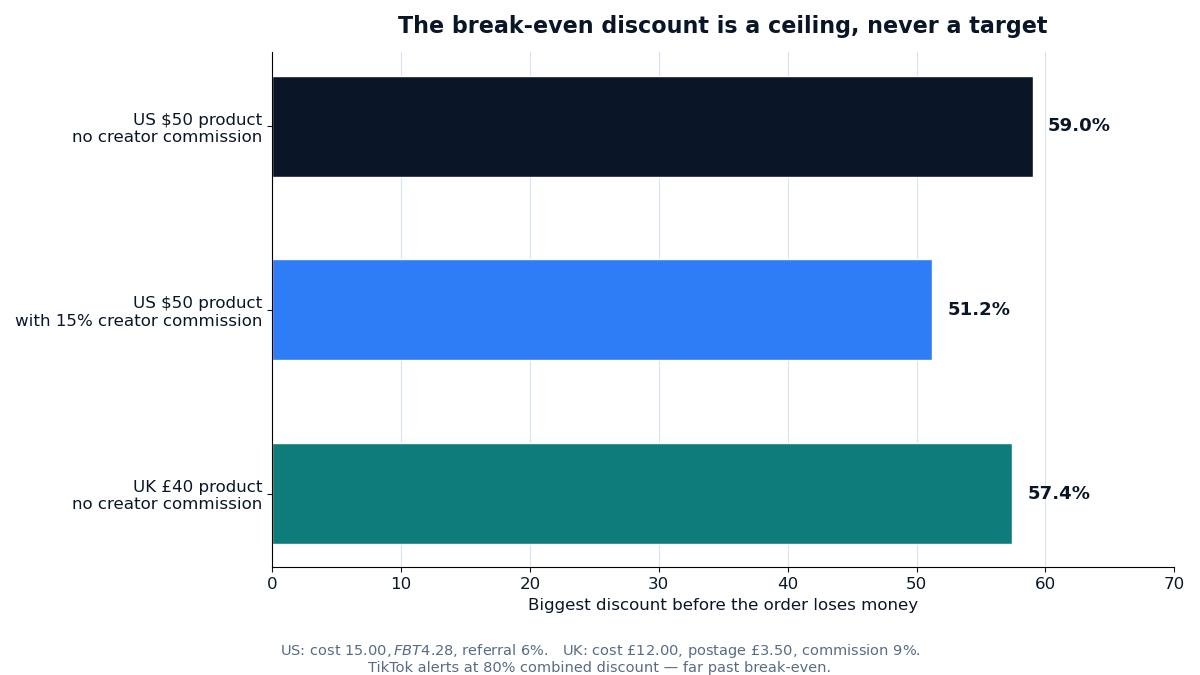
Figure 3: The biggest discount each example can carry before the order loses money. The US break-even is 59% with no creator commission and 51% with a 15% commission; the UK break-even is 57%. Treat these as ceilings, never as targets.
Why is my TikTok Shop discount not showing?
If you set a discount and the product page still shows the full price, check these in order. First, the start time: a discount only appears once its period begins, so a promotion set to start tomorrow is invisible today. Second, the strikethrough rule: TikTok may not show the crossed-out original price on a newly listed product with no sales history, because it cannot verify the list price — the discount itself still applies at checkout, but the “was” price does not display until the product has sales at the original price. The same happens if TikTok judges your list price misleading compared with the price buyers actually paid in the past; in that case, review the list price and make sure it reflects the real retail value.
Third, check for a stronger promotion overriding yours: a Flash Deal takes precedence over a Product Discount, so while a Flash Deal runs, buyers see the Flash Deal price, not yours. Fourth, check the product selection: a discount set at variation level only applies to the variations you picked, and a fixed-price discount on a multi-SKU product applies to all SKUs whether you meant it to or not. Finally, if you used the seller app, confirm the promotion actually submitted — an unfinished draft in the app creates nothing. Manage everything from Promotions, then Sales Promotions, then Product Discount, then My Promotions, where you can edit, deactivate or duplicate a promotion depending on whether it is upcoming, ongoing, deactivated or expired.
Five discount mistakes that cost TikTok sellers money
1. Discounting before checking the break-even. A 30% discount on a thin-margin product can be below break-even before you add the creator commission. Run the fee calculator first; the discount button is quick, the loss is not.
2. Stacking discounts by accident. A Product Discount plus a coupon plus a Flash Deal can add up to 80% off. TikTok alerts you at 80%, but your break-even is usually near 50–60%, so you were losing money long before the alert. Check the combined final price, not each discount on its own.
3. Discounting the product creators are promoting. The creator’s commission is charged on the discounted price, which is good for you — but the creator earns less per sale too, and a deep discount can make your listing less attractive to the creators you need. Keep the combined cost — discount plus commission — inside the break-even.
4. Leaving a discount running forever. A promotion with no end date trains buyers to never pay full price, and it quietly halves your margin on every order for months. Use the usual 14-day period, review the sales lift, then decide again.
5. Discounting to fix a product problem. If a listing does not sell because the photos are weak, the title is wrong, or the reviews mention a defect, a discount buys a few orders and keeps the problem. TikTok’s own advice is the same: if sales do not improve after a competitive price, work on awareness and the listing itself, including TikTok Ads, rather than cutting deeper.
The short version
Adding a discount on TikTok Shop takes five minutes in Seller Center: Promotions, Promotional Tools, Product Discount, Create, then a percentage or a fixed price, your products, and a period of about 14 days. The part that takes thought is the price. On a $50 product, 20% off costs you $9.40 of profit per order and needs 51% more orders to pay for itself; on a £40 product it costs £7.28 and needs 53% more. Start at 10%, measure the lift, keep the combined discount and creator commission well inside your break-even, and never let a discount run without an end date. That is the whole discipline: the button is easy, the maths is the job. Zyrro’s TikTok Shop Fee & Profit Calculator will run your exact numbers in seconds — put your cost, your rate and your discount in before you publish the promotion, not after. For the bigger picture, our TikTok Shop seller tools hub gathers the fee calculator, the affiliate commission calculator, and every seller guide in one place.
Frequently asked questions about discounts on TikTok Shop
How do I add a discount code on TikTok Shop?
Open Seller Center, go to Promotions, then Promotional Tools, and create a Product Discount for an automatic price cut every buyer sees, or a coupon for a code buyers claim or enter at checkout. A Product Discount needs no code; a coupon suits rewards for followers or live viewers, not a general sale.
How to add a discount to a TikTok Shop product?
In Seller Center on a desktop, go to Promotions, then Promotional Tools, then Product Discount, and click Create. Choose percentage off or a fixed price, pick the product or variation, set the purchase limit and a period of about 14 days, then submit. In the seller app the path is Home, then Promotions, then Product Discount, then Create Product Discount.
How do I add a discount on TikTok?
If you mean as a seller, use the Product Discount tool in TikTok Shop Seller Center, not the TikTok app itself — the app is for buyers. As a buyer, discounts appear automatically on product pages, in your coupon wallet, and during lives; claim any voucher shown before checkout and it applies to that order.
How do I apply a discount code on TikTok Shop?
As a buyer, add the item to your basket, go to checkout, and open the coupons section, where claimed codes appear — select one and the total updates before you pay. As a seller, you create codes under Promotions; buyers apply them at checkout. If a code does not apply, check its minimum spend, expiry, and product limits.
How do I add a promo code to my TikTok Shop?
Create a coupon under Promotions in Seller Center, set its value, which products it covers, and its start and end dates, then share the code with the audience it is for — your followers, one video, or a live. Platform-funded vouchers from TikTok itself are separate: they appear in buyers’ wallets automatically and you neither create nor pay for them.
How to add a flash sale on TikTok Shop?
A flash sale is a Flash Deal, created under Promotions in Seller Center. Set a short window and a deep discount, and remember a Flash Deal takes precedence over a Product Discount while it runs. Use it for short bursts and slow stock, not as a permanent price, and keep the combined discount inside your break-even.