How to Do a Flash Sale on TikTok Shop: Setup, Rules & Profit Maths (2026)

A flash sale on TikTok Shop is a limited-time discount you create in Seller Center that overrides your listing price and shows buyers a countdown timer. This guide shows how to set one up, how the three flash sale types differ, the lowest-price rule that decides whether your price is accepted, and the profit maths on a real $50 sale.
All fee figures in this guide come from TikTok’s own Seller Center pages, checked live by Zyrro for this guide.
What Is a Flash Sale on TikTok Shop?
A flash sale is a seller-funded, time-limited discount on TikTok Shop. You pick a product (or a single variation of it), set a lower deal price and a start and end time, and TikTok shows buyers the deal price with a “Flash Deal” logo and a countdown timer on the product page — and a lightning-bolt logo if they buy during a livestream. When the sale ends, the price goes back to normal automatically.
Three details matter before you touch any settings. First, the flash sale price overrides your displayed price while it runs — a Product Discount on the same item is ignored until the flash sale ends. Second, you set it at product level or variation (SKU) level, so on a multi-variation listing you can discount one size or colour and leave the rest at full price. Third, it is not available for Shopify sellers — if your TikTok Shop is connected through Shopify, the Flash Sale tool will not be offered to you.
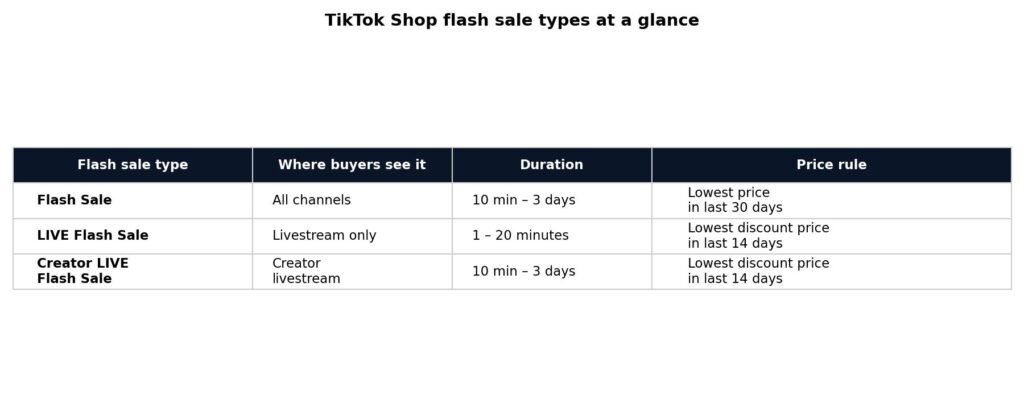
There are three different flash sale types, and sellers mix them up constantly. They have different durations, different price rules and different places they appear — so the first decision is which one you actually want.
Flash Sale vs LIVE Flash Sale vs Creator LIVE Flash Sale: Which One Do You Need?
| Flash Sale | LIVE Flash Sale | Creator LIVE Flash Sale | |
|---|---|---|---|
| Where buyers see it | All channels: store page, Shopping Center, LIVE, short videos | Livestream only (your official account) | Livestream only (a creator’s channel) |
| Duration | 10 minutes to 3 days | 1 to 20 minutes | 10 minutes to 3 days |
| Pre-launch countdown | None | 5 minutes by default | None |
| Price rule | Lower than the lowest product price in the last 30 days | Lowest discount price in the last 14 days AND lowest campaign price in the last 24 hours | Lowest discount price in the last 14 days AND lowest campaign price in the last 24 hours |
| Set up on | Seller Center PC or seller app | Seller Center PC, seller app, or TikTok app | Seller Center PC only |
| Best for | A sale that runs for a day or two across your whole shop | A 10-minute urgency spike in the middle of your own LIVE | Letting a creator push your product with an exclusive deal |
The plain Flash Sale is the default choice for most sellers: it runs for hours or days, shows everywhere your product appears, and needs no livestream. The LIVE Flash Sale is a short, sharp tool — 1 to 20 minutes, shown only during your livestream, with a 5-minute pre-launch countdown that tells viewers a deal is coming. The Creator LIVE Flash Sale is the same idea on someone else’s livestream: you pick up to 50 creators, reserve stock for them, and the deal price appears only on their LIVE channel.
Two precedence rules from TikTok’s own comparison table are worth knowing before you combine types. A single product can hold different flash sale types at the same time, and when more than one applies, the largest discount wins — except that a co-funded flash sale always takes precedence. And while a LIVE Flash Sale is running, campaign prices and platform incentives do not apply on the livestream channel: the LIVE Flash Sale price is the only price viewers there can get.
How to Do a Flash Sale on TikTok Shop
This is the regular Flash Sale — the one that shows on all channels. It takes about five minutes in Seller Center on a PC, and you can also do it in the seller app.
- Open Seller Center and go to Marketing, then Promotions, then Flash Sale. Click Create. (In the seller app the path is Home, then Promotions, then Flash Deal, then Create Flash Deal.)
- Name the promotion and set the period. Give it a name you will recognise later, such as “Weekend Flash Sale — Blue Hoodie”. Set the start and end time: the shortest Flash Sale is 10 minutes and the longest is 3 days.
- Choose product level or variation (SKU) level. Product level discounts every variation of the listing to the same price; variation level lets you discount one size or colour only. On the seller app you can only set product level — variation level needs the PC.
- Set the deal price and the purchase limit. You can set a fixed deal price or a percentage off. The discount range is 10% to 90% — TikTok narrowed it from 5% to 99% on 30 September 2026. Set the total purchase limit (how much stock the sale can sell — it cannot exceed the product’s stock) and the buyer purchase limit (the most one customer can buy). If you set the purchase limit to a number such as 2, a buyer can buy 2 pieces of each SKU under the product, not 2 pieces of the product in total. You can fill in the price and limits at the top, tick all the products, and click Update to apply them in bulk.
- Check the price rule, then submit. TikTok checks your deal price against the lowest-price rule below and shows a warning if it does not comply. Fix the price, then click Agree and Publish.
Buyers see the Flash Deal logo, the time remaining and both prices — deal price and original price — on the product page. If your product is new and has no sales history, TikTok may not show the strikethrough on the original price: it cannot verify a list price it has never seen a buyer pay, so the strikethrough appears only once the product has sales at that price. The same applies if TikTok thinks your list price does not match the price buyers actually paid — it treats that as potentially misleading pricing and hides the strikethrough.
Manage the sale afterwards from Seller Center, then Promotions, then Promotion Tools, then Manage your promotions. From there you can duplicate a promotion to run it again with the same settings, or deactivate it to end it early. The seller app can only view and deactivate a Flash Sale — for anything else, use the PC.
How to Do a LIVE Flash Sale on TikTok Shop
A LIVE Flash Sale runs only while you are live, lasts 1 to 20 minutes, and is built for one moment in a stream: a demo, an unboxing, or a viewer peak. There are three ways to set it up, and they behave slightly differently.
In Seller Center on a PC, go to Marketing, then Promotions, then LIVE Flash Deal, and click Create. Register your LIVE session first — name the promotion, set the period, then pick products at product or variation level. If you choose “effective immediately”, the sale starts within 1 minute and the pre-launch countdown is shortened to under a minute. If you schedule it, the pre-launch countdown is 5 minutes by default.
In the TikTok app, before or during your LIVE, open the LIVE Shopping interface and select LIVE Flash Sale. Only products already in your LIVE Shopping Bag can be selected. Here you can only set a fixed discounted price (not a percentage), and the price must be lower than the lowest price in the last 30 days. Set the total purchase limit, the buyer purchase limit (no more than 99 per buyer), and the duration, then choose Publish — the deal starts after 1 minute — or Publish in 5 mins.
In LIVE Manager during a livestream, open the Flash Sale tab while live and click the “+” button. Pick a product from your LIVE Shopping Bag, then set the price, total purchase limit and per-buyer limit for each SKU — you can batch-edit by percentage or by a fixed dollar amount. Set the countdown timer (10 to 300 seconds) and the sale duration (1 to 20 minutes), then click Create and Publish. If the sale fails to create, a pop-up tells you the reason — usually a price that breaks the lowest-price rule.
One warning applies to all three routes: during a LIVE Flash Sale, campaign prices and platform incentives do not work on the livestream channel. If you are also running a campaign, your LIVE viewers will not see that price — only the LIVE Flash Sale price. Plan the two so they do not fight each other.
There is also a quirk in how TikTok tracks who gets the LIVE price. The channel a buyer added the item from is saved per SKU: if a buyer adds the same SKU to their cart from a different channel or a different creator, the channel source changes and they lose the LIVE Flash Sale price. Leaving the app and reopening it does not change the source. So if a viewer says the deal price vanished at checkout, the usual cause is that they re-added the item from somewhere other than your LIVE.
How to Set Up a Creator LIVE Flash Sale on TikTok Shop
A Creator LIVE Flash Sale puts your deal on a creator’s livestream instead of your own. It is the right tool when your affiliate commission is low and creators need another reason to feature you, or when you want a creator to push a new product that has few reviews.
- Go to Seller Center on a PC — this type is PC-only — then Marketing, then Promotions, then LIVE Flash Deal, and click Create.
- Choose the Creator LIVE deal promotion type. You can set a Creator Flash Sale (the price must be the lowest in 14 days) or a Creator Exclusive Price (a discount of 5% or more).
- Pick your creators. Enter creator usernames or IDs — up to 50 per promotion. If you pick a group of creators rather than one, the stock you allocate is shared across all of them on a first-come, first-served basis, and each creator sees the remaining stock update in real time.
- Set the active dates and the products. The promotion must run for more than 10 minutes and less than 14 days, and the flash sale itself lasts 10 minutes to 3 days. Select products by SKU. For a Creator Flash Sale, the stock you reserve is locked to that creator — it cannot be sold elsewhere while the promotion runs. For a Creator Exclusive Price, stock is not locked, but you can set a total purchase limit.
- Review and publish. Check the deal price against the 14-day lowest-price rule, then click Agree and Publish.
If you set both a regular Flash Sale and a Creator Flash Sale on the same product, TikTok shows the buyer the best price of the two. And if your creator’s audience is small, remember the stock lock: reserved units sit unsold if the creator’s LIVE underperforms, so start with a modest allocation on a first collaboration and increase it only after you see the sell-through.
How Long Does a TikTok Flash Sale Last?
It depends on which of the three types you run, and the limits are set by TikTok — you cannot stretch them.
| Flash sale type | Shortest | Longest |
|---|---|---|
| Flash Sale (all channels) | 10 minutes | 3 days |
| LIVE Flash Sale | 1 minute | 20 minutes |
| Creator LIVE Flash Sale | 10 minutes | 3 days |
In practice, most sellers run a regular Flash Sale for 24 to 48 hours: long enough to catch buyers in every time zone, short enough that the countdown still creates urgency. A LIVE Flash Sale is deliberately tiny — 1 to 20 minutes — because it is a spike inside a stream, not a sale in its own right. If you schedule a LIVE Flash Sale to start later, TikTok gives viewers a 5-minute pre-launch countdown; if you launch it immediately, that countdown shrinks to under a minute.
What Is the Lowest-Price Rule for TikTok Flash Sales?
This is the rule that rejects more flash sales than any other, and it is also the one sellers misunderstand most. TikTok will not let you set a “deal” price that is higher than what buyers recently paid — the discount has to be real.
For a regular Flash Sale, your deal price must be lower than the lowest product price in the last 30 days, including any seller product discount you already applied. Platform promotions and chat coupons do not count. If the product has no order history in the last 30 days, the deal price must simply be lower than the original price.
For a LIVE Flash Sale or a Creator LIVE Flash Sale, the rule is stricter: the price must beat the lowest product discount price from the past 14 days and the lowest campaign price from the last 24 hours. With no order history in the last 14 days, it must be lower than the original price.
The practical consequence is simple: you cannot raise your price and then “discount” it back to the normal price. If your hoodie sold at $40 last week and you list it at $60 today, a $45 flash sale price will be rejected — $45 is not lower than the $40 buyers actually paid. Set your list price honestly, keep it stable for 30 days before a sale, and the price rule stops being a problem.
What Does a Flash Sale Cost? The Profit Maths
A flash sale is free to set up — TikTok charges no fee for creating one. What it costs you is the discount itself, plus the commission on the discounted price. That second part is what sellers forget: TikTok’s referral fee is a percentage of what the buyer actually pays, so a lower sale price means a lower fee in dollars, but the discount comes entirely out of your margin. Work it out before you publish, not after.
The $50 example: full price vs 30% off (US)
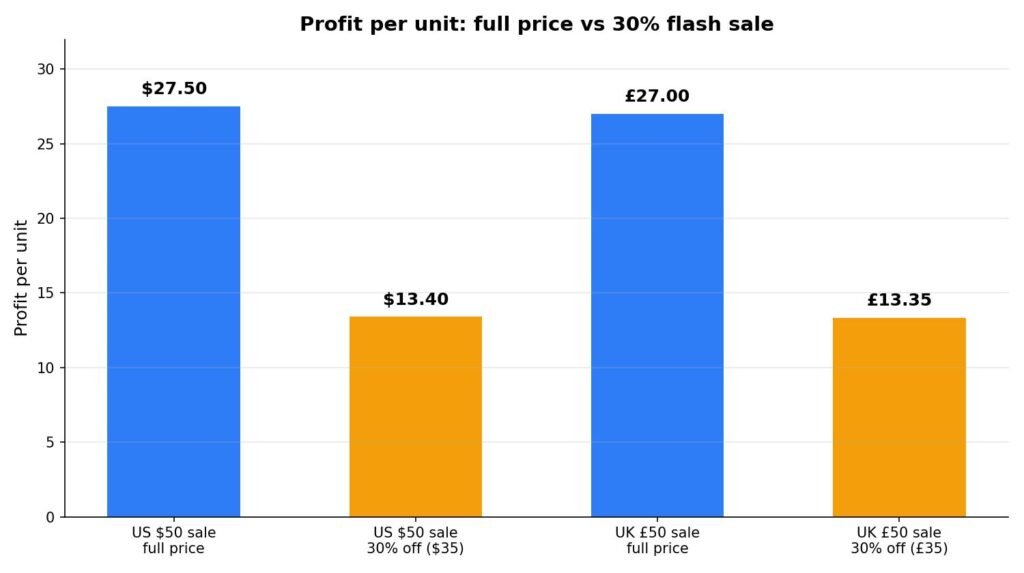
Take a product that sells for $50, costs you $15, and costs $4.50 to ship with your own label. In the US, TikTok charges a 6% referral fee on the price the buyer pays. All figures below were recalculated for this guide; the item cost and the label cost are example assumptions, labelled with an asterisk.
| Full price ($50) | Flash sale, 30% off ($35) | |
|---|---|---|
| Sale price | $50.00 | $35.00 |
| Referral fee (6%) | $3.00 | $2.10 |
| Item cost* | $15.00 | $15.00 |
| Shipping label* | $4.50 | $4.50 |
| Profit per unit | $27.50 | $13.40 |
The 30% discount costs you $14.10 of profit on every unit — $15.00 of discount, partly offset by the $0.90 you save on the referral fee. To come out ahead on profit, the flash sale has to sell 2.05 times as many units as you would have sold at full price: $27.50 ÷ $13.40. If it only doubles your sales, you are roughly level; if it sells 1.5 times as many, you made less money than doing nothing.
The same sale in the UK
In the UK, TikTok’s commission is 9% including VAT. On a £50 product with a £15 cost and a £3.50 label, the full-price profit is £27.00 (fee £4.50). At 30% off (£35), the fee is £3.15 and the profit is £13.35. The maths is nearly identical to the US version — the discount, not the fee rate, is what decides whether a sale pays.
How big a discount can you afford?
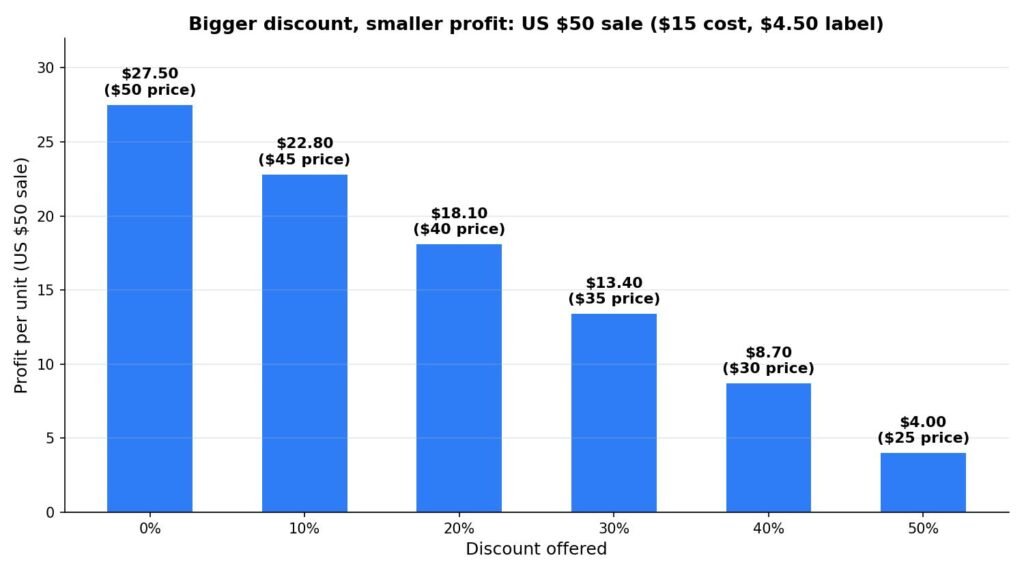
Work backwards from zero profit. In the US example, profit hits zero when the sale price is $20.74 — that is a 58.5% discount. In the UK example, the break-even price is £20.33, a 59.3% discount. Anything deeper than that loses money on every order before refunds and returns are counted. And at 50% off, the US example still makes only $4.00 per unit — a refund on one of those orders wipes out the profit on more than three good ones.
| Discount | Sale price | Referral fee (6%) | Profit per unit |
|---|---|---|---|
| 0% | $50.00 | $3.00 | $27.50 |
| 10% | $45.00 | $2.70 | $22.80 |
| 20% | $40.00 | $2.40 | $18.10 |
| 30% | $35.00 | $2.10 | $13.40 |
| 40% | $30.00 | $1.80 | $8.70 |
| 50% | $25.00 | $1.50 | $4.00 |
Use this table as a template for your own numbers: replace the $50 price, the $15 cost and the $4.50 label with your own, and check the discount you are about to offer. If you want the maths done for you, Zyrro’s free TikTok Shop fee and profit calculator works out the fee and profit on any sale price in seconds, and the TikTok Shop pricing calculator helps you set a price that survives a discount.
What a refund costs on a flash sale order
Refunds hurt more on discounted orders because the fee does not fully come back. In the US, when an order is refunded, TikTok returns the referral fee minus a refund administration fee of 20% of the referral fee, capped at $5 per SKU. On the $35 flash sale above, the referral fee was $2.10, so the administration fee is $0.42 — small on one order, but on a 100-unit flash sale with a 5% return rate, that is five refunds at $0.42 plus the label and the product cost on every returned unit. Build a return rate into your flash sale plan; a sale that looks profitable at 0% returns can be underwater at 5%.
What a creator flash sale costs
If a creator is selling your product during the flash sale, their commission is calculated on the discounted price — and it comes on top of TikTok’s fee. Take a $40 flash deal price on a product that costs $12, with a $4.50 label and a 15% creator commission (TikTok lets sellers set affiliate commission anywhere from 1% to 80%):
| Amount | |
|---|---|
| Deal price | $40.00 |
| Referral fee (6%) | $2.40 |
| Creator commission (15%) | $6.00 |
| Item cost* | $12.00 |
| Shipping label* | $4.50 |
| Profit per unit | $15.10 |
At the full $50 price with the same 15% commission, the same unit makes $23.00. The creator’s cut shrinks with the price — $6.00 instead of $7.50 — which is exactly why a flash sale is a useful sweetener when your commission is too low to get creators interested: the deal price does the persuading that the commission cannot. If you want to model creator payouts properly, see the TikTok Shop affiliate commission calculator.
How Do Flash Sales Stack With Other Discounts?
A flash sale never runs in isolation — your product probably also has a Product Discount, a coupon, or a campaign price. TikTok’s stacking rules decide what the buyer actually pays, and they are not what most sellers expect.
First, a Flash Deal always wins over a Product Discount: while the flash sale runs, buyers see the flash sale price, not your product discount. When the flash sale ends, the product discount takes over again.
Second, TikTok shows a real-time alert when your combined promotions reach 80% off or more. Treat that alert as a stop sign, not a suggestion: your break-even is usually near 50–60% off, so you were losing money long before the alert appeared. Check the combined final price, not each discount on its own. Our guide to adding a discount on TikTok Shop covers the four promotion tools side by side and the stacking mistakes that cost sellers the most.
Third, during a LIVE Flash Sale, campaign prices and platform incentives do not apply on the livestream channel at all — the LIVE Flash Sale price replaces them entirely. And if a regular Flash Sale and a Creator Flash Sale are both live on the same product, TikTok shows the buyer whichever price is lower.
Why Won’t My Flash Sale Price Save?
Most flash sale failures come down to one of a handful of causes, and TikTok usually tells you which one — if you know where to look.
“The price does not meet the requirement.” This is the lowest-price rule above. Your deal price is not lower than the lowest price buyers paid in the last 30 days (regular Flash Sale) or the last 14 days (LIVE and Creator LIVE). Lower the deal price, or wait until the old low price falls out of the window.
The strikethrough price does not show. For a new product with no sales history, TikTok cannot verify your list price, so it hides the strikethrough until the product has sales at that price. It also hides it if your list price does not match what buyers actually paid. The fix is not a setting — it is sales history at an honest list price.
The sale does not appear on the app. Variation-level flash sales and bulk setup need the PC version of Seller Center. The seller app only supports product-level setup, and the TikTok app only supports LIVE Flash Sales for products already in your LIVE Shopping Bag. If a button is missing, you are in the wrong app.
The deal price vanished at checkout. The buyer probably re-added the item from a different channel. TikTok saves the channel source per SKU, and adding the same SKU from another channel or creator changes it — the LIVE price is lost. Ask the buyer to buy directly from your LIVE, not from a re-added cart item.
You sell through Shopify. Flash Sales do not work for Shopify sellers at all. You will need to manage promotions another way, or move the listing to a native TikTok Shop setup.
How Often Should You Run a Flash Sale on TikTok Shop?
There is no limit in TikTok’s rules — the comparison table says the number of flash sale events is unlimited, and one product can hold different flash sale types at the same time. The limit is your buyers’ behaviour, not TikTok’s.
Run flash sales too often and two things happen. Buyers learn to wait for the next sale instead of buying at full price, and your 30-day lowest price keeps dropping — which makes the next flash sale harder to set up, because the price rule measures against the discounted prices you already offered. A sale that runs constantly is not a sale; it is your real price, and TikTok’s price rule will eventually treat it that way.
A practical rhythm for most small sellers: one product at a time, one sale every few weeks, with the discount sized from the profit maths above — not from what feels generous. Pick your best-converting SKU, give it a genuine 24–48 hour window, brief any creators 72 hours ahead so their content lands inside the window, and check afterwards whether unit sales actually rose by the 2.05 times your maths required. If they did not, the next sale needs a smaller discount or a better product — not a longer window.
FAQ
How long does a TikTok flash sale last?
A regular Flash Sale lasts from 10 minutes to 3 days, a LIVE Flash Sale lasts from 1 to 20 minutes, and a Creator LIVE Flash Sale lasts from 10 minutes to 3 days. Most sellers run a regular Flash Sale for 24 to 48 hours, which catches buyers in every time zone while the countdown still creates urgency.
How to start a flash sale on TikTok?
Open Seller Center, go to Marketing, then Promotions, then Flash Sale, and click Create. Name the promotion, set the period, choose product or variation level, set the deal price and purchase limits, then click Agree and Publish. For a LIVE Flash Sale, use LIVE Flash Deal in the same menu instead.
How to turn off a flash sale on TikTok Shop?
Go to Seller Center, then Promotions, then Promotion Tools, then Manage your promotions. Find the sale in the ongoing list and click Deactivate to end it immediately. You can also end a LIVE Flash Sale from the TikTok app by opening the promotions list in your LIVE session and tapping End.
Is the TikTok flash sale real or fake?
A real TikTok Shop flash sale is a seller-funded discount created in Seller Center. It shows a Flash Deal logo, a countdown timer, and both the deal price and the original price on the product page. Be wary of any “flash sale” outside TikTok asking you to pay elsewhere — flash sales always check out inside TikTok Shop.
What does flash sale mean on TikTok Shop?
A flash sale means a product is discounted for a short time, from 10 minutes to 3 days, with a visible countdown timer. The deal price overrides the normal price while the sale runs, and TikTok requires the deal price to be lower than the lowest price buyers paid in the last 30 days (or 14 days for LIVE sales).
Can I use a coupon with a flash sale on TikTok Shop?
Yes, but the Flash Deal price takes precedence: buyers see the flash sale price, and a coupon can still apply on top of it at checkout. TikTok shows a real-time alert if your combined promotions reach 80% off or more. Check the combined final price against your break-even before you publish: the coupon discount comes out of your margin too.
Conclusion
A flash sale on TikTok Shop is a simple tool with expensive failure modes: the wrong type, a price that breaks the lowest-price rule, or a discount that looked generous and turned out to be below break-even. Pick the type that matches where your buyers are — all channels, your LIVE, or a creator’s LIVE — size the discount from your own cost and fee numbers, and let the countdown do the persuading. Zyrro’s TikTok Shop fee and profit calculator will check any deal price against the 6% US or 9% UK commission before you commit to it.
Sources: TikTok Shop Seller Center, “How to Use Seller Flash Sale” (US, updated 24 April 2026); “Seller LIVE Flash Sale” comparison table (US); “TikTok Shop LIVE Promotions Tools” (updated 13 May 2026); TikTok Shop referral fee and commission rates as verified against TikTok’s official Seller Center pages on 31 October 2026 and re-checked 3 and 16 November 2026. Fee figures in the worked examples use the verified 6% US referral fee and 9% UK commission; item costs and label costs are example assumptions, marked with an asterisk. Durations and price rules are as TikTok’s Seller Center comparison table lists them; where TikTok’s AI Overview and People Also Ask answers disagree with those pages, this guide follows the Seller Center pages.