How to Add Products to TikTok Shop: 4 Methods for Sellers (2026)
Short answer: To add products to TikTok Shop, open Seller Center, go to Products > Manage Products, and click Add new product. Fill in the four sections — basic information, product details, sales information and shipping — then submit the listing for review. Quick Listing, Amazon import and bulk upload are faster alternatives.
How to Add Products to TikTok Shop
Adding your first product is the step where most new TikTok Shop sellers get stuck. The shop is approved, the bank account is linked, and then Seller Center asks for a product name, a category, five photos, variations, a shipping weight — and rejects the listing with a one-line reason that explains nothing. It is a small job once you know the flow, and a frustrating loop if you keep guessing at what TikTok wants.
This guide shows you all four ways to add products to TikTok Shop — manual listing, Quick Listing, Amazon URL import, and bulk upload — using TikTok’s own UK Seller Center guide, read on 4 November 2026, with the exact image and title rules that decide whether a listing is approved, and worked examples showing what a $50 or £40 sale actually earns you after fees. Zyrro’s free TikTok Shop Fee & Profit Calculator uses the same rates, so you can run any price through it before you list. One honest note first: most of the pages currently ranking for this question are short videos, two-year-old tutorials, or setup guides where adding products is a single section — not a full written walkthrough of the listing form itself. That is the gap this guide fills.
| Method | Best for | What you need | Limits |
|---|---|---|---|
| Add from scratch (manual) | 1–20 products, full control over every field | Photos, title, price, weight and dimensions | One product at a time |
| Quick Listing | A product that already exists on TikTok Shop | Keyword, GTIN or UPC to find it | Brand authorisation needed; invite-only categories filtered out |
| URL Listing | Moving a listing over from Amazon | Amazon product URL + brand authorisation | Amazon only; one product at a time; no bundles |
| Bulk upload / sync | 20+ products, or a Shopify / Printify catalogue | Excel template or a connected store | Template is category-specific; some categories need qualification files |
What Do You Need Before You Add Products to TikTok Shop?
Prepare these before you open the listing form and the whole process takes minutes instead of an afternoon of back-and-forth.
- An approved TikTok Shop seller account. You register as an individual or a business through Seller Center with a valid ID, tax information and a bank account in a matching name. There is no follower minimum to open a shop — followers only matter later, for creator-side features.
- Your product photos, ready to upload. TikTok recommends at least five images. The first must show a single product on a white background, with no text, icons, borders, colour blocks or watermarks. Lifestyle shots can come later in the gallery, but the first image is the one that gets judged.
- Your price and costs worked out. The category you pick sets your referral fee — 6% for most US categories, 5% for jewellery and pre-owned, 9% including VAT in the UK — so check the fee before you set the price, not after. The worked examples below show the maths.
- Brand authorisation, if the product is branded. If you sell someone else’s brand, TikTok asks for proof that you are the trademark owner, an authorised distributor, or an appointed reseller. Without it, the brand simply does not show to customers — and cloned or imported listings are blocked outright.
- A category check. Some categories are prohibited outright and others need extra approval or certification — cosmetics, supplements and food are the usual ones. Check the prohibited and restricted product lists before you list, because a rejected category can flag the whole application, not just the one product.
- Your TikTok account linked to Seller Center. Linking unlocks product tags in videos and LIVE shopping. Without it, your products are only visible in the Shop tab, which is where the fewest buyers ever look.
How to Add a Product to TikTok Shop Manually (Method 1)
Manual listing is the default route and the one every seller should learn first, because it teaches you the form that every other method fills in for you. In Seller Center, go to Products, then Manage Products, and click Add new product. TikTok’s own guide breaks the form into four parts, and this is what each one actually asks for.
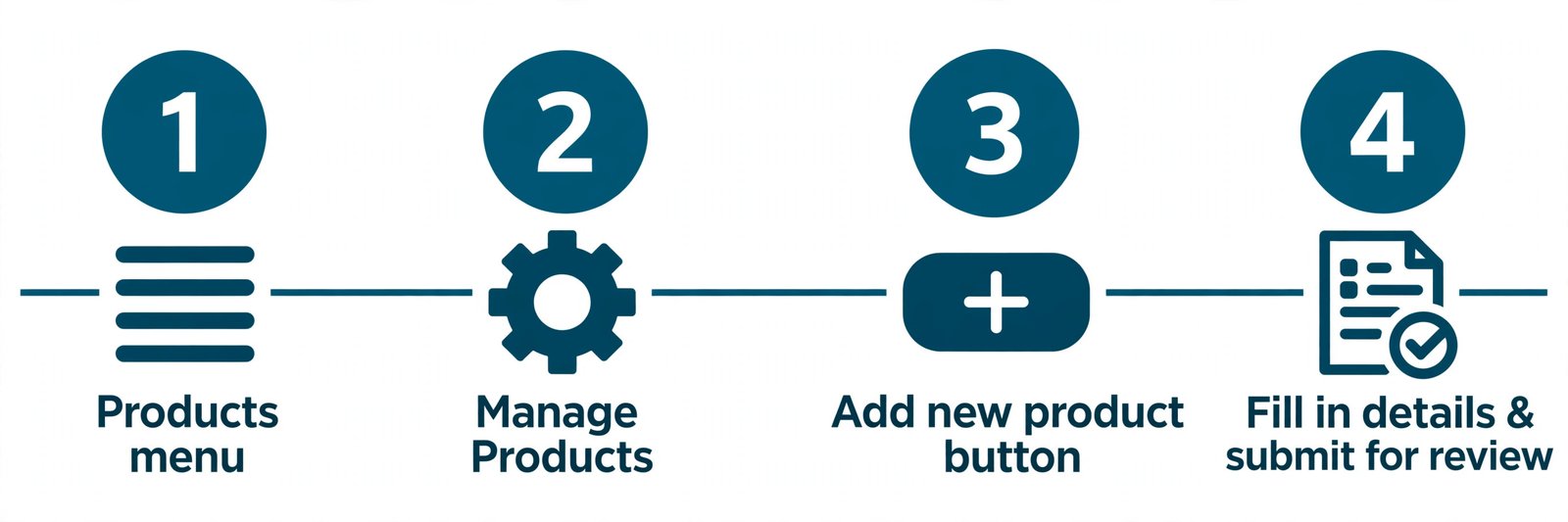
The manual route in four clicks: Products > Manage Products > Add new product > fill in the form and submit for review.
Part 1: Basic information — photos, title, category, brand
Product images. Upload at least five clear, high-quality photos. The first image should display a single product (except for product sets) on a white background, with no text, icons, borders, colour blocks or watermarks. Do not upload the same image more than once — TikTok says so explicitly, and duplicate images are one of the commonest reasons a listing bounces back.
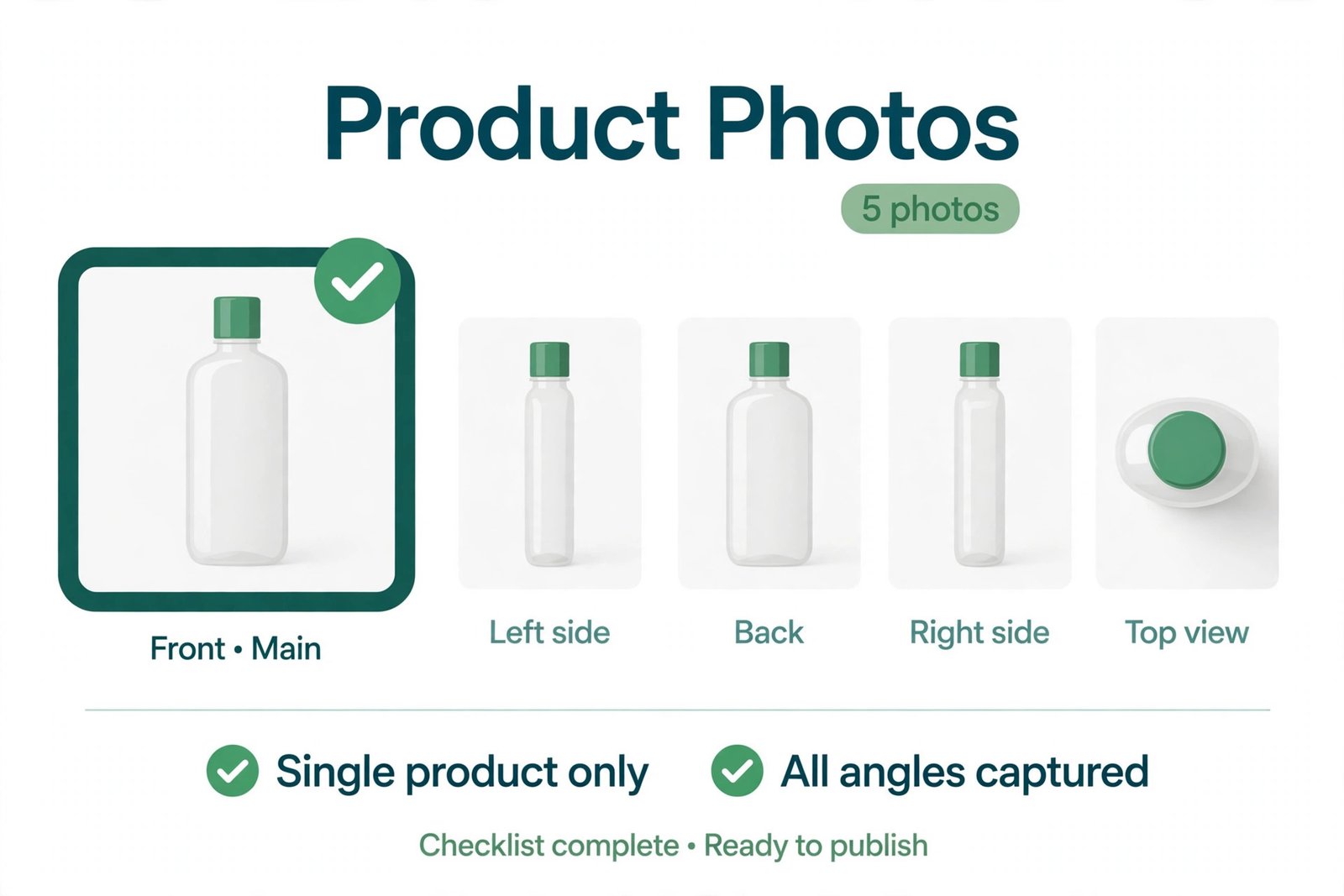
TikTok’s photo rule in one picture: at least five photos, the first one a single product, all angles covered.
Product name. The name must be more than 25 characters including spaces and ideally no more than 80. TikTok suggests the template [Brand] + [Details] + [Application Scope] + [Product Type] + [Main Features] — for example, a velvet lipstick set with its key features in the title — and capitalising the first letter of each word except conjunctions, articles and prepositions. Front-load the words a buyer would actually search for.
Category. The system suggests a category from your product name, and you can change it if a better fit exists. Choose carefully: the category decides which attributes you must fill in, whether you need extra approval, and — as the worked examples below show — what referral fee you pay. A product listed in the wrong category can cost you more on every single sale.
Brand. If the product is branded, you upload certificates proving you are the trademark owner, a first-level authorised seller, or a second-level authorised seller. If you have submitted brand qualifications, “Authorised” shows under the brand name and buyers see the brand on the product page. If not, “Unauthorised” appears and the brand is hidden from customers.
Product attributes. The attribute fields are generated from the category you picked — size, material, colour, and so on. Fill in every required one; a half-finished attributes section is another quiet reason listings sit in review.
Part 2: Product details — description and video
Write a short description of what the product is and why it is worth buying. TikTok’s own guidance is to keep it under 500 characters, organise selling points into separate paragraphs, and not repeat information. You can also let TikTok’s AI draft a description from keywords you enter and then edit it to match your product — but read it before you submit, because a generic AI description is the fastest way to make your listing look like everyone else’s. You can also upload a short video showing the product in use, which helps buyers far more than a fifth still photo.
Part 3: Sales information — variations, price and stock
By default there is a single SKU, but you can enable up to 300 distinct product variations — different sizes, colours and styles — with up to three sales attributes. Upload a unique image for the first variation, because different attributes should have different images, and use Batch Edit to adjust prices and stock across many SKUs at once instead of editing them one by one. For each SKU you enter the price and the quantity available, and a Seller SKU of your own is optional.
Part 4: Shipping — weight and dimensions
Enter the total package weight including the box and packing material — TikTok allows 1 to 220 pounds — and the parcel dimensions in centimetres. Accurate figures matter twice over: they feed the estimated shipping cost the buyer sees, and they are what TikTok uses to check carrier compatibility. Guess the weight and you will either overcharge buyers and lose sales, or undercharge and pay the difference yourself.
When the form is complete you have two choices: Save as Draft, which keeps the listing without submitting it, or Publish, which sends it for review. Every listing is reviewed before it goes live. Seller guides report that most listings are approved within a few hours, and new products can take up to two hours just to appear in Seller Center — so if your product does not show up immediately, wait before you submit it a second time.
How to List an Existing Product with Quick Listing (Method 2)
Quick Listing is TikTok’s shortcut for products that are already on the platform — the same item, or something close enough that its details are worth copying instead of typing. It is the fastest method when it applies, and useless when it does not, so knowing its limits saves you the time of trying it on a product it will never accept.
- Open the Quick Listing Tool. In Seller Center, go to Add New Product and choose Quick Listing Tool.
- Search for the product to clone. Search by keyword, GTIN or UPC and pick the matching product from the results.
- Apply the product information. Click Apply to preview the details, then Apply Info to copy them into your new listing form.
- Complete the listing. Fill in everything the tool does not pre-fill — your product images and video, your price and quantity, and any compliance information such as required certifications or category attributes.
- Submit for review. Click Submit for review to finish, exactly as with a manual listing.
The same flow works in the TikTok Shop Seller Center app: open the app, tap Add Product, select Quick Listing, search for the target product, tap Apply Info, verify the details, add anything missing, and tap Submit for review. Two limits matter. First, you cannot clone a branded product without brand authorisation — TikTok’s own FAQ says so plainly, and the only fix is to apply for authorisation. Second, if you cannot find the product you want to clone, it is probably in an invite-only category you do not have access to, and you need to apply for category permission first.
How to Add Products to TikTok Shop from Amazon (Method 3)
If the product already sells on Amazon, TikTok lets you import its listing instead of retyping it — but only from Amazon, only one product at a time, and only if you have the brand rights. This is URL Listing, and it is narrower than most sellers expect.
- Open URL Listing. In Seller Center on desktop, go to Products > Add Products and click List with a URL.
- Paste the Amazon product URL and click Import. Wait for the system to process it. If the import fails, the product tile shows an error such as “Could not process URL”.
- Review the imported draft. Find the new draft at the top of your product list and click Review and List.
- Edit and finalise. TikTok imports the product images and fills in the name, category, brand, attributes and description automatically — but review every pre-filled field and correct anything wrong before you submit. Imported descriptions are the most common source of errors.
- Complete the remaining sections. Add the sales information, product compliance details and shipping, then click Submit for Review.
The limits are strict: only Amazon product URLs are supported — no other marketplace; cross-border Amazon links (for example, linking from Amazon UK to TikTok Shop Germany) are not supported; store-wide imports and bulk uploads by URL are not available; and product bundles cannot be imported. And the brand rule applies here too: before using URL Listing, you must have the appropriate brand authorisation to copy and publish the product information. Sellers are fully responsible for making sure their listings comply — importing someone else’s listing without the rights to it is a fast way to lose the account.
How to Bulk Upload Products to TikTok Shop (Method 4)
When you have twenty or more products, adding them one at a time is a waste of a day. TikTok’s bulk route uses a spreadsheet template, and the same bulk tools also let you edit existing listings in bulk — which is how serious sellers change prices across a whole catalogue in one pass.
- Open Bulk Actions. Go to Products > Manage Products > Bulk Actions.
- Download the template. Generate and download the template for your product’s category. The template is grouped by category, so each file only contains products from one category — download a separate template per category.
- Fill in the template. Complete every field marked in red — those are mandatory qualifications and attributes. Fields not marked in red are optional.
- Upload qualification files where needed. Some categories need documents: electronics may need a user manual, an EU Declaration of Conformity or an electrical product label; textiles may need a wash or care label. Upload these to the Media Centre and paste the file URL into the template. Only image formats (JPEG, JPG, PNG) are supported — PDF qualification files are not accepted.
- Upload the completed template. Return to the bulk upload page and upload the finished file.
If your catalogue already lives somewhere else, syncing beats spreadsheets. TikTok offers a native integration with Shopify through the TikTok channel app in the Shopify App Store: once connected, your product catalogue syncs automatically and orders placed on TikTok Shop flow back into Shopify’s order management. Print-on-demand sellers can do the same with Printify or Printful — connect the store, sync the designs, and the products are pushed into Seller Center — but check eligibility first, because not every print technique or product is eligible for TikTok Shop. For a full walkthrough of what happens after a product is listed, including shipping setup, see our guide to how to ship on TikTok Shop.
How to Add Products to TikTok Shop on Your Phone
You can add products from your phone through the TikTok Shop Seller Center app, and the Quick Listing flow works the same on mobile as on desktop: open the app, tap Add Product, select Quick Listing, search for the target product, tap Apply Info, verify the information, add anything missing, and tap Submit for review. For the full manual form — all four sections with photos, attributes and shipping — use Seller Center on a desktop browser. The desktop form is where the image rules, variation settings and batch editing live, and trying to do it on a small screen is where most of the typos and wrong categories creep in. A practical split that works: draft and submit listings on desktop, then use the app to check review status and fix the small rejections TikTok sends back.
What Does It Cost to Add a Product to TikTok Shop? Worked Examples
Adding a product costs nothing — there is no listing fee and no monthly subscription in TikTok’s fee definition. What costs money is selling it, because the referral fee is charged on every order. The fee depends on the category you pick when you list, which is why the category choice in the listing form is a pricing decision, not admin. In the US the standard referral fee is 6% of the customer payment plus platform discount minus tax, and the base includes buyer-paid shipping. In the UK the commission is 9% including VAT. A few categories pay less: 5% for five jewellery sub-categories and all pre-owned goods in the US, and 5% for specified electronics and selected beauty and personal care in the UK.
Here is what that means on real sales. Both examples use a $15.00 product cost and a $4.28 fulfilment fee — the $4.28 figure is the lightest tier of TikTok’s FBT rate card effective 13 July 2026, as reported by seller guides; TikTok’s official rate card itself needs a Seller Center login to read, so treat it as an estimate and check your own rate card.
| $50 beauty product (US, 6%) | $50 gold jewellery (US, 5%) | £40 product (UK, 9% incl. VAT) | |
|---|---|---|---|
| Sale price | $50.00 | $50.00 | £40.00 |
| Referral / commission fee | $3.00 | $2.50 | £3.60 |
| Product cost* | $15.00 | $15.00 | £12.00 |
| Fulfilment / postage* | $4.28 (FBT) | $4.28 (FBT) | £3.50 (postage) |
| Profit | $27.72 | $28.22 | £20.90 |
| Margin | 55.4% | 56.4% | 52.3% |
| Break-even price | $20.51 | $20.29 | £17.03 |
* Product cost and postage are example assumptions for the worked example — replace them with your own costs.
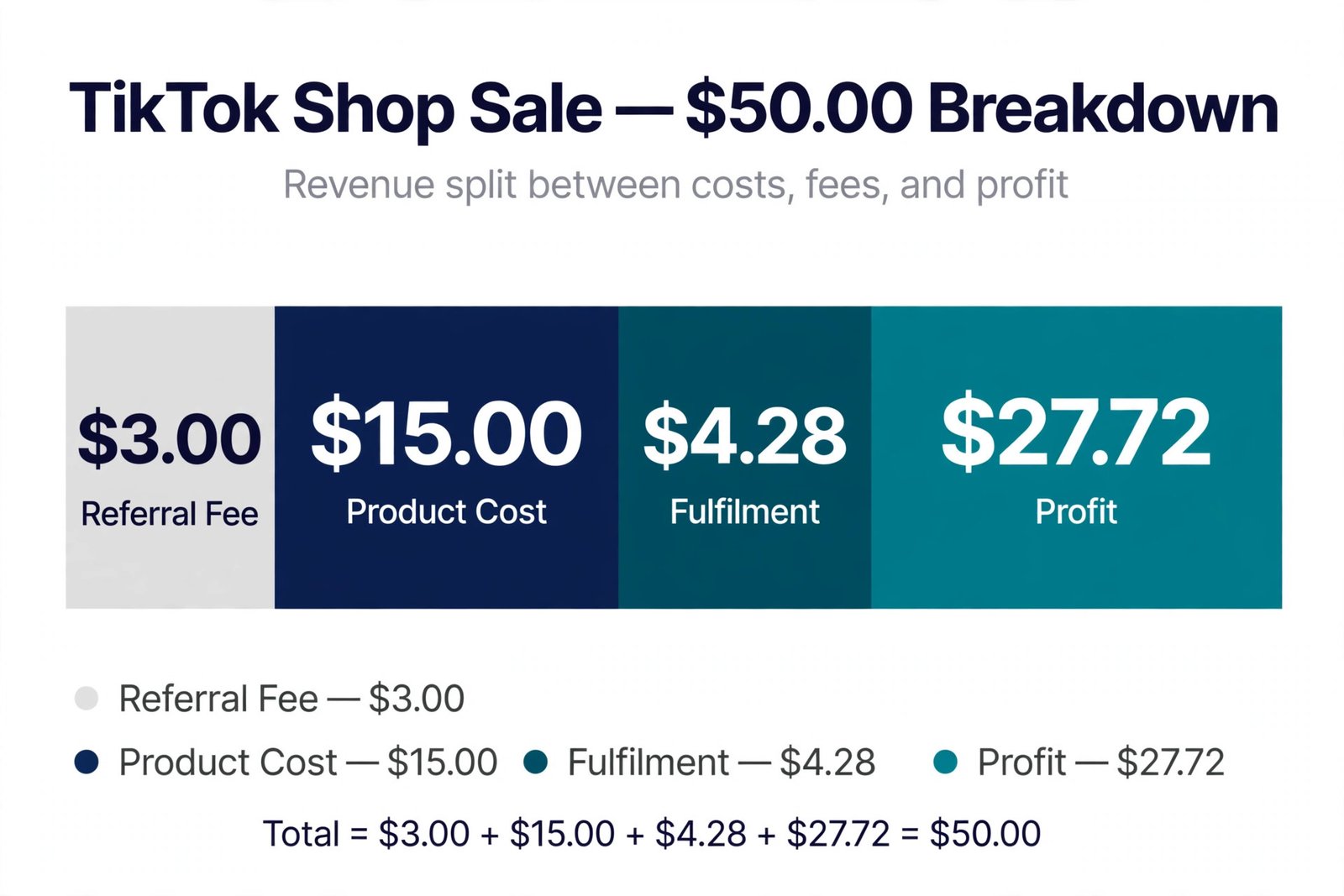
Where a $50 TikTok Shop sale goes: $3.00 referral fee, $15.00 product cost, $4.28 fulfilment, $27.72 profit.
Two things in that table are worth noticing before you price anything. First, the same $50 product earns $0.50 more in the 5% jewellery category than in the 6% beauty category — small per sale, real across a hundred sales, and entirely decided by the category you pick in the listing form. Second, TikTok pays you the sale price minus the referral fee — $47.00 on the $50 US sale — and your fulfilment and product costs come out of that, so the payout hitting your bank is not your profit. Run your own numbers through Zyrro’s TikTok Shop Fee & Profit Calculator before you set a price: it uses the same 6% and 9% rates, lets you switch categories, and shows the break-even price, which is the number that actually decides whether a product is worth listing. If you plan to let creators promote the product as well, remember the affiliate commission is one more cost — you set it yourself anywhere from 1% to 80%, and 10% on a $50 sale is another $5.00. Our TikTok Shop Affiliate Commission Calculator works out what that leaves you. For the full fee picture, including the 8% rate some seller reports claim, see how much TikTok Shop takes from a sale.
Why Can’t I Add Products to My TikTok Shop?
Most failed listings fail for one of a handful of reasons, and each has a specific fix. Work down the table before you submit the same listing a second time — resubmitting an unchanged listing just gets the same rejection.
| Problem | Likely cause | Fix |
|---|---|---|
| Listing stuck in review or rejected | Photos break the image rules — text, watermark, or a lifestyle shot as the first image | Re-shoot to the image rules: five photos, first one a single product on white |
| “Brand authorisation required” | Cloning or importing a brand you cannot prove rights to | Apply for brand authorisation, or list the product unbranded |
| Product not found in Quick Listing | Invite-only or restricted category you have no access to | Apply for category permission first |
| Cannot add more products | New shops start at Beginner level with a 100-product cap, reported by seller guides | Grow order volume and standing to graduate; prioritise your best sellers meanwhile |
| Product will not tag in videos | TikTok account not linked to Seller Center | Link the account in Seller Center |
| Category rejected | Prohibited or restricted product, or missing certification | Check the prohibited and restricted lists; supply the certification the category needs |
After Your Product Is Live: Tag It in Videos, LIVE and Showcase
Listing the product is only half the job — a product sitting in the Shop tab barely sells. Once it is live, add it to your Showcase so it can be tagged in videos and LIVE streams: when you create a video, tap Add Link and attach the product, and in LIVE, enable Product Showcase to link your catalogue to the session. This is also where the affiliate side starts: you set a commission for each product — anywhere from 1% to 80%, with 10% to 15% the average sellers offer in the UK — and creators find it in the Affiliate Marketplace and add it to their own Showcase. A product with no commission set gets no creators; a product with a realistic commission gets promoted for free until it sells. If the product still will not appear in your Showcase, check the three usual causes first: the listing is still in review, the category needs approval, or the TikTok account is not linked to Seller Center.
Frequently Asked Questions About Adding Products to TikTok Shop
Why can’t I add products to my TikTok showcase?
The usual causes are a listing still in review, a restricted category that needs approval, a TikTok account not linked to Seller Center, or missing brand authorisation. Check the listing status in Manage Products first — a product in review cannot join a Showcase yet. If it is live, link your account and confirm the category is not restricted.
How many followers do you need to link products on TikTok?
There is no follower minimum to open a TikTok Shop and list products — sellers add products through Seller Center regardless of follower count. Linking products in videos as a creator through the affiliate programme is separate, with its own eligibility rules in the Creator Marketplace. Check the affiliate eligibility shown in Seller Center.
How much does it cost to set up a TikTok Shop?
Registration itself is free — you only pay once you start selling. There is no listing fee and no monthly subscription in TikTok’s fee definition. On each sale you pay the referral fee of 6% in the US for most categories, or the commission of 9% including VAT in the UK, with lower 5% rates for some categories.
Do I need an LLC to open a TikTok Shop?
No. Individuals can register with a government-issued photo ID, proof of residential address, tax information and a bank account in their own name. Businesses register with company registration documents, the ID of the legal representative, a tax number such as an EIN in the US or a VAT number in the UK, and a business bank account.
How do I add products to TikTok Shop from Shopify?
Install the TikTok channel app from the Shopify App Store and connect it to your TikTok Shop. Your Shopify catalogue then syncs automatically, and orders placed on TikTok Shop flow back into Shopify’s order management, so you do not recreate each listing by hand. Once synced, manage prices, stock and variations in Seller Center.
How do I add products to TikTok Shop as an affiliate?
Affiliates do not add products to the shop — the seller does that, then sets a commission for each product, anywhere from 1% to 80%, in the Affiliate Marketplace. As a creator, find products there, apply to promote them, and add the approved ones to your Showcase to tag in videos and LIVE streams.
Adding a product to TikTok Shop is a fifteen-minute job when the photos, price and category are ready before you open the form — and a day of rejections when they are not. Pick the method that fits how many products you have, follow the image and title rules exactly, set the price from the fee maths rather than a guess, and let Zyrro’s TikTok Shop Fee & Profit Calculator check the numbers before you publish. If you are still deciding what to sell, start with one product listed properly rather than fifty listed badly: a single live listing you can tag in a video will teach you more about TikTok Shop than a catalogue full of rejected drafts. For the next steps — getting orders out the door and working out what each sale actually earns — see our guides to how to ship on TikTok Shop and how much TikTok Shop takes from a sale, or browse all the free tools on the TikTok Shop seller tools hub.