eBay Selling Limits: How to Check and Increase Them (2026)

Short answer: eBay selling limits cap how many items and how much total value you can list and sell in a calendar month — new sellers typically start around 10 items and $500, whichever you hit first. Check your exact limit in Seller Hub under Overview, then Monthly limits, and request an increase from the same screen.
What Are eBay Selling Limits?
Every eBay seller has a selling limit, and most new sellers meet it within days of their first listings — usually as an error message when eBay refuses to publish one more item. The limit is two ceilings at once: a maximum number of items, and a maximum total value of those items, per calendar month. Whichever ceiling you reach first is the one that stops you. List ten $20 items and you have used the item cap with value room to spare; list one $600 item and you have blown past the value cap with nine item slots still open.
eBay sets the limit per account, based on your selling history, buyer feedback, account behaviour and the categories you sell in — there is no single published number, and your limit is not the same as another seller’s. The limit exists to stop fraud: a brand-new account cannot list hundreds of high-value items and vanish before buyers notice. It is a trust-building mechanism, not a punishment, and it is designed to grow as you prove you ship on time and look after buyers. Zyrro’s free eBay Fee & Profit Calculator uses the same verified fee rates as our fee guides, so once you know your limit you can work out exactly what a full month of selling inside it is worth.
Three details catch new sellers out. First, the limit counts active listings and sold listings together — a sold item still uses a slot until the month resets. Second, Good ‘Til Cancelled listings count too, and they will not renew automatically if you have reached your maximum. Third, if you do somehow create listings over your limit, eBay may end them; you can list them again when your allowance renews on the first day of the next calendar month, or if you receive an increase. The limit resets on the first of each calendar month — it is a calendar-month cap, not a rolling 30-day window.
What Are the eBay Selling Limits for New Sellers in 2026?
The figure almost every seller guide quotes for a new account is 10 items and $500 per month, and eBay’s own export seller hub uses exactly that pair as its example of a new seller’s limit. Treat it as the typical starting point, not a promise: eBay’s US help page does not publish a fixed starting number at all, and your account may start higher or lower depending on how eBay scores it. The only number that matters is the one in your own Seller Hub — everything else is an example.
UK sellers face the same structure with a pound figure instead of a dollar one, and here the reporting is messier: seller guides variously report starting value caps of £300 to £500, around £400, or £650, and eBay publishes no official UK number. If you are a UK seller, assume roughly 10 items and a few hundred pounds of value, then check your own Seller Hub before planning any inventory around a specific figure. The table below shows the two markets side by side.
| US (ebay.com) | UK (ebay.co.uk) | |
|---|---|---|
| Typical new-seller item cap | 10 items / month (widely reported example) | 10 items / month (widely reported example) |
| Typical new-seller value cap | $500 / month (widely reported example) | £300–£650 / month (seller reports vary — no official figure) |
| Where to check yours | Seller Hub > Overview > Monthly limits | Seller Hub > Overview > Monthly limits |
| When it resets | 1st of each calendar month | 1st of each calendar month |
| What moves it | Monthly review: sales volume + buyer feedback | Monthly review: sales volume + buyer feedback |
| Free listings (separate from the limit) | 250 zero-insertion-fee listings / month | Private sellers have their own free-listing allowance — it does not add limit room either |
New-seller selling limits in the US and UK. The 10-item / $500 pair is eBay’s own example of a new seller’s limit; the UK value figure is not published by eBay, so check your Seller Hub for your exact number.
One distinction is worth making early, because it confuses almost everyone: your free listings are not your selling limit. On ebay.com you get 250 zero-insertion-fee listings a month, and eBay states plainly that this number is not related to your selling limit — 250 free listings on a 10-item account still means 10 items. Free listings are about fees; the selling limit is about how much you are allowed to sell. The same separation applies in the UK, where private sellers have their own free-listing allowance. Do not plan a 250-item launch on a 10-item limit.
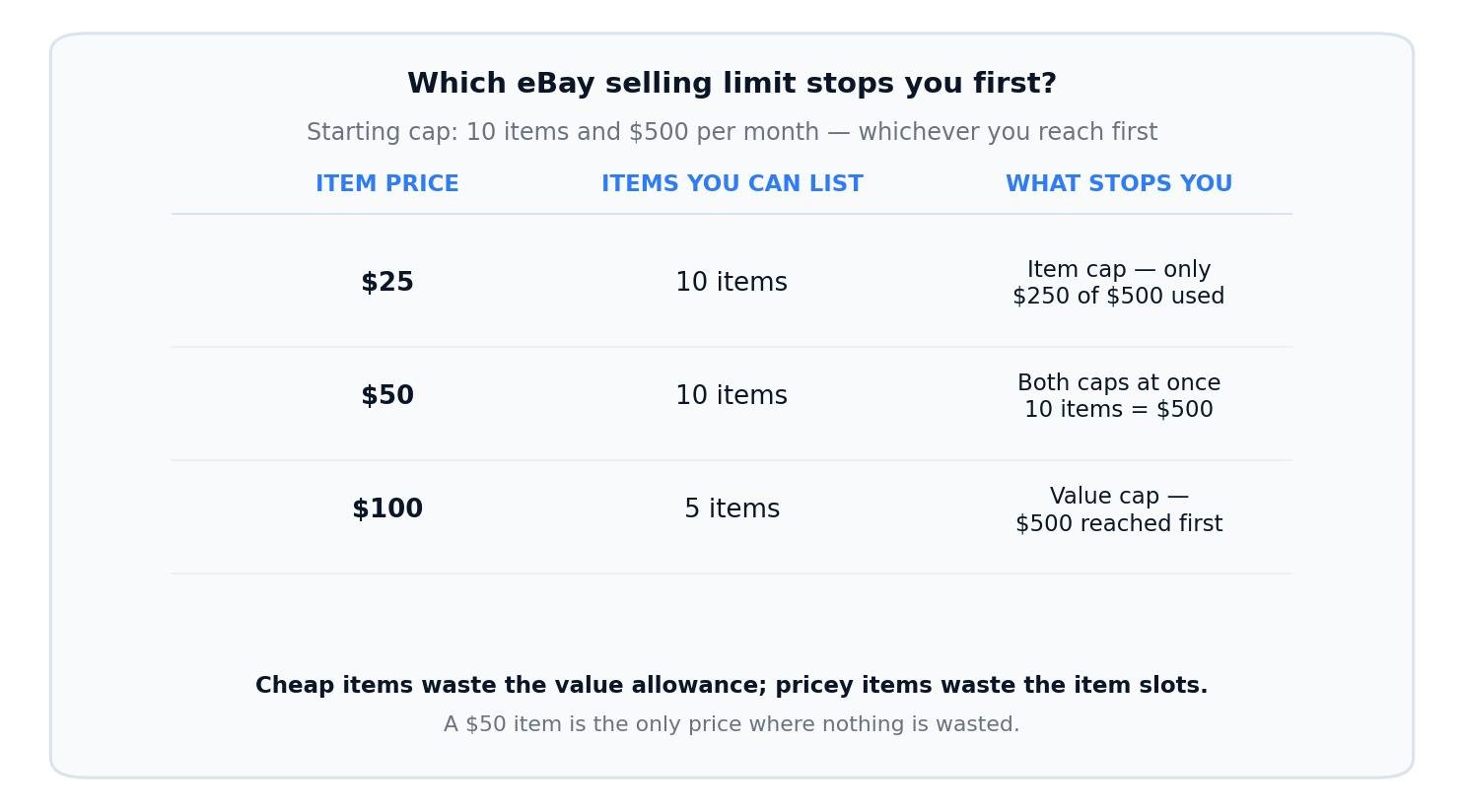
Which ceiling stops you depends on your price. Cheap items run out of item slots; expensive items run out of value first; a $50 item hits both caps at exactly 10 items.
How to Check Your eBay Selling Limits
Checking takes less than a minute, and it is the first thing to do before you buy stock for eBay — your limit, not your ambition, decides how much you can list this month. eBay’s own help page gives two routes to the same number:
Check in Seller Hub (the usual route)
Open Seller Hub, stay on the Overview tab, and scroll down to the Monthly limits section. It shows both numbers — how many more items you can list this month, and how much more sales value you have left — plus a link to request more. eBay also sends you a message when you get close to your monthly limit, and you can request an increase directly from that message.
Check in My eBay
Go to My eBay Selling Overview and scroll down to Monthly selling limits. The same two numbers appear there. If the section is missing entirely, you are probably looking at the buying side of the account — switch to the selling view.
Read both numbers, not just one. Sellers who watch only the item count get surprised by the value cap, and sellers who watch only the value get surprised by the item count. A quick example: with a 10-item / $500 limit, two items priced at $240 leave you eight item slots open but only $20 of value — you are effectively done for the month even though your listings page looks half empty. Note the figure down somewhere before you start listing, and check it again after every few sales, because sold items keep counting until the month resets.
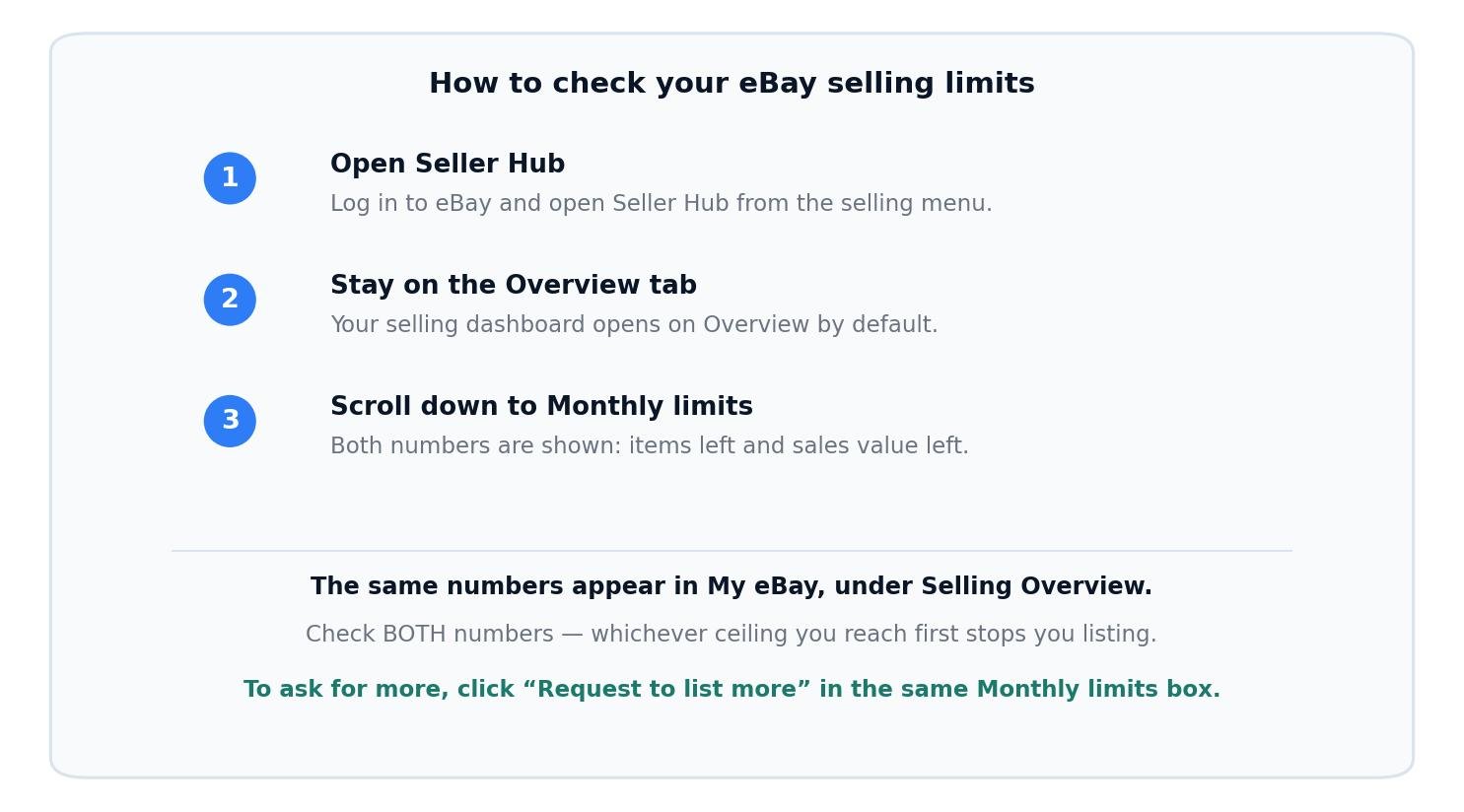
Where your limit lives: Seller Hub, Overview tab, Monthly limits. The same numbers appear in My eBay under Selling Overview.
How to Increase Your eBay Selling Limits
There are two ways your limit goes up: eBay raises it for you, or you ask. The first way is automatic. eBay reviews your account every month and adjusts the limit based on your sales volume and the feedback buyers leave you. Sell steadily, dispatch on time, answer messages, and avoid cases and defects, and the limit grows on its own — most sellers who trade cleanly see movement within their first one to three months. Several seller guides report the monthly review landing around the 20th of the month, but eBay itself only promises a monthly review, so do not plan around a specific date.
The second way is a request, and it takes about a minute. In Seller Hub, go to Overview, scroll to Monthly limits, and click Request to list more. In My eBay, the same link reads Request a limit increase. eBay considers the request against your record so far — the same things the automatic review looks at — and tells you the outcome. You can also request from the message eBay sends when you approach your limit. If you have more than one seller account, linking to a more established account of yours can raise the limit too: eBay offers that option inside the request flow when your accounts are eligible to be linked.
What actually moves the decision is boring and entirely in your control: completed sales, on-time dispatch, tracking uploaded, positive feedback, no unresolved cases, and a fully verified account with bank and identity details in place. What does not move it is volume of listings alone — ten listings that never sell prove nothing, while five listings that sell, ship and earn positive feedback prove everything. If your request is refused, keep selling cleanly inside the limit you have and ask again next month; the monthly review keeps running whether you ask or not.
How to increase selling limits on eBay without calling
You do not need to call anyone. The request button in Seller Hub is the whole process for most sellers — no phone call, no email, no chat. Calling eBay can help in edge cases (a limit that has not moved after months of clean selling, or a category limit that looks wrong), but it is not a step in the normal process, and a phone call cannot override a record with defects or unresolved cases on it.
Category Limits: The Second Cap New Sellers Miss
On top of your account limit, eBay can set a separate category limit when you are new to selling in a particular category. Jewellery and electronics are the two categories sellers run into most often — eBay treats them as higher fraud risk — but any category can carry one. The category cap applies specifically in your first 90 days after your first sale in that category, even if your account overall has been active and well-behaved for much longer, and eBay does not publish the exact numbers for these caps.
Most category limits lift on their own once you have a clean track record in that category, though other limits can still apply based on what you list. The practical advice is to start a new category small: list a few items, sell them, ship them, collect feedback, and let the category record build before you commit real stock to it. A seller who lists twenty phones on day one in a brand-new category will hit the category cap long before the account cap, and will wrongly conclude their whole account is stuck.
What eBay Selling Limits Cost You: Worked Examples
A limit is only a problem if it stops profitable sales, so it is worth working out what a full month inside the cap is actually worth. The examples below use the typical 10-item / $500 starting limit and the verified eBay fee rates from our fee guides — US sellers pay a 13.6% final value fee in most categories plus a $0.40 per-order fee, and UK business sellers pay 5% to 14.9% final value fee by category plus a 0.35% regulatory operating fee, a 40p per-order fee and 20% VAT on the fees. Shipping and product costs are stated assumptions, so substitute your real numbers; the fee figures are the verified ones. Run your own listing through Zyrro’s eBay Fee & Profit Calculator to check any price before you list it.
| Item price (US) | Items you can list | Value used | Fees per sale | Profit per sale* | Best possible month |
|---|---|---|---|---|---|
| $25 | 10 (item cap binds) | $250 of $500 | $3.80 | $7.70 | $77.00 |
| $50 | 10 (both caps bind) | $500 of $500 | $7.20 | $18.30 | $183.00 |
| $100 | 5 (value cap binds) | $500 of $500 | $14.00 | $41.00 | $205.00 |
*Profit assumes product cost $10 / $20 / $40 and shipping $3.50 / $4.50 / $5.00 for the $25 / $50 / $100 items. Fees are the verified US rates: 13.6% final value fee plus a $0.40 per-order fee.
Three things fall out of the table. First, the $50 item is the sweet spot for a new account: it is the only price where both caps bind at once, so no allowance is wasted. Second, the $100 item earns the most in a month despite only five sales, because the value cap, not the item count, is doing the work — if you sell higher-value items, the limit hurts less than you think. Third, the $25 item wastes half the value allowance: you run out of item slots with $250 of value still unused, which is the worst use of a new account’s limit. If your stock is mostly cheap items, the fastest way to earn more inside the cap is to raise your average order value — bundle items, list higher-value stock first, or hold the cheap stock until your limit grows.
The UK picture is the same shape with a different fee stack. Take a UK business seller with a commonly reported 10-item / £500 starting cap, selling a £50 item in the 12.9% “Everything Else” category: the fees are £8.43 in total (£6.45 final value fee, £0.18 regulatory operating fee, a £0.40 per-order fee, and £1.41 VAT on the fees). With a £20 product cost and £3.50 postage (assumed), the profit is £18.07 per sale — £180.70 for a full month of ten sales. For the full UK fee picture, see our guide to how much eBay takes from a sale in the UK, and for the VAT layer, our eBay VAT on fees explainer.
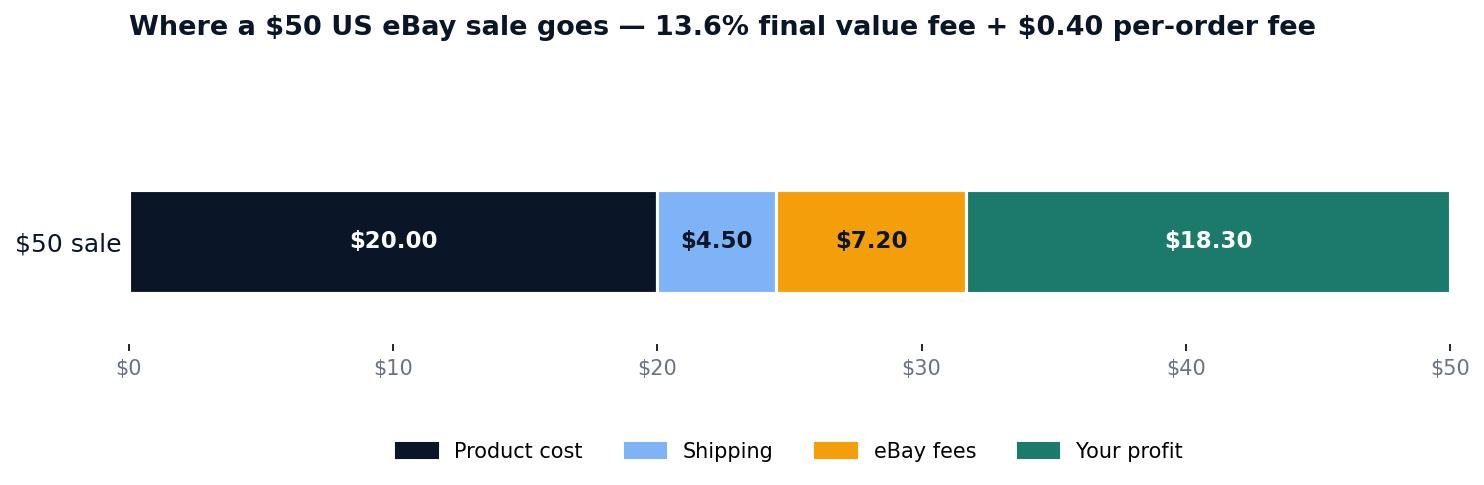
Where a $50 US sale goes under the starting limit: $20 product cost, $4.50 shipping, $7.20 eBay fees, $18.30 profit. Ten such sales fill the 10-item / $500 cap exactly and earn $183.00.
What Does NOT Raise Your eBay Selling Limits
Three common “fixes” do not work, and two of them can damage your account.
Buying an eBay Store. A Store subscription buys free listings and lower listing fees, and our eBay Store guide works through whether that is worth paying for — but eBay states plainly that you cannot increase your selling limit by purchasing a Store subscription package. If your only reason for buying a Store is the limit, save the money.
Opening a second account. Registering a new account to get around a selling limit is prohibited by eBay, and its own help page warns that all of your accounts may be suspended indefinitely if you do it. The legitimate version of this idea is linking an established account you already own through the request flow, which eBay itself offers.
Using up free listings. Free listings and selling limits are separate systems. Listing 250 free items does not raise your limit, and a 10-item limit still means 10 items no matter how many free listings you have left. Spend your free listings on the items you can actually sell inside your limit, not on stock the cap will block.
eBay Selling Limits vs Tax Reporting: Do Not Mix Them Up
Half the questions sellers ask about limits are not about limits at all — they are about tax reporting, and the numbers get mixed up constantly. The three figures that cause the confusion are $600, 30 items and $20,000, and none of them is a selling limit. They are reporting thresholds: the point at which eBay has to tell a tax authority about your sales. Crossing one does not block your listings, does not change your limit, and does not mean you owe tax — it means a report gets filed, and whether you owe anything depends on your profit and your local rules, not on the threshold itself.
In the US, the $600 figure is the long-planned threshold for the 1099-K form, which reports your gross payments to the IRS; the threshold has been lowered in stages, and the $20,000 figure sellers still quote is the old threshold from before that change. In the UK, eBay must report sellers to HMRC once they pass 30 sales or roughly €2,000 (about £1,700) in a year, and the UK’s £1,000 trading allowance — the amount of trading income you can earn without declaring it — is a separate rule again. If a number you have heard sounds like a limit, check which system it belongs to before you let it change how you list: limits live in Seller Hub under Monthly limits, and tax thresholds live with the IRS or HMRC, not with eBay. If your sales are growing past these reporting figures, that is a sign to keep proper records and, if you are unsure, to ask an accountant — not a sign to stop listing.
Frequently Asked Questions About eBay Selling Limits
What are the eBay selling limits for 2026?
eBay selling limits cap the items and total value you can list and sell per month. New sellers typically start around 10 items and $500 in the US; UK sellers report a similar item cap and roughly £300 to £650 of value. eBay publishes no fixed starting number — your limit is in Seller Hub, under Overview then Monthly limits.
How to increase eBay selling limits?
Sell cleanly inside the limit you have — completed sales, on-time dispatch, tracking uploaded, positive feedback, no unresolved cases — and eBay raises it in its monthly review. Or ask: in Seller Hub go to Overview, scroll to Monthly limits and click Request to list more. Linking a more established account can raise it too, when eBay offers that option.
How long does it take to increase eBay selling limits?
eBay reviews every account monthly, so the first increase comes after one to three months of clean selling — sales, on-time dispatch and positive feedback. A limit can stay low for 90 days or more if you are not actively selling, or if your record has defects. Keep trading inside the cap and the review keeps working in your favour.
How to increase selling limits on eBay without calling?
You do not need to call anyone. The request button in Seller Hub — Overview, Monthly limits, Request to list more — is the whole process for most sellers, and it takes about a minute. A phone call cannot override a record with defects or unresolved cases, so fix the record first and let the button do the work.
What happens if I sell more than $600 on eBay?
Nothing happens to your selling limit. The $600 figure is a US tax-reporting threshold for the 1099-K form, not an eBay limit — crossing it means eBay may report your gross payments to the IRS, and whether you owe tax depends on your profit, not on the $600 itself. Your listings keep running, and your limit is unchanged.
How to check eBay selling limits?
Open Seller Hub, stay on the Overview tab and scroll down to Monthly limits — it shows how many more items you can list and how much sales value you have left this month, plus the link to request more. The same numbers appear in My eBay under Selling Overview. Check both: whichever ceiling you reach first stops you listing.
Selling-limit rules, check steps and increase routes in this article were verified against eBay’s own help pages on 4 November 2026: “Selling limits” (eBay US help) and “Selling limit and zero insertion fee listings” (eBay export seller pages). UK and US fee rates are the verified figures from Zyrro’s earlier eBay fee guides: UK business sellers pay 5% to 14.9% final value fee by category plus a 0.35% regulatory fee, a 30p or 40p per-order fee and 20% VAT on fees; US sellers pay 13.6% plus $0.30 or $0.40 per order. The 10-item / $500 starting limit is the widely reported typical figure and eBay’s own example — eBay publishes no fixed starting number, and UK starting value caps are reported by sellers as roughly £300 to £650, so always confirm your exact limit in Seller Hub. Shipping and product costs in the worked examples ($3.50–$5.00, $10–$40, £3.50, £20) are stated assumptions, not eBay rates — substitute your real costs. Tax-reporting figures ($600, $20,000, 30 sales, ~€2,000, £1,000 allowance) describe reporting thresholds, not selling limits, and tax rules change — check the current IRS or HMRC guidance before acting. This article is general information, not financial or tax advice. Zyrro’s free eBay Fee & Profit Calculator uses the same verified rates.